1. Киришүү
Сатып алганыңыз үчүн рахматasing the Inline USB 3.0 Hub. This 4-port SuperSpeed USB 3.0 hub is designed to expand the connectivity of your computer, allowing you to connect multiple USB devices simultaneously. With its external power adapter, it ensures stable power delivery for all connected peripherals. Please read this manual carefully before using the product to ensure proper operation and to maximize its lifespan.
2. Продукт бүтүп калдыview
2.1 Негизги өзгөчөлүктөрү
- Түзмөк түрү: Хаб - 4 порт
- Порттор: 4 x SuperSpeed USB 3.0
- Шайкеш стандарттар: USB 3.0 (USB 2.0 жана USB 1.1 менен артка шайкеш келет)
- Корпусунун түрү: Иш такта
- Түсү: Кара
- Күч: External power adapter included for stable operation
2.2 Пакеттин мазмуну
- Inline USB 3.0 4-Port Hub
- Супер ылдамдыктагы USB 3.0 кабели
- Тышкы адаптер
- Колдонуучунун Колдонмосу (бул документ)
2.3 Продукт диаграммасы

1-сүрөт: Фронт View of the USB 3.0 Hub. This image displays the sleek black casing of the hub, highlighting the four SuperSpeed USB 3.0 ports, identifiable by their blue interior, and a small LED indicator light on the top surface.
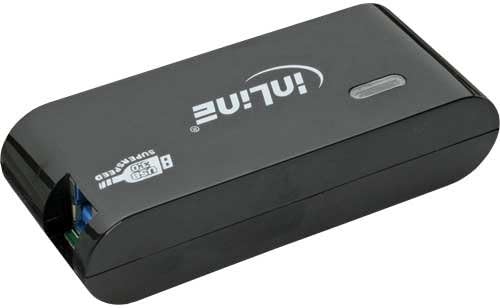
2-сүрөт: Арткы View of the USB 3.0 Hub. This image shows the back of the hub, featuring the input port for the external power adapter and the upstream USB 3.0 port used to connect the hub to your computer.
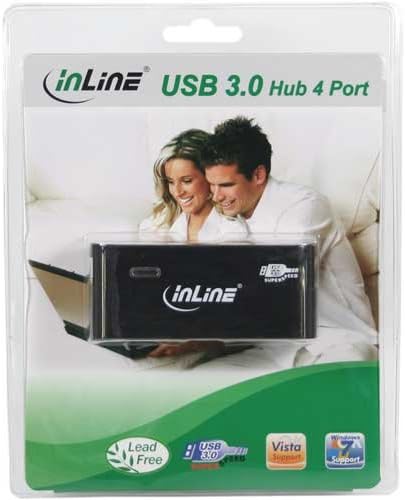
3-сүрөт: Product Packaging. This image displays the Inline USB 3.0 Hub enclosed in its transparent retail packaging, showcasing the product as it would appear when purchased.
3. Орнотуу
- Кубат адаптерин туташтыруу: Insert the DC plug of the external power adapter into the "DC IN" port on the back of the USB 3.0 Hub. Plug the power adapter into a standard electrical outlet.
- Компьютерге туташуу: Use the provided SuperSpeed USB 3.0 cable. Connect the Type-B end of the cable to the "USB IN" port on the back of the hub. Connect the Type-A end of the cable to an available USB 3.0 port on your computer. For optimal performance, ensure you connect it to a USB 3.0 port on your computer (usually identified by a blue port or a "SS" symbol).
- Драйверди орнотуу (Plug & Play): The Inline USB 3.0 Hub is plug-and-play. Your operating system (Windows, macOS, Linux) should automatically detect and install the necessary drivers. No manual driver installation is typically required.
- Байланышты текшерүү: Once connected, the LED indicator light on the hub should illuminate, indicating that the hub is powered and ready for use.
Эскертүү: While the hub is backward compatible with USB 2.0 and USB 1.1, connecting it to a USB 2.0 port on your computer will limit the data transfer speed to USB 2.0 speeds.
4. Иштөө нускамалары
- USB түзмөктөрүн туташтыруу: Once the hub is set up and connected to your computer, you can plug your USB devices (e.g., flash drives, external hard drives, keyboards, mice, printers) into any of the four available USB 3.0 ports on the front of the hub.
- Маалыматтарды өткөрүү: The hub supports SuperSpeed USB 3.0 data transfer rates up to 5 Gbps, which is significantly faster than USB 2.0 (480 Mbps). This allows for quick transfer of large files.
- Кубат жеткирүү: The external power adapter ensures that the hub can provide sufficient power to all connected devices, including power-hungry devices like external hard drives, without relying solely on your computer's USB port for power.
- Коопсуз алып салуу: Always safely eject USB storage devices from your operating system before disconnecting them from the hub to prevent data corruption.
5. Техникалык тейлөө
- Тазалоо: Disconnect the hub from power and your computer before cleaning. Use a soft, dry, lint-free cloth to wipe the surface of the hub. Do not use liquid cleaners, aerosols, or abrasive solvents.
- Сактагыч: Узак мөөнөткө пайдаланылбаганда, хабды түз күн нурунан жана өтө температурадан алыс салкын, кургак жерде сактаңыз.
- Колдонуу: Avoid dropping the hub or subjecting it to strong impacts. Do not attempt to disassemble or modify the hub, as this will void the warranty and could cause damage.
6. Кыйынчылыктарды
Жалпы маселелер жана чечимдер:
- Hub not recognized by computer:
- Ensure the USB cable is securely connected to both the hub and your computer.
- Компьютердеги борборду башка USB портуна туташтырып көрүңүз.
- Verify that the power adapter is correctly connected and plugged into a working outlet. Check if the LED indicator on the hub is lit.
- Компьютериңизди өчүрүп күйгүзүңүз.
- Devices connected to the hub are not working or are unstable:
- Ensure the external power adapter is connected and providing power to the hub. Some power-hungry devices require the hub to be externally powered.
- Try connecting the device directly to your computer's USB port to confirm it functions correctly.
- Disconnect and reconnect the problematic device from the hub.
- If using multiple power-hungry devices, try reducing the number of devices connected to the hub.
- Жай маалымат берүү ылдамдыгы:
- Ensure the hub is connected to a USB 3.0 port on your computer. USB 3.0 ports are often blue or marked with "SS".
- Verify that the device you are connecting also supports USB 3.0.
- The performance can be affected by the quality of the USB cable used. Ensure you are using the provided SuperSpeed USB 3.0 cable.
7. Техникалык шарттар
| Өзгөчөлүк | Description |
|---|---|
| Продукциянын өлчөмдөрү | 7.68 x 6.1 x 3.27 дюйм (19.5 x 15.5 x 8.3 см) |
| Элемент Салмагы | 11 унция (313 грамм) |
| Модель номери | 35394B |
| Бренд | Inline |
| Аппараттык интерфейс | USB, USB 3.0, USB 2.0, USB 1.1 |
| Порттардын саны | 4 |
| Материал | Жез |
| Түс | Кара |
| Кубат шайманы | Тышкы адаптер |
8. Кепилдик жана колдоо
Inline products are designed for reliability and performance. This product comes with a standard manufacturer's warranty. Please refer to the warranty card included in your product packaging for specific terms and conditions, or visit the official Inline webсайт толук кепилдик маалымат алуу үчүн.
For technical support, troubleshooting assistance, or product inquiries, please contact Inline customer service. Contact information can typically be found on the Inline webсайтында же продуктунун таңгагында.
Онлайн ресурстар: For the latest drivers, FAQs, and product information, please visit the official Inline webсайт.


