1. Киришүү
Thank you for choosing the Bazooka MA460 4-Channel Ampкөтөргүч. Бул колдонмо сиздин шайманыңызды туура орнотуу, иштетүү жана техникалык тейлөө үчүн маанилүү маалыматты берет. ampкөтөргүч. Оптималдуу аткарууну жана коопсуздукту камсыз кылуу үчүн орнотууга же иштетүүдөн мурун бул колдонмону кылдат окуп чыгыңыз.
2. Коопсуздук маалыматы
Жараат же зыянга учурабаш үчүн ар дайым төмөнкү коопсуздук чараларын сактаңыз ampкөтөргүч жана унаа:
- Disconnect the vehicle's negative battery terminal before any electrical work.
- Айлананын туура желдетилишин камсыз кылыңыз ampысып кетүүнүн алдын алуу үчүн көтөргүч.
- Орнотуу бөлүмүндө көрсөтүлгөндөй, кубат, жерге жана динамик туташтыруу үчүн тийиштүү ченегич зымдарын колдонуңуз.
- орнотуудан качыңыз ampтүз күн нуру, ашыкча ысык, нымдуулук же чаңга дуушар болгон жерлерде liifier.
- Эгерде сиз орнотуунун кандайдыр бир кадамдары боюнча күмөн санасаңыз, квалификациялуу кесипкөй орнотуучуга кайрылыңыз.
3. Продукт бүтүп калдыview
The Bazooka MA460 is a versatile 4-channel amplifier designed to deliver clear and powerful audio. It features flexible configuration options for both stereo and bridged mono applications, along with adjustable crossovers and bass equalization for fine-tuning your sound system.
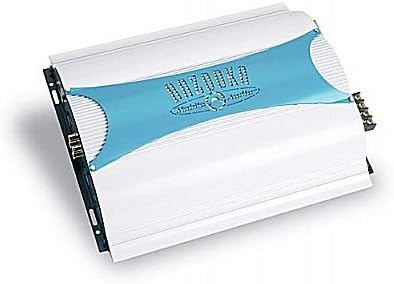
Бурчтуу view of the Bazooka MA460 4-channel amplifier, featuring a silver casing with a blue central panel displaying the 'Bazooka' logo. The cooling fins are visible on the sides, and connection terminals are on the right.
Негизги өзгөчөлүктөрү:
- 4-Channel Stereo or 2-Channel Bridged Mono Operation
- High Power Output: Up to 4 x 85 Watts RMS @ 2 ohms stereo or 2 x 170 Watts RMS @ 2 ohms mono
- Variable 12dB High-Pass/Low-Pass Crossover (60Hz - 400Hz)
- Variable Bass EQ (0 - 12dB)
- Input Sensitivity: 0.2V - 6V
- Көмөкчү чыгаруу
- Алыстан башкаруу мүмкүнчүлүгү
4. Орнотуу жана орнотуу
Туура орнотуу сиздин иштөө жана узак иштөө үчүн абдан маанилүү болуп саналат amplifier. It is recommended that installation be performed by a qualified professional.
4.1 Орнотуу Ampөмүрлүү
The MA460 amplifier is designed for surface mount installation. Choose a location that:
- Provides adequate ventilation and airflow around the amplifier's cooling fins.
- Is protected from moisture, excessive heat, and direct sunlight.
- Allows for secure fastening to a solid surface.
- Is easily accessible for wiring and adjustments.
орнотуудан качыңыз amplifier directly to carpeted surfaces as this can restrict airflow.
4.2 Зымдарды туташтыруу
Before making any connections, ensure the vehicle's battery is disconnected.
4.2.1 Кубат туташтыруу
- Күч (B+): Connect a heavy-gauge power cable (e.g., 8-gauge or larger, depending on cable length) directly from the positive terminal of the vehicle's battery to the amplifier's B+ terminal. Install an appropriate fuse holder with a fuse (not included) within 18 inches (45 cm) of the battery.
- Жер (GND): кубат кабели менен бирдей өлчөмдөгү оор өлчөмдүү жер кабелин туташтырыңыз ampкөтөргүчтүн GND терминалын унаанын шассисинин таза, боёлбогон металл бетине. Катуу, аз каршылыктуу байланышты камсыз кылыңыз.
- Алыстан күйгүзүү (REM): кичирээк ченегич зымды туташтырыңыз ampкөтөргүчтүн REM терминалын башкы блокуңуздун алыстан күйгүзүү чыгышына. Бул зым сигнал берет ampаудио системаңызды күйгүзүү жана өчүрүү үчүн көтөргүч.
4.2.2 Киргизүү байланыштары
RCA кабелдерин башкы бирдигиңизден туташтырыңызamp чыгарат amplifier's RCA input jacks. The MA460 features an input sensitivity range of 0.2V to 6V, allowing compatibility with various head units.
4.2.3 Динамиктердин байланыштары
Динамиктерге туташтырыңыз amplifier's speaker terminals. Observe correct polarity (+ to + and - to -) for all speakers. The MA460 supports:
- 4-Channel Stereo: Connect one speaker to each of the four output channels.
- 2-Channel Bridged Mono: For higher power output to two speakers or subwoofers, bridge two channels together. Refer to the amplifier's terminal markings for correct bridging connections. Ensure the speaker impedance is suitable for bridged operation (typically 4 ohms minimum per bridged pair).
4.2.4 Көмөкчү чыгаруу
The amplifier includes an auxiliary output, which can be used to pass the audio signal to another ampсистемаңыздагы көтөргүч.
4.2.5 Алыстан башкаруу
If using the optional remote control, connect it to the designated remote input on the ampөмүрлүү.
5. Иштөө нускамалары
Once all connections are securely made and verified, reconnect the vehicle's battery. Turn on your head unit to power up the ampөмүрлүү.
5.1 Башкаруу элементтерин жөндөө
- Gain/Input Sensitivity: Бул көзөмөл дал келет amplifier's input level to the output level of your head unit. Start with the gain set to minimum. Play a familiar piece of music at about 75% of your head unit's maximum volume. Slowly increase the amplifier's gain until you hear distortion, then back it off slightly until the sound is clear.
- Crossover (HPF/LPF): The MA460 features variable 12dB high-pass (HPF) and low-pass (LPF) filters, adjustable from 60Hz to 400Hz.
- Жогорку өтүүчү чыпка (HPF): Жыштыктарга уруксат берет жогоруда the set point to pass through. Typically used for full-range speakers to remove low bass frequencies they cannot reproduce effectively.
- Төмөн өткөрүүчү чыпка (LPF): Жыштыктарга уруксат берет төмөндө the set point to pass through. Typically used for subwoofers to reproduce only bass frequencies.
- Bass EQ: The variable bass equalization (0 - 12dB) allows you to boost bass frequencies. Use this control sparingly to avoid distortion and potential speaker damage.
6. Техникалык тейлөө
The Bazooka MA460 ampкөтөргүч минималдуу тейлөөнү талап кылат.
- Мезгил-мезгили менен бардык зымдарды байланыштарды текшерип, алар бекем жана коррозияга учурабайт.
- сактаңыз amplifier's cooling fins clean and free of dust or debris to maintain proper heat dissipation. Use a soft, dry cloth for cleaning.
- Ensure that nothing obstructs the airflow around the ampөмүрлүү.
7. Кыйынчылыктарды
Эгер сиз менен көйгөйлөр пайда болсо amplifier, төмөнкү жалпы көйгөйлөрдү жана чечимдерди карагыла:
| Көйгөй | Мүмкүн себеп | Чечим |
|---|---|---|
| Ampкөтөргүч күйбөйт | No power, blown fuse, faulty ground, no remote turn-on signal. | Check battery connections, inline fuse, ground connection, and remote turn-on wire from head unit. |
| Үн чыгышы жок | RCA cables disconnected, speaker wires disconnected, gain too low, head unit muted. | Verify RCA and speaker connections, adjust gain, check head unit settings. |
| Бурмаланган үн | Gain set too high, improper crossover settings, faulty speaker, poor ground. | Reduce gain, adjust crossover, check speaker integrity, ensure solid ground connection. |
| Ampкөтөргүч ысып кетет | Insufficient ventilation, impedance too low, gain too high. | Ensure proper airflow, verify speaker impedance, reduce gain. |
If these steps do not resolve the issue, contact Bazooka customer support or a qualified service technician.
8. Техникалык шарттар
| Өзгөчөлүк | Спецификация |
|---|---|
| Каналдар | 4 |
| RMS Power @ 4 Ohms Stereo | 4 х 65 Ватт |
| RMS Power @ 2 Ohms Stereo | 4 х 85 Ватт |
| RMS Power @ 4 Ohms Mono (Bridged) | 2 х 130 Ватт |
| RMS Power @ 2 Ohms Mono (Bridged) | 2 х 170 Ватт |
| Frequency Response | 20Гц - 22кГц |
| Signal-to-Noise Ratio (S/N R.) | > 90дБ |
| Variable Crossover (HPF/LPF) | 12dB/octave, 60Hz - 400Hz |
| Variable Bass EQ | 0 - 12 дБ |
| Киргизүү сезгичтиги | 0.2В - 6В |
| Көмөкчү чыгаруу | Ооба |
| Алыстан башкаруу | Ооба |
| Өлчөмдөрү (L x W x Y) | 31.75 x 26.04 x 6.99 см (12.5 x 10.25 x 2.75 дюйм) |
| Монтаж түрү | Surface Mount |
| Minimum Supply Voltage | 0.2 вольт |
9. Кепилдик жана колдоо
For warranty information or technical support, please refer to the documentation provided with your purchase or visit the official Bazooka webсайт. Ар кандай кепилдик дооматтары үчүн сатып алганыңыздын далилин сактаңыз.


