1. Киришүү
The Behringer XENYX 302USB is an ultra-compact, low-noise analog mixer designed for a variety of audio applications, from home recording to live podcasting. It features a high-quality XENYX microphone preamp and a built-in USB/audio interface, allowing direct connection to your computer for recording and playback. Its small footprint makes it ideal for setups where space is limited.

1.1-сүрөт: Жогорку view of the Behringer XENYX 302USB mixer, showing all controls and inputs/outputs.
2. Негизги өзгөчөлүктөрү
- Ультра компакт дизайн: Small footprint (approx. 117 x 135 mm) ideal for portable use or limited desktop space.
- XENYX Mic Preamp: State-of-the-art, phantom-powered microphone preamp for transparent, high-quality audio.
- USB/аудио интерфейси: Built-in stereo USB interface for direct connection to PC or Mac, enabling recording and playback.
- Ар тараптуу киргизүүлөр: Features an XLR & 1/4-inch combination input, a stereo USB/Line channel, and a dedicated 2-Track input.
- British EQ: Sublimely musical 2-band EQ on the Line/USB channel for sound shaping.
- ийкемдүү күч: Can be powered directly via a laptop's USB socket or an included external power adapter.
- Камтылган программа: Comes with free audio recording, editing, and podcasting software (Tracktion) plus 150 instrument/effect plug-ins.
3. Орнотуу жана байланыштар
This section details how to connect your XENYX 302USB mixer to various audio sources and destinations.
3.1 Кубат туташтыруу
The 302USB can be powered via its USB port from a computer or by using the included external power adapter. Connect the USB cable to your computer or the power adapter to a suitable power outlet and then to the mixer's USB port.
3.2 Киргизүү байланыштары
- MIC IN: Connect a microphone using an XLR cable to the combination XLR/TRS input. This input provides phantom power for condenser microphones.
- САПАР: Connect stereo line-level sources (e.g., keyboard, media player) to the RCA LINE IN jacks.
- 2-TRACK IN: Connect an external playback device (e.g., CD/DVD player, dedicated audio player) to the RCA 2-TRACK IN jacks.
3.3 Чыгуу байланыштары
- MAIN MIX OUT: Connect these RCA outputs to your monitoring system (e.g., powered speakers, ampөмүр).
- ГУШНЕТКА: Connect headphones to the 3.5mm HEADSET jack.

Figure 3.1: Basic setup diagram showing connections for a microphone, laptop (USB), powered speakers, and a DVD player.

Figure 3.2: Advanced setup diagram illustrating connections for a guitar, keyboard, digital recorder, and headphones.

Figure 3.3: Podcasting setup diagram showing connections for a microphone, laptop (USB), headphones, and an iPod.

Figure 3.4: Studio setup diagram with connections for a microphone, laptop (USB), studio monitors, headphones, a keyboard, and an iPod.
4. Миксерди иштетүү
Understanding the controls and signal flow is essential for optimal performance.
4.1 Controls Overview
- GAIN (MIC): Adjusts the input sensitivity for the microphone channel. Use this to set a healthy signal level without clipping.
- LOW/HIGH (LINE/USB EQ): Two-band equalizer for the Line/USB channel, allowing adjustment of bass and treble frequencies.
- PAN (MIC): Pans the microphone signal between the left and right channels of the main mix.
- BAL (LINE/USB): Balances the stereo signal of the Line/USB channel between left and right.
- MIC Level: Controls the output level of the microphone channel to the main mix.
- LINE/USB Level: Controls the output level of the Line/USB channel to the main mix.
- MAIN MIX Level: Controls the overall output level of the main mix to the MAIN MIX OUT jacks.
- ТЕЛЕФОНДОР Деңгээли: Controls the volume of the headphones output.
4.2 Индикаторлор
- POWER LED: Illuminates when the mixer is receiving power.
- SIG/CLIP LEDs: Indicate signal presence (SIG) and clipping (CLIP) for the left and right channels. Adjust input gain to avoid consistent clipping.
- USB LED: Illuminates when the USB interface is active and connected to a computer.
4.3 Signal Routing
- LINE IN to USB Play: This switch routes the signal from the LINE IN jacks to the USB output for recording on your computer.
- MAIN MIX to PHONES: This switch routes the main mix signal to the headphones output.
- 2-TRACK to MAIN MIX/PHONES: This switch routes the signal from the 2-TRACK IN to either the main mix or the headphones output, depending on the position.
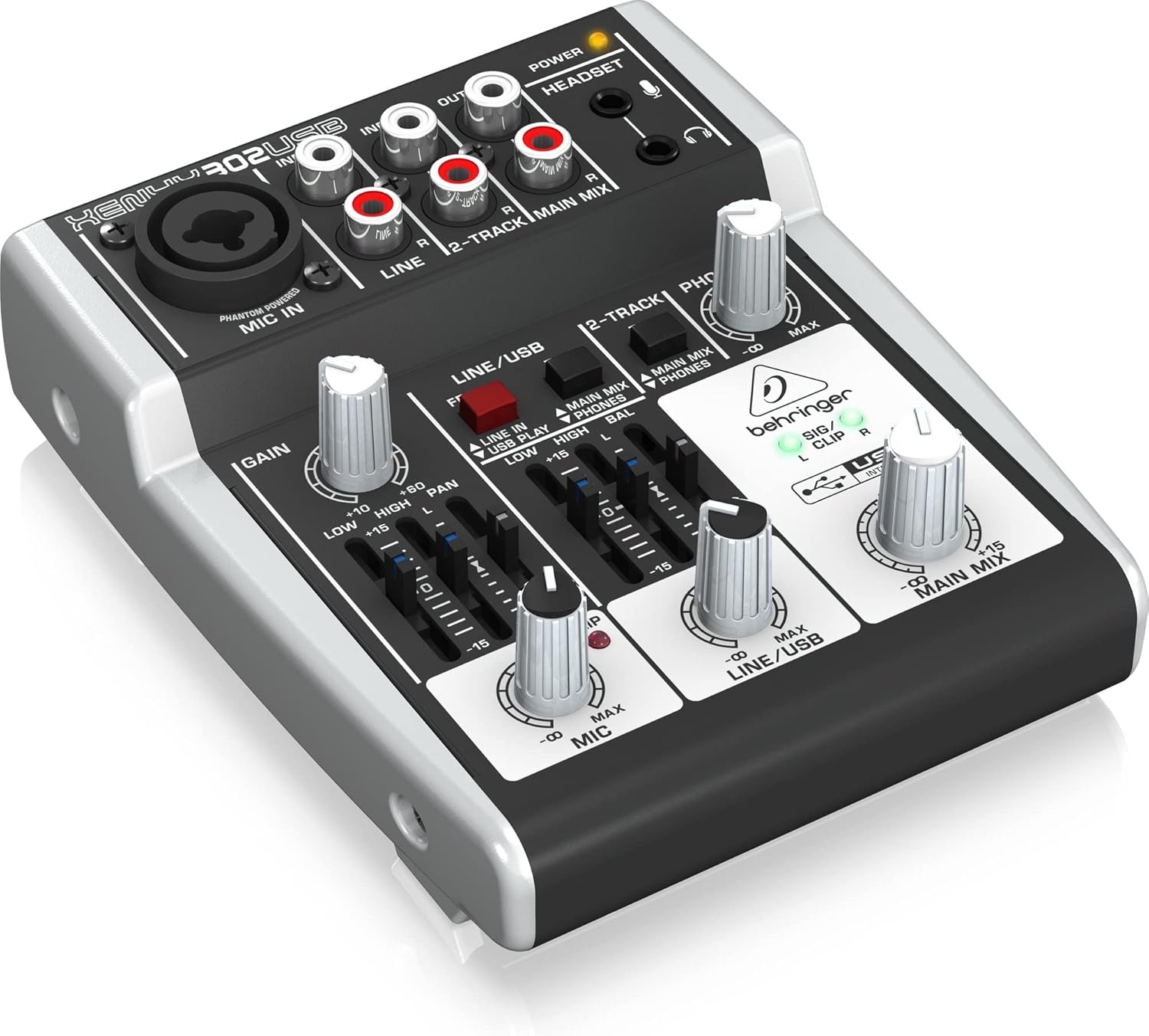
4.1-сүрөт: Бурчтуу view of the mixer, highlighting the various knobs and faders for control.
5. Техникалык тейлөө
Туура кам көрүү сиздин аралаштыргычыңыздын узак иштөөсүн жана иштешин камсыз кылат.
- Тазалоо: Миксердин сыртын тазалоо үчүн жумшак, кургак чүпүрөктү колдонуңуз. Абразивдүү тазалоочу каражаттарды же эриткичтерди колдонбоңуз.
- Курчап турган чөйрө: Operate and store the mixer in a clean, dry environment, away from direct sunlight, excessive heat, moisture, and dust.
- Вентиляция: Ашыкча ысып кетүүнүн алдын алуу үчүн аппараттын айланасында туура желдетүүнү камсыз кылыңыз.
- Кабелдик башкаруу: Avoid putting strain on cables and connectors. Disconnect cables by pulling the plug, not the cable itself.
6. Кыйынчылыктарды
If you encounter issues, try these basic troubleshooting steps before seeking professional assistance.
- Үн чыгышы жок:
- Бардык кабелдик байланыштарды текшериңиз (киргизүүлөр, чыгыштар, кубат).
- Ensure all level knobs (GAIN, MIC, LINE/USB, MAIN MIX, PHONES) are turned up.
- Verify that your monitoring system (speakers, headphones) is powered on and functioning.
- Check the signal routing switches (e.g., MAIN MIX to PHONES).
- Бурмаланган үн:
- Reduce input GAIN to prevent the CLIP LED from illuminating consistently.
- Lower the channel level or MAIN MIX level.
- Бузулган кабельдерди текшериңиз.
- USB Not Recognized by Computer:
- USB кабелинин миксерге да, компьютерге да бекем туташтырылганын текшериңиз.
- Компьютериңиздеги башка USB портун колдонуп көрүңүз.
- Install the latest drivers from the Behringer webсайт.
- Компьютериңизди жана миксерди өчүрүп-күйгүзүңүз.
- Phantom Power Issue:
- Ensure the mixer is powered on. The XENYX 302USB's phantom power is always active on the MIC IN. If a condenser mic isn't working, check the mic and cable.
7. Техникалык шарттар
| Өзгөчөлүк | Спецификация |
|---|---|
| Продукциянын өлчөмдөрү | 13.59 x 11.4 x 4.6 см |
| Элемент моделинин номери | 302USB |
| Дене материалы | Композит |
| Түс аты | Кара |
| Туташтыргыч түрү | USB; 1 x XLR/TRS; 1 x 3.5mm |
| Аппараттык интерфейс | USB 2.0 |
| Country Produced In | Германия |
| Миксер каналынын саны | 5 |
| Power Source | Электр зымдары |
| Тtage | 15 вольт |
| Элемент Салмагы | 380 г |
| Каналдардын саны | 5 |
| Байланыш технологиясы | Cable (XLR, TRS, RCA) |
| Output Connector Type | XLR |
| Аудио киргизүү | XLR (Mono) & Stereo |
| Ызы-чуу деңгээли | 130 дБ |
8. Кепилдик жана колдоо
Behringer offers a generous 3-Year Warranty program for its products, reflecting confidence in their manufacturing quality. For detailed warranty terms and conditions, please refer to the official Behringer webсайт.
For technical support, driver downloads, software updates, and additional resources, please visit the official Behringer website. A comprehensive library of resources is available to assist you with your product.
Официалдуу Webсайт: www.behringer.com


