BlackBerry BB 9900

BlackBerry BB 9900 Bold Touch Smartphone User Manual

Model: BB 9900

1. Киришүү

This manual provides essential instructions for setting up, operating, and maintaining your BlackBerry BB 9900 Bold Touch smartphone. Please read this guide thoroughly to ensure proper use and to maximize the device's capabilities. The BlackBerry BB 9900 Bold Touch combines a capacitive touchscreen with a full QWERTY keyboard, running on BlackBerry OS 7.

2. Пакеттин мазмуну

Пакетиңизде төмөнкү заттар бар экенин текшериңиз:

3. Түзмөк бүттүview

Familiarize yourself with the physical features of your BlackBerry BB 9900 Bold Touch.

3.1 Фронт View

BlackBerry BB 9900 Bold Touch front view, showing the screen, QWERTY keyboard, and navigation buttons.

Сүрөт: алдыңкы view of the BlackBerry BB 9900 Bold Touch, highlighting the 2.8-inch touchscreen and the physical QWERTY keyboard below it. The device also features a trackpad and call/end buttons.

  • Сенсордук дисплей: 2.8-inch capacitive display for interactive navigation.
  • QWERTY клавиатурасы: Full physical keyboard for efficient typing.
  • Optical Trackpad: For precise navigation and selection.
  • Чалуу/аяктоо баскычтары: Standard telephony controls.

3.2 Арткы View

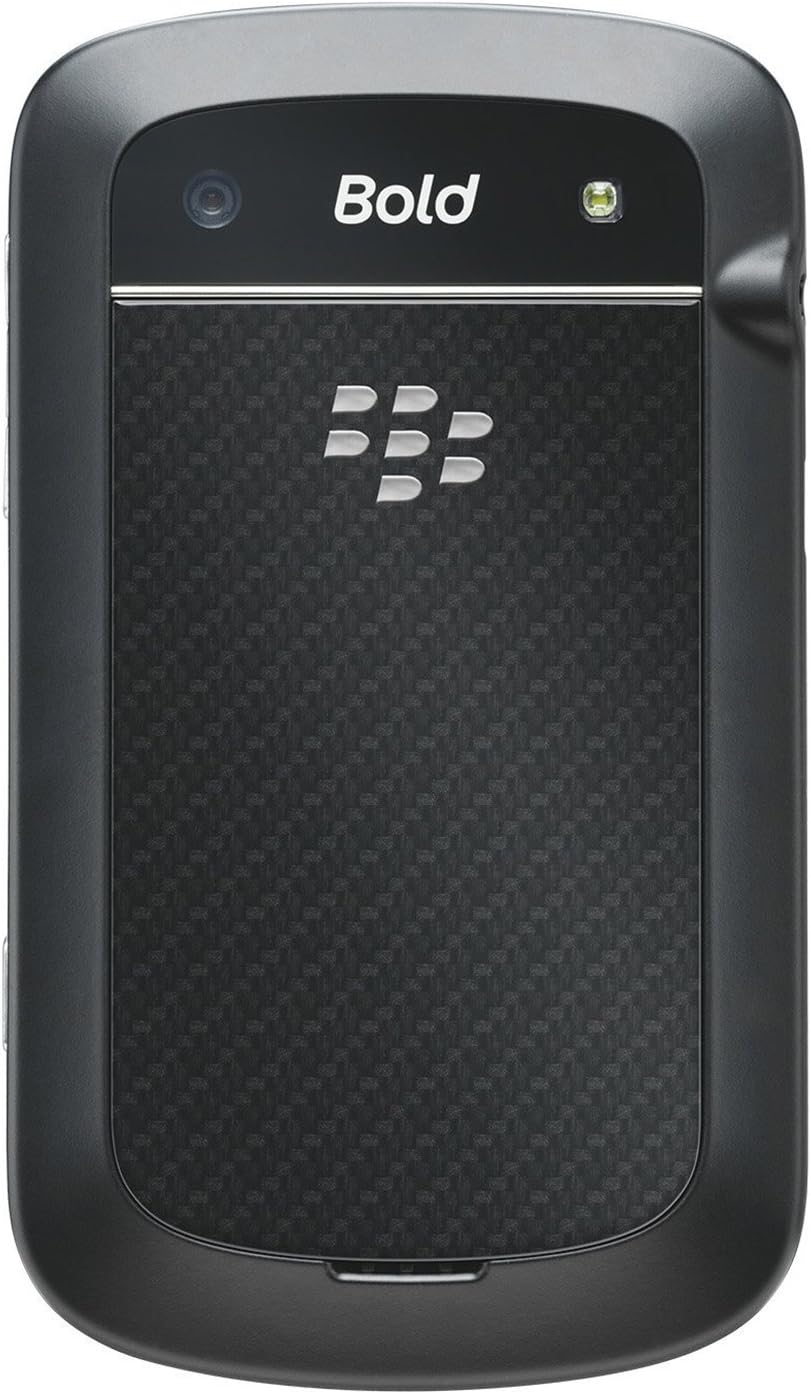
BlackBerry BB 9900 Bold Touch rear view, showing the 5MP camera lens and LED flash.

Сүрөт: Арткы view of the BlackBerry BB 9900 Bold Touch, featuring the 5-megapixel camera lens, LED flash, and the BlackBerry logo.

  • 5MP Камера: Primary camera with autofocus and LED flash.
  • Батарея капкагы: Removable cover for battery and SIM card access.

3.3 тарап View

BlackBerry BB 9900 Bold Touch side view, showing volume buttons and convenience key.

Сүрөт: каптал view of the BlackBerry BB 9900 Bold Touch, illustrating the placement of the volume control buttons and a customizable convenience key.

  • Үн баскычтары: Аудио деңгээлин тууралоо.
  • Convenience Key: Ыңгайлаштырылуучу кыска жол баскычы.

4. Орнотуу

4.1 SIM картаны салуу

  1. Батарея капкагын түзмөктүн арткы жагынан алып салыңыз.
  2. SIM картанын уячасын табыңыз.
  3. SIM картаны алтын түстүү учтарын ылдый каратып жана кесилген бурчун оюк менен бир тегиз кылып салыңыз.
  4. SIM картанын бекем орнотулганын текшериңиз.

4.2 Батареяны салуу

  1. After inserting the SIM card, align the battery's gold contacts with the contacts in the battery compartment.
  2. Батареяны чыкылдагыча акырын басыңыз.
  3. Батареянын капкагын алмаштырыңыз.

4.3 Аппаратты заряддоо

  1. Connect the USB cable to the charging port on your device.
  2. Plug the other end of the USB cable into the wall charger, then into a power outlet.
  3. Түзмөктү биринчи жолу колдонуудан мурун толук кубаттаңыз. Экрандагы батареянын индикатору кубаттоо абалын көрсөтөт.

4.4 Күйгүзүү/өчүрүү

  • Күйгүзүү үчүн: Press and hold the Power/Lock button (usually located on the top edge) until the BlackBerry logo appears.
  • Өчүрүү үчүн: Press and hold the Power/Lock button until the 'Power Off' option appears on the screen. Tap 'Power Off' to confirm.

5. Иштөө нускамалары

5.1 Сенсордук экран навигациясы

  • таптаңыз: Тиркемелерди ачуу, элементтерди тандоо же баскычтарды иштетүү үчүн экранды кыскача басыңыз.
  • Серпүү: Drag your finger across the screen to scroll through lists or switch between home screen panels.
  • Чымчып-кичирейтүү: Use two fingers to zoom in or out on photos, web баракчалар же карталар.

5.2 QWERTY клавиатурасын колдонуу

The physical QWERTY keyboard allows for fast and accurate text entry. Each key corresponds to a letter, number, or symbol. Use the 'Alt' key for alternate characters and the 'Shift' key for capitalization.

5.3 Чалууларды жасоо

  1. From the home screen, tap the Phone icon or press the green Call button.
  2. Enter the phone number using the keyboard.
  3. Press the green Call button to initiate the call.
  4. To end a call, press the red End Call button.

5.4 Кабарларды жөнөтүү

  1. Tap the Messages icon from the home screen.
  2. Select 'Compose New' or similar option.
  3. Алуучунун номерин киргизиңиз же байланыштардан тандаңыз.
  4. Билдирүүңүздү QWERTY клавиатурасын колдонуп териңиз.
  5. "Жөнөтүү" баскычын таптаңыз.

5.5 Камераны колдонуу

  1. Камера колдонмосун ачуу үчүн Камера сөлөкөтүн таптаңыз.
  2. Кадрыңызды экран катары колдонуп кадрга тартыңыз viewтапкыч.
  3. Tap the screen or press the convenience key (if configured) to take a photo.
  4. The 5MP camera features autofocus and an LED flash for improved image quality.

5.6 Wi-Fiга туташуу

  1. Go to 'Options' > 'Networks and Connections' > 'Wi-Fi'.
  2. Turn Wi-Fi on. The device will scan for available networks.
  3. Каалаган тармакты тандап, суралса сырсөздү киргизиңиз.
  4. Once connected, the Wi-Fi indicator will appear in the status bar.

5.7 Using NFC (Near Field Communication)

The BlackBerry BB 9900 Bold Touch supports NFC for short-range wireless communication. This allows for quick pairing with compatible accessories or sharing data with other NFC-enabled devices by tapping them together.

  1. Түзмөгүңүздүн жөндөөлөрүндө NFC иштетилгенин текшериңиз.
  2. Hold your device close to another NFC-enabled device or tag.
  3. Follow on-screen prompts to complete the desired action (e.g., pairing, data transfer).

6. Техникалык тейлөө

6.1 Аппаратыңызды тазалоо

  • Түзмөктүн экранын жана корпусун аарчуу үчүн жумшак, мамыксыз чүпүрөктү колдонуңуз.
  • Катуу химиялык заттарды, абразивдүү тазалагычтарды же аэрозолдук спрейлерди колдонуудан алыс болуңуз.
  • Аппаратты ашыкча нымдуулукка дуушар кылбаңыз.

6.2 Батареяга кам көрүү

  • Батареянын иштешин начарлатышы мүмкүн болгон өтө жогорку температуралардан алыс болуңуз.
  • Түпнуска же бекитилген кубаттагычты гана колдонуңуз.
  • Батареяны тешип же зыян келтирбеңиз.

6.3 Программалык камсыздоо жаңыртуулары

Periodically check for software updates to ensure your device has the latest features and security enhancements. Updates can typically be found in the device's 'Options' or 'Settings' menu under 'Software Updates'.

7. Кыйынчылыктарды

7.1 Түзмөк күйбөй жатат

  • Батарея туура салынганын жана заряддалганын текшериңиз.
  • Connect the device to the charger and wait a few minutes before attempting to power on again.
  • Эгер көйгөй чечилбесе, батарейканы чыгарып, кайра салып көрүңүз.

7.2 Тармакка туташуу маселелери

  • Check if your SIM card is correctly inserted and activated with your carrier.
  • Verify that cellular data or Wi-Fi is enabled in your device settings.
  • Аппаратты кайра иштетиңиз.
  • If using Wi-Fi, ensure your router is working and you have entered the correct password.

7.3 Сенсордук экран жооп бербейт

  • Аппаратты кайра иштетиңиз.
  • Экран таза жана таштанды же ным жок экенин текшериңиз.
  • If the issue is intermittent, check for any recent software installations that might be causing conflicts.

8. Техникалык шарттар

Өзгөчөлүк Деталь
Модель аты BB 9900
Операция системасы BlackBerry OS 7
Дисплей 2.8-inch Capacitive Touchscreen, 640 x 480 Resolution
Процессор Not specified (typically 1.2 GHz for this model)
RAM 768 MB
Ички сактагыч 8 ГБ
Арткы камера 5 MP, Autofocus, LED Flash
Байланыш Wi-Fi 802.11 b/g/n, NFC, Bluetooth, GPS
Тармакты колдоо Quad-band GSM/GPRS/EDGE, Tri-band HSPA+
Өлчөмдөр 4.53 x 2.6 x 0.41 дюйм (115 x 66 x 10.5 мм)
Салмагы 4.6 унция (130 грамм)
Аудио Jack 3.5 мм

9. Колдоо жана кепилдик

9.1 Кардарларды колдоо

For technical assistance, troubleshooting beyond this manual, or service inquiries, please visit the official BlackBerry support website or contact your local service provider. Refer to the packaging or official webконкреттүү байланыш маалыматы үчүн сайт.

9.2 Кепилдик маалыматы

Your BlackBerry BB 9900 Bold Touch is covered by a limited warranty. Please refer to the warranty card included in your product packaging or visit the official BlackBerry webКепилдик мөөнөтү жана камтуу өзгөчөлүктөрү, анын ичинде деталдуу шарттар жана шарттар үчүн сайт. Кепилдик дооматтар үчүн сатып алганыңыздын далилин сактаңыз.

Тектеш документтер - BB 9900

Preview BlackBerry Q10 Смартфонунун Колдонуучусу
BlackBerry Q10 Смартфону боюнча комплекстүү колдонмо, BlackBerry Hub, клавиатура, BBM Video, камера, медиа бөлүшүү жана түзмөк жөндөөлөрү сыяктуу функцияларды камтыйт. Өндүрүмдүүлүктү кантип жогорулатууну жана тажрыйбаңызды ыңгайлаштырууну үйрөнүңүз.
Preview BlackBerry Java өнүктүрүү чөйрөсү: GPS жана BlackBerry карталарын өнүктүрүү боюнча колдонмо
Бул колдонмо GPS жана BlackBerry Карталарынын функцияларын BlackBerry Java өнүктүрүү чөйрөсүндө интеграциялоону майда-чүйдөсүнө чейин баяндап, иштеп чыгуучулар жайгашкан жерди билүүчү тиркемелерди куруу үчүн техникалык ресурс катары кызмат кылат.
Preview Android үчүн BlackBerry Tasks Колдонуучунун колдонмосу | Коопсуз тапшырмаларды башкаруу
Расмий BlackBerry Tasks for Android User Guide (v3.17) BlackBerry'дин коопсуз ишкана тапшырмаларын башкаруу тиркемеси үчүн орнотуу, активдештирүү, тапшырмаларды башкаруу, орнотуулар жана көйгөйлөрдү чечүү боюнча толук нускамаларды берет.
Preview BlackBerry Q5 Smartphone User Guide: Setup, Features, and Operations
This comprehensive user guide provides detailed information and instructions for operating the BlackBerry Q5 Smartphone. It covers the features and functionalities of the BlackBerry 10 OS, version 10.2.1, designed to enhance productivity and connectivity.
Preview BlackBerry Z30 Smartphone Колдонуучу колдонмосу: Функциялар, Орнотуулар жана Иштетүү
BlackBerry Z30 Смартфону үчүн кеңири колдонуучу колдонмосун табыңыз (Version 10.3.2). Бул колдонмо түзмөктү орнотуу, навигация функциялары, байланыштарды башкаруу, медиа мүмкүнчүлүктөрүн колдонуу, орнотууларды ыңгайлаштыруу жана оптималдуу колдонуучу тажрыйбасы үчүн коопсуздукту жогорулатуу боюнча кеңири нускамаларды камтыйт.
Preview BlackBerry Work, Notes, and Tasks Administration Guide
Comprehensive administration guide for BlackBerry Work, Notes, and Tasks, detailing setup, configuration, management, and troubleshooting for IT administrators using BlackBerry UEM.