1. Киришүү
The ZIPRO Treadmill (Model 5941329 L) is a versatile and compact fitness machine designed for home use, offering a comprehensive range of features for effective cardiovascular training, jogging, and walking. Its foldable design makes it ideal for small spaces, allowing for easy storage when not in use.
This treadmill is equipped with a powerful 1.96 HP motor, providing a speed range of 1 to 16 km/h. It features 12 adjustable incline levels to increase workout intensity and engage different muscle groups. The integrated LED display and heart rate sensors provide real-time data on time, speed, distance, calories burned, and heart rate, helping you monitor your progress effectively.
For an enhanced training experience, the treadmill supports connectivity with compatible fitness applications like Kinomap and FitShow, allowing for interactive workouts and data tracking. It also includes a smartphone holder, MP3 function, and built-in speakers for entertainment during your exercise sessions. Designed with user comfort in mind, it features a spacious running surface (45 x 125 cm) and a joint-friendly cushioning system to minimize impact.

Image: The ZIPRO Treadmill in an unfolded state, with a user actively running on it. A smartphone with fitness app icons is shown in the background, highlighting the app connectivity feature.
2. Коопсуздук маалыматы
Чуркоо жолун колдонуудан мурун бардык көрсөтмөлөрдү кунт коюп окуп чыгыңыз. Бул колдонмону келечекте колдонуу үчүн сактап коюңуз.
- Максималдуу Салмак сыйымдуулугу: Do not exceed the maximum user weight of 130 kg (286 lbs). Exceeding this limit can cause damage to the treadmill and lead to injury.
- Жайгашкан жери: Place the treadmill on a flat, stable surface. Ensure there is at least 2 meters (6.5 feet) of clear space behind the treadmill and 0.6 meters (2 feet) on each side.
- Кубат туташуу: Чуркоо жолун жерге туташтырылган электр розеткасына туташтырыңыз. Узарткычтарды же адаптерлерди колдонбоңуз.
- Коопсуздук ачкычы: Always attach the safety key clip to your clothing before starting the treadmill. In case of an emergency or if you fall, the safety key will detach, immediately stopping the machine.
- Балдар жана үй жаныбарлары: Keep children and pets away from the treadmill, especially when it is in operation. This equipment is not a toy.
- Медициналык шарттар: Ар кандай көнүгүү программасын баштоодон мурун, айрыкча, мурдатан бар медициналык шарттарыңыз болсо, дарыгериңиз менен кеңешиңиз.
- Туура унутат: Wear appropriate athletic footwear and clothing that will not get caught in the moving parts of the treadmill.
- Тейлөө: Perform regular maintenance as described in this manual to ensure safe and optimal operation.

Image: A user exercising on the ZIPRO treadmill, illustrating the safe and versatile training environment provided by the machine, including its adjustable speed range.
3. Пакеттин мазмуну
Таңгактан чыгарганда, таңгагыңызда төмөнкү компоненттердин бардыгы бар экенин текшериңиз:
- ZIPRO Treadmill (Main Unit)
- Колдонуучунун Колдонмосу (бул документ)
- Tool Kit for assembly and maintenance
- Lubricant for treadmill belt maintenance
- Коопсуздук ачкычы
- Электр кабели
Эгерде кандайдыр бир бөлүктөрү жок же бузулуп калса, дароо кардарларды колдоо менен байланышыңыз.
4. Орнотуу жана чогултуу
The ZIPRO Treadmill is designed for minimal assembly. Follow these steps for initial setup:
4.1 Чуркоо жолун ачуу
- Чуркоо жолун таңгагынан этияттык менен чыгарыңыз.
- Чуркоо жолун тегиз, тегиз жерге коюңуз.
- Lift the console/handlebar assembly until it locks into the upright position. Ensure it is securely locked before proceeding.
- Lower the running deck gently until it rests flat on the floor.
4.2 Кубатка туташуу
Plug the power cord into the treadmill's power input, then into a grounded electrical outlet. Ensure the power switch (usually located near the power cord input) is in the 'ON' position.
4.3 Сактоо үчүн бүктөлмө
To fold the treadmill for storage:
- Чуркоо тилкесинин өчүрүлгөнүн жана розеткадан ажыратылганын текшериңиз.
- Carefully lift the running deck until it clicks into the vertical locked position.
- The treadmill can then be moved using the transport wheels and stored vertically, requiring minimal space (approx. 31.5 cm high when folded flat, or 150 cm high when stored vertically).

Image: A user demonstrating the folding mechanism of the ZIPRO treadmill, highlighting its compact design and ease of vertical storage to save space.
5. Иштөө нускамалары
5.1 Башкаруу панелинин үстүнөview
The treadmill features an intuitive LED display and control buttons on the console and handlebars. The display shows key metrics such as time, speed, distance, calories, and heart rate.
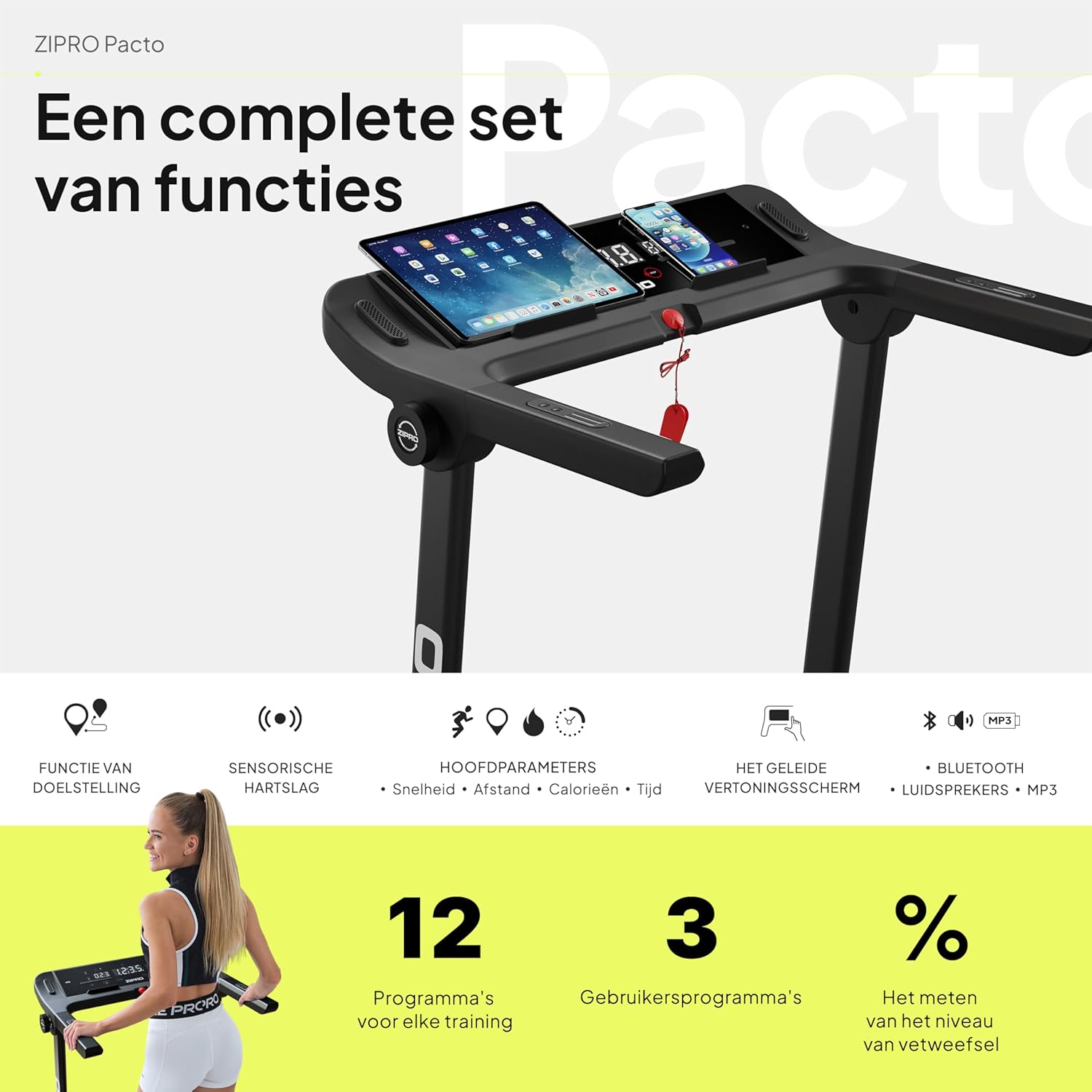
Сүрөт: деталдуу view of the ZIPRO treadmill's control panel, featuring a tablet and smartphone in their respective holders, illustrating the comprehensive set of functions available.
5.2 Машыгууну баштоо
- Ensure the safety key is properly attached to the console and your clothing.
- Press the 'START' button. The treadmill will typically begin with a short countdown before the belt starts moving at a low speed.
5.3 Ылдамдыкты жана жантайыңкылыкты жөндөө
- Ылдамдыгы: Use the '+' and '-' buttons on the console or handlebars to adjust the speed from 1 km/h to 16 km/h. Quick speed buttons (e.g., 3, 6, 9, 12 km/h) may also be available for rapid adjustments.
- Жантайма: Use the 'INCLINE +' and '-' buttons to adjust the incline level. The treadmill offers 12 adjustable incline levels to simulate uphill walking or running.
5.4 Алдын ала коюлган программаларды колдонуу
The treadmill comes with 12 pre-set workout programs and 3 customizable user programs. Refer to the specific program section in your detailed manual for instructions on selecting and using these programs.
5.5 Жүрөктүн кагышын көзөмөлдөө
Grasp the heart rate sensors on the handlebars to display your current heart rate on the LED screen. For accurate readings, ensure your hands are clean and firmly placed on the sensors.
5.6 App Connectivity (Kinomap & FitShow)
Enhance your workout experience by connecting your smartphone or tablet to the treadmill via Bluetooth and using compatible fitness apps like Kinomap and FitShow. These apps offer interactive training, virtual routes, and detailed workout tracking.
- Download the Kinomap or FitShow app from your device's app store.
- Түзмөгүңүздө Bluetooth'ду иштетиңиз.
- Open the app and follow the on-screen instructions to connect to your ZIPRO treadmill.

Image: A smartphone displaying the logos for Kinomap and FitShow applications, illustrating the treadmill's compatibility with these popular fitness apps for interactive training.
5.7 MP3 Function and Speakers
Connect your audio device to the treadmill's MP3 input to play music through the built-in speakers, making your workouts more enjoyable.
5.8 Машыгууну токтотуу
Press the 'STOP' button to gradually slow down and stop the treadmill belt. Alternatively, pulling the safety key will immediately stop the treadmill.
6. Техникалык тейлөө
Regular maintenance is crucial for the longevity and optimal performance of your ZIPRO treadmill.
6.1 Тазалоо
- Консольду жана башка беттерди жумшак, d менен сүртүңүзamp терди жана чаңды кетирүү үчүн ар бир колдонуудан кийин чүпүрөк менен сүртүңүз.
- Абразивдүү тазалагычтарды же эриткичтерди колдонбоңуз, алар финишке зыян келтириши мүмкүн.
- Vacuum underneath the treadmill regularly to prevent dust and debris from accumulating.
6.2 Курду майлоо
The running belt requires periodic lubrication to reduce friction and extend its lifespan. Use the provided lubricant or a silicone-based treadmill lubricant.
- Өчүрүңүз жана розеткадан ажыратыңыз.
- Курду көтөрүү үчүн арткы ролик болтторун бир аз бошотуңуз.
- Курдун ортосунан төмөн карай жука сызык майлоочу каражатты бирдей кылып сүйкөңүз.
- Арткы ролик болтторун тартыңыз.
- Майлоочу майдын бөлүштүрүлүшү үчүн чуркоо жолун бир нече мүнөт жай ылдамдыкта (мисалы, 3 км/саат) иштетиңиз.
Frequency of lubrication depends on usage: every 3-6 months for moderate use, or more frequently for heavy use.
6.3 Курдун тартылышы жана тегизделиши
Check the belt tension and alignment periodically. If the belt slips or drifts to one side, adjust the rear roller bolts using the tool kit provided. Refer to the detailed manual for precise adjustment instructions.
7. Кыйынчылыктарды
This section addresses common issues you might encounter with your treadmill. If the problem persists, please contact customer support.
| Көйгөй | Мүмкүн себеп | Чечим |
|---|---|---|
| Чуркоо тилкеси күйбөйт. | Электр шнурунун розеткасына сайылган эмес; өчүрүү; өчүргүч иштен чыкты. | Ensure power cord is securely plugged in. Check if the power switch is ON. Reset the circuit breaker if necessary. |
| Кур кыймылдабайт. | Safety key not in place; motor overload; loose belt. | Ensure the safety key is correctly inserted. Reduce user weight if exceeding capacity. Check belt tension and adjust if loose. |
| Дисплей туура иштебей жатат. | Loose cable connection; software glitch. | Check all cable connections to the console. Try turning the treadmill off and on again. |
| Иш учурунда адаттан тыш ызы-чуу. | Lack of lubrication; loose parts; foreign object. | Lubricate the running belt. Inspect for any loose screws or foreign objects under the belt. |
| Кур тайып же тартынып калат. | Belt too loose; lack of lubrication. | Adjust belt tension. Lubricate the running belt. |
8. Техникалык шарттар
| Өзгөчөлүк | Деталь |
|---|---|
| Бренд | ZIPRO |
| Модель номери | 5941329 |
| Түс | Pacto |
| Өлчөмү | L |
| Дисплей түрү | LED |
| Дисплей өлчөмү | 2.4 дюйм |
| Мотор кубаты | 1.96 HP |
| Максималдуу ылдамдык | 16 км/саат |
| Максималдуу Салмак сыйымдуулугу | 130 кг |
| Running Surface Dimensions | 45 x 125 см |
| Ачылган өлчөмдөр (L x W x Y) | 154 x 77.4 x 114 см |
| Катталган бийиктик | 31.5 cm (when folded flat) |
| Элемент Салмагы | 41.9 кг |
| Алдын ала коюлган программалар | 12 |
| Ыңгайлаштырылуучу программалар | 3 |
| Adjustable Incline Levels | 12 |
| Power Source | Электр зымдары |
| Негизги өзгөчөлүктөрү | Touchscreen, Adjustable Height, Bottle Holder, Timer, Heart Rate Monitor |
| Материалдын түрү | Alloy Steel, Plastic, Aluminum |
| Камтылган компоненттер | User Manual, Tool Kit, Lubricant, Safety Key, Power Cord |
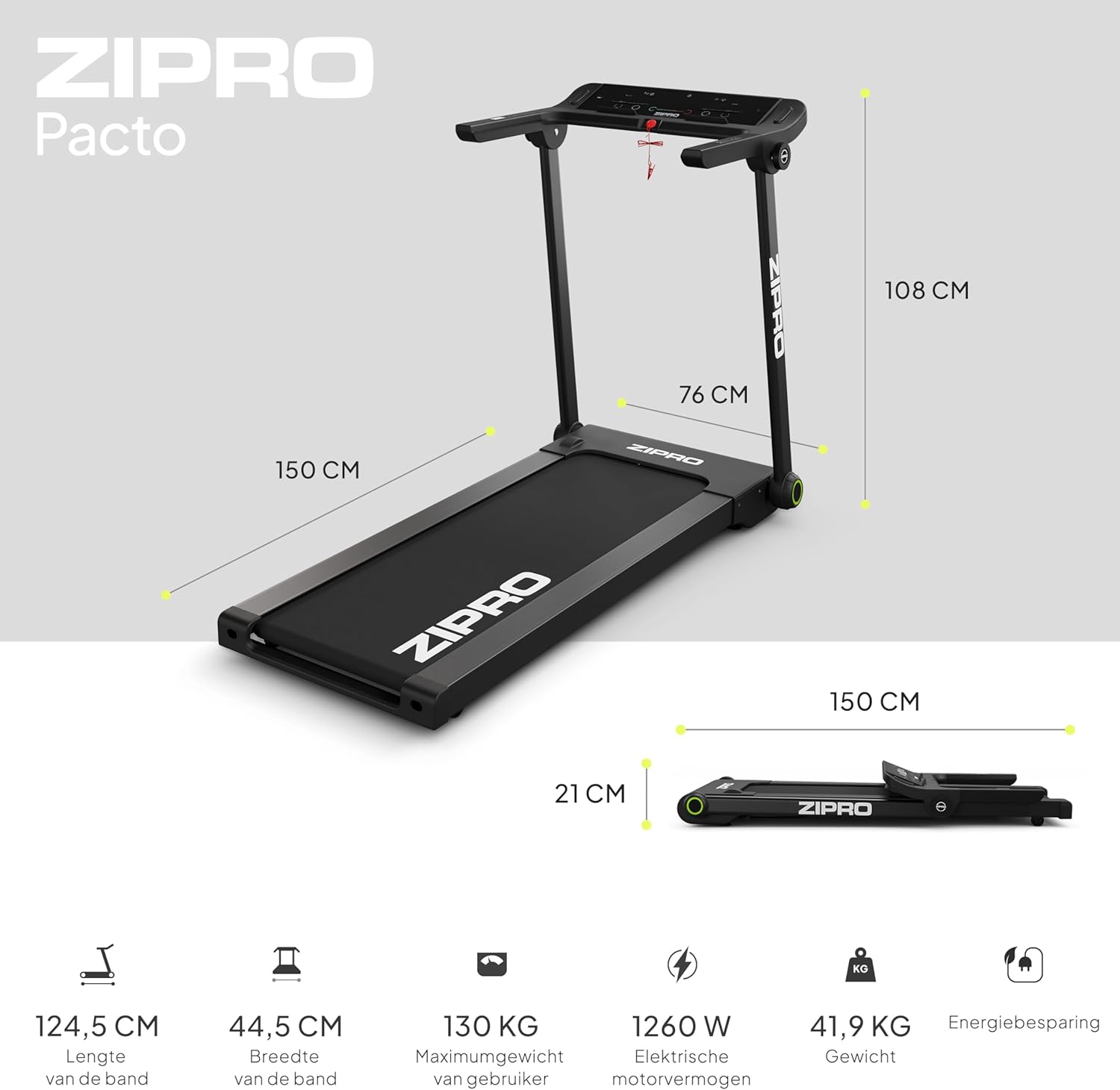
Image: A visual representation of the ZIPRO treadmill's dimensions when unfolded and folded, accompanied by key specifications such as belt length, width, maximum user weight, motor power, and item weight.

Сүрөт: деталдуу view of the ZIPRO treadmill's cushioning system, highlighting the shock absorbers designed to provide a comfortable and joint-friendly workout experience.
9. Кепилдик жана колдоо
Your ZIPRO Treadmill is covered by a manufacturer's warranty against defects in materials and workmanship. Please refer to the warranty card included in your package for specific terms and conditions, including the warranty period and coverage details.
For technical assistance, troubleshooting beyond this manual, or to inquire about warranty claims, please contact ZIPRO customer support. Contact information can typically be found on the product packaging, the warranty card, or the official ZIPRO webсайт.
When contacting support, please have your model number (5941329 L) and proof of purchase readily available to expedite the service process.


