Introduction
This manual provides essential information for the proper installation, operation, and maintenance of your Delta 590T1151TR Commercial Faucet. Please read these instructions thoroughly before beginning installation or use to ensure optimal performance and longevity of the product. Retain this manual for future reference.
Маанилүү коопсуздук маалыматы
- Always turn off the water supply at the main shut-off valves before installing or servicing the faucet.
- Орнотуу учурунда коопсуздук көз айнек сыяктуу тиешелүү жеке коргоочу шаймандарды тагыныңыз.
- Орнотуу процессинин кандайдыр бир бөлүгүнө ишенбесеңиз, квалификациялуу сантехникке кайрылыңыз.
- Орнотуу учурунда бардык жергиликтүү сантехника жана курулуш нормалары сакталганын текшериңиз.
- Бул продукт коммерциялык колдонуу үчүн иштелип чыккан.
Продукт бүттүview
The Delta 590T1151TR is a commercial-grade, single-hole, deck-mount faucet featuring electronic sensor operation. It is designed for efficiency and hygiene in commercial environments. This faucet is ADA Compliant, CalGreen Compliant, and Watersense Qualified, ensuring water conservation with a flow rate of 0.5 GPM.

1-сүрөт: The Delta 590T1151TR Commercial Faucet. This image displays the chrome-finished faucet body with the integrated sensor at the base.
Орнотуу жана орнотуу
Маанилүү эскертүү: The Delta 590T1151TR is a trim kit only. A separate Rough-In Kit is required for complete installation and functionality. The rough-in kit typically includes the necessary control box, power source (e.g., battery pack or AC adapter), and other components for water supply and electronic connections. Ensure you have the correct rough-in kit before proceeding with installation.
Components Included (Trim Kit)

2-сүрөт: жарылды view of the Delta 590T1151TR trim kit components. This image shows the faucet spout, mounting hardware, and various seals and connectors that are part of the trim kit.
General Installation Steps (Requires Rough-In Kit)
- Орнотуу аймагын даярдоо: Ensure the mounting surface is clean and clear. Turn off the water supply.
- Install Rough-In Kit: Follow the instructions provided with your specific Delta rough-in kit to install the control box, power source, and water supply lines. This typically involves mounting the control box under the sink and connecting the hot and cold water lines.
- Кранды орнотуу: Place the faucet body through the single hole on the deck. Secure it from underneath with the provided mounting hardware.
- Суу линияларын туташтыруу: Connect the flexible supply lines from the faucet to the corresponding outlets on the rough-in kit's control box.
- Connect Electronic Cables: Connect the sensor cable from the faucet to the control box. Ensure all electrical connections are secure.
- Сыноо операциясы: Turn on the water supply and check for leaks. Activate the sensor to ensure proper water flow.
Иштөө нускамалары
The Delta 590T1151TR faucet operates using an integrated electronic sensor, providing touchless activation for enhanced hygiene.
Сенсорду активдештирүү
- To Activate Water Flow: Place your hands within the detection range of the sensor located at the base of the faucet spout. Water will begin to flow automatically.
- To Stop Water Flow: Remove your hands from the sensor's detection range. The water flow will cease automatically after a brief delay.
- Суунун температурасын тууралоо: Water temperature is typically controlled by a mixing valve within the rough-in kit or external thermostatic mixing valve, which is set during installation. This faucet does not have an integrated temperature adjustment handle.
Техникалык тейлөө
Regular maintenance ensures the longevity and optimal performance of your Delta faucet.
Кранды тазалоо
- Care Care: Хром каптамасын жумшак, d менен тазалаңызamp кездеме. Абразивдүү тазалоочу каражаттарды, катуу химиялык заттарды же кыргыч губкаларды колдонбоңуз, анткени алар капталга зыян келтириши мүмкүн.
- Сенсор тазалоо: Gently wipe the sensor window with a soft, lint-free cloth to ensure it remains clear and responsive. Do not use harsh chemicals on the sensor.
Аэраторду тейлөө
- Periodically unscrew the aerator from the spout tip and rinse it under running water to remove any debris or mineral buildup. This helps maintain consistent water flow.
- Reinstall the aerator securely, ensuring it is hand-tightened to prevent leaks.
Power Source (Rough-In Kit Dependent)
- If your rough-in kit uses batteries, monitor the battery indicator (if present) or replace batteries as recommended by the rough-in kit's instructions to ensure continuous operation.
- If using an AC adapter, ensure the power connection is secure and free from damage.
Проблемаларды чечүү
Колдоо кызматына кайрылуудан мурун, кайраview төмөнкү жалпы маселелер жана чечимдер.
| Көйгөй | Мүмкүн себеп | Чечим |
|---|---|---|
| Суу агымы жок | Water supply off; Power issue (batteries/AC); Clogged aerator; Sensor obstruction | Check main water supply; Verify power to control box; Clean aerator; Ensure sensor is clear. |
| Суунун аз агымы | Clogged aerator; Debris in supply lines; Low water pressure | Clean aerator; Flush supply lines (consult plumber); Check building water pressure. |
| Сенсор жооп бербей жатат | Sensor dirty/obstructed; Power issue; Sensor malfunction | Clean sensor window; Check power supply; If problem persists, contact support. |
| Constant water flow | Сенсордун иштебей калышы; Клапандагы таштандылар | Remove any objects from sensor range; Turn off water supply and contact support. |
Техникалык шарттар
| Өзгөчөлүк | Деталь |
|---|---|
| Бренд | ДЕЛТА |
| Модель номери | 590T1151TR |
| Аяктоо түрү | Chrome |
| Материал | Жез |
| Монтаж түрү | Deck Mount |
| Орнотуу түрү | Single Hole |
| Handle Type | Sensor (Electronic) |
| Flow Rate | 0.5 GPM |
| ADA менен шайкеш | Ооба |
| CalGreen Compliant | Ооба |
| Watersense Qualified | Ооба |
| Элемент Салмагы | 1 фунт |
| Продукциянын өлчөмдөрү | 1 x 1 x 1 inches (Faucet body only) |
| UPC | 055870374461 |
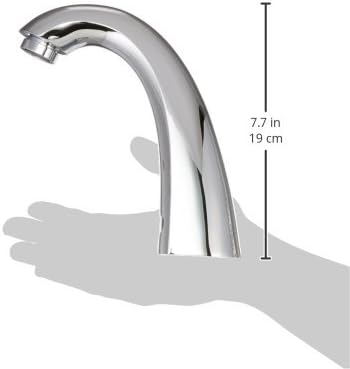
3-сүрөт: Side view of the Delta 590T1151TR faucet with approximate height measurement of 7.7 inches (19 cm).
Кепилдик маалымат
Specific warranty details for the Delta 590T1151TR Commercial Faucet are typically provided with the complete product package, including the rough-in kit. For the most current and detailed warranty information, please refer to the documentation included with your purchase or visit the official Delta Faucet webсайт.
Колдоо маалыматы
For technical assistance, replacement parts, or further inquiries regarding your Delta 590T1151TR Commercial Faucet, please contact Delta Faucet customer service. Contact information and support resources can be found on the official Delta Faucet webсайт:


