Introduction
This manual provides comprehensive instructions for the setup, operation, maintenance, and troubleshooting of your Avaya 9508 Digital Phone. The Avaya 9508 is designed to deliver reliable, high-quality communication for business environments, offering functionality similar to the Avaya 9600 Series IP Deskphones in a digital telephony setting.
Продукт бүттүview
The Avaya 9508 Digital Phone is a robust communication device featuring a sleek design suitable for various business users. It integrates essential telephony functions with an intuitive interface.

Сүрөт 1: Алдыңкы view of the Avaya 9508 Digital Phone, showing the handset, display, and keypad.

2-сүрөт: Каптал view of the Avaya 9508 Digital Phone, illustrating its ergonomic design with the desk stand.
Орнотуу нускамалары
1. Аппаратты таңгактан чыгаруу
Бардык компоненттерди таңгактан кылдаттык менен алып салыңыз. Төмөнкү нерселердин бар экенин текшериңиз:
- Avaya 9508 Digital Phone unit
- Телефон
- Телефон шнуры
- Линия шнуры
- Үстөл станы
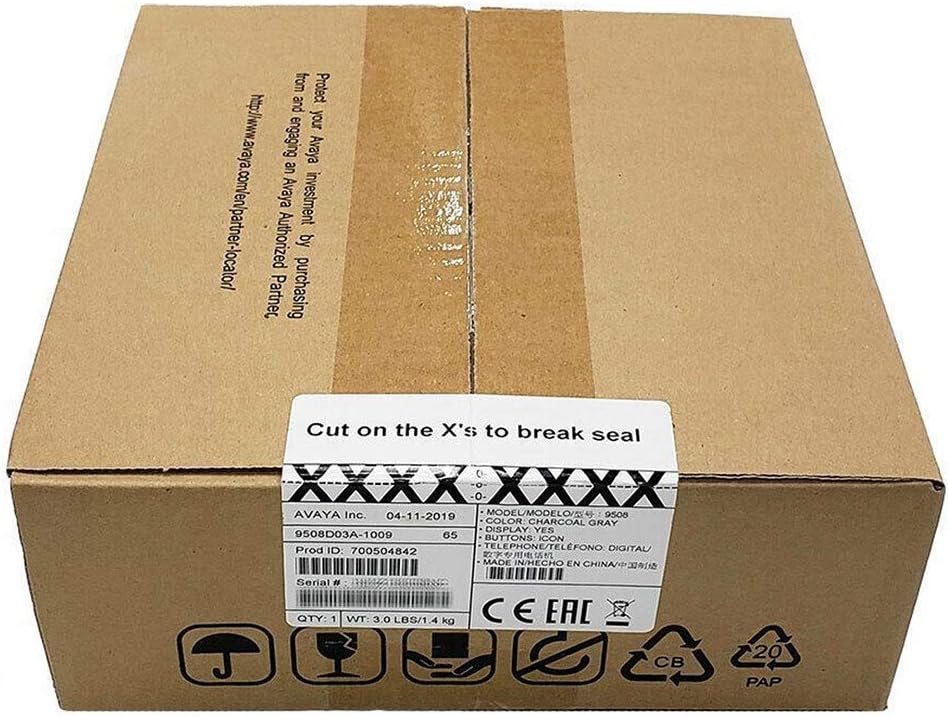
Figure 3: The Avaya 9508 Digital Phone packaging box, indicating product details and sealing instructions.
2. Үстөл стендин бекитүү
- Locate the slots on the back of the phone unit.
- Align the tabs on the desk stand with these slots.
- Slide the stand into place until it clicks securely.
3. Телефонду туташтыруу
- Plug one end of the coiled handset cord into the handset.
- Plug the other end into the designated handset port on the phone unit (usually marked with a handset icon).
4. Connecting to the Phone System
The Avaya 9508 is a digital phone and requires connection to a compatible Avaya phone system. It cannot be directly connected to a standard analog phone line or a modem/router for VoIP services without the appropriate system infrastructure.
- Connect one end of the line cord to the port labeled "LINE" or "DIGITAL" on the back of the phone.
- Connect the other end of the line cord to the digital station port on your Avaya communication system.
- Ensure the phone receives power from the system or an external power adapter (if required and not included).
Иштөө нускамалары
Негизги чалуу функциялары
- Чакыруу: Трубканы көтөрүңүз же динамик баскычын басыңыз, андан кийин номерди териңиз.
- Чалууга жооп берүү: Телефон шыңгыраганда трубканы көтөрүңүз же динамик баскычын басыңыз.
- Чалууну аяктоо: Трубканы ордуна коюңуз же динамик баскычын кайра басыңыз.
- Кайра терүү: Акыркы терилген номерге чалуу үчүн Кайра терүү баскычын басыңыз.
Advanced Features
- Кармап туруу: During a call, press the Hold button.
- өткөрүүсү: During a call, press the Transfer button, dial the new extension or number, and then press Transfer again.
- Конференция: During a call, press the Conference button, dial the next participant, and then press Conference again to join all parties.
- Үн почтасы: Press the Voicemail button (often represented by an envelope icon) to access your messages. Follow the audio prompts for setup and retrieval.
- Үндү тууралоо: Use the volume up/down buttons on the side of the phone to adjust handset, speaker, or ringer volume.
Техникалык тейлөө
Тазалоо
Телефонуңуздун сырткы көрүнүшүн жана иштешин сактоо үчүн:
- жумшак колдонуу, damp cloth to wipe the phone's surface.
- Avoid using abrasive cleaners, solvents, or strong chemicals, as these can damage the plastic and electronic components.
- Ensure the phone is disconnected from the power source before cleaning.
Сактагыч
Эгер телефонду көпкө сактап жатсаңыз, бардык кабелдерди сууруп, салкын, кургак жерде, күн нуру түз тийбеген жана өтө жогорку температурадан алыс сактаңыз.
Проблемаларды чечүү
| Көйгөй | Мүмкүн себеп | Чечим |
|---|---|---|
| Терүү үнү жок | Phone not properly connected to the system. | Check all cable connections, especially the line cord to the phone system. Ensure the phone system is operational. |
| Чалуу адамды уга албайт / Чалуу мени уга албайт | Handset or speaker volume too low; faulty cord. | Adjust volume. Check handset cord connection. Test with another handset if available. |
| Дисплей бош | No power; phone system issue. | Verify power connection. Contact your system administrator if other phones are also affected. |
| Баскычтар жооп бербейт | Убактылуу программалык ката. | Disconnect and reconnect the phone from the system (power cycle). |
If issues persist after attempting these solutions, please contact your system administrator or Avaya support.
Техникалык шарттар
- Модел: Avaya 9508 Digital Phone
- Бөлүмдүн номери: 700504842
- Өлчөмдөрү (L x W x Y): 1.97 x 1.97 x 1.97 дюйм (болжолдуу, продукт маалыматтарынын негизинде)
- Элемент Салмагы: 7.1 унция (200 грамм)
- Түсү: Кара
- Материал: Пластик
- Телефон түрү: Digital Landline
- Кубат булагы: Corded Electric (typically powered by the Avaya communication system)
- Шайкеш түзмөктөр: Requires connection to a compatible Avaya digital communication system.
- Биринчи жеткиликтүү: 3-май, 2013-жыл
Кепилдик жана колдоо
For warranty information, please refer to the documentation provided at the time of purchase or contact your Avaya reseller. Technical support is typically provided by your organization's IT department or the Avaya certified partner who installed your communication system.
For general information about Avaya products, visit the official Avaya webсайт: www.avaya.com


