1. Киришүү
This manual provides essential information for the proper use and care of your Leica V-LUX 3 digital camera. The Leica V-LUX 3 is designed for versatile photography, featuring a 24x super-telephoto zoom lens and a 12.1-megapixel CMOS image sensor. It is capable of capturing high-quality still images and recording full-HD video.
Please read this manual thoroughly before operating the camera to ensure optimal performance and longevity of the device.
2. Продукт бүтүп калдыview
2.1 Негизги өзгөчөлүктөрү
- 12.1-megapixel CMOS image sensor for high-quality imaging.
- 24x optical super-telephoto zoom lens (25-600mm equivalent) for extensive focal length range.
- Full-HD video recording capability (1920 x 1080 at 60 fps).
- Optical Image Stabilization to reduce blur.
- 3-inch articulating LCD display and electronic viewтапкыч.
- Fast continuous shooting up to 12 frames per second.
2.2 Кутуда эмне бар
The Leica V-LUX 3 package typically includes:
- Leica V-LUX 3 Camera Body
- Lithium-Ion Rechargeable Battery (BP-DC 9)
- Батарея заряддагыч
- Погон
- USB кабели
- Объективдин капкагы
- Көрсөтмө (бул документ)
3. Орнотуу
3.1 Батареяны заряддоо
- Insert the battery into the provided charger.
- Connect the charger to a power outlet. The charging indicator light will illuminate.
- Once charging is complete, the indicator light will change or turn off. Disconnect the charger and remove the battery.
Note: Fully charge the battery before first use for optimal performance.
3.2 Батареяны жана эстутум картасын салуу
Батареяны же эс тутум картасын салуудан же чыгаруудан мурун камеранын өчүрүлгөнүн текшериңиз.
- Камеранын ылдый жагында жайгашкан батарейка/карта бөлүмүнүн капкагын ачыңыз.
- Insert the charged battery with the contacts facing the correct direction, as indicated inside the compartment. Push until it clicks into place.
- Insert an SD/SDHC/SDXC memory card into the card slot with the label facing the correct direction. Push until it clicks.
- Бөлүмдүн капкагын бекем жабыңыз.

Сүрөт 1: Алдыңкы view of the Leica V-LUX 3 camera. This image displays the lens, built-in flash, and the Leica branding on the camera body.
3.3 Баштапкы күйгүзүү жана негизги орнотуулар
- КҮЙГҮЗҮҮ/ӨЧҮРҮҮ которгучун 'КҮЙГҮЗҮҮ' абалына жылдырыңыз.
- The camera's LCD screen will power on.
- Follow the on-screen prompts to set the date, time, and language. Use the directional buttons and 'MENU/SET' button to navigate and confirm selections.
4. Камераны иштетүү
4.1 Негизги сүрөт
- Камераны күйгүзүңүз.
- Rotate the mode dial (located on the top of the camera) to select your desired shooting mode (e.g., Program AE, Aperture Priority, Shutter Priority, Manual, Scene Modes).
- Сүрөтүңүздү LCD монитор же электрондук каражат менен кадрга алыңыз viewтапкыч.
- Автофокусту жана экспозицияны өлчөөнү иштетүү үчүн жапкыч баскычын жарымына басыңыз.
- Сүрөттү тартуу үчүн жапкычты толугу менен басыңыз.
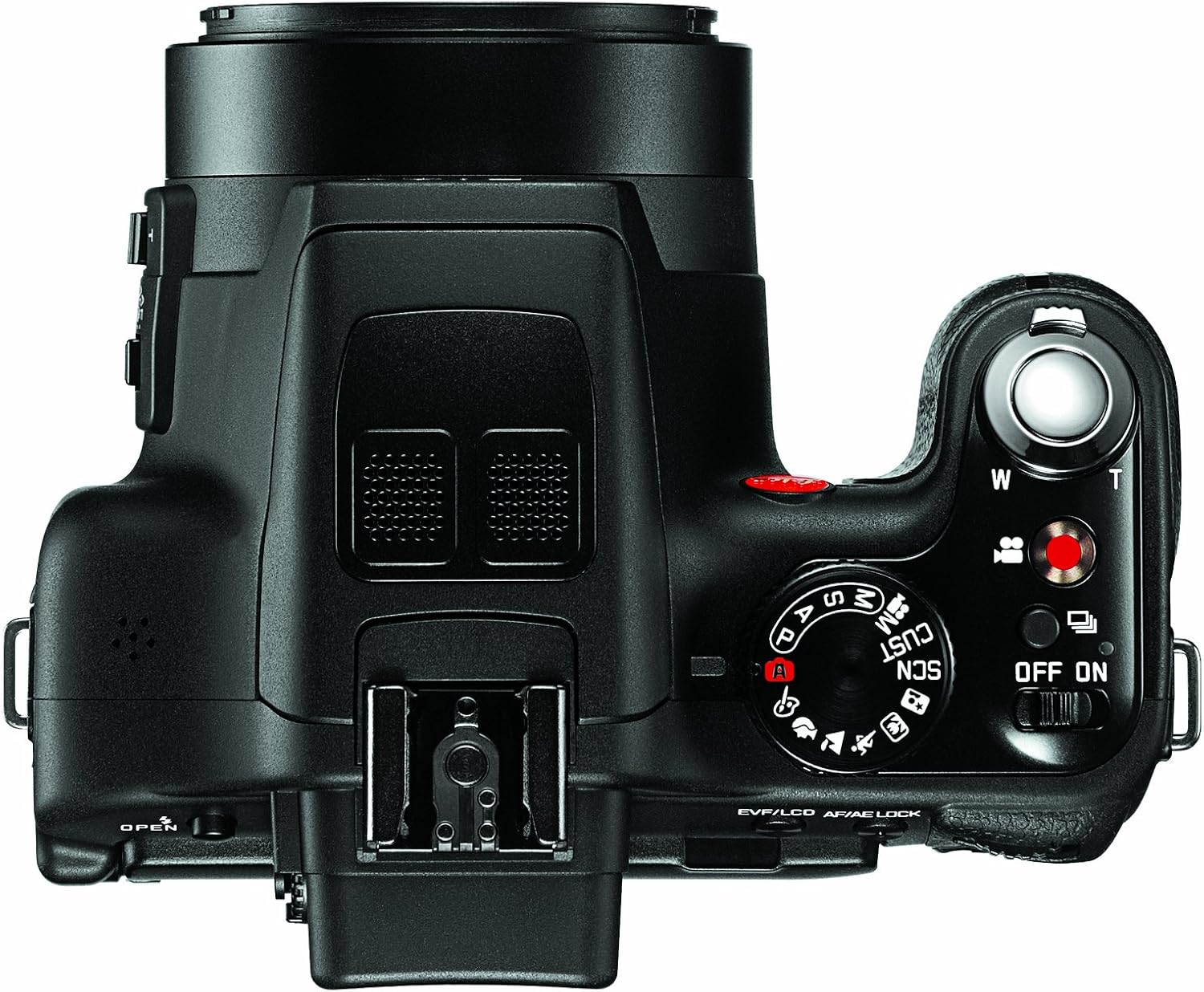
2-сүрөт: Жогорку view of the Leica V-LUX 3 camera. This image highlights the mode dial, shutter button, and zoom lever.
4.2 Чоңойтуу операциясы
The camera features a 24x optical zoom lens. Use the zoom lever, typically located around the shutter button, to adjust the focal length.
- Push the zoom lever towards 'W' (Wide) to zoom out.
- Push the zoom lever towards 'T' (Telephoto) to zoom in.

3-сүрөт: Каптал view of the Leica V-LUX 3 camera. This image shows the side controls, including the zoom rocker and focus mode switch.
4.3 Видео жаздыруу
Видео жаздыруу үчүн:
- Press the dedicated video recording button (often marked with a red dot) to start recording.
- Жазууну токтотуу үчүн баскычты кайра басыңыз.
- The camera records in AVCHD and MPEG-4 formats, with resolutions up to 1920 x 1080 at 60 frames per second.
4.4 Flash колдонуу
The Leica V-LUX 3 has a built-in flash. To use the flash:
- Locate the flash pop-up button or lever, typically near the flash unit.
- Press the button to raise the flash.
- In certain shooting modes (e.g., Auto), the flash may pop up automatically in low-light conditions.
- Access flash modes (Auto, Red-eye Reduction, Forced Flash, Slow Sync, Flash Off) through the camera's menu system.

Сүрөт 4: Алдыңкы view of the Leica V-LUX 3 camera with the built-in flash in the deployed (popped-up) position.
4.5 Фокустоо
The camera offers both autofocus and manual focus options.
- Автофокус (AF): The default setting. Press the shutter button halfway to allow the camera to automatically focus on your subject. The V-LUX 3 uses contrast detection AF with 23 autofocus points.
- Кол менен Фокус (MF): Switch to MF mode using the dedicated switch on the lens barrel or through the menu. Rotate the focus ring on the lens to adjust focus manually.
5. Техникалык тейлөө
5.1 Камераны тазалоо
- Объектив: Чаңды акырын тазалоо үчүн жумшак, түксүз кездемени же линза щеткасын колдонуңуз. Булгануулар үчүн линзага түздөн-түз эмес, чүпүрөккө колдонулган атайын линзаны тазалоочу эритмени колдонуңуз.
- Камеранын корпусу: Жумшак, кургак чүпүрөк менен сүртүңүз. Өжөр кир үчүн бир азampчүпүрөктү суу менен. Күчтүү тазалоочу каражаттарды колдонуудан алыс болуңуз.
- LCD экран: Use a soft, dry cloth. Avoid pressing too hard.
5.2 Батареяга кам көрүү
- Батареяларды колдонбогондо салкын, кургак жерде сактаңыз.
- Батареяны бат-баттан толук кубаттап калуудан алыс болуңуз.
- Батареяларды экстремалдык температурага калтырбаңыз.
5.3 Сактоо
When storing the camera for extended periods, remove the battery and memory card. Store the camera in a dry, dust-free environment, preferably in a camera bag or case to protect it from impacts and moisture.
6. Кыйынчылыктарды
| Көйгөй | Мүмкүн болгон себеп / Чечим |
|---|---|
| Камера күйбөйт. |
|
| Сүрөттөр бүдөмүк. |
|
| Flash күйбөйт. |
|
| Эстутум картасынын катасы. |
|
7. Техникалык шарттар
| Өзгөчөлүк | Деталь |
|---|---|
| Модель аты | VLUX 3 |
| Сүрөт сенсорунун чечилиши | 12.1 депутат |
| Фото сенсор технологиясы | CMOS |
| Оптикалык масштаб | 24x |
| Линзанын түрү | Telephoto, Zoom (25-600mm equivalent) |
| Максималдуу диафрагма | F2.8 |
| Image Stabilization | Оптикалык |
| Video Resolution | 1920 x 1080 (60, 30 fps), 1280 x 720 (60, 30 fps), 640 x 480 (30 fps) |
| Колдоого алынган File Формат | AVCHD, MPEG-4, Motion JPEG (Video); JPEG (Still) |
| Screen Size | 3 дюйм |
| Дисплей түрү | Түзүлүүчү LCD |
| Viewтапкыч | Электрондук |
| Flash эс тутум түрү | SD/SDHC/SDXC |
| Байланыш технологиясы | HDMI, USB |
| Батарея түрү | Lithium-Ion BP-DC 9 rechargeable battery |
| Элемент Салмагы | 1.19 фунт |
| Түс | Кара |
8. Кепилдик жана колдоо маалыматы
8.1 Кепилдик
This product is covered by a 90-day parts and labor warranty from the date of purchase. This warranty covers manufacturing defects and malfunctions under normal use. It does not cover damage caused by misuse, accidents, unauthorized repairs, or normal wear and tear.
Кепилдик дооматтары үчүн сатып алганыңыздын далилин сактап коюңуз.
8.2 Кардарларды колдоо
For technical assistance, troubleshooting beyond this manual, or warranty service, please contact Leica customer support. Refer to the official Leica webучурдагы байланыш маалыматы үчүн сайт же сатып алуу документтери.


