1. Киришүү
Thank you for choosing Master Lock 40KA-4 Keyed Alike Stainless Steel Trailer and Multi-Purpose Padlocks. This set includes four durable padlocks designed for various outdoor applications, offering enhanced security and convenience with a single key for all locks. These padlocks feature a robust stainless steel body and a hardened steel shackle for superior resistance against cutting and corrosion.

Figure 1: Four Master Lock 40KA-4 padlocks with accompanying keys. These padlocks are designed for multi-purpose use, featuring a discus shape and a stainless steel finish.
2. Негизги өзгөчөлүктөрү
- Keyed Alike Convenience: All four padlocks in this set operate with the same key, simplifying access and management.
- Туруктуу курулуш: Features a 2-3/4" (70mm) wide stainless steel body engineered to resist corrosion, making it suitable for outdoor environments.
- Өркүндөтүлгөн коопсуздук: Equipped with a case-hardened 3/8" (10mm) steel shackle for extra resistance against cutting attempts.
- Advanced Locking Mechanism: Utilizes a 4-pin cylinder to help prevent picking, increasing коопсуздук.
- Key Retaining Feature: The key can only be removed when the padlock is locked, ensuring the padlock is not accidentally left unlocked.

Figure 2: Illustration highlighting the "Keyed Alike" feature of the Master Lock 40KA-4 padlocks, showing that all locks in the pack use the same key.
3. Орнотуу
The Master Lock 40KA-4 padlocks come pre-configured for immediate use. No assembly is required.
3.1 Алгачкы текшерүү
- Upon unboxing, inspect all four padlocks and the provided keys for any signs of damage.
- Confirm that all keys operate all padlocks smoothly. Insert a key into the keyway, turn it clockwise to unlock, and counter-clockwise to lock.
- Keep spare keys in a secure, accessible location separate from the padlocks.
4. Иштөө нускамалары
4.1 Locking the Padlock
- Ensure the shackle is fully open.
- Position the padlock around the item(s) you wish to secure (e.g., a gate latch, chain, or storage unit hasp).
- Push the shackle firmly into the padlock body until it clicks into place. The padlock is now locked.
- Remove the key. Due to the key retaining feature, the key can only be removed when the padlock is in the locked position.
4.2 Unlocking the Padlock
- Insert the key fully into the keyway.
- Turn the key clockwise until the shackle springs open.
- Бекитилген буюмдан(дардан) кулпуну алып салыңыз.
- The key cannot be removed while the padlock is in the unlocked position.

Figure 3: A Master Lock 40KA-4 padlock shown in use, securing a red storage unit door with a metal latch. This demonstrates a typical application for the padlock.
5. Техникалык тейлөө
Proper maintenance will ensure the longevity and smooth operation of your Master Lock padlocks.
- Тазалоо: Periodically wipe down the padlock body with a clean, damp кирди жана кирди кетирүү үчүн кездеме колдонуңуз. Абразивдүү тазалоочу каражаттардан алыс болуңуз.
- Майлоо: For optimal performance, especially in outdoor or dusty environments, apply a small amount of graphite lubricant or a silicone-based lubricant specifically designed for locks into the keyway and around the shackle mechanism every 6-12 months. Do not use oil-based lubricants as they can attract dirt.
- Сактагыч: When not in use, store padlocks in a dry environment to prevent moisture buildup.
6. Кыйынчылыктарды
| Көйгөй | Мүмкүн себеп | Чечим |
|---|---|---|
| Ачкычты киргизүү же буруш кыйын. | Ачкычтын ордундагы кир же таштандылар; майлоонун жетишсиздиги; ачкыч майышып калган. | Clean keyway with compressed air. Apply lock lubricant. Inspect key for damage; use a spare key if bent. |
| Shackle does not open or close smoothly. | Corrosion or dirt on shackle; lack of lubrication in shackle mechanism. | Clean shackle and apply lock lubricant to the shackle entry points. |
| Key cannot be removed when padlock is unlocked. | This is a design feature (key retaining). | The key is designed to be removed only when the padlock is in the locked position. This ensures the padlock is not left unlocked. |
7. Техникалык шарттар
| Атрибут | Деталь |
|---|---|
| Модель номери | 40КА-4 |
| Бренд | Master Lock |
| Кулпу түрү | Keyed Padlock (Discus Style) |
| Дене материалы | Дат баспаган болот |
| Body Width | 2-3/4 дюйм (70мм) |
| Кишен материал | Case-Hardened Steel |
| Кишендин диаметри | 3/8 дюйм (10мм) |
| Цилиндр түрү | 4-пин |
| Терүү | Keyed Alike (KA) |
| Түс | Silver |
| Элемент Салмагы (4-пакет) | 2.59 фунт |
| Пакеттин өлчөмдөрү | 7.28 x 4.92 x 4.45 дюйм |
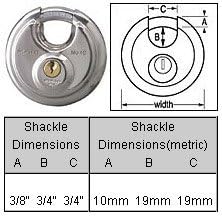
Figure 4: Detailed diagram illustrating the shackle dimensions (A, B, C) of the Master Lock 40KA-4 padlock in both imperial and metric units.
8. Кепилдик маалыматы
Master Lock products are manufactured to the highest quality standards. For specific warranty details pertaining to your 40KA-4 padlocks, please refer to the official Master Lock website or contact their customer support directly. Warranty terms typically cover defects in material and workmanship under normal use.
9. Кардарларды колдоо кызматы
Should you have any questions, require assistance, or need to report an issue with your Master Lock 40KA-4 padlocks, please visit the official Master Lock website for their comprehensive support resources, FAQs, and contact information.
You can typically find support at: www.masterlock.com/support


