Introduction
This manual provides detailed instructions for the safe and efficient operation of your Utilitech Mechanical Residential Plug-In Timer. Please read this manual thoroughly before use and retain it for future reference.
The Utilitech Mechanical Residential Plug-In Timer is designed to automate the on/off cycles of electrical devices, helping to conserve energy and enhance convenience. It features up to 48 on/off settings per day and includes 4 outlets for connecting multiple devices.
Продукт бүттүview
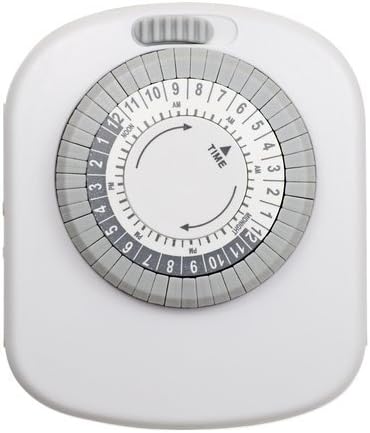
Сүрөт 1: Алдыңкы view of the Utilitech Mechanical Residential Plug-In Timer, showing the central dial with time markings and surrounding pins.
The timer features a circular dial with hour markings (AM/PM) and a series of push-down pins around its circumference. These pins control the on/off cycles. A manual override switch is typically located on the top or side of the unit.
Негизги өзгөчөлүктөрү:
- Up to 48 on/off settings per 24-hour period.
- Non-removable pins for easy programming.
- Энергияны үнөмдөө үчүн иштелип чыккан.
- Equipped with 4 outlets for multiple device connections.
- Simple plug-in installation.
Жайгашуу
Баштапкы орнотуу:
Таймерди таңгактан чыгаруу: Carefully remove the timer from its packaging. Inspect for any damage.
Плагин: Plug the timer into a standard 120V AC wall outlet. Ensure the outlet is easily accessible.
Батареяны заряддоо (эгер бар болсо): Although this model does not require batteries for operation, some timers may have an internal battery for timekeeping during power outages. If so, allow it to charge for at least 30 minutes before programming.
Учурдагы убакытты коюу: Rotate the entire dial clockwise until the current time aligns with the "TIME" arrow indicator on the timer's face. The dial is marked with AM and PM hours (e.g., 12 PM for Noon, 12 AM for Midnight).
Figure 2: Detail of the timer dial, highlighting the "TIME" arrow and the 24-hour markings for setting the current time.
Иштөө нускамалары
Программалоону күйгүзүү/өчүрүү убактысы:
The timer uses push-down pins around the dial to set the on/off intervals. Each pin represents a 30-minute segment.
Пиндерди аныктоо: Locate the small, grey pins around the outer edge of the dial. Each pin corresponds to a 30-minute interval.
Set "ON" Times: Push down the pins corresponding to the time periods you want the connected device to be ON. When a pin is pushed down, it activates the power during that 30-minute segment as the dial rotates.
Set "OFF" Times: Leave the pins in the "up" position for the time periods you want the connected device to be ӨЧҮРҮҮ. When a pin is in the up position, it deactivates the power during that 30-minute segment.
3-сүрөт: Детальдуу view of the timer's outer ring with individual pins, illustrating how to push them down for "ON" periods.
Кол менен жокко чыгаруу которуштуруу: The timer typically has a manual override switch (often a slider or button) located on the top or side. This switch allows you to bypass the programmed settings and keep the device either continuously ON or OFF. Ensure this switch is in the "Timer" or "Auto" position for programmed operation.
Түзмөктү туташтыруу: Plug the device you wish to control into one of the 4 outlets on the timer. Ensure the device's own power switch is set to the "ON" position.
Example Programming:
To turn a lamp on from 6:00 PM to 10:00 PM:
- Locate the 6 PM mark on the dial.
- Push down all pins from 6 PM to 10 PM.
- Ensure all other pins are in the "up" position.
- Set the current time on the dial.
- lamp into the timer.
Техникалык тейлөө
The Utilitech Mechanical Residential Plug-In Timer requires minimal maintenance.
Тазалоо: Тазалоодон мурун таймерди розеткадан ажыратыңыз. Сыртын жумшак, кургак чүпүрөк менен сүртүңүз. Суюк тазалагычтарды же абразивдүү материалдарды колдонбоңуз.
Сактагыч: If storing the timer for an extended period, ensure it is clean and dry. Store in a cool, dry place away from direct sunlight and extreme temperatures.
Текшерүү: Таймерди жана анын шнурун зымдардын эскириши же жарылып кетиши сыяктуу бузулуу белгилерин мезгил-мезгили менен текшерип туруңуз.asinг. Эгерде бузулуу табылса, дароо колдонууну токтотуп, аппаратты алмаштырыңыз.
Проблемаларды чечүү
| Көйгөй | Мүмкүн себеп | Чечим |
|---|---|---|
| Түзмөк программалангандай күйбөйт/өчпөйт. |
|
|
| Таймердин баскычы айланбай жатат. |
|
|
| Timer makes a rattling or loud noise. |
|
|
Техникалык шарттар
| Атрибут | Деталь |
|---|---|
| Модель номери | 358707 |
| Бөлүмдүн номери | TM20DHBL |
| Бренд | Utilitech |
| Type | Mechanical Residential Plug-In Timer |
| Соода түйүндөрүнүн саны | 4 |
| Daily Settings | Up to 48 on/off settings (30-minute intervals) |
| Монтаж түрү | Plug-In Mount |
| Түс | Ак |
| Элемент Салмагы | 6.4 унция |
| Пакеттин өлчөмдөрү | 6.7 x 4.1 x 2.1 дюйм |
| Батареялар талап кылынат | Жок |
| UPC | 070686507131 |
Коопсуздук маалыматы
Жаракат алуунун же зыяндын алдын алуу үчүн бардык коопсуздук көрсөтмөлөрүн окуп чыгып, аткарыңыз.
Үй ичинде гана колдонуу: This timer is designed for indoor use in dry locations only. Do not expose to water or moisture.
Электрдик рейтинг: Do not exceed the electrical rating of the timer. Overloading can cause overheating and fire.
Негиздөө: Ensure the timer is plugged into a properly grounded outlet if applicable. This model is a 2-prong device.
Балдар жана үй жаныбарлары: Балдар жана үй жаныбарлары жетпеген жерде сактаңыз.
Ажыратуу: Always unplug the timer from the wall outlet before cleaning or when not in use for extended periods.
Оңдоо: Таймерди өз алдынча ачууга же оңдоого аракет кылбаңыз. Бардык тейлөө иштерин квалификациялуу адистерге тапшырыңыз.
Кепилдик жана колдоо
For warranty information or technical support, please refer to the product packaging or contact Utilitech customer service. Keep your purchase receipt for warranty claims.
Note: Specific warranty terms and contact information may vary. Please consult the documentation included with your product.


