1. Киришүү
This manual provides essential instructions for the installation, operation, and maintenance of your Intel Server Board S1200BTLR. This server board is designed to support Intel Xeon Processor E3-1200 series based on the Next-Generation Intel Microarchitecture (Sandy Bridge).
Негизги өзгөчөлүктөр төмөнкүлөрдү камтыйт:
- 4 DDR3 (1066/1333MHz) ECC UDIMM sockets (Unbuffered)
- Multiple PCI Express slots for expansion: 1x PCIe 2.0 x8 (x16 mechanical), 1x PCIe 2.0 x8 (x8 mechanical), 1x PCIe 2.0 x4 (x8 mechanical), 1x PCIe x4 (x8 mechanical), and 1x PCI 32/33 (5V) slot
- 6 SATA ports (2x 6Gbps, 4x 3Gbps) via Intel C204 chipset with Intel Embedded Server RAID Technology and Intel RST
- Embedded Intel Dual Gigabit Controller 82574L and 82578DM
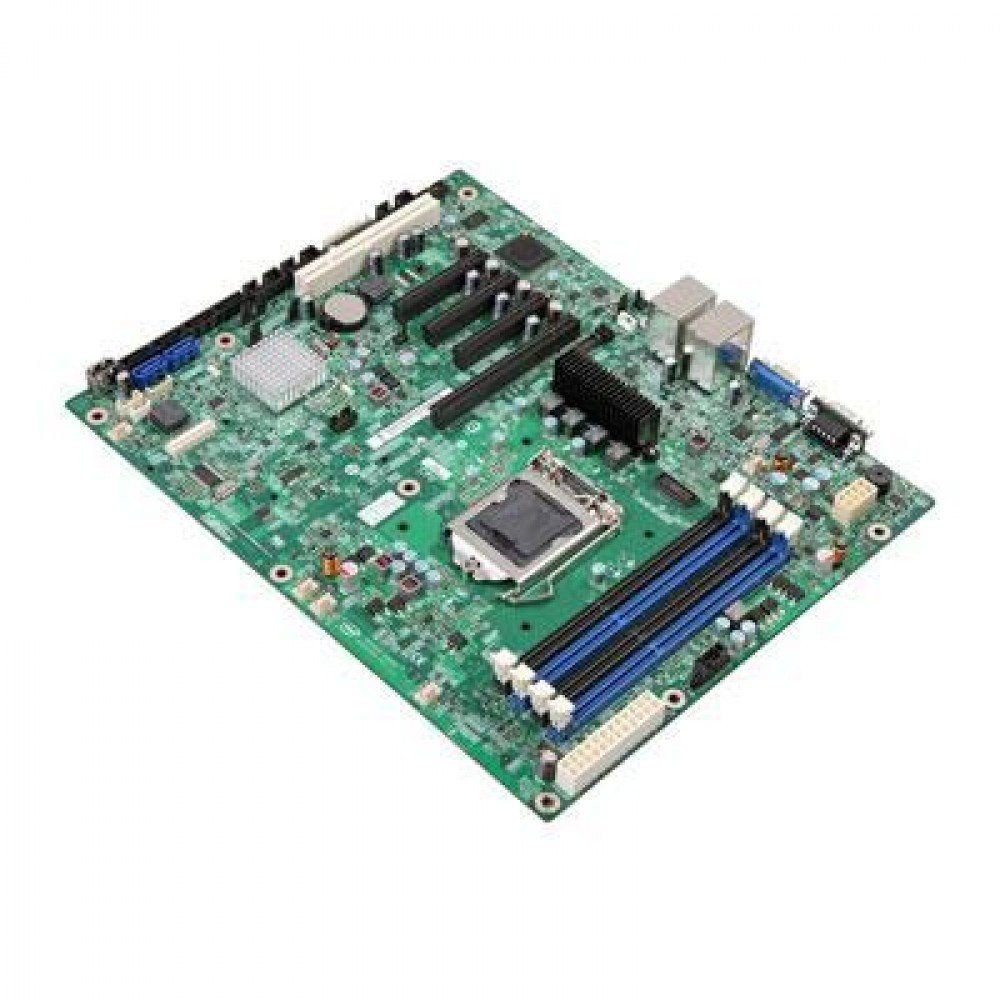
1-сүрөт: Intel Server Board S1200BTLR. This image displays the full layout of the server motherboard, highlighting the CPU socket, RAM slots, PCI Express slots, and various connectors.
2. Орнотуу жана орнотуу
Before beginning installation, ensure your workspace is clean, well-lit, and static-free. Use an anti-static wrist strap to prevent damage to components.
2.1. Керектүү компоненттер
- Intel Xeon Processor E3-1200 series (LGA 1155 socket compatible)
- DDR3 ECC UDIMM memory modules (1066/1333MHz)
- Compatible power supply unit (PSU)
- Storage devices (SATA hard drives or SSDs)
- Server chassis
- Operating system installation media
2.2. Процессорду орнотуу
- LGA 1155 CPU розеткасын энелик платадан табыңыз.
- Gently lift the load plate lever and open the load plate.
- Align the processor's triangular mark with the corresponding mark on the socket. Carefully place the processor into the socket without forcing it.
- Жүктөө пластинасын жаап, аны рычаг менен бекитиңиз.
- Термикалык пастаны сүйкөңүз жана CPU муздаткычын өндүрүүчүнүн көрсөтмөлөрүнө ылайык орнотуңуз.
2.3. Эстутум орнотуу
- Identify the four DDR3 UDIMM sockets.
- Эстутум уячасынын эки учундагы кармоочу клиптерди ачыңыз.
- Align the memory module's notch with the key in the slot.
- Модулду уячага бекиткич клиптер ордуна бекитилгенге чейин бекем салыңыз.
- Repeat for additional memory modules, ensuring proper channel configuration as per your system requirements.
2.4. Сактагыч түзмөгүнө туташуу
- Connect SATA data cables from your storage devices to the SATA ports on the motherboard. The board features 2x 6Gbps ports and 4x 3Gbps ports.
- Connect power cables from the PSU to your storage devices.
2.5. Электр кубатын кошуу
- Connect the 24-pin ATX main power connector from the PSU to the corresponding socket on the motherboard.
- 8-пиндүү (же 4-пиндүү) ATX 12V CPU кубат туташтыргычын энелик платага туташтырыңыз.
2.6. Кеңейтүү картасын орнотуу
The server board includes various PCI Express and PCI slots:
- 1x PCI Express 2.0 x8 slot (x16 mechanical)
- 1x PCI Express 2.0 x8 slot (x8 mechanical)
- 1x PCI Express 2.0 x4 slot (x8 mechanical)
- 1x PCI Express x4 slot (x8 mechanical)
- 1x PCI 32/33 (5V) slot
Insert expansion cards firmly into the appropriate slots and secure them with the chassis retention mechanism.
3. Иштөө нускамалары
3.1. Баштапкы күйгүзүү
- After all components are installed and connected, ensure the power supply is switched on.
- Press the power button on your server chassis.
- Monitor the POST (Power-On Self-Test) sequence.
3.2. BIOS/UEFI конфигурациясы
POST учурунда, белгиленген баскычты басыңыз (адатта DEL or F2) to enter the BIOS/UEFI setup utility. Here you can configure:
- Жүктөө тартиби
- SATA controller mode (AHCI, RAID)
- Эстутум орнотуулары
- Integrated peripherals
- Системанын убактысы жана күнү
Refer to the Intel documentation for detailed BIOS/UEFI settings specific to the S1200BTLR.
3.3. Операциялық системаны орнотуу
Insert your operating system installation media (USB drive or DVD) and configure the BIOS/UEFI to boot from it. Follow the on-screen instructions to install your preferred server operating system (e.g., Linux, Windows Server).
3.4. Драйверди орнотуу
After OS installation, install all necessary drivers for the motherboard components, including chipset, network controllers (Intel Dual Gigabit Controller 82574L and 82578DM), and any integrated graphics or RAID controllers. Drivers are typically available on the Intel support webсайт.
4. Техникалык тейлөө
Regular maintenance ensures optimal performance and longevity of your Intel Server Board S1200BTLR.
4.1. Dust Removal
Periodically clean the interior of the server chassis to prevent dust buildup, which can lead to overheating. Use compressed air to gently remove dust from heatsinks, fans, and other components. Ensure the system is powered off and unplugged before cleaning.
4.2. Микропрограмма жана драйвер жаңыртуулары
Intel колдоо кызматын үзгүлтүксүз текшерип туруңуз website for updated BIOS/UEFI firmware and device drivers. Keeping these components up-to-date can improve stability, performance, and security.
4.3. Компоненттерди текшерүү
Occasionally inspect the motherboard for any signs of damage, loose connections, or bulging capacitors. Address any issues promptly.
5. Кыйынчылыктарды
Бул бөлүмдө сиз кабылышы мүмкүн болгон жалпы маселелерди чечүү жолдору каралган.
5.1. Күч жок
- Verify that the power supply unit (PSU) is connected correctly to the motherboard (24-pin ATX and 8-pin/4-pin CPU power).
- Кубат булагы күйгүзүлгөнүн жана иштеп жаткан розеткага туташтырылганын текшериңиз.
- Check the power button connection from the chassis to the motherboard.
- Test the PSU with another system or a PSU tester if available.
5.2. Дисплейдин чыгышы жок
- Ensure the monitor is connected to the correct video output port and is powered on.
- Эстутум модулдарын кайра орнотуңуз. RAM туура эмес орнотулгандыктан, дисплейдин жоктугу кеңири таралган.
- If using a dedicated graphics card, ensure it is properly seated in its PCIe slot and has auxiliary power connected (if required).
- Try booting with only one memory module installed.
5.3. Системанын туруксуздугу же кыйроолору
- Check CPU and system temperatures. Overheating can cause instability. Ensure CPU cooler is properly installed.
- RAM модулдарынын бузулгандыгын текшерүү үчүн эс тутумду диагностикалоо куралдарын иштетиңиз.
- Verify that all drivers are correctly installed and up-to-date.
- Check for BIOS/UEFI updates.
- Ensure the power supply is sufficient for all installed components.
5.4. Storage Device Not Detected
- Verify SATA data and power cables are securely connected to both the drive and the motherboard.
- Check BIOS/UEFI settings to ensure SATA ports are enabled and configured correctly (e.g., AHCI mode).
- Test the drive on another system or with a different SATA cable.
6. Техникалык шарттар
| Өзгөчөлүк | Деталь |
|---|---|
| Модель аты | S1200BTLR |
| Бренд | Intel |
| CPU розетка | LGA 1155 |
| Шайкеш процессорлор | Intel Xeon E3-1200 сериясы |
| Чипсет түрү | Intel C204 |
| RAM эс технологиясы | DDR3 ECC UDIMM |
| Memory Clock Speed | 1066 МГц, 1333 МГц |
| Memory Slots | 4 |
| Макс эстутум сактоо сыйымдуулугу | 16 GB (per input) |
| PCI Express Slots | 1x PCIe 2.0 x8 (x16 mechanical), 1x PCIe 2.0 x8 (x8 mechanical), 1x PCIe 2.0 x4 (x8 mechanical), 1x PCIe x4 (x8 mechanical) |
| PCI Slots | 1x PCI 32/33 (5V) |
| SATA порттору | 6 (2x 6Gbps, 4x 3Gbps) with Intel Embedded Server RAID Technology and Intel RST |
| Network башкаруучусу | Embedded Intel Dual Gigabit Controller 82574L and 82578DM |
| Шайкеш түзмөктөр | Personal Computer (Server) |
| Платформа | Linux (and other server OS) |
| Элемент Салмагы | 3.75 фунт |
| Дата биринчи жеткиликтүү | 24-май, 2012-жыл |
7. Колдоо жана кепилдик
7.1. Техникалык колдоо
For technical assistance, driver downloads, and additional documentation, please visit the official Intel support website. You can find product-specific information by searching for "Intel Server Board S1200BTLR" or "S1200BTLR".
Intel's support resources typically include:
- Knowledge base articles
- Драйверлерди жана программалык камсыздоону жүктөп алуу
- Коомчулук форумдары
- Түз колдоо үчүн байланыш маалыматы
7.2. Кепилдик маалыматы
Warranty terms and conditions for the Intel Server Board S1200BTLR are provided by Intel. Please refer to the warranty documentation included with your product or visit the Intel website for the most current warranty policy. Keep your proof of purchase for warranty claims.


