Introduction
This manual provides comprehensive instructions for the setup, operation, and maintenance of your Perixx PERIBOARD-409U Wired USB Mini Keyboard. Please read this manual thoroughly before using the product to ensure proper functionality and longevity.
Пакеттин мазмуну
- 1x Perixx PERIBOARD-409U Wired USB Mini Keyboard
- Колдонуучунун Колдонмосу (бул документ)

Image: The Perixx PERIBOARD-409U keyboard shown with its retail packaging and included user manual.
Орнотуу нускамалары
- Баскычтопту туташтыруу: Locate an available USB port on your computer. Insert the USB connector of the PERIBOARD-409U into the USB port.
- Автоматтык драйверди орнотуу: The keyboard is a plug-and-play device. Your operating system (Windows 7, 8, or 10) will automatically detect and install the necessary drivers. No additional software installation is required.
- Текшерүү: Once connected, the keyboard should be ready for immediate use. Test by typing in a text editor or browser.

Image: The Perixx PERIBOARD-409U keyboard featuring its integrated USB cable, ready for connection to a computer. The cable length is 5.9 ft (1.8 meters).
Иштөө нускамалары
The PERIBOARD-409U is a standard QWERTY layout keyboard designed for general office and computing tasks.
Негизги өзгөчөлүктөрү:
- Компакт дизайн: The keyboard measures approximately 12.40" x 5.79" x 0.79" (31.4 x 14.6 x 2 cm), making it suitable for limited desk space.
- Зымдуу USB туташуу: Provides a stable and reliable connection with a 5.9 ft (1.8m) cable.
- Стандарттык QWERTY жайгашуусу: Familiar key arrangement for ease of use.
- Индикатор жарыктары: Features LED indicators for Num Lock, Caps Lock, and Scroll Lock.
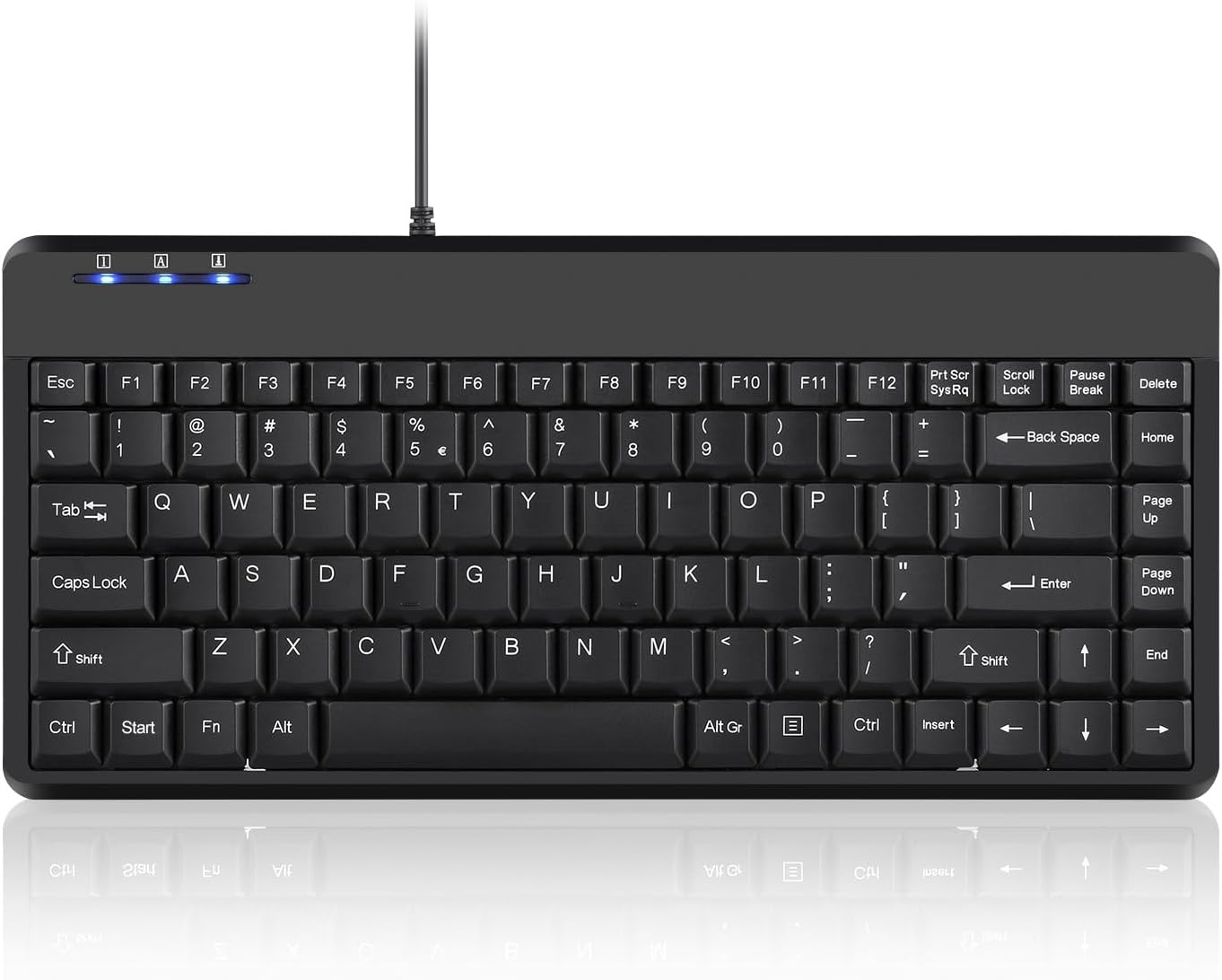
Сүрөт: толук жогорудан ылдыйга view of the Perixx PERIBOARD-409U keyboard, showcasing its compact QWERTY layout and indicator lights.

Image: A hand demonstrating typing on the Perixx PERIBOARD-409U keyboard, highlighting its suitability for accurate typing.

Image: The Perixx PERIBOARD-409U keyboard with overlaid dimensions, illustrating its compact size of 315mm width and 147mm depth, and a slim profile 21 мм.

Сүрөт: бир тарап view of the Perixx PERIBOARD-409U keyboard on a desk, emphasizing its slim and minimal design alongside a computer mouse.
Проблемаларды чечүү
Issue: Double Lettering or Repeated Characters
If you experience issues with keys producing double letters or repeated characters, this can often be resolved by adjusting your computer's keyboard settings.
- Adjust Filter Keys (Windows):
- Open the "Control Panel".
- Click on "Ease of Access Center".
- Select "Make Keyboard Easier to Use".
- Check the box for "Turn on Filter Keys" under "Make it easier to type".
- Click "Apply" to save these settings.
- Adjust Keyboard Repeat Rate (Windows):
- Go to "Keyboard Properties" in the "Control Panel".
- Adjust the "Repeat rate" slider to a faster setting.
- Click "Apply" and then "OK".
Test the keyboard after making these adjustments. If the issue persists, please refer to the support section for further assistance.
Техникалык шарттар
| Бренд | Perixx |
| Модель номери | PERIBOARD-409U (Item model number: 10960) |
| Байланыш технологиясы | USB-A (Зымдуу) |
| Кабелдин узундугу | 5.9 фут (1.8 метр) |
| Keyboard Description | QWERTY |
| Шайкеш түзмөктөр | Ноутбук, компьютер |
| Операциялык системанын шайкештиги | Windows 7, 8, 10 |
| Өлчөмдөрү (LxWxH) | 12.40" x 5.79" x 0.79" (31.4 x 14.6 x 2 см) |
| Элемент Салмагы | 14.1 унция (болжол менен 400 грамм) |
| Түс | Кара |
| Материал | Пластик |
Техникалык тейлөө
To ensure the longevity and optimal performance of your Perixx PERIBOARD-409U keyboard, follow these maintenance guidelines:
- Тазалоо: Клавиатуранын бетин жумшак, кургак чүпүрөк менен сүртүңүз. Тереңирээк тазалоо үчүн, бир азamp cloth with mild soap can be used, ensuring no liquid enters the key switches. Avoid abrasive cleaners or solvents.
- Чаңды тазалоо: Баскычтардын ортосундагы чаңды жана калдыктарды тазалоо үчүн кысылган абаны колдонуңуз.
- Төгүлгөндөн сактаныңыз: Ички бөлүктөргө зыян келтирбөө үчүн клавиатурадан суюктуктарды алыс кармаңыз.
- Сактагыч: Колдонулбаганда, клавиатураны өтө ысыктан алыс, таза, кургак чөйрөдө сактаңыз.
Кепилдик жана колдоо
The Perixx PERIBOARD-409U includes a 12 айлык чектелген кепилдик from the date of purchase. This warranty covers manufacturing defects under normal use. It does not cover damage caused by misuse, accidents, unauthorized modifications, or external factors.
For technical support, warranty claims, or further assistance, please contact Perixx customer service through their official webпродукт сатылып алынган сайт же сатуучу.


