1. Киришүү
This manual provides instructions for the Uniden DECT 6.0 Cordless Phone, model D1364. This phone features DECT 6.0 digital technology for enhanced clarity, security, and range. It includes Caller ID, Call Waiting, a phonebook, and an Eco-Mode for power management.
For optimal performance and to prevent damage, please read these instructions thoroughly before using your new phone.
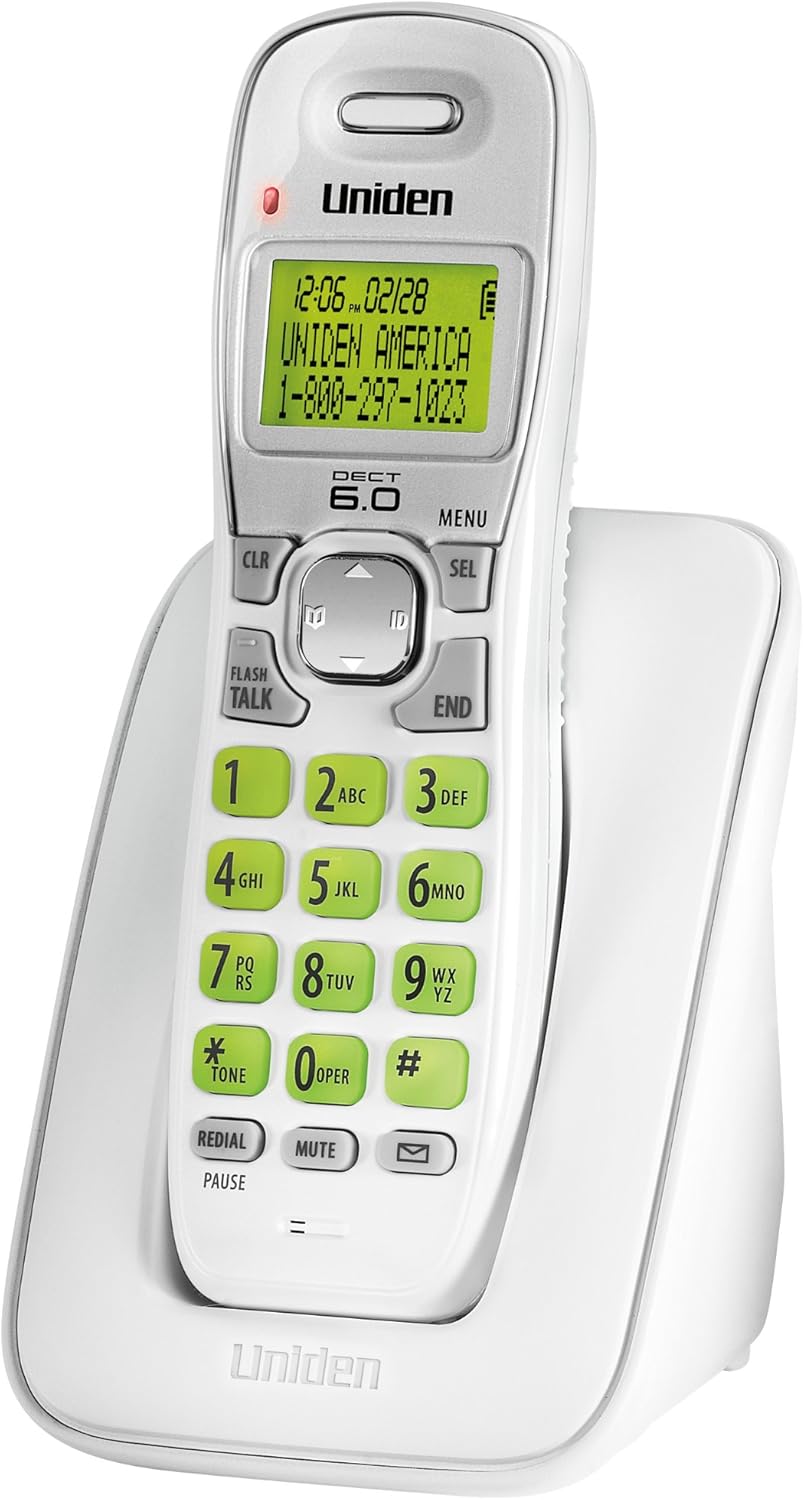
1-сүрөт: Uniden DECT 6.0 Cordless Phone D1364. This image shows the white cordless handset resting in its charging base. The handset features a green backlit LCD display showing time, date, and a sample caller ID entry. The keypad has large, green-backlit buttons for dialing and function keys like CLR, MENU, SEL, FLASH/TALK, END, REDIAL/PAUSE, MUTE, and a message indicator.
2. Пакеттин мазмуну
Пакетиңизде төмөнкү заттар бар экенин текшериңиз:
- One (1) Cordless Handset (D1364)
- One (1) Handset Charging Base
- One (1) AC Adapter for the charging base
- Бир (1) телефон линиясы
- One (1) Rechargeable Battery Pack (Product Specific, included)
- Бул Колдонуучунун колдонмосу
3. Орнотуу
3.1 Батареяны орнотуу
- Телефондун артындагы батарея бөлүкчөсүнүн капкагын табыңыз.
- Капкактын үстүн ылдый жылдырып, көтөрүп алыңыз.
- Батарея топтомунун туташтыргычын бөлүмдүн ичиндеги розеткага туташтырыңыз, бул туура полярдуулукту камсыз кылат.
- Батарея пакетин бөлүмгө салыңыз.
- Батарея бөлүмүнүн капкагын ордуна коюп, чыкылдаган үн чыкканча өйдө жылдырыңыз.
3.2 Негизги блокту туташтыруу
- Plug the small end of the AC adapter into the DC IN jack on the back of the charging base.
- AC адаптеринин чоң учун стандарттуу электр розеткасына сайыңыз.
- Plug one end of the telephone line cord into the TEL LINE jack on the back of the charging base.
- Телефон линиясынын экинчи учуна телефон уячасына сайыңыз.
3.3 Батареяны алгачкы заряддоо
Place the handset on the charging base. The handset display will indicate charging. Allow the handset to charge for at least 15-20 саат before initial use to ensure full battery capacity.
3.4 Дубалга орнотуу (кошумча)
The charging base includes a built-in wall mount feature. Consult the diagrams in the full manual for detailed wall mounting instructions, typically involving two screws spaced appropriately on the wall.
4. Иштөө нускамалары
4.1 Чалууларды кабыл алуу жана кабыл алуу
- Чалуу үчүн: Басыңыз FLASH/TALK, андан кийин номерди териңиз. Же болбосо, адегенде номерди териңиз, анан басыңыз FLASH/TALK.
- Чалууну аяктоо үчүн: Басыңыз END or place the handset back on the charging base.
- Чалууга жооп берүү үчүн: Телефон шыңгыраганда, басыңыз FLASH/TALK.
4.2 Үндү тууралоо
Чалуу учурунда колдонуңуз ЖОГОРУ/ТӨМӨН жебе баскычтары on the navigation pad to adjust the earpiece volume.
4.3 Телефон китеби
Телефон китепчеси 30гө чейин ысымдарды жана номерлерди сактай алат.
- Жазуу кошуу үчүн: Басыңыз МЕНЮ, navigate to "Phonebook," select "Add Entry," and follow the on-screen prompts to enter the name and number.
- Телефон китепчесинен терүү үчүн: басыңыз ЖОГОРУ/ТӨМӨН жебе баскычтары to browse the phonebook, then press FLASH/TALK to dial the selected entry.
4.4 Чалуучуну аныктоо жана чалуу күтүү
This phone supports Caller ID and Call Waiting features (subscription required from your telephone service provider).
- The Caller ID list stores up to 30 incoming calls. Press the ID button (down arrow on navigation pad) to review the Caller ID list.
- During a call, if you hear a Call Waiting tone, press FLASH to switch to the incoming call.
4.5 Кайра терүү
The phone stores the last 5 numbers dialed.
- Басыңыз КАЙРА ТЕРҮҮ/ТЫНЫГЫ чейин view кайра терүү тизмеси.
- колдонуу ЖОГОРУ/ТӨМӨН жебе баскычтары to select a number, then press FLASH/TALK терүү.
4.6 Үнсүз кылуу функциясы
Чалуу учурунда басыңыз БАСУУ to temporarily disable your microphone. The other party will not hear you. Press БАСУУ кайра сүйлөшүүнү улантуу үчүн.
4.7 Телефондун жайгашкан жерин аныктоочу
Телефонду туура эмес жайгаштырсаңыз, баскычын басыңыз ТАБУУ button on the base unit. The handset will beep, allowing you to locate it.
4.8 Эко-режим
The phone features Eco-Mode, which automatically manages power consumption to extend battery life. This mode is active by default and does not require manual activation.
5. Техникалык тейлөө
5.1 Тазалоо
Телефонду жана негизги блокту жумшак менен сүртүңүз, damp cloth. Do not use cleaning sprays or abrasive cleaners, as they may damage the finish or electrical components.
5.2 Батареяга кам көрүү
- Always use the specified rechargeable battery pack.
- If the phone will not be used for an extended period, remove the battery pack to prevent leakage.
- Эски батареяларды жергиликтүү эрежелерге ылайык жок кылыңыз. Аларды отко таштаба.
5.3 Айлана-чөйрөнү коргоо
Avoid placing the phone in direct sunlight, near heat sources, or in areas with high humidity. Ensure proper ventilation around the base unit.
6. Кыйынчылыктарды
| Көйгөй | Мүмкүн себеп | Чечим |
|---|---|---|
| Терүү үнү жок | Телефон линиясы ажыратылган. | Телефон линиясынын шнуру түбүнө жана дубалдагы уячага бекем сайылганын текшериңиз. |
| Телефон заряддалбайт | AC adapter is disconnected or handset is not seated correctly. | Verify the AC adapter is plugged into the base and a working outlet. Re-seat the handset firmly on the charging base. |
| Үн сапаты начар/статикалык | Башка электрондук түзүлүштөрдүн тоскоолдуктары же базадан алыстыгы. | Move the handset closer to the base. Relocate the base away from other electronic devices (Wi-Fi routers, microwaves). |
| Чалуучунун IDси көрсөтүлбөй жатат | No subscription to Caller ID service. | Contact your telephone service provider to subscribe to Caller ID service. |
| Handset lost connection to base | Handset out of range or power interruption. | Move the handset closer to the base. Check power connections for the base. |
7. Техникалык шарттар
| Өзгөчөлүк | Деталь |
|---|---|
| Модел | D1364 |
| Технология | DECT 6.0 Digital |
| Түс | Ак |
| Чалуучунун ID эстутуму | 30 ат/сан |
| Телефон китепчесинин сыйымдуулугу | 30 ат/сан |
| Кайра терүү эстутум | Акыркы 5 сан |
| Дисплей | Green Backlit LCD |
| Баскычтоп | Жашыл арткы жарык |
| Батарея түрү | Rechargeable (Product Specific, included) |
| Talk Time (approx.) | 7 саатка чейин |
| Standby Time (approx.) | 6 күнгө чейин |
| Power Source | AC Adapter (Base), Battery Powered (Handset) |
| Өлчөмдөрү (L x W x Y) | 5.12 x 3.62 x 7.68 дюйм |
| Элемент Салмагы | 3.76 фунт |
| Энергия натыйжалуулугу | Eco-Mode, Energy Star compliant |
8. Кепилдик жана колдоо
For warranty information and technical support, please refer to the warranty card included with your product or visit the official Uniden website. You may also contact Uniden customer service directly.
Uniden America Customer Service: 1-800-297-1023
Эскертүү: Продукттун мүнөздөмөлөрү жана өзгөчөлүктөрү эскертүүсүз өзгөртүлүшү мүмкүн.


