1. Киришүү
This manual provides detailed instructions for the OREI HD-104 HDMI Splitter. This device is designed to distribute one HDMI input signal to four identical HDMI output signals simultaneously, making it suitable for various display setups.
Негизги өзгөчөлүктөрү:
- Splits one HDMI input signal into four identical HDMI output signals.
- Supports resolutions up to 4K@30Hz, 1080p, and 720p.
- Compatible with HDCP 1.4 for secure content transmission.
- Supports advanced audio formats including LPCM, Dolby-AC3, DTS 7.1, DSD, Dolby TrueHD, and DTS-HD Master Audio.
- Compact design with easy plug-and-play operation.

Figure 1: OREI HD-104 HDMI Splitter distributing a single source to four displays.
Пакеттин мазмуну
Пакетте бардык буюмдар бар экенин текшериңиз:
- 1 x OREI HD-104 HDMI Splitter (1 input, 4 outputs)
- 1 x 5V AC кубат адаптери
- 1 x User Manual
Эскертүү: HDMI кабелдери комплектке кирбейт жана өзүнчө сатып алынышы керек.
2. Орнотуу жана орнотуу
Follow these steps to connect and set up your OREI HD-104 HDMI Splitter:
- Өчүрүү түзмөктөрү: Ensure all source devices (e.g., Blu-ray player, gaming console) and display devices (e.g., TVs, monitors) are powered off before making connections.
- HDMI киргизүүсүн туташтырыңыз: Connect an HDMI cable from your source device to the 'IN' port on the OREI HD-104 splitter.
- Connect HDMI Outputs: Connect HDMI cables from the 'OUT 1', 'OUT 2', 'OUT 3', and 'OUT 4' ports on the splitter to your display devices.
- Кубат адаптерин туташтыруу: Plug the 5V AC power adapter into the 'DC 5V' port on the splitter, then plug the adapter into a power outlet.
- Түзмөктөрдү күйгүзүү: Power on the splitter, then power on your display devices, and finally your source device.

Figure 2: Front and rear panel connections of the OREI HD-104 HDMI Splitter.
EDID башкаруу
The HD-104 features an EDID (Extended Display Identification Data) switch to manage display compatibility. This switch is located on the front panel:
- ЖЖБИ (Стандарттык): Select this mode for standard EDID settings, which may resolve compatibility issues with older or specific display devices.
- TV: Select this mode to copy the EDID from the display connected to Output 1. This ensures the source device outputs a signal compatible with the primary display. If Output 1 is not connected, the splitter will default to a standard EDID.
It is recommended to set the EDID mode before powering on the source device.
3. Операция
Once connected and powered on, the OREI HD-104 splitter will automatically duplicate the HDMI input signal to all four connected displays. No additional configuration is typically required for basic operation.
LED көрсөткүчтөрү
The front panel of the splitter includes LED indicators to show the status of the device:
- Power LED: Түзмөк күйгүзүлгөндө жарык берет.
- Киргизүү LED: Illuminates when an active HDMI input signal is detected.
- Output 1-4 LEDs: Each LED illuminates when an active HDMI output connection is established with a display.
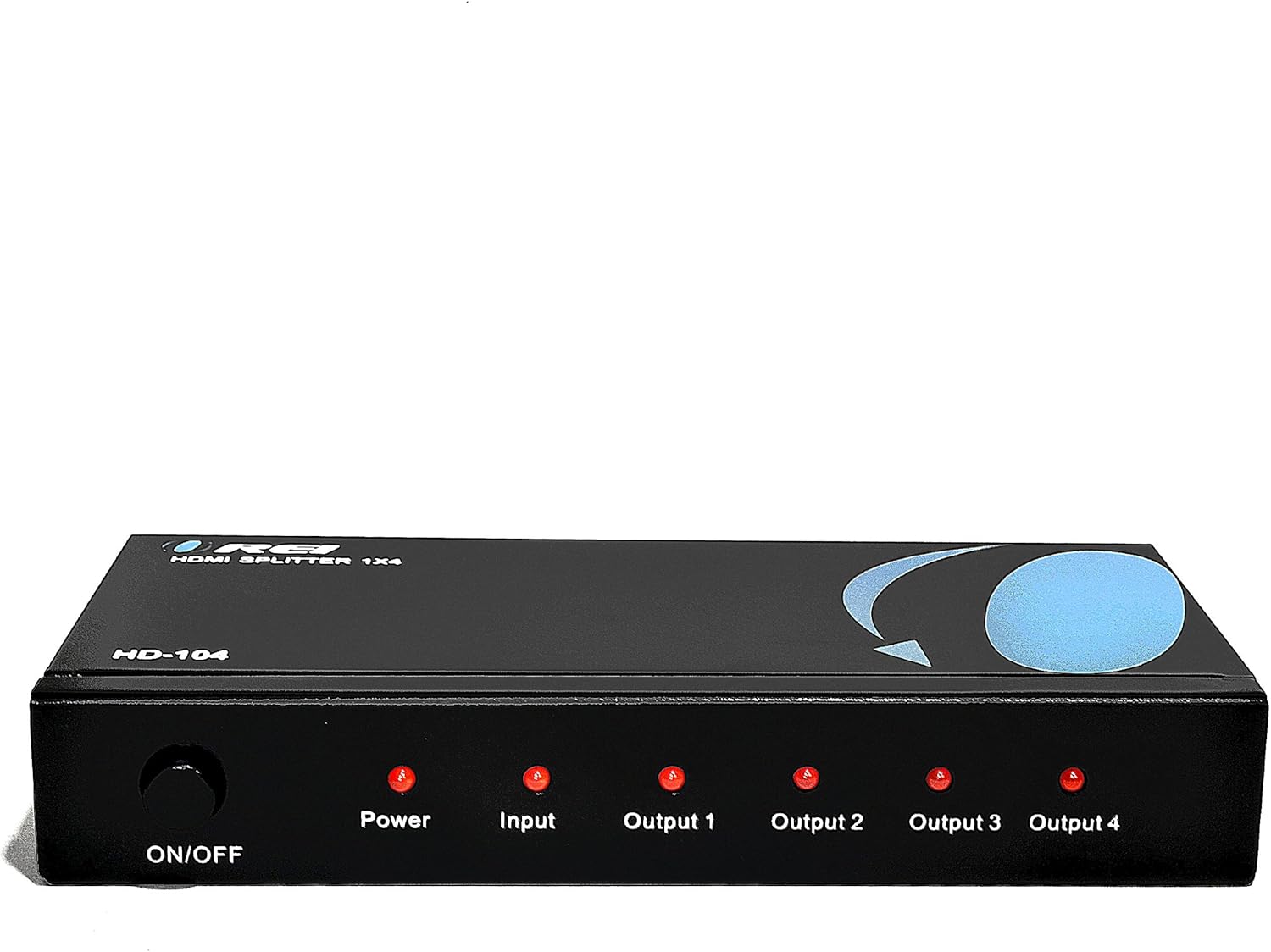
Figure 3: Front panel with LED indicators.
Маанилүү ойлор
- Duplication Only: This device duplicates the input signal. It does not extend your desktop across multiple monitors to create a single, larger display. All connected displays will show the same content.
- No Audio Extraction: The splitter passes through audio signals but does not extract or separate audio from the HDMI stream.

Figure 4: Connection diagram and functional limitations.
4. Техникалык шарттар
| Модел | HD-104 |
| Киргизүү порттору | 1 x HDMI |
| Output Ports | 4 x HDMI |
| HDMI версиясы | HDMI 2.0 (backward compatible) |
| HDCP Нускасы | HDCP 1.4 |
| Max чечим | 4K@30Hz, 1080p, 720p |
| Аудио колдоо | LPCM, Dolby-AC3, DTS 7.1, DSD, Dolby TrueHD, DTS-HD Master Audio |
| Электр камсыздоо | DC 5V |
| Өлчөмдөрү (L x W x Y) | 7 x 3 x 1 дюйм (17.8 x 7.6 x 2.5 см) |
| Салмагы | 15.4 унция (436.6 грамм) |
| Материал | Heavy-duty metal enclosure |

Figure 5: Durable metal casing for heat dissipation.

Figure 6: Compact design and included power adapter.
5. Кыйынчылыктарды
If you encounter issues with your OREI HD-104 HDMI Splitter, refer to the following troubleshooting tips:
- Сүрөт жок/сигнал:
- Ensure the splitter is powered on and the Power LED is illuminated.
- Verify all HDMI cables are securely connected to both the splitter and your source/display devices.
- Бузулган кабелдер сигналдын жоголушуна алып келиши мүмкүн болгондуктан, ар кандай HDMI кабелдерин колдонуп көрүңүз.
- Test the source device and display directly without the splitter to confirm they are working correctly.
- Adjust the EDID switch (STD/TV) on the splitter and restart all devices.
- Ensure your display devices support the resolution output by your source device.
- Poor Picture Quality/Flickering:
- Use high-quality HDMI cables, especially for longer runs or higher resolutions (4K).
- Башка электрондук шаймандардын кийлигишүүсүн текшериңиз.
- Ensure the power adapter is providing stable power to the splitter.
- Аудио көйгөйлөр:
- Confirm that your source device is outputting audio via HDMI.
- Баштапкы түзмөгүңүздөгү жана дисплейиңиздеги аудио жөндөөлөрүн текшериңиз.
- Ensure the EDID setting is appropriate for your audio setup.
- LED Indicators Not Lighting Up:
- If the Power LED is off, check the power adapter and outlet.
- If Input/Output LEDs are off, ensure devices are connected and powered on, and active signals are present.
6. Техникалык тейлөө
To ensure the longevity and optimal performance of your OREI HD-104 HDMI Splitter:
- Түзмөктү салкын, кургак жерде, күн нурунан, жылуулук булактарынан жана нымдуулуктан алыс кармаңыз.
- Avoid placing heavy objects on the splitter.
- Түзмөктү жумшак, кургак чүпүрөк менен тазалаңыз. Суюк же аэрозоль тазалагычтарды колдонбоңуз.
- Ашыкча ысып кетүүнүн алдын алуу үчүн аппараттын айланасында туура желдетүүнү камсыз кылыңыз.
7. Кепилдик жана колдоо
The OREI HD-104 HDMI Splitter comes with a 12-Month Manufacturer's Warranty. OREI also provides Өмүр бою техникалык колдоо анын продукциялары үчүн.
For technical assistance or warranty claims, please contact OREI customer support through their official website or the retailer where the product was purchased. Please have your model number (HD-104) and purchase information ready.


