Introduction
Сатып алганыңыз үчүн рахматasing the GPX Weatherx WR282B Weather and Alert Radio. This portable radio is designed to provide you with AM/FM radio reception and access to all 7 NOAA weatherband channels, ensuring you stay informed during various conditions. It offers flexible power options, operating on either AC power or D-size batteries, making it suitable for both indoor and outdoor use.
Сураныч, аппаратты туура колдонууну камсыз кылуу жана анын өндүрүмдүүлүгүн жана узак мөөнөттүү иштөөсүн камсыз кылуу үчүн аны иштетүүдөн мурун бул колдонмону кылдат окуп чыгыңыз.
Маанилүү коопсуздук маалыматы
- Көрсөтмөлөрдү окуу: Бардык коопсуздук жана эксплуатациялоо инструкциялары продуктуну иштетүүдөн мурун окуу керек.
- Көрсөтмөлөрдү сактоо: Коопсуздук жана эксплуатациялоо боюнча нускамалар келечектеги маалымат үчүн сакталышы керек.
- Эскертүүлөргө кулак сал: Буюмдагы жана колдонуу нускамасындагы бардык эскертүүлөр сакталышы керек.
- Инструкцияларды аткарыңыз: Бардык иштетүү жана колдонуу нускамалары аткарылышы керек.
- Суу жана ным: Do not use this product near water (e.g., near a bathtub, washbowl, kitchen sink, laundry tub, in a wet basement, or near a swimming pool).
- Тазалоо: Кургак чүпүрөк менен гана тазалаңыз.
- Вентиляция: Эч кандай желдетүүчү тешиктерди жаап албаңыз. Өндүрүүчүнүн көрсөтмөлөрүнө ылайык орнотуу.
- Жылуулук: Радиаторлор, жылуулук регистрлери, мештер же башка аппараттар (анын ичинде) сыяктуу жылуулук булактарынын жанына орнотпоңуз ampкөтөргүчтөр) жылуулукту пайда кылуучу.
- Электр кабелин коргоо: Электр шнурунун басылып кетүүсүнөн же кысып калуудан сактаңыз, өзгөчө сайгычтарда, розеткаларда жана алар аппараттан чыга турган жеринде.
- Чагылган: Бул аппаратты чагылгандуу бороондордо же узак убакыт бою колдонбогондо электр розеткасынан ажыратыңыз.
- Тейлөө: Бардык тейлөөлөрдү квалификациялуу тейлөө кызматкерлерине тапшырыңыз. Аппарат кандайдыр бир зыянга учураганда, мисалы, кубат берүүчү шнур же сайгыч бузулганда, суюктук төгүлгөндө же аппараттын ичине нерселер түшкөндө, аппарат жамгырга же нымдуулукка дуушар болгондо, нормалдуу иштебей калганда тейлөө талап кылынат. , же түшүрүлгөн.
Өзгөчөлүктөрү
- AM/FM радио тюнери
- Weatherband - All 7 NOAA Channels
- Swivel Telescopic Antenna
- Үндү көзөмөлдөө
- Audio Line Input (Auxiliary Input)
- Комплекстүү жүргүзүү туткасы
- Dual Power Options: AC/DC Adapter or 3 x 'D' Batteries
Пакеттин мазмуну
- GPX Weatherx WR282B Weather and Alert Radio
- AC/DC кубат адаптери
- Колдонуучунун Колдонмосу (бул документ)
Башкаруу каражаттары жана көрсөткүчтөр
Familiarize yourself with the various controls and indicators on your WR282B radio.
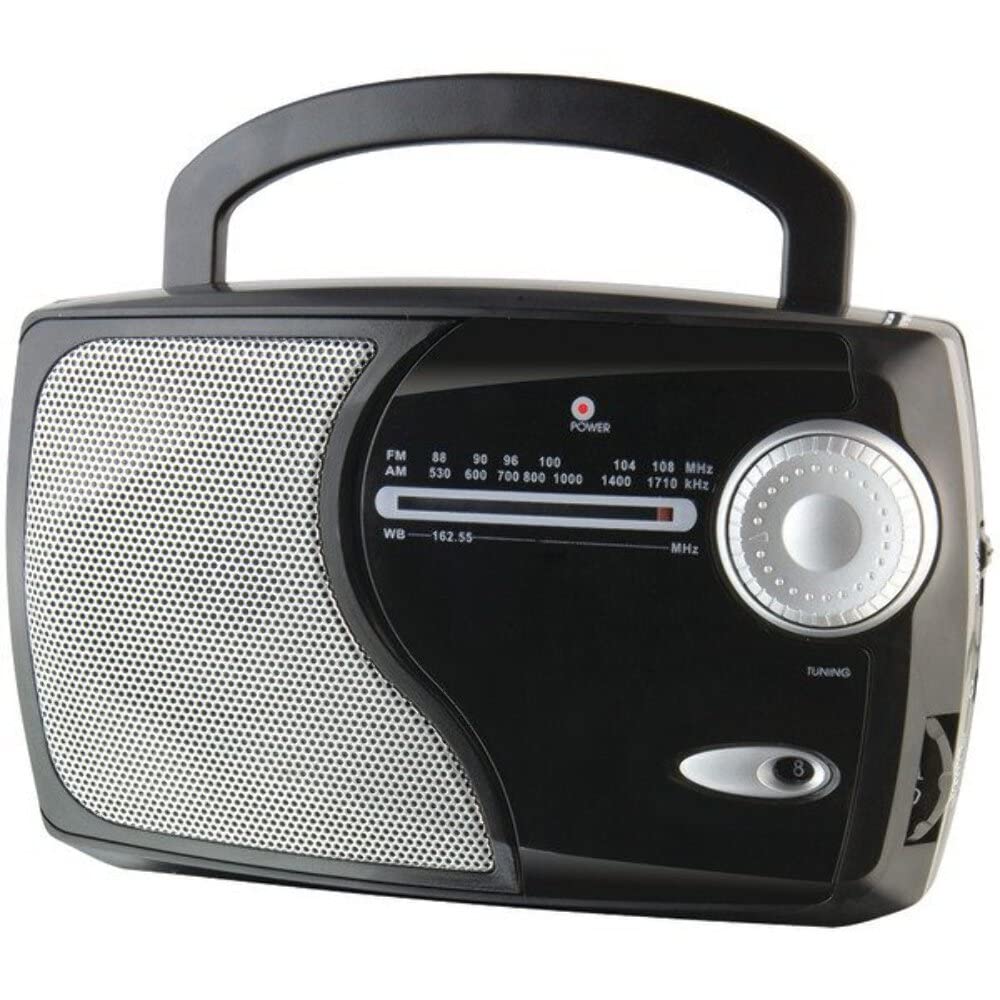
Сүрөт: алдыңкы view of the GPX Weatherx WR282B radio, showing the speaker, tuning dial, and control knobs.
- Кубат/үн баскычы: Turns the radio on/off and adjusts the audio output level.
- Тасма тандоо которгучу: Selects between AM, FM, and Weatherband (WB) modes.
- Тунинг баскычы: Adjusts the frequency to tune into desired radio stations or weather channels.
- Тюнинг индикатору: Illuminates when a strong signal is received.
- Жыштык терүү: Учурдагы радио жыштыгын көрсөтөт.
- Телескопиялык антенна: Extendable antenna for improved FM and Weatherband reception.
- Көмөкчү киргизүү (AUX IN): Тышкы аудио түзүлүштөрдү туташтыруу үчүн 3.5 мм уяча.
- AC кубаттуулугун киргизүү: Jack for connecting the included AC/DC power adapter.
- Батарея бөлүмү: Located on the back, holds 3 'D' size batteries.
- Ташуу туткасы: Жөнөкөй көчүрүү үчүн.
Жайгашуу
Радиону иштетүү
The WR282B radio can be powered using either the included AC/DC power adapter or three 'D' size batteries.
1. AC Power Operation
- Ensure the radio is turned off by rotating the Power/Volume knob counter-clockwise until it clicks.
- Insert the small plug of the AC/DC power adapter into the AC Power Input jack on the radio.
- Plug the other end of the AC/DC power adapter into a standard wall outlet (AC 120V~60Hz).
- The radio is now ready for use with AC power.
Эскертүү: When the AC adapter is connected, battery power is automatically disconnected.
2. Battery Power Operation
- Радио өчүрүлгөнүн текшериңиз.
- Радионун артындагы батарея бөлүкчөсүн табыңыз.
- Батарея уясынын капкагын ачыңыз.
- Insert three (3) 'D' size batteries (not included) into the compartment, observing the correct polarity (+/-) as indicated inside the compartment.
- Батарея уясынын капкагын бекем жабыңыз.
- The radio is now ready for use with battery power.
Маанилүү: Эгерде радио көпкө чейин колдонулбаса, агып кетүүсүн жана бузулушун алдын алуу үчүн батарейкаларды алып салыңыз.
Иштөө нускамалары
1. Turning On and Adjusting Volume
- айлантыңыз Кубат/Көлөм баскычы clockwise to turn on the radio. Continue rotating to increase the volume to a comfortable listening level.
- Радиону өчүрүү үчүн, айлантуу Кубат/Көлөм баскычы чыкылдаганга чейин сааттын жебесине каршы басыңыз.
2. Selecting a Radio Band (AM/FM/Weatherband)
- колдонуу Band Selector Switch to choose your desired listening mode:
- БАР: үчүн Amplitude Modulation radio stations.
- FM: For Frequency Modulation radio stations.
- WB: For NOAA Weatherband channels.
3. Tuning to a Station or Channel
- узартуу Телескоптук Антенна fully for optimal FM and Weatherband reception. For AM reception, the radio has a built-in antenna, and adjusting the radio's position may improve reception.
- айлантыңыз Тюнинг баскычы to scan through frequencies on the Frequency Dial.
- When a strong signal is received, the Тунинг көрсөткүчү жарык болот.
- For Weatherband (WB) mode, tune to one of the 7 NOAA weather channels (162.400 MHz to 162.550 MHz).
4. Using the Auxiliary Input (AUX IN)
- Connect a 3.5mm audio cable (not included) from your external audio device (e.g., MP3 player, smartphone) to the Көмөкчү киргизүү (AUX IN) jack on the radio.
- Ensure the radio is turned on and the volume is adjusted.
- The audio from your external device will now play through the radio's speaker. Control playback and track selection from your external device.
Техникалык тейлөө
- Тазалоо: Радионун сыртын жумшак, кургак чүпүрөк менен сүртүңүз. Абразивдүү тазалагычтарды, момдорду же эриткичтерди колдонбоңуз.
- Батареяны алмаштыруу: Replace all three 'D' batteries when the radio's performance diminishes or if the unit will not be used for an extended period. Always replace with new batteries of the same type.
- Сактагыч: When storing the radio for a long time, remove the batteries to prevent leakage. Store in a cool, dry place away from direct sunlight and extreme temperatures.
- Антеннага кам көрүү: Ийилип же сынбаш үчүн телескоптук антеннаны акырын кармаңыз.
Проблемаларды чечүү
| Көйгөй | Мүмкүн себеп | Чечим |
|---|---|---|
| Күч жок |
|
|
| Радио кабыл алуу начар |
|
|
| No sound from AUX IN |
|
|
Техникалык шарттар
- Модел: WR282B
- Радио топтору: AM, FM, Weatherband (7 NOAA channels)
- Кубат булагы: AC 120V~60Hz (via included adapter) or 3 x 'D' Batteries (not included)
- Байланыш: 3.5 мм көмөкчү киргизүү
- Антенна: Telescopic (FM/WB), Built-in Ferrite Bar (AM)
- Продукциянын өлчөмдөрү: 8.86" L x 2.76" W x 5.51" H (approximately)
- Элемент Салмагы: 1.06 фунт (батареясыз)
Кепилдик жана колдоо
For detailed warranty information and customer support, please refer to the warranty card included with your product or visit the official GPX webсайт. Сатып алуу квитанциясын кепилдик дооматтары үчүн сатып алуунун далили катары сактаңыз.
If you experience issues not covered in the troubleshooting section, please contact GPX customer service for assistance.


