Продукт бүттүview
The Targus Presenter AMP09AP is a multimedia presentation remote designed for ease of use during presentations. It features a laser pointer for highlighting content, backlit buttons for low-light environments, and an ergonomic design for comfortable handling. This remote also offers cursor control for remote program access and volume adjustment for media. Its wireless technology provides a range of up to 50 feet, and the USB receiver conveniently stores within the presenter.
Орнотуу колдонмосу
1. таңгактан чыгаруу
Carefully remove the Targus Presenter AMP09AP and its components from the packaging. The box should contain:
- One Targus Presentation Remote
- One USB Receiver
2. Батареяны орнотуу
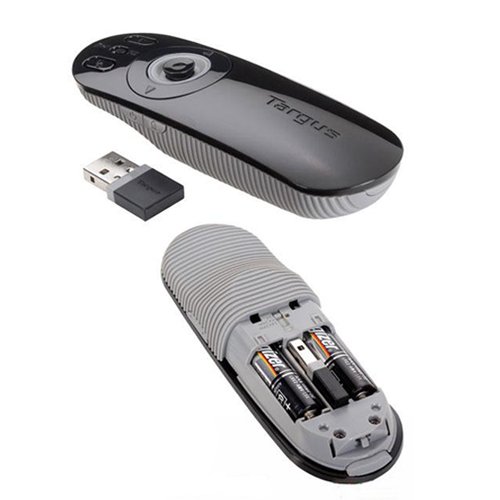
The Targus Presenter AMP09AP requires batteries (not included). Use alkaline batteries for optimal performance.
- Locate the battery compartment on the back of the presenter.
- Батарея уясынын капкагын ачыңыз.
- Туура полярдуулукту (+/-) камсыз кылуу менен керектүү батарейкаларды салыңыз.
- Батарея уясынын капкагын бекем жабыңыз.
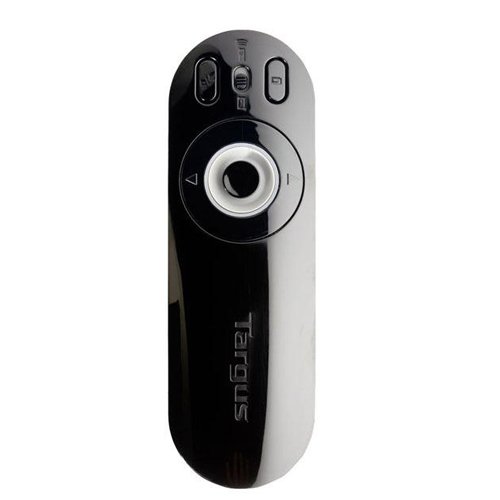
Image: The Targus Presenter AMP09AP, its USB receiver, and the open battery compartment revealing two AAA batteries.
3. USB кабылдагычты туташтыруу
- Remove the USB receiver from its storage slot within the presenter.
- USB ресиверди компьютериңиздеги жеткиликтүү USB портуна сайыңыз.
- Компьютер керектүү драйверлерди автоматтык түрдө таап, орнотушу керек.
Пульт азыр колдонууга даяр.
Иштөө нускамалары
Презентация режими
The presenter's simplistic layout allows for easy navigation during presentations.
Сүрөт: Жогорку view of the Targus Presenter AMP09AP, highlighting the laser pointer button, slide navigation buttons, and the mode switch.
- Лазердик көрсөткүч: Press and hold the dedicated laser button to activate the laser pointer for highlighting content.
- Кийинки слайд: Press the forward arrow button to advance to the next slide.
- Мурунку слайд: Press the backward arrow button to return to the previous slide.
- Арткы жарык баскычтары: Buttons are backlit for visibility in dimly lit rooms.
Cursor Control Mode
The presenter features cursor control for remote access to programs and media functions.
- Activating Cursor Control: Use the mode switch (located at the top right of the remote) to toggle between presentation and cursor control modes.
- Moving Cursor: Use the central circular button (joystick/directional pad) to move the mouse cursor on the screen.
- Басуу: Press the center of the circular button to perform a left-click action.
- Үндү көзөмөлдөө: Adjust the volume for music and videos remotely using the designated volume controls (if available on your specific model).
Зымсыз диапазон
The wireless technology allows operation up to 50 feet (approximately 15 meters) from the computer, providing flexibility during presentations.
Техникалык тейлөө
- Тазалоо: Wipe the presenter with a soft, dry cloth. Avoid using harsh chemicals or abrasive cleaners.
- Батареяны алмаштыруу: Replace batteries when the indicator light (if present) signals low power, or when performance degrades. Ensure correct polarity during replacement.
- Сактагыч: When not in use, store the USB receiver inside the presenter's dedicated slot to prevent loss. Store the presenter in a cool, dry place.
Проблемаларды чечүү
| Көйгөй | Мүмкүн себеп | Чечим |
|---|---|---|
| Алып баруучу жооп бербей жатат | Батареялары аз же өлүк | Батареяларды жаңы щелочтуу батарейкалар менен алмаштырыңыз. |
| Алып баруучу жооп бербей жатат | USB ресивер туура туташкан эмес | USB кабыл алгыч компьютериңиздеги иштеп жаткан USB портуна бекем сайылып турганын текшериңиз. Башка USB портун колдонуп көрүңүз. |
| Алып баруучу жооп бербей жатат | диапазондон тышкары | Move closer to the computer (within 50 feet / 15 meters). |
| Лазердик көрсөткүч иштебей жатат | Батарея аз | Батареяларды алмаштырыңыз. |
| Cursor control erratic or not working | Interference or mode not activated | Ensure no obstructions between presenter and receiver. Check if cursor control mode is active using the mode switch. |
Техникалык шарттар
| Өзгөчөлүк | Деталь |
|---|---|
| Бренд | Таргус |
| Модель номери | AMP09AP-51 |
| Түс | Кара жана ак |
| Өлчөмдөрү (LxWxH) | 12.1 x 3.8 x 2.5 см |
| Элемент Салмагы | 140 г |
| Байланыш технологиясы | Зымсыз |
| Зымсыз диапазон | 50 футка чейин (болжол менен 15 метр) |
| Батарея түрү | щелочтуу (киргизилген эмес) |
| Камтылган компоненттер | Presentation Remote, USB Receiver |
| Өзгөчөлүктөр | Ergonomic design, Laser pointer, Cursor control, Backlit buttons |
Кепилдик жана колдоо
For warranty information and technical support, please refer to the documentation provided with your purchase or visit the official Targus webсайт. Кепилдик дооматтар үчүн сатып алганыңыздын далилин сактаңыз.


