1. Киришүү
The Claber 87315 COMETA EVO8016 is a sophisticated 6-zone control unit designed for automated irrigation systems. This unit provides precise control over watering schedules, ensuring efficient water usage for your garden or landscape. It features a large liquid crystal display (LCD) and a user-friendly three-button programming system for easy setup and adjustment. The unit allows for flexible watering times ranging from one minute to four hours per line, and includes a manual start button for immediate watering needs. Power is supplied via an external transformer, with a 9V buffer battery for memory retention during power outages. The unit is equipped with a screw terminal block for secure and reliable connections to your irrigation valves.
2. Коопсуздук маалыматы
- Орнотуудан жана иштетүүдөн мурун бардык нускамаларды кылдат окуп чыгыңыз.
- Ар кандай зымдарды же техникалык тейлөө иштерин жүргүзүүдөн мурун электр менен жабдуунун өчүрүлгөнүн текшериңиз.
- Do not immerse the control unit in water. It is designed for outdoor use but should be protected from direct heavy rain and extreme weather conditions.
- Use only the specified external transformer and battery type (9V buffer battery).
- Балдар жетпеген жерде сактаңыз.
- If the unit appears damaged, do not use it. Contact qualified personnel for repair.
3. Пакеттин мазмуну
Пакетте бардык компоненттер бар экенин текшериңиз:
- 1 x Claber 87315 COMETA EVO8016 6-Zone Control Unit
- 1 x External Power Transformer
- 1 x 9V Buffer Battery (may be pre-installed or included separately)
- Көрсөтмө (бул документ)
4. Продукт бүтүп калдыview
Familiarize yourself with the main components of the control unit:
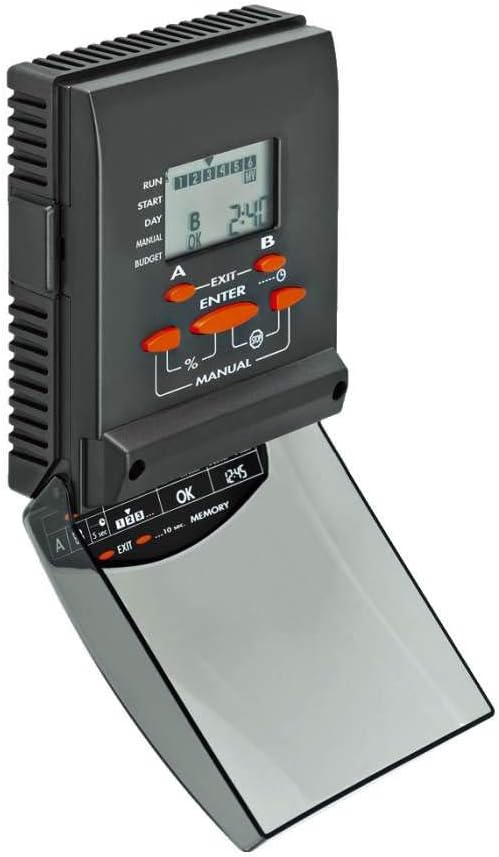
Сүрөт 1: Алдыңкы view of the Claber 87315 COMETA EVO8016 control unit, showing the LCD screen, programming buttons (A, B, ENTER, EXIT, %, MANUAL), and the hinged cover for the lower controls.
- LCD экран: Large display showing current time, program status, and programming parameters.
- Programming Buttons (A, B, ENTER, EXIT): Used for navigating menus and setting program parameters.
- Кол менен баскыч: Initiates immediate watering.
- Персенtage (%) баскычы: Adjusts watering duration by a percentage.
- Батарея бөлүмү: Located at the back or side for the 9V buffer battery.
- Терминал блогу: Screw terminals for connecting irrigation valves and common wire.
5. Орнотуу
5.1 Монтаждоо
Choose a suitable location for mounting the control unit. It should be protected from direct sunlight and heavy precipitation, yet accessible for programming and maintenance. Use appropriate screws and anchors to secure the unit to a wall or sturdy surface.
5.2 Электр зымдары
Before wiring, ensure the external transformer is unplugged from the power outlet.
- Connect the common wire from your irrigation valves to the terminal labeled "COMMON" or "C" on the control unit's terminal block.
- Connect each zone wire from your irrigation valves to the corresponding zone terminals (e.g., 1, 2, 3, 4, 5, 6).
- Ensure all connections are secure and free from exposed wires.
5.3 Кубат туташтыруу
- Insert the 9V buffer battery into its designated compartment. This battery maintains program memory during power outages.
- Connect the external transformer to the power input port on the control unit.
- Plug the external transformer into a suitable electrical outlet. The LCD screen should illuminate, indicating power is supplied.
6. Иштөө
6.1 Баштапкы орнотуу жана убакытты орнотуу
Upon first power-up or after a prolonged power loss without the buffer battery, you may need to set the current time and day.
- колдонуу A жана B buttons to navigate through the initial setup menu.
- Басыңыз ENTER параметрди тандоо же орнотууну ырастоо үчүн.
- Adjust the time and day using the A жана B баскычтарын, анан басыңыз ENTER ар бир жөндөөнү ырастоо үчүн.
6.2 Сугаруу графигин түзүү
The COMETA EVO8016 allows for flexible programming across its 6 zones.
- басыңыз ПРОГРАММА or МЕНЮ button (if available, otherwise use A/B to navigate to programming mode).
- Select the desired program (e.g., Program 1, Program 2).
- For each program, set the following:
- Баштоо убактысы: Define up to multiple start times per day. Use A жана B тууралоо, ENTER ырастоо үчүн.
- Сугаруу узактыгы: For each zone (1-6), set the watering duration from 1 minute to 4 hours. Use A жана B тууралоо, ENTER ырастоо үчүн.
- Сугаруу күндөрү: Select specific days of the week or an interval (e.g., every 2 days). Use A жана B тандоо, ENTER ырастоо үчүн.
- Repeat for all desired zones and programs.
- Басыңыз ЧЫГУУ to save settings and return to the main display.
6.3 Кол менен иштетүү
To initiate watering immediately, independent of the programmed schedule:
- басыңыз КОЛ баскычы.
- Колдонуу A or B to select the zone you wish to water manually.
- Басыңыз ENTER to start watering. The zone will water for its last programmed duration or a default manual duration.
- Кол менен сугарууну токтотуу үчүн басыңыз КОЛ кайра же ЧЫГУУ.
6.4 Seasonal Adjustment (Budget)
пайызtage (%) button allows for seasonal adjustment of watering durations without reprogramming each zone individually.
- басыңыз % баскычы.
- Колдонуу A or B сугаруунун узактыгын пайыз менен жөндөө үчүнtage (e.g., 50% for half duration, 120% for increased duration).
- Басыңыз ENTER to confirm. All programmed watering times will be adjusted by this percentage.
7. Техникалык тейлөө
7.1 Батареяны алмаштыруу
The 9V buffer battery should be checked annually and replaced as needed to ensure program memory retention during power outages.
- Disconnect the external transformer from the power outlet.
- Locate the battery compartment (usually on the back or side of the unit).
- Remove the old 9V battery and insert a new one, observing polarity.
- Close the battery compartment and reconnect the external transformer.
7.2 Тазалоо
Башкаруу блогунун сыртын жумшак, г менен сүртүңүзamp кездеме. Абразивдүү тазалоочу каражаттарды же эриткичтерди колдонбоңуз. Ички компоненттерге суу кирбегенин текшериңиз.
8. Кыйынчылыктарды
| Көйгөй | Мүмкүн себеп | Чечим |
|---|---|---|
| Дисплей бош. | No power from transformer; faulty transformer; dead buffer battery. | Check power outlet and transformer connection. Replace buffer battery. |
| Сугарылбаган зоналар. | Master valve off; wiring issues; low water pressure; solenoid malfunction; program not set correctly. | Check master valve. Verify wiring connections. Check water supply. Test solenoids. Review программалоо. |
| Incorrect watering times. | Programming error; seasonal adjustment active. | Review and correct program settings. Check seasonal adjustment percentage. |
| Unit not responding to buttons. | Түзмөк тоңуп калган; ички бузук. | Электр кубатын 30 секундга ажыратып, андан кийин кайра туташтырыңыз. Эгерде көйгөй чечилбесе, колдоо кызматына кайрылыңыз. |
9. Техникалык шарттар
| Өзгөчөлүк | Деталь |
|---|---|
| Модель номери | 87315 |
| Бренд | Клабер |
| Зоналардын саны | 6 |
| Сугаруу узактыгы | 1 minute to 4 hours per line |
| Дисплей түрү | Large Liquid Crystal Display (LCD) |
| Программалоо системасы | Three-button interface |
| Электр камсыздоо | Тышкы трансформатор |
| Buffer Battery | 9V (for memory retention) |
| Өлчөмдөрү (L x W x Y) | 25.5 x 26 x 8 см |
| Салмагы | 400 грамм |
| Материал | Пластик |
10. Кепилдик жана колдоо
Specific warranty information for the Claber 87315 COMETA EVO8016 control unit is not available in this document. Please refer to the warranty card included with your product or visit the official Claber webдеталдуу кепилдик шарттары жана шарттары үчүн сайт.
For technical support, troubleshooting assistance, or spare parts, please contact Claber customer service through their official webсайтына же продуктуңуздун таңгагында берилген байланыш маалыматына кайрылыңыз. Колдоо кызматына кайрылганда, моделиңиздин номерин (87315) жана сатып алуу маалыматтарын даярдап коюңуз.
Claber Official Webсайт: www.claber.com


