Introduction
This manual provides essential information for the safe and efficient operation of your Technical Pro AW1 Torque Audio 2U Professional 2-Channel Power Amplifier. The AW1 is designed to deliver robust audio amplification for various professional sound applications. Please read this manual thoroughly before operating the unit to ensure proper setup and performance.
Коопсуздук маалыматы
ЭСКЕРТҮҮ: To reduce the risk of electric shock, do not open the ampкөтөргүч casinг. Бардык тейлөөлөрдү квалификациялуу кызматкерлерге тапшырыңыз.
- Кубат булагы: Connect the unit only to a 110 Volt AC power outlet. Ensure the power cord is securely connected.
- Вентиляция: Вентиляция тешиктерин жаап албаңыз. Ашыкча ысып кетүүнүн алдын алуу үчүн аппараттын айланасында адекваттуу аба агымын камсыз кылыңыз.
- Нымдуулук: Агрегатты жамгырга же нымдуулукка дуушар кылбаңыз. Ваза сыяктуу суюктуктар толтурулган нерселерди аппараттын үстүнө койбоңуз.
- Тазалоо: Disconnect the power cord before cleaning. Use a dry cloth only.
- Жайгашкан жери: Түзмөктү туруктуу, тегиз жерге коюңуз. Аны жылуулук булактарынын жанына же күн нуру түз тийген жерге койбоңуз.
- Тейлөө: Do not attempt to service this unit yourself. Contact qualified service personnel for any repairs.
Пакеттин мазмуну
Пакетте бардык буюмдар бар экенин текшериңиз:
- Technical Pro AW1 Torque Audio 2U Professional 2-Channel Power Ampкөтөргүч бирдиги
- AC Power Cord

Продукт бүттүview
Front Panel
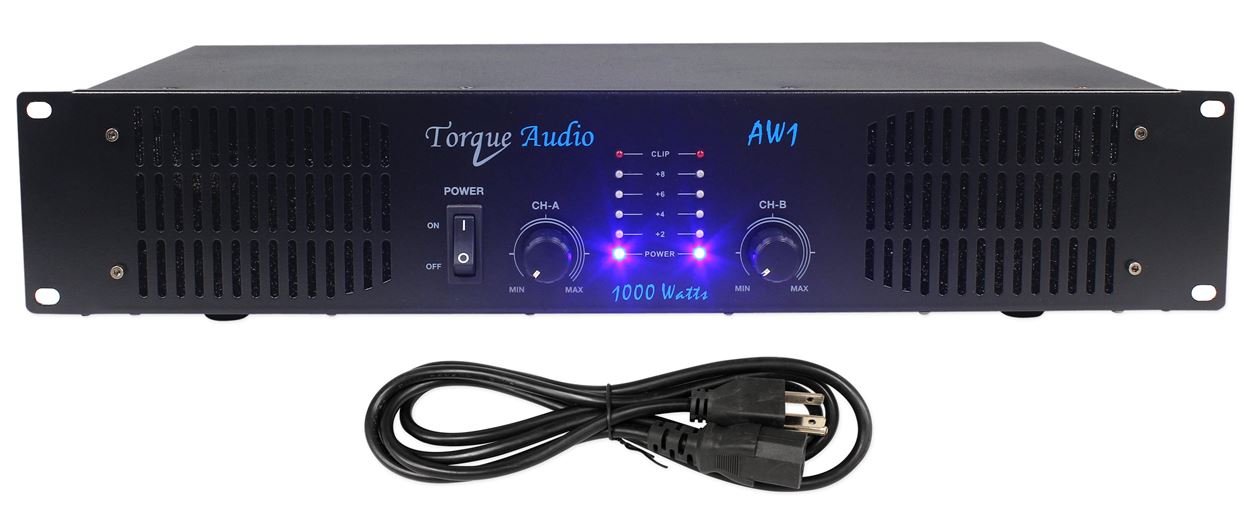
- POWER которуштуруу: Күйгүзөт ampкөтөргүчтүн кубатын күйгүзүү же өчүрүү.
- Channel A/B Level Controls: Rotary knobs to adjust the output level for each channel independently.
- Күч көрсөткүчтөрү: LEDs that illuminate when the unit is powered on.
- Деңгээл көрсөткүчтөрү: LEDs that show the output signal level for each channel.
- Кесүү көрсөткүчтөрү: LEDs that illuminate when the audio signal is clipping, indicating potential distortion.
Арткы панель

- Audio Inputs (CH A, CH B): RCA jacks for connecting audio sources (e.g., mixer, preampөмүр).
- Channel A/B Outputs: Banana binding posts for connecting passive speakers.
- AC Power Inlet: Connector for the supplied AC power cord.
Жайгашуу
- Жайгашкан жери: жайгаштырыңыз amplifier in a location with adequate ventilation, away from direct sunlight, heat sources, and moisture. Ensure it is on a stable surface.
- Аудио булактарын туташтыруу: Using RCA cables, connect your audio source (e.g., mixer, DJ controller, preamplifier) to the "AUDIO INPUTS" (CH A and CH B) on the rear panel. Match the left channel of your source to CH A input and the right channel to CH B input.
- Динамиктерди туташтыруу: Connect your passive speakers to the "CH A OUTPUTS" and "CH B OUTPUTS" using speaker wire terminated with banana plugs or bare wire. Ensure correct polarity (+ to + and - to -) for each speaker. The amplifier supports speakers with appropriate impedance (typically 2 ohms or higher).
- Туташуу кубаты: камсыз кылуу amplifier's POWER switch is in the OFF position. Connect the supplied AC power cord to the "AC POWER INLET" on the rear panel and then plug the other end into a standard 110 Volt AC wall outlet.
Маанилүү: Before powering on, double-check all connections to prevent damage to the amplifier or connected equipment.
Иштөө нускамалары
- Күйгүзүү: Turn the Channel A and Channel B Level Controls to their minimum (MIN) position. Then, press the POWER switch to the ON position. The Power Indicators on the front panel should illuminate.
- Үндү тууралоо: Start playing audio from your source. Slowly increase the Channel A and Channel B Level Controls to achieve the desired listening volume.
- Монитор көрсөткүчтөрү: Observe the Level Indicators to ensure the signal is not consistently peaking. If the Clipping Indicators illuminate frequently or stay lit, reduce the input level from your source or the amplifier's channel level controls to prevent distortion and potential damage to speakers.
- Өчүрүү: Before powering off, turn both Channel A and Channel B Level Controls to their minimum (MIN) position. Then, press the POWER switch to the OFF position.
Техникалык тейлөө
- Тазалоо: Дайыма сүртүп туруңуз ampliifier сыртын жумшак, кургак чүпүрөк менен. Суюк тазалагычтарды же эриткичтерди колдонбоңуз.
- Вентиляция: Ensure that the ventilation grilles on the sides and top of the unit remain clear of dust and obstructions. Proper airflow is crucial for preventing overheating.
- Байланыштары: Periodically check all audio and power connections to ensure they are secure.
- Сактагыч: сакталган болсо amplifier for an extended period, disconnect it from power, clean it, and store it in a cool, dry place, preferably in its original packaging.
Проблемаларды чечүү
| Көйгөй | Мүмкүн себеп | Чечим |
|---|---|---|
| Күч жок | Электр шнуру туташтырылган эмес; Розетка иштебейт; Ampкөтөргүчтү өчүрүү. | Ensure power cord is firmly connected. Check the power outlet with another device. Turn the POWER switch to ON. |
| Үн чыгышы жок | Audio input cables not connected; Speaker cables not connected; Channel level controls at minimum; Audio source not playing or volume too low. | Verify all audio input and speaker connections. Increase channel level controls. Check audio source playback and volume. |
| Бурмаланган үн | Input signal too high (clipping); Speaker impedance mismatch; Damaged speaker or cable. | Булактан келген киргизүү деңгээлин азайтыңыз же amplifier channel controls until clipping indicators stop illuminating. Ensure speakers meet impedance requirements. Check speakers and cables for damage. |
| Бирдик ысык сезилет | Inadequate ventilation; Prolonged high-volume operation. | Ensure ventilation openings are clear. Reduce volume or allow the unit to cool down. |
If the problem persists after attempting these solutions, contact Technical Pro customer support.
Техникалык шарттар
- Модел: AW1
- Чоку күчү: 1000 Ватт
- RMS күчү: 450 Ватт @ 2 Ом
- Каналдар: 2
- Аудио киргизүү каражаттары: RCA (CH A, CH B)
- Аудио чыгуулар: Banana Binding Post
- Көрсөткүчтөр: Power, Level, Clipping (per channel)
- Тtage: 110 вольт (AC)
- Өлчөмдөрү (L x W x Y): 20 x 12 x 6 дюйм (Өнүмдүн өлчөмдөрү)
- Элемент Салмагы: Approximately 6 pounds (based on product description)
- Материал: Металл
Кепилдик жана колдоо
For warranty information and technical support, please refer to the documentation provided with your purchase or visit the official Technical Pro webсайт. Сатып алуу квитанциясын кепилдик дооматтары үчүн сатып алуунун далили катары сактаңыз.
Technical Pro Store: Visit the Technical Pro Store on Amazon


