Продукт бүттүview
The APC Blanking Panel Kit (AR8101BLK) consists of metal panels designed to occupy unused rack space within server enclosures. These panels are crucial for maintaining optimal airflow and preventing the recirculation of hot air, thereby improving the overall cooling efficiency of your equipment.
The kit includes four blanking panels, suitable for use in vertical rails that feature either square or threaded holes. Their black finish ensures a consistent aesthetic with most rack systems.
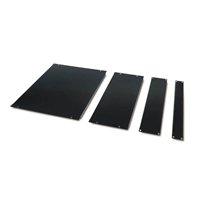
Image: The APC Blanking Panel Kit showing the four different sized panels included.
Орнотуу жана орнотуу
These blanking panels are designed for straightforward installation into standard 19-inch rack enclosures. They are compatible with vertical rails that have either square or threaded mounting holes.
Орнотуу кадамдары:
- Identify Unused Rack Space: Locate any open U-spaces (rack units) within your server enclosure. Filling these spaces is essential for proper airflow management.
- Select Appropriate Panel Size: The kit includes panels of various sizes (1U, 2U, 4U, 8U). Choose the panel that matches the size of the open rack unit.
- Тегиздөө панели: Position the blanking panel against the front of the vertical rack rails, aligning its mounting holes with the corresponding holes on the rails.
- Коопсуздук панели:
- үчүн square-hole rails, use cage nuts and screws (typically supplied with the rack or panel, though not explicitly stated as included in this product description). Insert cage nuts into the rail holes, then secure the panel with screws.
- үчүн threaded-hole rails, simply align the panel and secure it directly with appropriate rack screws.
- Жарактуулугун текшерүү: Ensure the panel is securely fastened and sits flush with the rack's front, creating a sealed barrier to prevent air recirculation.
Proper installation of blanking panels is critical for directing cool air through active equipment and preventing hot exhaust air from re-entering the front of the rack.
Иштөө жана иштөө
The APC Blanking Panels operate passively by physically blocking unused rack spaces. Their primary function is to optimize airflow within the rack enclosure. By preventing hot air from recirculating through empty spaces, they ensure that cooling air is efficiently directed over active IT equipment.
Бул төмөнкүлөргө алып келет:
- Improved Cooling Efficiency: Cool air is forced through equipment, not around it.
- Reduced Hot Spots: Minimizes areas of elevated temperature within the rack.
- Lower Energy Consumption: Cooling systems do not have to work as hard to maintain desired temperatures.
Техникалык тейлөө
The APC Blanking Panels require minimal maintenance. Regular inspection and cleaning will ensure their continued effectiveness.
Тейлөө көрсөтмөлөрү:
- Тазалоо: Periodically wipe the panels with a soft, damp cloth to remove dust and debris. Avoid abrasive cleaners that could damage the finish.
- Текшерүү: Annually, or as part of routine data center maintenance, inspect the panels for any signs of damage, bending, or loose fasteners. Ensure they remain securely attached and are effectively blocking airflow.
- Алмаштыруу: If a panel becomes damaged or no longer fits securely, replace it promptly to maintain optimal airflow management.
Проблемаларды чечүү
While blanking panels are simple components, issues can arise if they are not properly installed or maintained. Here are some common issues and their solutions:
| Көйгөй | Мүмкүн себеп | Чечим |
|---|---|---|
| Air Recirculation/Hot Spots: Despite panels, cooling is inefficient. |
|
|
| Panel Does Not Fit: Cannot align or secure the panel. |
|
|
Техникалык шарттар
| Атрибут | Деталь |
|---|---|
| Продукт аты | Blanking Panel Kit 19" Black |
| Модель номери | AR8101BLK (Manufacturer Part Number), 73128 (Item Model Number) |
| Бренд | APC (American Power Conversion) |
| Продукт түрү | Боштоо панели |
| Түс | Кара |
| Форма фактору | 1 x 19 (refers to 19-inch rack compatibility) |
| Таңгак Саны | 4 панель |
| Шайкештик | Vertical rack rails with square or threaded holes |
| Продукциянын өлчөмдөрү (L x W x Y) | 14.5 x 23.5 x 1.5 inches (Shipping Dimensions) |
| Элемент Салмагы | 8.55 фунт (болжол менен) |
Кепилдик жана колдоо
Specific warranty terms and support contact information for the APC Blanking Panel Kit (AR8101BLK) are typically provided with the product packaging or can be found on the official APC (American Power Conversion) website. Please refer to these resources for the most accurate and up-to-date details regarding product warranty, technical support, and customer service.
For general inquiries or to locate support resources, visit the official APC webсайтка же түздөн-түз кардарларды тейлөө бөлүмүнө кайрылыңыз.


