Introduction
This manual provides comprehensive instructions for the installation, operation, and maintenance of your Braeburn 5310 Touchscreen Hybrid Thermostat. The Braeburn 5310 is a versatile thermostat designed for universal auto changeover, compatible with low voltage жалгыз сtage gas, oil, or electric heating/cooling systems, and single stage heat pump systems. It also supports 250Mv – 750Mv millivolt heating-only systems.
Key features include a bright blue backlight display, a responsive touchscreen with a Speedbar for quick adjustments, and a separate sub-base for easy installation. The thermostat offers multi-level keypad lockout for security and retains all user, installer, and program settings even during power failures due to its permanent non-volatile memory.
Продукт өзгөчөлүктөр:
- Large 6.5 sq. in. easy-read touchscreen display.
- Flexible programming: 7-day, 5-2 day, or non-programmable options.
- Automatic or manual changeover between heating and cooling.
- Speedbar multi-function button for intuitive control.
- Adjustable temperature limits for energy management.
- Indoor or outdoor remote sensing capability.
- Speed Set programming mode for quick setup.
- Meets Energy Aware guidelines.
- Separate user and installer reset buttons.
- Power options: Hardwire (24V AC) or battery (2 AA alkaline batteries).
- Multi-level keypad lockout for enhanced security.
- Circulating Fan mode and programmable Fan mode.
- Suitable for residential or commercial applications.

Сүрөт 1: Алдыңкы view of the Braeburn 5310 Thermostat, showcasing its touchscreen and control interface.
Орнотуу жана орнотуу
Proper installation is crucial for the optimal performance of your Braeburn 5310 thermostat. It is recommended that installation be performed by a qualified technician. Ensure all power to the HVAC system is turned off at the circuit breaker before beginning installation.
Энергияга талаптар:
- The thermostat can be powered by 24 Volt AC (common wire required) or by two "AA" alkaline batteries (3.0 Volt DC).
- For continuous backlight and optimal performance, 24V AC power is recommended.
Монтаждоо жана зымдар:
- Кубатты өчүрүү: Before any wiring, ensure the power to your heating and cooling system is completely off at the main circuit breaker.
- Эски термостатты алып салуу: Carefully remove your old thermostat from the wall. Note the wiring connections. It is advisable to take a picture of the existing wiring for reference.
- Install Sub-Base: The Braeburn 5310 features a separate sub-base. Mount this sub-base securely to the wall using the provided screws. Ensure it is level for aesthetic purposes.
- Зым байланыштары: Connect the wires from your HVAC system to the corresponding terminals on the sub-base. Refer to the wiring diagram provided with your thermostat for specific connections. For systems requiring a common wire (C-wire), ensure it is connected for 24V AC power. If using battery power only, the C-wire may not be necessary, but connecting it is recommended for enhanced functionality.
- Термостатты тиркөө: Once wiring is complete and secure, carefully snap the main thermostat unit onto the sub-base.
- Батареяларды салыңыз: If using battery power, insert two fresh "AA" alkaline batteries into the battery compartment.
- Күчтү калыбына келтирүү: Электрди өчүргүчтөн кайра күйгүзүңүз.

2-сүрөт: Арткы view of the Braeburn 5310 Thermostat, illustrating the wiring terminal block and sub-base design.
Баштапкы конфигурация:
After installation, the thermostat will guide you through initial setup. It features separate installer and user setup modes. To access installer options, you may need to press specific buttons simultaneously (e.g., "System" and "Config" as mentioned in user reviews) and then release. This allows configuration of system type, programming mode (7-day, 5-2 day), temperature differential, and other advanced settings.
A front reset button is available to return user settings to default values if needed.
Сиздин термостатты иштетүү
The Braeburn 5310 thermostat is designed for user-friendly operation with its intuitive touchscreen and Speedbar.
Негизги операция:
- Температураны жөндөө: Touch the desired temperature on the screen or use the up/down arrows (if present) to adjust the setpoint. The temperature control range is between 45°F and 90°F (7°C and 32°C), with an accuracy of +/- 1°F (+/- 0.5°C).
- Система режими: Select your desired system mode (Heat, Cool, Auto, Off) using the touchscreen options. "Auto" mode allows the thermostat to automatically switch between heating and cooling as needed.
- Күйөрман режими: Choose between Fan ON (continuous operation), Fan AUTO (fan runs only when heating or cooling is active), or Circulating Fan mode (fan cycles on and off periodically to keep air moving).
- Арткы жарык: The bright blue backlight display illuminates when the screen is touched and turns off shortly after to conserve energy.
Программалоо режимдери:
The Braeburn 5310 offers flexible programming options to suit your lifestyle:
- 7 күндүк программалоо: Allows for different temperature settings for each day of the week.
- 5-2 күндүк программалоо: Provides one set of programs for weekdays (Monday-Friday) and another for weekends (Saturday-Sunday).
- Программаланбаган: Operates as a manual thermostat, maintaining a constant temperature until adjusted.
Refer to the detailed programming instructions in the full manual for setting up your desired schedule using the Speed Set programming mode.
Өркүндөтүлгөн өзгөчөлүктөр:
- Adaptive Recovery Mode (ARM): This feature learns how long it takes your system to reach programmed temperatures, activating heating or cooling early to ensure comfort at the scheduled time.
- кармап туруу функциясы: Temporarily overrides the programmed schedule to maintain a specific temperature. The duration of the "Hold" can often be adjusted.
- Ариптакта блоктоосу: Prevents unauthorized changes to settings. Multiple levels of lockout are available.
- Residual Cooling Fan Delay: Allows the fan to continue running for a short period after the cooling cycle ends to maximize efficiency.
Техникалык тейлөө
Regular maintenance ensures the longevity and accurate operation of your Braeburn 5310 thermostat.
Батареяны алмаштыруу:
If your thermostat is battery-powered or uses batteries as a backup, replace the two "AA" alkaline batteries annually or when the low battery indicator appears on the display. To replace, gently pull the thermostat off its sub-base, remove the old batteries, insert new ones, and reattach the thermostat to the sub-base.
Тазалоо:
Термостаттын сенсордук экранын тазалап,asing periodically with a soft, damp cloth. Avoid using abrasive cleaners or solvents, as these can damage the display or finish.
Filter, UV, and Humidifier Pad Check Monitor:
The thermostat includes a monitor for air filter, UV lamp, and humidifier pad checks. The display will indicate when it's time to inspect or replace these components based on programmed intervals. Follow your HVAC system's recommendations for these maintenance tasks.
Проблемаларды чечүү
If you encounter issues with your Braeburn 5310 thermostat, try the following troubleshooting steps:
| Көйгөй | Мүмкүн себеп | Чечим |
|---|---|---|
| Термостаттын дисплейи бош же күңүрт. | No power (24V AC) or dead batteries. | Check circuit breaker for HVAC system. Replace "AA" batteries with fresh ones. Ensure C-wire is properly connected if using 24V AC. |
| System (heating/cooling) is not responding. | Incorrect system mode selected, wiring issue, or system lockout. | Verify the thermostat is set to the correct mode (Heat, Cool, Auto). Check wiring connections at the sub-base and HVAC unit. Ensure keypad lockout is not active. If the thermostat calls for heat/cool but no signal is sent to the equipment, consult a qualified technician. |
| Температура көрсөткүчтөрү так эмес окшойт. | Thermostat location, sensor obstruction, or calibration needed. | Ensure the thermostat is not exposed to direct sunlight, drafts, or heat sources. Clean any dust from the thermostat vents. If issues persist, a professional may need to check calibration. |
| Экранды окуу кыйын. | Lighting conditions, display settings. | The blue backlight activates upon touch. Ensure adequate ambient lighting in the area where the thermostat is mounted. |
| Thermostat not holding program. | "Hold" function active, or programming error. | Deactivate the "Hold" function. Re-enter your program schedule carefully, ensuring all steps are followed. |
If these steps do not resolve the issue, please contact a qualified HVAC technician or Braeburn customer support for further assistance.
Техникалык шарттар
| Өзгөчөлүк | Деталь |
|---|---|
| Модель номери | 5310 |
| Өлчөмдөрү (H x W x D) | 3.94" x 5.56" x 1.19" (болжол менен 10см x 14.1см x 3см) |
| Салмагы | 14.4 унция (болжол менен 408 грамм) |
| Power Source | 24 Volt AC or 2 "AA" Alkaline Batteries (3.0 Volt DC) |
| Температураны көзөмөлдөө диапазону | 45°F – 90°F (7°C – 32°C) |
| Температуранын тактыгы | +/- 1°F (+/- 0.5°C) |
| Иштеп жаткан нымдуулук диапазону | 5% - 95% Салыштырмалуу нымдуулук (конденсацияланбаган) |
| Шайкештик | Төмөн үнtage жалгыз сtage gas, oil, or electric heating/cooling systems; single stage heat pump systems; 250Mv – 750Mv millivolt heating-only systems. |
| Дисплей түрү | Touchscreen with bright blue backlight |
| Өзгөчөлүктөр | Permanent non-volatile memory, filter/UV/humidifier pad check monitor, Adaptive Recovery Mode (ARM), programmable independent Fan control, residual cooling Fan delay, indoor/outdoor remote sensor capability, multi-level keypad lockout. |
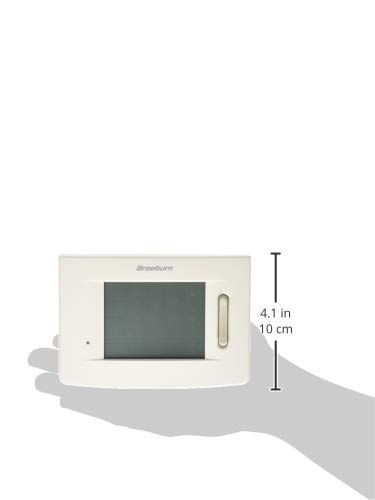
Figure 3: Size reference of the Braeburn 5310 Thermostat.
Кепилдик жана колдоо
For specific warranty information regarding your Braeburn 5310 Thermostat, please refer to the warranty card included with your product packaging or visit the official Braeburn webсайт. Кепилдик шарттары, адатта, сатып алынган күндөн тартып белгилүү бир мөөнөткө материалдардагы жана жасалгалоодогу кемчиликтерди камтыйт.
For technical support, troubleshooting assistance beyond this manual, or to inquire about replacement parts, please contact Braeburn customer service. Contact details can usually be found on the manufacturer's website or on the product packaging. Braeburn also provides English/Spanish packaging and instruction cards.


