1. Киришүү
Welcome to the user manual for your Logitech G600 MMO Gaming Mouse. This guide will assist you in setting up, understanding the features, and maintaining your new gaming mouse. Designed specifically for Massively Multiplayer Online (MMO) games, the G600 offers extensive customization and comfort for prolonged gaming sessions.
2. Продукт бүтүп калдыview жана өзгөчөлүктөрү
The Logitech G600 MMO Gaming Mouse is engineered for precision and control, featuring a robust set of programmable buttons and customizable lighting.
Негизги өзгөчөлүктөрү:
- 20 MMO Tuned Buttons: Includes a unique 12-button thumb panel designed for quick, no-look navigation and command execution.
- G-Shift Ring Finger Button: A dedicated button that instantly doubles the number of actions you can perform with every other button, providing unparalleled control.
- Built for Comfort: Its sculpted shape and tuned buttons are designed to reduce click fatigue during marathon multiplayer sessions.
- Total Personalization: Customize thumb panel lighting colors, DPI levels, and button assignments through the Logitech G HUB software.
- Low Friction PTFE Feet: Ensures smoother motions, precise cursor movements, and improved accuracy on nearly any surface.

Figure 2.1: Logitech G600 MMO Gaming Mouse, top view, showcasing its ergonomic design and central scroll wheel with G7 and G8 buttons.

2.2-сүрөт: Бурчтуу view of the Logitech G600 MMO Gaming Mouse, highlighting the 12 programmable thumb buttons on the side, designed for easy access during gameplay.
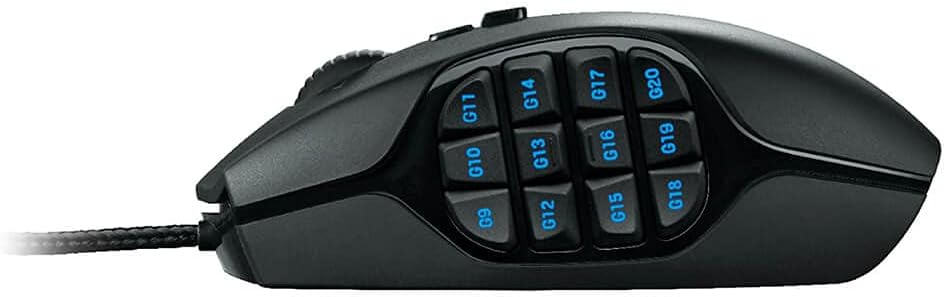
2.3-сүрөт: Side profile of the Logitech G600 MMO Gaming Mouse, clearly displaying the arrangement of the 12 G-keys on the thumb panel.
3. Орнотуу
3.1 Кутуда эмне бар
- Logitech G600 MMO оюн чычкан
- Колдонуучунун документтери
3.2 Чычканыңызды туташтыруу
- Unpack the Logitech G600 mouse and its documentation.
- Компьютериңиздеги жеткиликтүү USB портун табыңыз.
- Plug the USB connector of the G600 mouse into the USB port.
- Your operating system (Windows Vista, Windows 7, Windows 8, or later) will automatically detect and install basic drivers for the mouse.
3.3 Software Installation (Logitech G HUB)
To unlock the full customization potential of your G600 mouse, including programmable buttons, DPI settings, and RGB lighting, it is highly recommended to install the Logitech G HUB software.
- Сиздин ачыңыз web browser and navigate to the official Logitech G HUB download page.
- Download the latest version of the Logitech G HUB software compatible with your operating system.
- Run the downloaded installer and follow the on-screen instructions to complete the installation.
- Once installed, launch Logitech G HUB to begin customizing your G600 mouse.
4. Чычканды иштетүү
4.1 Негизги функциялар
- Сол чыкылдатуу: Негизги аракет.
- Оң чыкылдатуу: Secondary action, typically context menus.
- Жылдыруу дөңгөлөгү: Өйдө/ылдый жылдырыңыз, жана ортоңку чыкылдатуу функциясы үчүн чыкылдатууга болот.
- G7/G8 Buttons: Located behind the scroll wheel, these are typically used for on-the-fly DPI switching.
- Thumb Panel G-Keys (G9-G20): These 12 buttons are fully programmable for macros, keybinds, and other commands.
- G-Shift Button: The third click button, located under the ring finger, activates a secondary set of functions for all other buttons when held down.
4.2 Customizing with Logitech G HUB
Logitech G HUB allows you to create custom profiles for different games and applications, assign commands to buttons, adjust DPI sensitivity, and personalize RGB lighting.
- Button Assignments: Drag and drop commands from the G HUB interface onto any of the 20 programmable buttons.
- DPI сезгичтиги: Set up to five DPI levels, which can be cycled through using the G7/G8 buttons. This allows for quick adjustments between precise aiming and fast movement.
- Жарыктандыруу: Customize the RGB backlighting of the thumb panel buttons to match your setup or game profile.
- Profiles: Бир нече профессионал түзүңүз жана башкарыңызfiles for different games or applications. G HUB can automatically switch profiles when you launch a specific game.
5. Техникалык тейлөө
Proper care will ensure the longevity and optimal performance of your Logitech G600 mouse.
- Тазалоо: Бир аз жумшак, түксүз кездемени колдонуңуз dampЧычкандын бетин суу же жумшак тазалоочу эритме менен сүртүңүз. Катуу химиялык заттардан же абразивдүү материалдардан алыс болуңуз.
- Сенсорго кам көрүү: Keep the optical sensor on the underside of the mouse clean and free of dust or debris. Use a can of compressed air to gently blow away any particles.
- Кабелдик башкаруу: Avoid sharp bends or excessive pulling on the braided USB cable to prevent internal damage.
- Сактагыч: Колдонулбаганда, чычканды экстремалдык температурадан алыс, таза, кургак чөйрөдө сактаңыз.
6. Кыйынчылыктарды
If you encounter issues with your Logitech G600 mouse, try the following troubleshooting steps:
| Көйгөй | Мүмкүн чечим |
|---|---|
| Чычкан жооп бербей жатат. |
|
| Buttons are not working or are unresponsive. |
|
| Курсордун кыймылы туруксуз же секирик. |
|
| RGB lighting is not working or incorrect. |
|
If these steps do not resolve your issue, please refer to the Logitech support webсайтка же кардарларды тейлөөгө кайрылыңыз.
7. Техникалык шарттар
| Өзгөчөлүк | Деталь |
|---|---|
| Бренд | Logitech |
| Модель номери | 910-002864 |
| Байланыш технологиясы | USB (Зымдуу) |
| Кыймылды аныктоо | Оптикалык |
| Программалануучу баскычтар | 20 |
| Түс | Кара |
| Элемент Салмагы | 4.7 унция (болжол менен 133 грамм) |
| Продукциянын өлчөмдөрү (LxWxH) | 4.6 x 2.9 x 1.6 дюйм (11.7 x 7.4 x 4.1 см) |
| Аппараттык платформа | PC |
| Операциялык системанын шайкештиги | Windows Vista, Windows 7, Windows 8, and later |

Figure 7.1: Logitech G600 MMO Gaming Mouse Dimensions.
8. Кепилдик жана колдоо
Logitech өнүмдөрү эң жогорку сапат стандарттарына ылайык өндүрүлөт. Кепилдик боюнча толук маалымат алуу үчүн, өнүмүңүзгө кошо берилген кепилдик картасын караңыз же расмий Logitech дүкөнүнө баш багыңыз. webсайт.
For additional support, FAQs, and driver downloads, please visit the Logitech колдоо Webсайт. You can also refer to the official Колдонуучунун колдонмосу (PDF) кошумча маалымат үчүн.


