1. Киришүү
Сатып алганыңыз үчүн рахматasing the Westek ATW-P24 Programmable Plug-in Timer. This device allows you to automate the operation of electrical appliances by setting specific ON/OFF times over a 7-day period. It is designed for indoor use and offers convenience and energy savings.
2. Коопсуздук боюнча маанилүү маалымат
- Имараттын ичинде гана колдонуу үчүн. Нымдуулукка же өтө жогорку температурага дуушар кылбаңыз.
- Do not exceed the electrical ratings: 120 VAC, 15 Amps, 1875 Watts. Overloading the timer can cause damage or fire.
- Таймердин жерге туташтырылган розеткага бекем сайылганын текшериңиз.
- Do not disassemble or attempt to repair the unit. Refer servicing to qualified personnel.
- Балдар жетпеген жерде сактаңыз.
3. Продукт бүтүп калдыview
Familiarize yourself with the components of your Westek ATW-P24 timer:
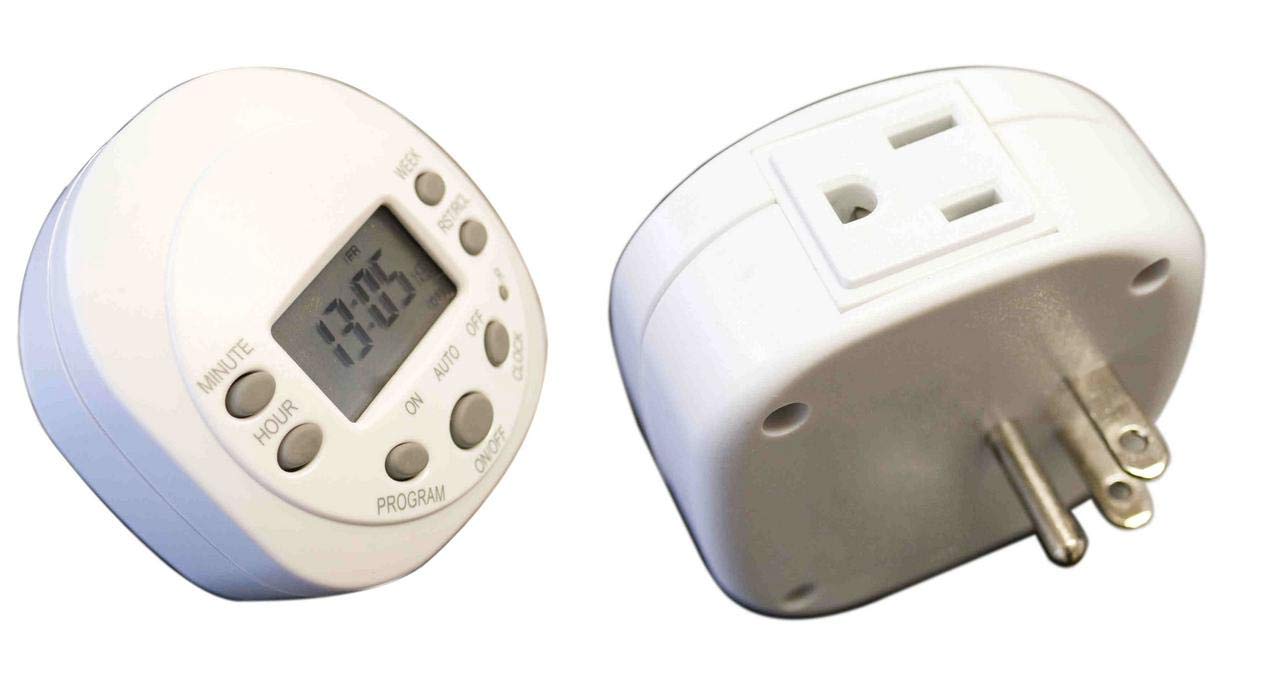
Бул сүрөт алдыңкы жагын көрсөтөт view of the Westek ATW-P24 Programmable Plug-in Timer. It features a digital LCD screen displaying the time and day, surrounded by control buttons labeled SET, TIME, RND, RESET, MANUAL, CTD, and plus/minus buttons. An electrical outlet is visible on the side.
Башкаруу жана дисплей:
- LCD дисплей: Учурдагы убакытты, күндү жана программанын абалын көрсөтөт.
- SET баскычы: Used to enter programming mode for time and programs.
- TIME баскычы: Учурдагы убакытты жана күндү коюу үчүн колдонулат.
- RND (Random) Button: Activates or deactivates the random ON/OFF feature.
- RESET баскычы: Бардык жөндөөлөрдү заводдук демейки жөндөөлөргө кайтарат. Басуу үчүн учтуу нерсени (мисалы, калемдин учу) колдонуңуз.
- КОЛ МЕНЕН БАШКАРУУ баскычы: Overrides current program to turn the connected device ON or OFF instantly.
- CTD (Countdown) Button: Activates or deactivates the countdown timer function.
- + / - баскычтары: Used to adjust time, day, and program settings.
4. Орнотуу
4.1 Баштапкы күйгүзүү жана баштапкы абалга келтирүү
- Plug the timer into a standard 120V AC wall outlet. The display should illuminate.
- Using a small, pointed object (like a pen or paperclip), press the RESET button located in the center of the control panel. This clears all previous settings and ensures proper operation. The display will show 12:00 AM and Monday.
4.2 Учурдагы убакытты жана күндү орнотуу
- басыңыз TIME баскычын бир жолу басыңыз. Сааттын саны күйүп-өчүп турат.
- колдонуу + or - Саатты жөндөө үчүн баскычтарды басыңыз. AM/PM көрсөткүчтөрүнө көңүл буруңуз.
- басыңыз TIME button again. The minute digit will flash.
- колдонуу + or - мүнөттөрдү тууралоо үчүн баскычтар.
- басыңыз TIME button a third time. The day of the week will flash.
- колдонуу + or - buttons to select the current day (MO, TU, WE, TH, FR, SA, SU).
- басыңыз TIME button one last time to confirm and exit time setting mode. The display will show the current time and day.
5. Иштөө нускамалары
5.1 Программалоо КҮЙГҮЗҮҮ/ӨЧҮРҮҮ убакыттары
The timer allows for multiple ON/OFF programs. Follow these steps to set a program:
- басыңыз SET button once. The display will show '1 ON' and the hour will flash. This is for the first ON program.
- колдонуу + or - buttons to set the desired ON hour.
- Басыңыз SET again. The minute will flash. Use + or - каалаган КҮЙГҮЗҮҮ МҮНӨТҮН коюу үчүн.
- Басыңыз SET again. The day(s) of the week will flash. Use + or - to cycle through various day combinations (e.g., MO-SU, MO-FR, SA-SU, individual days, etc.) until you find the desired setting for this ON program.
- Басыңыз SET again. The display will show '1 OFF' and the hour will flash. This is for the first OFF program, corresponding to the '1 ON' program you just set.
- Repeat steps 2-4 to set the desired OFF time and day(s) for this program.
- To set additional programs (2 ON/OFF, 3 ON/OFF, etc.), continue pressing the SET button and repeat the process. The timer typically supports several programs.
- Once all desired programs are set, press the TIME программалоо режиминен чыгып, учурдагы убакытты көрсөтүүгө кайтуу үчүн баскычты басыңыз.
5.2 Кол менен жокко чыгаруу
To temporarily turn the connected appliance ON or OFF without affecting the programmed settings:
- басыңыз КОЛ button. Each press will cycle through ON, OFF, and AUTO modes.
- In ON mode, the appliance will stay on until the next programmed OFF time or until manually changed.
- In ӨЧҮРҮҮ mode, the appliance will stay off until the next programmed ON time or until manually changed.
- In АВТО mode, the timer will follow the programmed ON/OFF settings.
5.3 Random Function (RND)
The random function is useful for security, making it appear as if someone is home. It will randomly turn the connected appliance ON and OFF within a certain time window.
- басыңыз RND button to activate the random function. 'RND' will appear on the display.
- басыңыз RND button again to deactivate it. 'RND' will disappear.
5.4 Countdown Function (CTD)
The countdown function allows you to turn an appliance ON or OFF after a specified duration.
- басыңыз CTD button. The display will show 'CTD' and the hour will flash.
- колдонуу + or - buttons to set the desired countdown hour.
- Басыңыз CTD again. The minute will flash. Use + or - to set the desired countdown minute.
- Басыңыз CTD again to start the countdown. The display will show the remaining time.
- Once the countdown reaches zero, the connected appliance will switch its state (if it was ON, it turns OFF; if it was OFF, it turns ON).
- Артка санаууну жокко чыгаруу үчүн, басыңыз CTD button again during the countdown.
6. Техникалык тейлөө
The Westek ATW-P24 timer requires minimal maintenance.
- Агрегатты жумшак, кургак чүпүрөк менен тазалаңыз. Абразивдүү тазалагычтарды же эриткичтерди колдонбоңуз.
- Ensure the timer is unplugged before cleaning.
- Ичинде колдонуучу тейлей турган бөлүктөр жок.
7. Кыйынчылыктарды
- Таймердин дисплейи бош: Ensure the timer is securely plugged into a live 120V AC outlet. If the display remains blank after plugging in, the unit may be faulty.
- Түзмөк программаланган убакытта күйбөйт/өчпөйт:
- Check if the timer is in АВТО mode (not ON or OFF from manual override).
- Учурдагы убакыт жана күн туура коюлганын текшериңиз.
- Review your programmed ON/OFF times and ensure they are set for the correct days.
- Ensure the appliance connected to the timer is working correctly when plugged directly into the wall outlet.
- Confirm the appliance's power switch is in the ON position if it has one.
- Электр энергиясы өчүрүлгөндөн кийин программалар жоголотtage: The timer has an internal battery to retain settings during brief power interruptions. If programs are lost, press the RESET button and reprogram the timer.
- Баскычтар жооп бербейт: басып көрүңүз RESET button with a pointed object. If the issue persists, the unit may be faulty.
8. Техникалык шарттар
- Модел: ATW-P24
- Электрдик рейтинг: 120 VAC, 15 Ampс, 1875 Уоттс
- Программалоо: 7 day/24 hour programmable
- Функциялары: Programmable ON/OFF, Manual Override, Random, Countdown
- Өлчөмдөрү: Болжол менен 1.25 x 2.75 x 3 дюйм
- Салмагы: Болжол менен 2.4 унция
- Материал: Brass (internal components), Plastic (housing)
- Түсү: Ак
9. Кепилдик жана колдоо
This Westek ATW-P24 Programmable Plug-in Timer comes with a 3 жылдык өндүрүүчүнүн кепилдиги сатып алынган күндөн тартып. Бул кепилдик нормалдуу колдонуудагы материалдардагы жана жасалгадагы кемчиликтерди камтыйт.
For warranty claims, technical support, or further assistance, please contact Westek customer service. Keep your proof of purchase for warranty validation.
Эскертүү: The warranty does not cover damage caused by misuse, accident, unauthorized modification, or exceeding the specified electrical ratings.


