Introduction
The Plantronics M25 Bluetooth headset is designed for convenient wireless communication and audio playback. It features an extended battery life with DeepSleep mode, ensuring readiness when needed. The headset provides whispered alerts for battery status and connection information, and allows for listening to music, internet radio, or navigation directions while managing calls.
Пакеттин мазмуну
Пакетиңизде бардык буюмдар бар экенин текшериңиз:
- Plantronics M25 Bluetooth гарнитура
- AC Charger (100-240v)
- Clip-on Earloop
Жайгашуу
1. Гарнитураны заряддоо
Before first use, fully charge the headset. Connect the AC charger to the headset's charging port. The indicator light will change to show charging status and turn off or change color when fully charged. A full charge can provide up to 5 months of readiness in DeepSleep mode.
2. Түзмөк менен жупташтыруу
To pair your Plantronics M25 headset with a Bluetooth-enabled device (e.g., smartphone, tablet):
- Гарнитура заряддалганын жана өчүрүлгөнүн текшериңиз.
- Press and hold the Call button on the headset until the indicator light flashes red and blue, indicating pairing mode.
- Түзмөгүңүздө Bluetooth иштетип, жаңы түзмөктөрдү издеңиз.
- Select "Plantronics M25" from the list of available devices.
- Эгер өткөрүүчү код суралса, "0000" (төрт нөл) киргизиңиз.
- Once paired, the headset's indicator light will stop flashing and a voice prompt will confirm the connection.
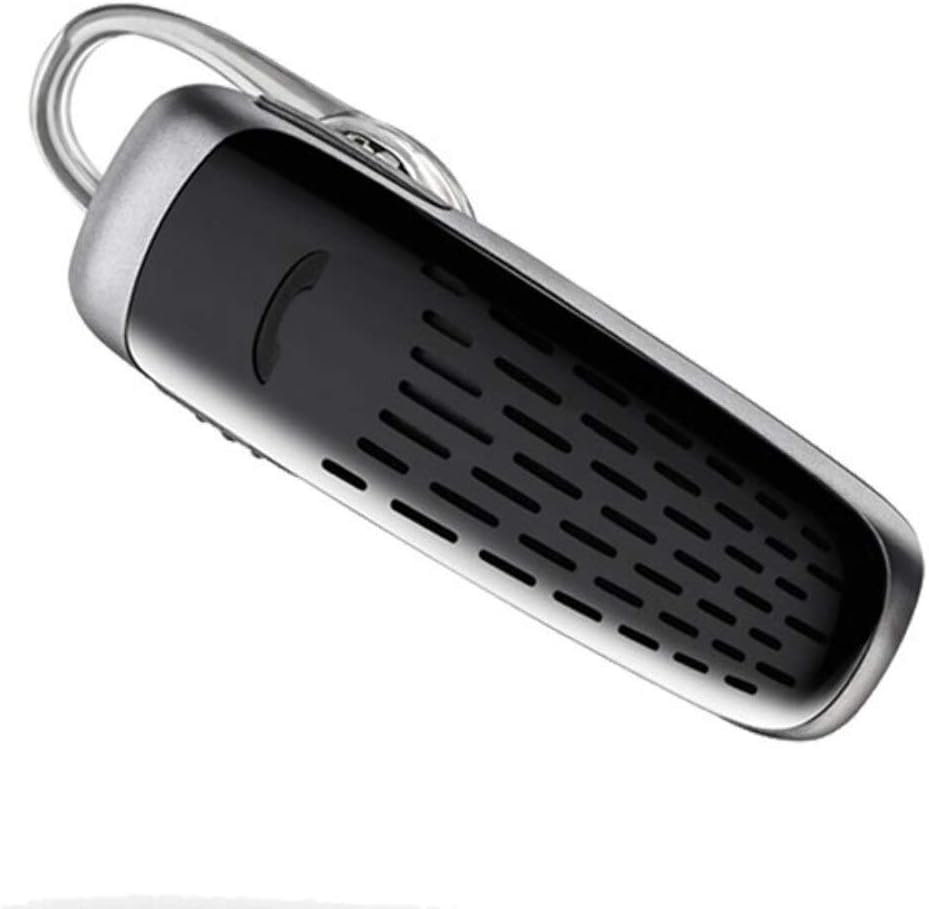
Image: The Plantronics M25 Bluetooth Headset, a compact black and silver device with an earloop, shown from an angled perspective. The call button is visible on the side.
Иштөө нускамалары
Күйгүзүү/өчүрүү
- Күйгүзүү: Индикатордун жарыгы көк түстөгү күйгүчө Күч баскычын басып, кармап туруңуз.
- Өчүрүү: Press and hold the Power button until the indicator light flashes red.
Чалууларды кабыл алуу жана кабыл алуу
- Чакырууга жооп берүү: Чакыруу баскычын басыңыз.
- Чакырууну аяктоо: Чакыруу баскычын басыңыз.
- Чакырууну четке кагуу: Чакыруу баскычын 2 секунд басып туруңуз.
- Акыркы номерди кайра терүү: Чакыруу баскычын эки жолу басыңыз.
Аудио ойнотуу
The headset supports streaming audio from your device, including music, podcasts, and GPS directions.
- Ойнотуу/тындыруу: Press the Call button during audio playback.
DeepSleep режими
The headset enters DeepSleep power-saving mode if it is disconnected from your phone for over 90 minutes. To wake it up when it's back in range (within 33 feet), simply tap the Call button.
Техникалык тейлөө
- Тазалоо: Гарнитураны тазалоо үчүн жумшак, кургак чүпүрөктү колдонуңуз. Суюк тазалоочу каражаттарды же аэрозольдорду колдонбоңуз.
- Сактагыч: Гарнитураны салкын, кургак жерде, өтө жогорку температурадан алыс сактаңыз.
- Батареяга кам көрүү: To preserve battery life, avoid fully discharging the battery frequently. Charge the headset regularly, even if not in use.
- Суу каршылык: Бул аппарат болуп саналат Сууга чыдамдуу эмесСууга же ашыкча нымдуулукка дуушар болбоңуз.
Проблемаларды чечүү
| Көйгөй | Чечим |
|---|---|
| Гарнитура күйбөйт. | Ensure the headset is charged. Connect it to the AC charger and allow it to charge for at least 30 minutes before attempting to power on. |
| Cannot pair the headset with my device. |
|
| No audio or low audio volume. |
|
| Headset frequently disconnects. |
|
Техникалык шарттар
| Өзгөчөлүк | Деталь |
|---|---|
| Модель аты | Plantronics M25 |
| Байланыш технологиясы | Bluetooth |
| Зымсыз байланыш технологиясы | Bluetooth |
| Шайкеш түзмөктөр | Smartphones, Laptops, Desktops, Tablets, Smart Speakers, Televisions |
| Башкаруу түрү | Чалууларды башкаруу |
| Элемент Салмагы | 0.3 унция (болжол менен 8.5 грамм) |
| Сууга туруктуулук деңгээли | Сууга чыдамдуу эмес |
| Жыштык диапазону | 20 Гцден 20,000 Гцге чейин |
| Battery Life (DeepSleep) | 150 күнгө чейин |
| Bluetooth диапазону | 10 метрге чейин (33 фут) |
| Кулак жайгаштыруу | Кулакта |
| Форма фактору | One Ear |
| Noise Control | Активдүү ызы-чууну жокко чыгаруу |
| Продукциянын өлчөмдөрү | 1.85 x 0.59 x 0.35 дюйм |
| Түс | Кара |
| Өндүрүүчү | Plantronics |
Кепилдик жана колдоо
Кепилдик маалыматы: Эске алыңыз, бул продукт төмөнкүлөр менен сатылат No Warranty or Return as per the provided information. Users are advised to verify product condition upon receipt.
For further assistance or inquiries, please refer to the official POLY support channels or visit their website. Contact information may be available on the product packaging or the manufacturer's official webсайт.
Disclaimer: Product specifications and features are subject to change without notice. Always refer to the latest information provided by the manufacturer.


