Introduction
Welcome to the user manual for your Timberland Washington Summit Digital Sensor Pacer Watch, Model 13386JPBUS_01. This guide provides detailed instructions for setting up, operating, maintaining, and troubleshooting your watch. Designed for durability and functionality, this watch features a digital display, chronograph, dual-time, alarm, compass, day-date, month display, finger touch heart rate meter, light, lap timer, digital sensor, and timer functions.
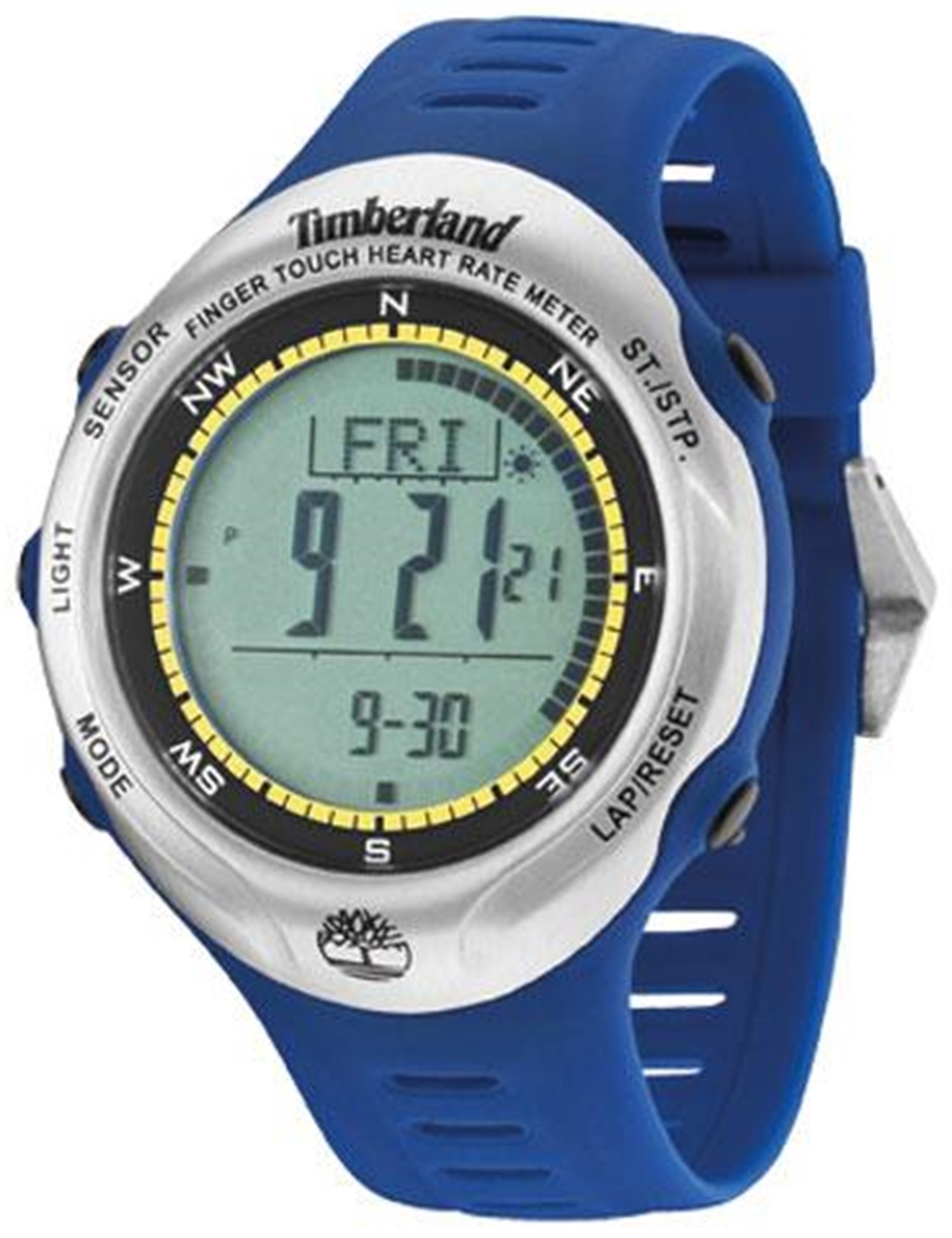
This image displays the Timberland Washington Summit Digital Sensor Pacer Watch, highlighting its digital grey dial, blue rubber strap, and function pushers.
Жайгашуу
1. Кутудан чыгаруу жана алгачкы текшерүү
- Саатты таңгагынан кылдаттык менен чыгарыңыз.
- Inspect the watch for any visible damage.
- Бардык компоненттер бар экенин ырастаңыз.
2. Саатты иштетүү
Your watch comes with a pre-installed battery. If the display is not active, gently press any button to wake the watch. If the watch remains inactive, refer to the Troubleshooting section.
3. Убакыт жана дата орнотуу
- Locate the mode button (usually on the left side). Press it repeatedly until the time setting mode is displayed.
- Use the adjustment buttons (typically on the right side) to change the hour, minute, year, month, and day.
- Press the mode button again to confirm settings and exit the time setting mode.
Иштөө нускамалары
Багыттоо режими
басыңыз Mode button (refer to your watch's specific button layout) to cycle through the following functions: Time, Chronograph, Dual-Time, Alarm, Compass, Heart Rate, Lap Timer, and Timer.
1. Time and Date Display
- The default display shows the current time, day, and date.
- To activate the backlight, press the Жарык баскычы.
2. Хронограф (Секундомер)
- Navigate to the Chronograph mode.
- басыңыз Start/Stop убакытты белгилөөнү баштоо үчүн баскыч.
- Басыңыз Start/Stop кайра тыныгуу/ улантуу үчүн.
- басыңыз Калыбына келтирүү button to clear the time.
3. Dual-Time
Бул функция сизге мүмкүнчүлүк берет view a second time zone. In Dual-Time mode, use the adjustment buttons to set the desired second time.
4. Ойготкуч
- Ойготкуч режимине кириңиз.
- Use the adjustment buttons to set the alarm time.
- Activate or deactivate the alarm using the designated button (refer to your watch's specific button functions).
5. Компас
In Compass mode, hold the watch level and allow it to calibrate. The display will indicate the cardinal directions. For accurate readings, avoid strong magnetic fields.
6. Finger Touch Heart Rate Meter
To measure your heart rate, ensure your fingers are clean and dry. In Heart Rate mode, place your finger firmly on the designated sensor area (usually on the bezel or case back). Remain still until the reading is displayed.
7. Lap Timer and Timer
The Lap Timer function allows you to record multiple lap times during an activity. The Timer (countdown timer) can be set for a specific duration, alerting you when it reaches zero. Refer to the on-screen prompts and button functions in their respective modes for detailed operation.
Техникалык тейлөө
1. Саатыңызды тазалоо
- Сааттын корпусун жана боосун жумшак, d менен сүртүңүзamp кездеме.
- Катуу химиялык заттарды, эриткичтерди же абразивдүү тазалагычтарды колдонуудан алыс болуңуз.
- For rubber straps, a mild soap solution can be used, followed by rinsing with clean water and thorough drying.
2. Сууга туруктуулук
Your watch is water resistant to 30 meters (99 feet). This means it can withstand splashes of water and rain. It is not suitable for showering, swimming, or submersion in water. Do not operate buttons when the watch is wet.
3. Батареяны алмаштыруу
When the display dims or functions become erratic, the battery may need replacement. This watch uses 1 product-specific battery. It is recommended to have the battery replaced by a qualified watch technician to ensure proper sealing and maintain water resistance.
Проблемаларды чечүү
| Көйгөй | Мүмкүн себеп | Чечим |
|---|---|---|
| Дисплей бош же күңүрт. | Батарея аз. | Батареяны алмаштырыңыз (адис сунуштайт). |
| Убакыт туура эмес. | Убакыт туура коюлган эмес же кокусунан туураланган. | Refer to "Setting Time and Date" in the Setup section. |
| Баскычтар жооп бербейт. | Watch may be in a locked mode or internal error. | Try pressing all buttons to see if it unlocks. If unresponsive, a battery reset may be needed by a technician. |
| Heart rate sensor not working. | Improper finger placement, dirty sensor, or dry skin. | Ensure clean, firm contact with the sensor. Moisten finger slightly if skin is very dry. |
Техникалык шарттар
| Модель номери | 13386JPBUS_01 |
| Бренд | Тимберленд |
| Кыймыл түрү | Кварц |
| Иштин диаметри | 47 миллиметр |
| Case Thickness | 14 миллиметр |
| Band Материал түрү | Каучук |
| Band Color | Көк |
| Кристалл түрү | Сапфир каптамасы бар минералдык айнек |
| Сууга каршылыктын тереңдиги | 30 метр (99 бут) |
| Батареялар талап кылынат | 1 Продукттун өзгөчө батареясы (кошулган) |
| Элемент Салмагы | 249 г |
Кепилдик маалымат
This Timberland Washington Summit Digital Sensor Pacer Watch comes with a 2-year store warranty. For any warranty claims or service, please contact the seller of record directly. Keep your proof of purchase for warranty validation.
Колдоо
For further assistance, technical support, or inquiries not covered in this manual, please refer to the official Timberland webсайтка же кардарларды тейлөө бөлүмүнө кайрылыңыз.
- Өндүрүүчү: Тимберленд
- Онлайн ресурстар: Visit the official Timberland website for product updates and additional support.
- Сатуучуну колдоо: For purchase-specific issues, contact the retailer from whom the watch was purchased.


