1. Киришүү
This manual provides detailed instructions for the safe and efficient operation of your Vivitek Qumi Q5 Pocket DLP Projector. Please read this manual thoroughly before using the projector and retain it for future reference. The Vivitek Qumi Q5 is a compact, high-definition LED projector designed for portability and versatility, featuring 500 lumens brightness, WXGA resolution, and various connectivity options.
2. Коопсуздук боюнча маанилүү маалымат
Проекторго зыян келтирбөө жана колдонуучунун коопсуздугун камсыз кылуу үчүн төмөнкү коопсуздук чараларын сактаңыз:
- Вентиляция тешиктерин жаап албаңыз. Проектордун айланасында адекваттуу аба агымын камсыз кылыңыз.
- l болгондо проектордун объективине тике карабаamp күйүк. Жарык жарык көзгө зыян келтириши мүмкүн.
- Проектор менен келген кубат адаптерин гана колдонуңуз.
- Өрт же электр тогуна урунуу коркунучун азайтуу үчүн проекторду жамгырдын же нымдуулуктун таасирине дуушар кылбаңыз.
- Проекторду туруктуу, тегиз жерге коюңуз.
- Проекторду тазалоодон мурун же узак убакыт бою колдонбогондо розеткадан сууруп алыңыз.
- Бардык тейлөөлөрдү квалификациялуу тейлөө кызматкерлерине тапшырыңыз.
3. Пакеттин мазмуну
Төмөндө тизмеленген нерселердин баары пакетиңизге камтылганын текшериңиз:
- Vivitek Qumi Q5 Projector
- Кубаттуу адаптер
- Universal I/O to VGA Cable
- HDMI кабели
- 3.5mm AV-in Cable
- Ташуу баштыгы
- Алыстан башкаруу
- Quick Start Guide
- Кепилдик картасы
4. Продукт бүтүп калдыview
Familiarize yourself with the various components and features of your Vivitek Qumi Q5 projector.
4.1 Фронт View

Сүрөт 4.1: Фронт view of the Vivitek Qumi Q5 projector, showing the lens and ventilation grilles.
The front of the projector features the projection lens and air vents for cooling. Ensure these vents are not obstructed during operation.
4.2 Жогору View

Сүрөт 4.2: Жогорку view of the Vivitek Qumi Q5 projector, highlighting the touch-sensitive control panel.
The top panel includes touch-sensitive controls for navigation and menu selection. The "Qumi" logo is also visible.
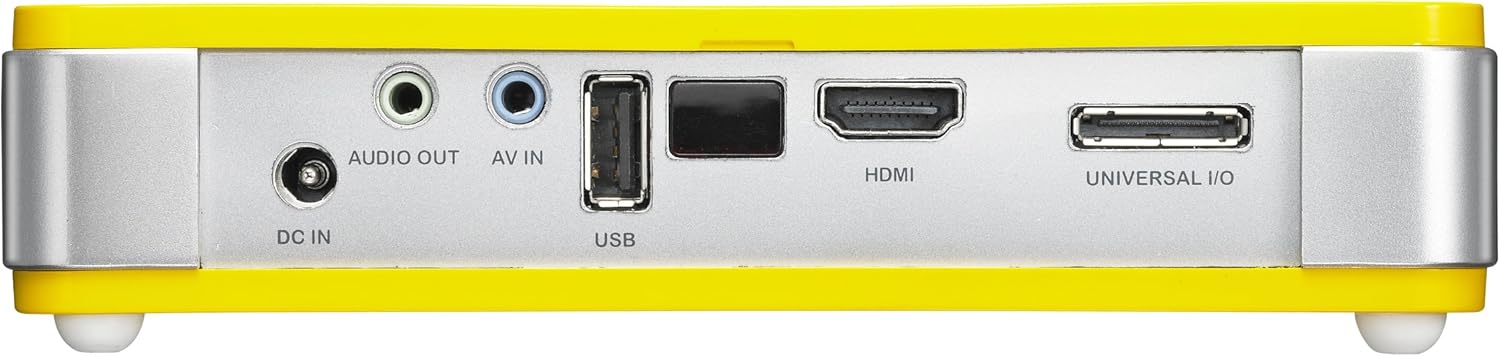
4.3 Арткы View (Туташуу порттору)

Сүрөт 4.3: Арткы view of the Vivitek Qumi Q5 projector, displaying all input and output ports.
The rear panel houses all essential connectivity ports:
- DC IN: Кубат адаптерин туташтыруу үчүн.
- АУДИО ЧЫГЫШ: 3.5mm jack for external speakers or headphones.
- AV IN: 3.5mm jack for composite video and stereo audio input.
- USB: USB сактагыч түзмөктөрдү туташтыруу үчүн.
- HDMI: High-Definition Multimedia Interface for digital video and audio input.
- UNIVERSAL I/O: Multi-purpose port for VGA and other analog inputs via adapter.
5. Орнотуу
Follow these steps to set up your Vivitek Qumi Q5 projector.
5.1 Powering On the Projector
- Кубат адаптерин DC IN проектордогу порт.
- Кубат адаптерин розеткага сайыңыз.
- Press the power button on the projector or remote control to turn on the device. The power indicator light will illuminate.
5.2 Киргизүү булактарын туташтыруу
The Qumi Q5 supports various input sources:
- HDMI: Баштапкы түзмөгүңүздөн (мисалы, ноутбук, Blu-ray ойноткуч) HDMI кабелин туташтырыңыз HDMI проектордогу порт.
- VGA: Use the supplied Universal I/O to VGA cable to connect your computer's VGA output to the UNIVERSAL I/O порт.
- AV (Composite): Use the supplied 3.5mm AV-in cable to connect composite video and stereo audio devices to the AV IN порт.
- USB: USB флэш-дискти салыңыз USB port to play media fileтүздөн-түз с.
- Зымсыз (кошумча): If using an optional WiFi USB dongle, insert it into the USB port for wireless connectivity. Refer to the dongle's instructions for setup.
5.3 Фокусту тууралоо
Locate the focus wheel on the side of the projector. Rotate the wheel until the projected image appears sharp and clear on your screen or wall.
Сүрөт 5.3: Side view of the Vivitek Qumi Q5, indicating the location of the focus adjustment wheel.
6. Проекторду иштетүү
6.1 Менюда навигация
Use the touch-sensitive buttons on the top panel or the remote control to navigate the projector's on-screen display (OSD) menu. The menu allows you to adjust image settings, input sources, and other system configurations.
6.2 Киргизүү булагын тандоо
Press the "Source" button on the remote control or navigate through the OSD menu to select the desired input source (HDMI, VGA, AV, USB, or Wireless).
6.3 Сүрөттү тууралоо
Within the OSD menu, you can adjust various image parameters:
- Жарыктык/Контраст: Adjust for optimal image visibility.
- Түсү/Төңү: Түстү кайра чыгаруу.
- Аспект катышы: Select between 4:3, 16:9, or other available ratios to match your content.
- Негизги ташты оңдоо: Эгерде проектор экранга толук перпендикуляр болбосо, трапеция сымал бурмалоону оңдоңуз.
6.4 USBден медианы ойнотуу
When a USB drive is inserted, the projector's media player interface will typically launch automatically. You can browse and play supported video, audio, and image files түздөн-түз USB дискинен.
6.5 3D функциясы
The Qumi Q5 is 3D-ready via DLP Link technology. To view 3D content, you will need compatible 3D source material, a 3D-capable player, and active DLP Link 3D glasses (sold separately).
7. Техникалык тейлөө
Туура тейлөө проекторуңуздун узак иштөөсүн жана оптималдуу иштешин камсыз кылат.
7.1 Проекторду тазалоо
- Сырткы: Бир аз жумшак, түксүз кездемени колдонуңуз dampсуу же жумшак тазалоо эритмеси менен. Абразивдүү тазалагычтарды же эриткичтерди колдонбоңуз.
- Объектив: Gently wipe the lens with a lens cleaning cloth or lens paper. Avoid touching the lens surface with your fingers.
- Тешиктер: Use a soft brush or compressed air to clear dust from the ventilation openings.
7.2 LED жарык булагы
The Qumi Q5 utilizes an LED light source with an estimated operational life of up to 30,000 hours, significantly reducing the need for lamp салттуу проекторлор менен салыштырганда алмаштыруу.
7.3 Сактоо
When not in use for extended periods, store the projector in its carrying pouch in a cool, dry place, away from direct sunlight and extreme temperatures.
8. Кыйынчылыктарды
Сиз кездештире турган кеңири таралган көйгөйлөрдүн чечимдери үчүн ушул бөлүмгө кайрылыңыз.
| Көйгөй | Мүмкүн себеп | Чечим |
|---|---|---|
| Сүрөт көрсөтүлгөн жок. |
|
|
| Сүрөт бүдөмүк. |
|
|
| Аудио жок. |
|
|
| Проектор ысып кетет же өчүп калат. |
|
|
9. Техникалык шарттар
Key technical specifications for the Vivitek Qumi Q5 projector:
- Модел: Qumi Q5
- Дисплей технологиясы: DLP Pico chipset
- Түпкү резолюция: WXGA (1280 x 720)
- Жарыктык: 500 люменге чейин
- Жарык булагы: LED (Estimated 30,000 hours operation)
- Байланыш: HDMI, Universal I/O (VGA), AV mini-jack, USB, Audio-out mini-jack, Wireless (via optional USB dongle)
- Ички эстутум: 4 ГБ
- 3D даяр: Yes, via DLP Link
- Өлчөмдөрү: 4 x 6.3 x 1.3 дюйм (10.16 x 16.00 x 3.30 см)
- Салмагы: 1.1 фунт (0.5 кг)
- Электр камсыздоо: Тышкы адаптер
10. Кепилдик жана колдоо
Your Vivitek Qumi Q5 projector is covered by a limited warranty. Please refer to the included Warranty Card for specific terms and conditions, including warranty period and coverage details. For technical support, service, or further inquiries, please visit the official Vivitek webсайтка же кардарларды тейлөө бөлүмүнө кайрылыңыз. Сатып алуу квитанциясын кепилдик дооматтары үчүн сатып алуунун далили катары сактаңыз.


