Introduction
This manual provides essential instructions for the setup, operation, maintenance, and troubleshooting of your Polycom HDX 7000-720 Video Conferencing System. Please read this manual thoroughly before using the system to ensure proper installation and optimal performance.
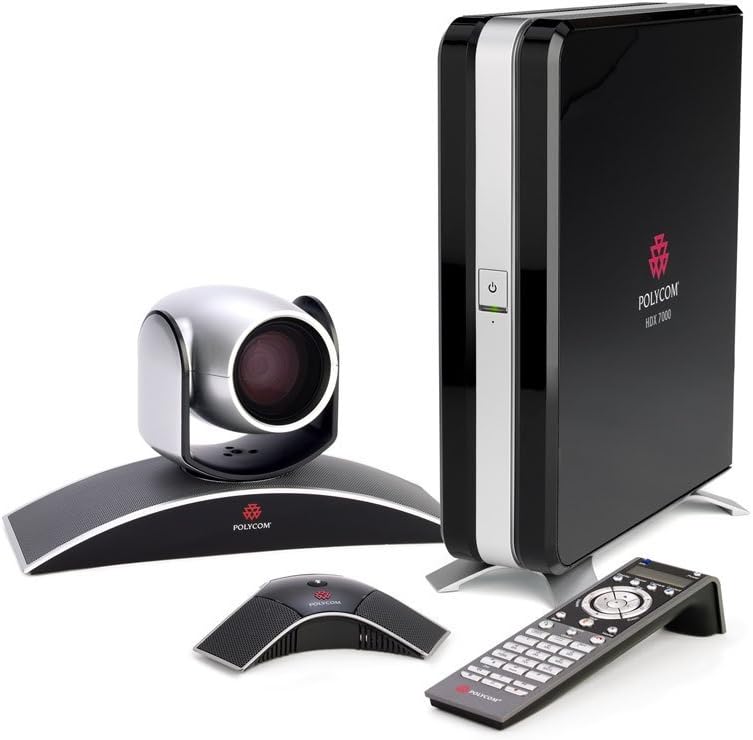
1. Системанын компоненттери
The Polycom HDX 7000-720 system typically includes the following components:
- Polycom HDX 7000 Codec Unit
- Polycom EagleEye Camera
- Polycom HDX Microphone Array
- Infrared алыстан башкаруу
- Necessary Cables (power, video, audio, network)
2. Системаны орнотуу
2.1 Пакеттен чыгаруу жана жайгаштыруу
Carefully unpack all components. Place the HDX 7000 codec unit in a well-ventilated area, away from direct sunlight or heat sources. Position the EagleEye camera and microphone array appropriately for optimal room coverage.
2.2 Туташтыруучу компоненттер
Refer to the rear panel diagram for correct connection points. Ensure all connections are secure before powering on the system.

- Кубат туташуу: Connect the power cable to the codec unit and then to a suitable power outlet.
- Камеранын туташуусу: Connect the EagleEye camera to the dedicated camera port on the rear of the HDX 7000 codec unit.
- Microphone Array Connection: Connect the HDX microphone array to the audio input port designated for microphones.
- Дисплей туташуусу: Connect your display(s) (monitor, projector) to the DVI video output ports on the codec unit. The system supports multiple displays.
- Тармак туташуусу: Connect an Ethernet cable from your network router or switch to the LAN port on the codec unit for network access.
- Content Input (Optional): If sharing content from a PC or other source, connect it to the DVI or other available video input ports.
3. Негизги операция
3.1 Күйгүзүү/өчүрүү
Press the power button on the front of the HDX 7000 codec unit or on the remote control to power the system on or off. Allow the system a few moments to boot up.
3.2 Алыстан башкарууну колдонуу
The infrared remote control provides access to all system functions, including call management, camera control, volume adjustment, and menu navigation.

3.3 Чалууларды кабыл алуу жана кабыл алуу
Use the remote control to navigate to the dialing menu. Enter the IP address or E.164 number of the desired contact and initiate the call. Incoming calls will typically display an alert on the screen, allowing you to accept or decline.
3.4 Камераны башкаруу
The EagleEye camera offers pan, tilt, and zoom (PTZ) capabilities. Use the directional buttons and zoom controls on the remote to adjust the camera's view. You can also save and recall camera presets for common viewбурчтар.

3.5 Мазмун бөлүшүү
To share content from a connected device (e.g., laptop), select the content sharing option from the system menu. Ensure your device is properly connected to the codec's content input port.
4. Техникалык тейлөө
4.1 Тазалоо
Use a soft, dry cloth to clean the exterior surfaces of the codec unit, camera, and microphone array. Avoid using liquid cleaners or abrasive materials, which can damage the finish or internal components.
4.2 Программалык камсыздоо жаңыртуулары
Polycom колдоо кызматын мезгил-мезгили менен текшерип туруңуз website for available software updates. Keeping your system's software up-to-date ensures optimal performance, security, and access to new features.
5. Кыйынчылыктарды
This section addresses common issues you might encounter with your Polycom HDX 7000-720 system.
5.1 Күч жок
- Verify the power cable is securely connected to both the codec unit and the power outlet.
- Электр розеткасынын иштешин текшериңиз.
- Check the power button on the front panel or remote control.
5.2 Видео көрсөтүү жок
- Confirm that the display is powered on and set to the correct input source.
- Check the DVI video cables connecting the codec to the display(s) for secure connections.
- Камеранын туура туташтырылганын жана кубатталганын текшериңиз.
5.3 Аудио жок
- Check the volume settings on the system and your display.
- Verify the microphone array is correctly connected and not muted.
- Ensure external speakers (if used) are connected and powered.
5.4 Тармакка туташуу маселелери
- Confirm the Ethernet cable is securely connected to the LAN port and your network device.
- Check your network router or switch for proper operation.
- Verify network settings within the system's configuration menu.
6. Техникалык шарттар
Key specifications for the Polycom HDX 7000-720 system:
- Бренд: Polycom
- Модель номери: HDX7000
- Өндүрүүчү бөлүгүнүн номери: 7200-23130-001
- Элемент Салмагы: 24.3 фунт
- Пакеттин өлчөмдөрү: 20 x 18 x 17 дюйм
- Биринчи жеткиликтүү: 28-сентябрь, 2013-жыл
7. Кепилдик маалыматы
For detailed warranty information regarding your Polycom HDX 7000-720 system, please refer to the warranty card included with your product or visit the official Polycom webсайт. Кепилдиктин шарттары жана шарттары аймакка жана сатып алуу күнүнө жараша өзгөрүшү мүмкүн.
8. Кардарларды колдоо кызматы
If you require further assistance or encounter issues not covered in this manual, please contact Polycom customer support. Support contact information can typically be found on the Polycom webсайтында же продукт документациясында.


