Introduction
The Fujifilm FinePix C25 is a compact digital camera designed for ease of use, allowing users to capture high-quality images with minimal effort. Featuring a 12-megapixel CCD sensor and a Fujinon 3x optical zoom lens, it delivers clear, high-resolution photographs. The camera includes a 2.4-inch TFT color LCD monitor for convenient viewинг жана навигация.
Key features include HD capability, Automatic Scene Recognition, Face Detection, and high ISO sensitivity levels, which contribute to capturing memorable moments in both still images and video. The camera also supports white balancing, digital image stabilization, and uses SD/SDHC memory cards for storage. A built-in flash and self-timer enhance its versatility.
Кутуда эмне бар
Пакетти ачканда, төмөнкү нерселердин бардыгы бар экенин текшериңиз:
- Fujifilm FinePix C25 Digital Camera
- 2 x AA батарейкалар
- USB кабели
- User Information Guide (this manual)
Жайгашуу
1. Батареяларды салуу
The camera operates on 2 AA batteries. Ensure correct polarity when inserting them into the battery compartment. The camera supports Alkaline and Lithium Ion battery types.
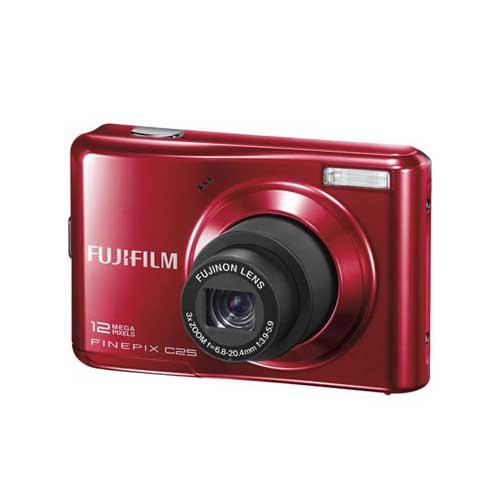
Image showing the front of the Fujifilm FinePix C25 digital camera, highlighting its compact design and lens. This is where the battery compartment is typically located on the underside or side.
2. Эстутум картасын салуу
The FinePix C25 uses SD or SDHC memory cards for storing photos and videos. Locate the memory card slot, typically near the battery compartment, and insert the card until it clicks into place. Ensure the card is inserted in the correct orientation.
- Колдоого алынган карталардын түрлөрү: SD, SDHC
3. Баштапкы күйгүзүү
After inserting batteries and a memory card, press the power button to turn on the camera. Follow any on-screen prompts for initial setup, such as setting the date and time.
Камераны иштетүү
Негизги сүрөт
- Күйгүзүү: Press the power button. The 2.4-inch LCD screen will activate.
- Режимди тандоо: Use the mode dial or menu to select your desired shooting mode. The camera features various scene modes and automatic exposure control.
- Сиздин кадр: Use the LCD monitor or optical viewfinder to compose your image.
- Фокус: The camera uses Contrast Detection Autofocus. Half-press the shutter button to focus. The focus indicator will confirm when focus is achieved.
- Тартуу: Fully press the shutter button to take a picture. The camera captures 12-megapixel still images with a JPEG Fine quality level.
Zoom функциясы
The FinePix C25 is equipped with a Fujinon 3x optical zoom lens, allowing you to magnify distant subjects without losing image quality. It also features a 6.3x digital zoom for further magnification, though this may reduce image clarity.
- Оптикалык масштаб: 3x
- Digital Zoom: 6.3x
Flash колдонуу
The camera has a built-in flash with automatic flash modes. The flash will automatically fire in low-light conditions when set to auto mode. You can also manually select flash modes via the camera's menu.
Видеолорду жаздыруу
To record video, switch the camera to movie mode. The camera captures video at 640 x 480 pixels resolution in AVI format. Press the shutter button to start and stop recording.
- Видеонун чечилиши: 640 x 480 пиксель
- Видео формат: AVI
Сүрөттү ойнотуу
Press the playback button (usually indicated by a triangle icon) to review your captured photos and videos on the 2.4-inch LCD screen.
Техникалык тейлөө
- Линзаны тазалоо: Камера линзалары үчүн атайын жасалган жумшак, түксүз кездемени колдонуңуз. Манжаларыңыз менен линзага тийүүдөн качыңыз.
- Денени тазалоо: Камеранын корпусун жумшак, кургак чүпүрөк менен сүртүңүз. өжөр кир үчүн, бир аз гampen the cloth with water. Do not use solvents or alcohol.
- Батареяга кам көрүү: Remove batteries if the camera will not be used for an extended period. Store batteries in a cool, dry place.
- Сактагыч: Store the camera in a dry, dust-free environment, away from extreme temperatures and direct sunlight.
Проблемаларды чечүү
| Көйгөй | Чечим |
|---|---|
| Камера күйбөйт. | Check if batteries are inserted correctly and fully charged. Replace with fresh batteries if necessary. Ensure the battery compartment is securely closed. |
| Сүрөткө тартуу мүмкүн эмес. | Ensure a memory card is inserted and has sufficient free space. Check if the lens cap is removed. Verify that the camera is not in playback mode. |
| Сүрөттөр бүдөмүк. | Ensure the lens is clean. Half-press the shutter button to allow the camera to focus before fully pressing. Use digital image stabilization in shaky conditions. |
| Flash күйбөйт. | Check flash settings; it might be set to "Flash Off" or "Red-eye Reduction" mode. Ensure the subject is within the flash's effective range. |
| Эстутум картасынын катасы. | Reinsert the memory card. Try a different compatible SD/SDHC card. Format the card (Эскертүү: бул бардык маалыматтарды өчүрөт). |
Техникалык шарттар
| Өзгөчөлүк | Деталь |
|---|---|
| Модель аты | FinePix C25 |
| Бренд | Fujifilm |
| Сүрөт сенсорунун чечилиши | 12 депутат |
| Сенсор түрү | CCD |
| Оптикалык масштаб | 3x |
| Digital Zoom | 6.3x |
| Линзанын түрү | Fujinon 3X optical zoom lens |
| Image Stabilization | Санарип |
| Дисплей түрү | LCD |
| Screen Size | 2.4 дюйм |
| Колдоого алынган File Format (Stills) | JPEG |
| Колдоого алынган File Формат (Видео) | AVI |
| Видео тартуунун резолюциясы | 640 x 480 пиксель |
| Flash түрү | Камтылган |
| Memory Card Slots | SD, SDHC |
| Батарея түрү | AA (Alkaline, Lithium Ion) |
| Элемент Салмагы | 128 грамм |
| Максималдуу жапкыч ылдамдыгы | 2000 секунд |
| Минималдуу жапкыч ылдамдыгы | 4 секунд |
| Экспозицияны көзөмөлдөө | Автоматтык |
| Автофокус технологиясы | Контрастты аныктоо |
| Байланыш | USB (1 port) |
Кепилдик жана колдоо
For warranty information and technical support regarding your Fujifilm FinePix C25 camera, please refer to the official Fujifilm website or contact their customer service directly. Details are typically provided in the separate warranty card included with your product or available on the manufacturer's support pages.
Өндүрүүчү: FUJIFILM


