1. Киришүү
Thank you for choosing the Hama 95236 8-inch LCD Digital Photo Frame. This manual provides important information regarding the safe operation, setup, and maintenance of your device. Please read it thoroughly before using the product and keep it for future reference.
2. Коопсуздук нускамалары
- Түзмөктү ачпаңыз. Туура эмес чогултуу же оңдоо электр тогуна урунууга алып келиши мүмкүн.
- Эгерде продукт көрүнөө бузулса, аны иштетпеңиз.
- Продукцияны кирден, нымдан жана ысып кетүүдөн сактаңыз. Аны кургак чөйрөдө гана колдонуңуз.
- Продукцияны түшүрбөңүз же күчтүү титирөөлөргө дуушар кылбаңыз.
- Продукцияны өз максаты боюнча гана колдонуңуз.
- Бул продуктуну, бардык электр буюмдары сыяктуу, балдар жетпеген жерде сактаңыз.
- Таңгактоочу материалды жергиликтүү колдонуудагы эрежелерге ылайык дароо жок кылыңыз.
3. Пакеттин мазмуну
Пакетте төмөнкү заттар бар экенин текшериңиз:
- Hama 95236 8-inch LCD Digital Photo Frame
- Кубаттуу адаптер
- Колдонуучунун Колдонмосу (бул документ)
4. Продукт бүтүп калдыview
Familiarize yourself with the components and controls of your digital photo frame.
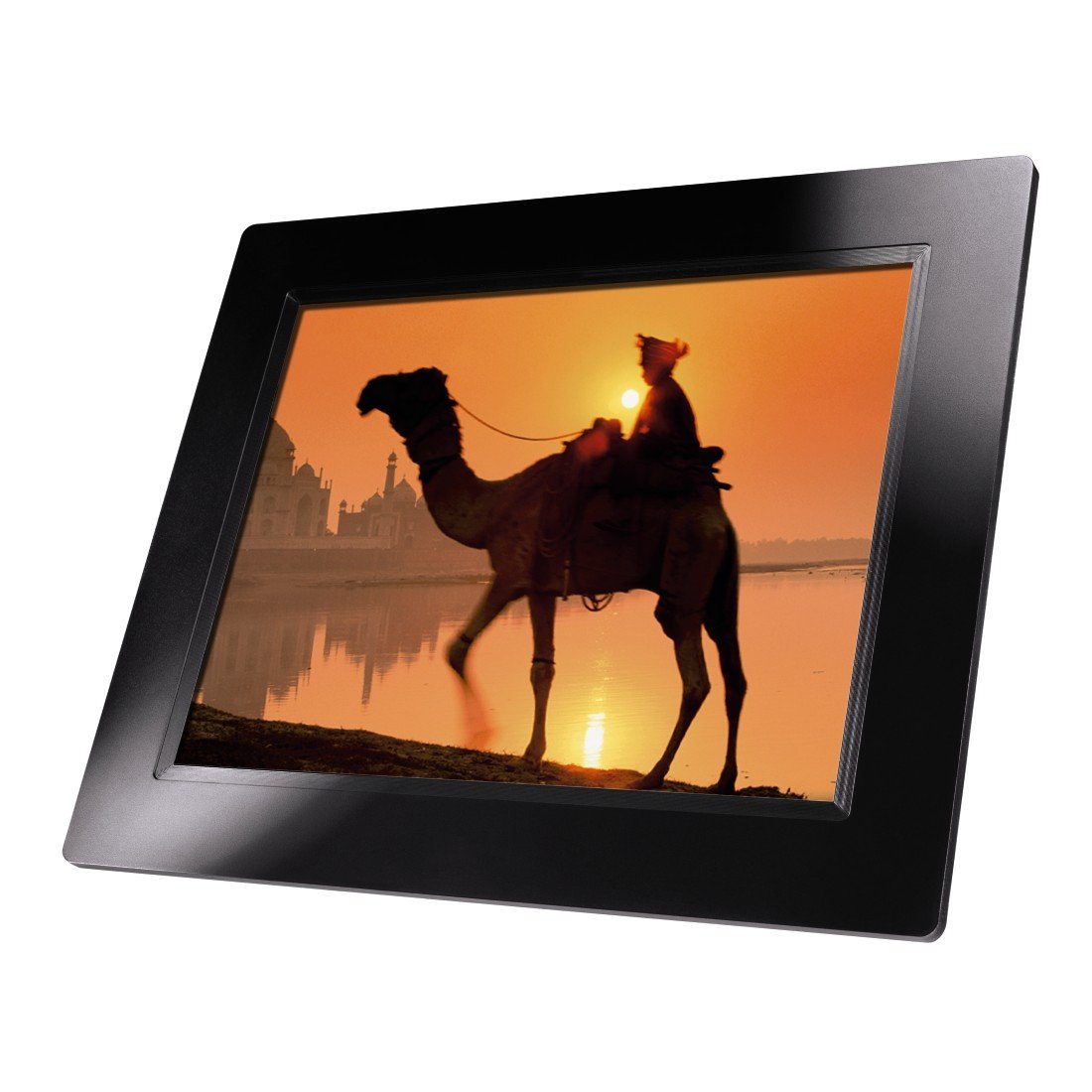
4.1-сүрөт: Фронт view of the Hama 95236 Digital Photo Frame, showing the 8-inch LCD screen.

4.2-сүрөт: Side view of the digital photo frame, highlighting the various input ports including the SD/MMC/MS card slot, USB port, and DC IN power port.

4.3-сүрөт: Арткы view of the digital photo frame, showing the stand attachment point, ventilation grilles, and the control panel with power, navigation, and menu buttons.
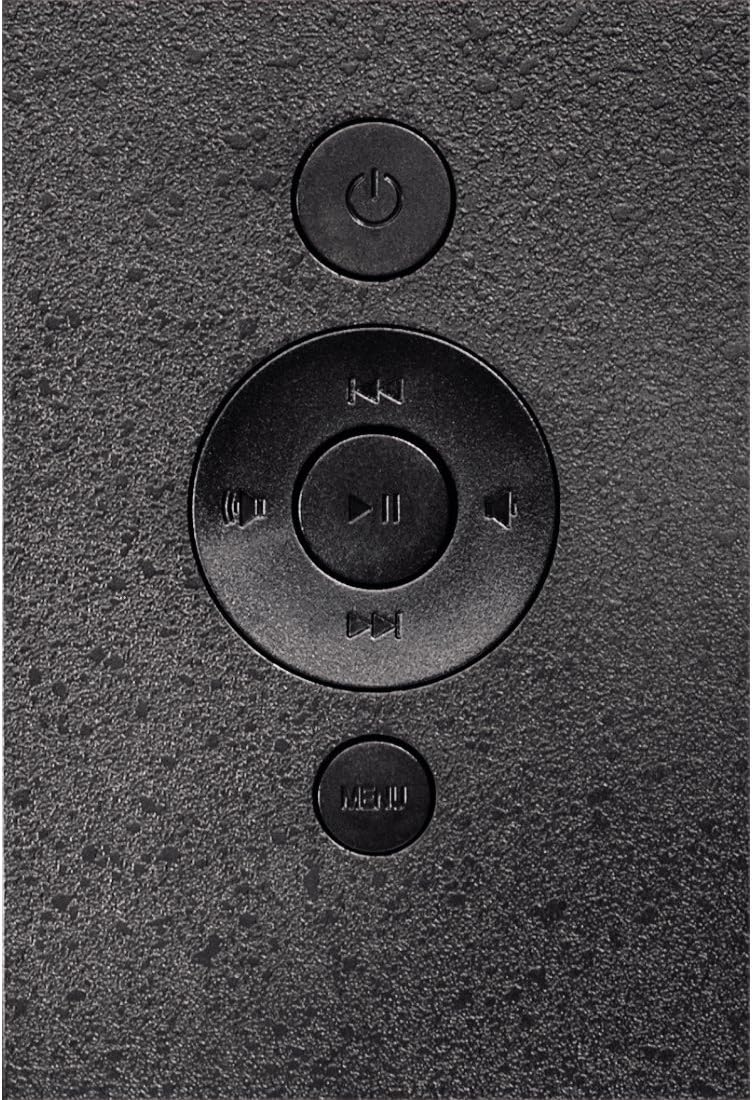
4.4-сүрөт: Close-up of the control buttons located on the back of the frame. These include the power button, directional navigation buttons (up, down, left, right), play/pause/enter button, and the menu button.
4.1. Порттор жана башкаруу элементтери
- SD/MMC/MS Card Slot: For inserting memory cards to display photos and videos.
- USB порт: For connecting USB flash drives or other compatible USB storage devices.
- DC IN: Power input for connecting the provided power adapter.
- Кубат баскычы: Аппаратты күйгүзөт же өчүрөт.
- Чабыттоо баскычтары (өйдө/төмөн/сол/оң): Менюларды карап чыгуу жана параметрлерди тандоо үчүн колдонулат.
- Play/Pause/Enter Button: Confirms selections or controls media playback.
- Меню баскычы: Орнотуулар жана опциялар үчүн негизги менюга кирет.
5. Орнотуу
5.1. Стендди бекитүү
Insert the metal stand into the designated slot on the back of the digital photo frame. Ensure it is securely fastened to provide stable support for the frame.
5.2. Power Connection
- Connect the power adapter to the DC IN port on the back of the photo frame.
- Кубат адаптерин ылайыктуу электр розеткасына сайыңыз.
- The frame will typically power on automatically or can be turned on using the power button.
5.3. Inserting a Memory Card or USB Drive
The Hama 95236 supports SD/MMC/MS memory cards and USB flash drives.
- Locate the SD/MMC/MS card slot or the USB port on the side of the frame (refer to Figure 4.2).
- Carefully insert your memory card or USB drive into the corresponding slot/port. Ensure it is inserted correctly to avoid damage.
- The frame should automatically detect the storage device and prompt you to view its contents or start a slideshow.
6. Иштөө нускамалары
6.1. Негизги навигация
Use the navigation buttons on the back of the frame to move through menus and options. The Play/Pause/Enter button confirms your selection.
6.2. Башкы меню
басыңыз МЕНЮ button to access the main menu. From here, you can select different modes and settings:
- Сүрөт: View photos in a slideshow or individually.
- Музыка: Аудио ойнотуу files.
- Видео: Видеону ойнотуу files.
- Calendar/Clock: Display the calendar and time.
- Орнотуулар: Adjust various device parameters.
6.3. Сүрөттү ойнотуу
- Негизги менюдан тандаңыз Сүрөт.
- Navigate to your desired folder or select all photos.
- басыңыз Ойнотуу/Тыныгуу/Киргизүү button to start the slideshow.
- During a slideshow, you can use the navigation buttons to skip photos or pause playback.
6.4. Тутум орнотуулары
кирүү Орнотуулар menu to customize your photo frame:
- Дисплейдин жөндөөлөрү: Adjust brightness, contrast, and display mode.
- Слайдшоу жөндөөлөрү: Configure transition effects, display time per photo, and repeat mode.
- Дата жана убакыт: Учурдагы күн менен убакытты коюңуз. Note: Some users have reported that date and time settings may reset after power loss.
- Тил: Меню интерфейси үчүн өзүңүзгө жаккан тилди тандаңыз.
- Сактоо маалыматы: View details about connected storage devices.
7. Техникалык тейлөө
7.1. Аспапты тазалоо
- Тазалоодон мурун ар дайым аппаратты кубаттан ажыратыңыз.
- Clean the screen and exterior surfaces with a soft, dry, lint-free cloth.
- Do not use aggressive cleaning agents, solvents, or abrasive materials.
7.2. Сактоо
Аппаратты узак убакытка сактасаңыз, аны электр кубатынан ажыратып, күн нурунан жана өтө температурадан алыс салкын, кургак жерде сактаңыз.
8. Кыйынчылыктарды
| Көйгөй | Мүмкүн себеп | Чечим |
|---|---|---|
| Түзмөк күйбөй жатат. | Кубат адаптери туташкан эмес же туура эмес. | Ensure the power adapter is securely connected to both the frame and the power outlet. Test the outlet with another device. |
| No images displayed. | No memory card/USB drive inserted or files not supported. | Insert a compatible memory card or USB drive with supported image formats (e.g., JPEG). Check if the storage device is properly inserted. |
| Date and time reset after power off. | Саат үчүн ички батарейканын камдык көчүрмөсү жок. | This model may not retain date/time settings without continuous power. Re-enter settings if necessary after power interruption. |
| Video playback is choppy or distorted. | Unsupported video format or high bitrate. | Видеону камсыз кылыңыз files are in a supported format and resolution. Convert videos to a lower resolution or bitrate if issues persist. |
| Баскычтар жооп бербейт. | Убактылуу программалык ката. | Disconnect the power adapter, wait a few seconds, then reconnect it to restart the device. |
9. Техникалык шарттар
| Өзгөчөлүк | Деталь |
|---|---|
| Модель номери | 00095236 |
| Screen Size | 8 дюйм |
| Display Resolution | 800 x 600 пиксель |
| Аспект катышы | 4:3 |
| Ички сактагыч | 2 ГБ (2048 МБ) |
| Байланыш | USB, SD/MMC/MS Card Slot |
| Өлчөмдөрү (L x W x Y) | 2.6 x 22.2 x 17.8 см |
| Салмагы | 550 г |
| Өндүрүүчү | Хама |
10. Кепилдик маалыматы
Hama GmbH & Co KG provides a manufacturer's warranty for this product. The specific terms and conditions of the warranty period and coverage are subject to the purchase date and the region of purchase. Please retain your proof of purchase (receipt) for any warranty claims.
For detailed warranty information, please refer to the official Hama webсайтка же түздөн-түз кардарларды колдоо менен байланышыңыз.
11. Кардарларды колдоо кызматы
Should you have any questions regarding this product, please contact Hama Customer Support:
- Webсайт: Visit the official Hama website for FAQs, drivers, and further product information. www.hama.com
- Байланыш: Refer to the contact section on the Hama webСиздин аймактагы телефон номерлери же электрондук почтаны колдоо сайты.
Колдоо кызматына кайрылганда моделиңиздин номери (00095236) жана сатып алганыңыздын далили даяр болсун.