1. Киришүү
This manual provides detailed instructions for the operation and maintenance of your Deli Scientific Calculator, model DELI-91-1710. This calculator is designed for a wide range of mathematical and scientific calculations, offering 240 functions to support various academic and professional needs.
Key features include advanced scientific functions, statistical calculations, fraction operations, and memory capabilities. Please read this manual thoroughly to ensure proper use and to maximize the calculator's potential.
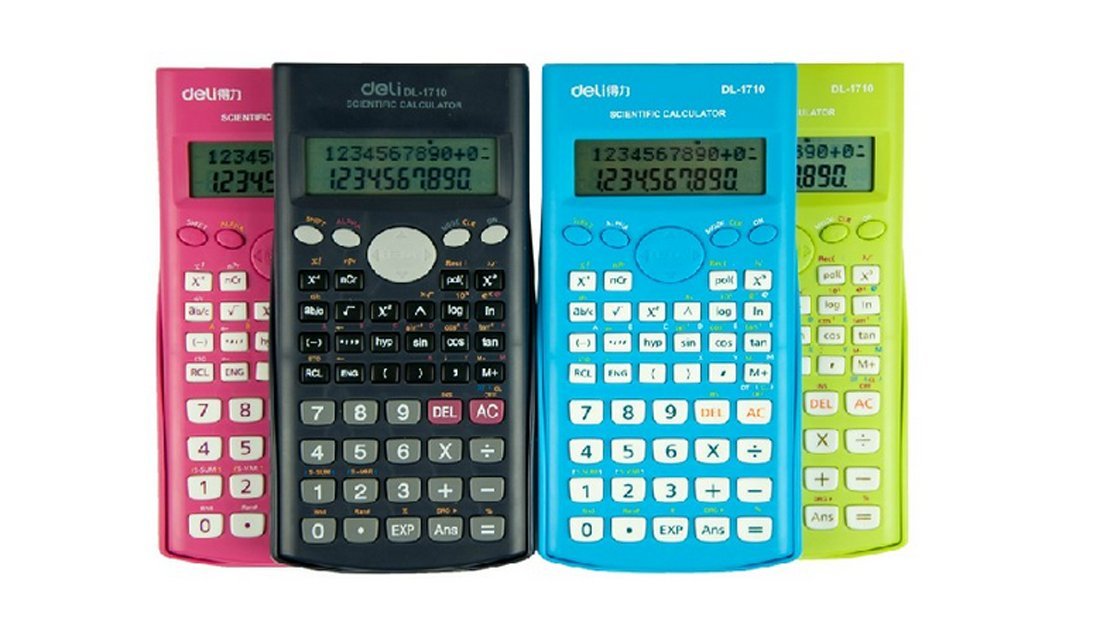
1-сүрөт: Deli Scientific Calculator DELI-91-1710. This image shows the calculator from an angled perspective, displaying its full keypad and display screen.
2. Орнотуу
2.1 Батареяны орнотуу
The Deli Scientific Calculator DELI-91-1710 typically uses standard button cell batteries. To install or replace batteries:
- Калькулятордун өчүрүлгөнүн текшериңиз.
- Калькулятордун артындагы батарея бөлүкчөсүнүн капкагын табыңыз.
- Use a small screwdriver (if required) to open the battery compartment.
- Insert new batteries, ensuring correct polarity (+/-) as indicated inside the compartment.
- Батарея бөлүгүнүн капкагын бекем жабыңыз.
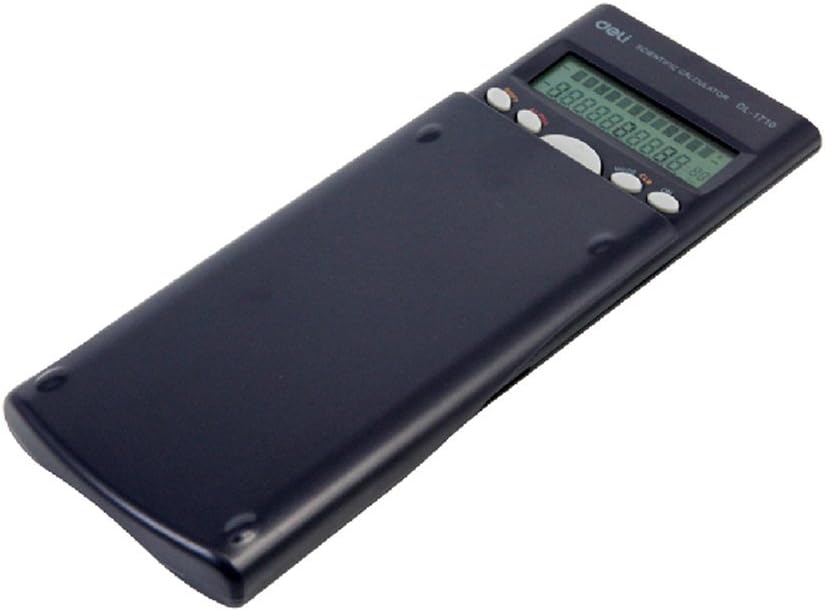
2-сүрөт: Артка view of the Deli Scientific Calculator with its protective slide cover. The battery compartment is typically located on this side.
2.2 Баштапкы күйгүзүү
After battery installation, press the [КҮЙҮК] button to power on the calculator. The display should show '0' or a similar initial state. If the display remains blank, recheck battery installation or replace with fresh batteries.
3. Иштөө нускамалары
This section details the various functions and operations of your Deli Scientific Calculator.
3.1 Негизги арифметикалык амалдар
Көрсөткүчтөрдү колдонуп, кошуу, кемитүү, көбөйтүү жана бөлүү амалдарын аткарыңыз [+], [-], [×], [÷] ачкычтар. Басыңыз [=] натыйжаны алуу үчүн.
- Exampле: 15 + 7 санын эсептөө үчүн баскычын басыңыз 1 5 [+] 7 [=].
3.2 Илимий функциялар
The calculator supports 240 scientific functions. Access these using dedicated keys or by pressing the [SHIFT] key followed by another function key.
- Тригонометриялык функциялар: Колдонуу [sin], [cos], [tan] for sine, cosine, and tangent. Inverse trigonometric functions (күнөө-1, cos-1, ошондуктан-1) are typically accessed via [SHIFT].
- Логарифмдик функциялар: Колдонуу [журнал] жалпы логарифм үчүн (10-негиз) жана [ln] натуралдык логарифм үчүн (e базасы).
- Күчтөр жана тамырлар: Колдонуу [x2] квадраттоо үчүн, [√] квадрат тамыр үчүн, жана [xy] жалпы ыйгарым укуктар үчүн.
- Factorial: The factorial function (x!) is usually accessed via [SHIFT].
3.3 Angle Modes
The calculator can operate in Degree (DEG), Radian (RAD), or Grad (GRA) modes. Press the [РЕЖИМ] key repeatedly or use a dedicated [DRG] key (often [SHIFT] + [DRG]) to cycle through these modes. The current mode is indicated on the display.
3.4 Бөлчөктөрдү эсептөө
To perform calculations with fractions, use the fraction key (often denoted as [ab/c] or [d/c]). This allows input of mixed numbers and improper fractions.
- Exampле: To input 1 2/3, press 1 [a b/c] 2 [a b/c] 3.
3.5 Эстутум функциялары
The calculator includes independent memory functions.
- [M+]: Көрсөтүлгөн маанини эс тутумга кошот.
- [M-]: Көрсөтүлгөн маанини эс тутумдан кемитип алат.
- [RCL]: Эстутумда сакталган маанини дисплейге чакырып алат.
- [STO]: Stores the displayed value into a specific memory variable (if available).
- [MC]: Clears the memory (often [SHIFT] + [M+] or a dedicated key).
3.6 Статистикалык эсептөөлөр
The calculator supports statistical calculations, including standard deviation and data editing.
- Enter STAT mode (usually via [РЕЖИМ]).
- Input data points using the data entry key (e.g., [МААЛЫМАТ] or [M+] in STAT mode).
- Use specific keys (often [SHIFT] + statistical function keys) to calculate mean, standard deviation, sum of squares, etc.
3.7 Other Advanced Functions
- ANS Function: The [ANS] key recalls the result of the previous calculation.
- Multi-step Functional Importance: The calculator automatically applies the correct order of operations (PEMDAS/BODMAS).
- Continuous Calculation: Allows you to use the result of a previous calculation directly in the next operation without re-entering it.
- Пермутациялар жана комбинациялар: колдонуу [nPr] жана [nCr] functions (often accessed via [SHIFT]).
- Координатты өзгөртүү: Convert between rectangular and polar coordinates (e.g., [Pol] жана [Рек] functions).
4. Техникалык тейлөө
4.1 Тазалоо
To clean your calculator, gently wipe the surface with a soft, dry cloth. For stubborn dirt, slightly dampen the cloth with water or a mild, non-abrasive cleaner. Avoid using strong solvents, alcohol, or abrasive materials, as these can damage the casing жана дисплей.
4.2 Сактоо
When not in use, store the calculator in a cool, dry place away from direct sunlight and extreme temperatures. Always use the protective slide cover to prevent damage to the keys and display.
4.3 Батареяны алмаштыруу
Refer to section 2.1 for detailed instructions on battery replacement. Replace batteries promptly when the display becomes dim or erratic to ensure optimal performance and prevent data loss.
5. Кыйынчылыктарды
If you encounter issues with your Deli Scientific Calculator, refer to the following common problems and solutions:
| Көйгөй | Мүмкүн себеп | Чечим |
|---|---|---|
| Дисплей бош же күңүрт. | Төмөн же өлүп калган батарейкалар; туура эмес батарея орнотуу. | Туура полярдуулукту камсыз кылуу менен батарейкаларды алмаштырыңыз. |
| Туура эмес эсептөө натыйжалары. | Incorrect mode setting (e.g., angle mode); syntax error; previous calculation error. | Check angle mode (DEG/RAD/GRA). Clear all calculations ([AC]) and re-enter. Perform a full reset if necessary. |
| Калькулятор баскычтарды басууга жооп бербейт. | Calculator frozen; low batteries. | Басып көрүңүз [КҮЙҮК] or [AC]. If unresponsive, remove and reinsert batteries to perform a hard reset. |
| Ката билдирүү дисплейде. | Mathematical error (e.g., division by zero, invalid input for function). | Review your input and the operation performed. Clear the error with [AC] or [CE]. |
5.1 Калькуляторду баштапкы абалга келтирүү
If the calculator behaves erratically, a full reset may resolve the issue. This typically clears all memory and returns settings to default. Consult the specific instructions for your model, but often involves pressing [SHIFT] анда [CLR] (Clear) or [КАЛПЫНА КЕЛТИРҮҮ], and confirming the reset.
6. Техникалык шарттар
- Бренд: deli
- Модел: DELI-91-1710
- Бөлүмдүн номери: DELI-91-1710
- ASIN: B008WXTE40
- UPC: 702168016298
- Функциялары: 240 scientific functions, including trigonometric, logarithmic, power, root, fraction, statistical (standard deviation, data editing), permutations, combinations, coordinate conversion, ANS function, multi-step functional importance, continuous calculation, independent memory.
- Бурч режимдери: Degrees, Radians, Grads
- Кубат булагы: Battery (type not specified, typically button cell)
- Дисплей: Single-line LCD (typical for this model type)
7. Кепилдик жана колдоо
For warranty information, technical support, or service inquiries regarding your Deli Scientific Calculator DELI-91-1710, please refer to the documentation provided at the time of purchase or visit the official Deli webсайт. Кардарларды тейлөө кызматынын байланыш маалыматтары, адатта, өндүрүүчүнүн сайтында жеткиликтүү. webсайт же сатуучу аркылуу.


