Introduction
Сатып алганыңыз үчүн рахматasing the Technical Pro RX55URIBT Professional Audio Receiver. This receiver is designed to deliver high-quality audio performance with versatile connectivity options, including Bluetooth, USB, SD card, and traditional RCA inputs. It features a built-in 7-band equalizer for precise sound control and recording capabilities. Please read this manual thoroughly before operating the unit to ensure proper use and to maximize its performance.
Пакеттин мазмуну
Таңгактан чыгаргандан кийин, төмөндө көрсөтүлгөн нерселердин бардыгы бар экенин жана жакшы абалда экендигин текшериңиз:
- Technical Pro RX55URIBT Professional Audio Receiver
- Алыстан башкаруу
- Электр кабели
- RCA аудио кабели
- FM антенна зымы
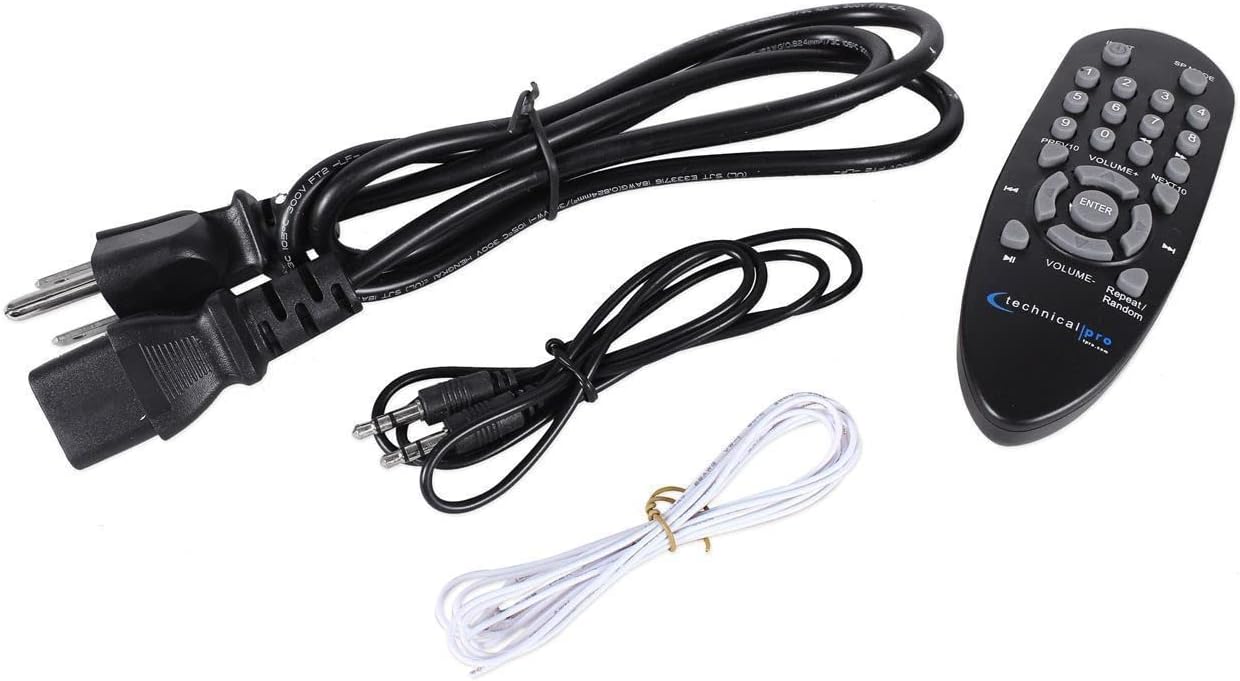
Продукт бүттүview
The RX55URIBT receiver features a comprehensive front panel for easy control and a rear panel for various audio connections.
Front Panel

- Кубат которгучу: Аппаратты күйгүзөт/өчүрөт.
- Digital Fluorescent Output Display: Shows audio source, ID3 tags, track and title information.
- Киргизүү тандоочулары: Buttons for Tuner, DVD, AUX, MP3/SD/USB/Bluetooth, REC.
- Тунинг баскычы: For FM radio station selection.
- Эквалайзер башкаруу элементтери: Dual 7-band equalizers for precise frequency adjustment (62Hz, 160Hz, 400Hz, 1kHz, 3kHz, 8kHz, 16kHz with ±12dB adjustment).
- Үндү көзөмөлдөө: Large rotary knob for master volume adjustment.
- Микрофон кириштери: Dual 1/4" inputs with dedicated volume, echo, and tone controls.
- Тон көзөмөлү: Bass, Treble, and Balance knobs for fine-tuning audio output.
- USB/SD карта уячалары: For playing .mp3, .wav, .wma files and recording. Supports up to 32GB.
Арткы панель
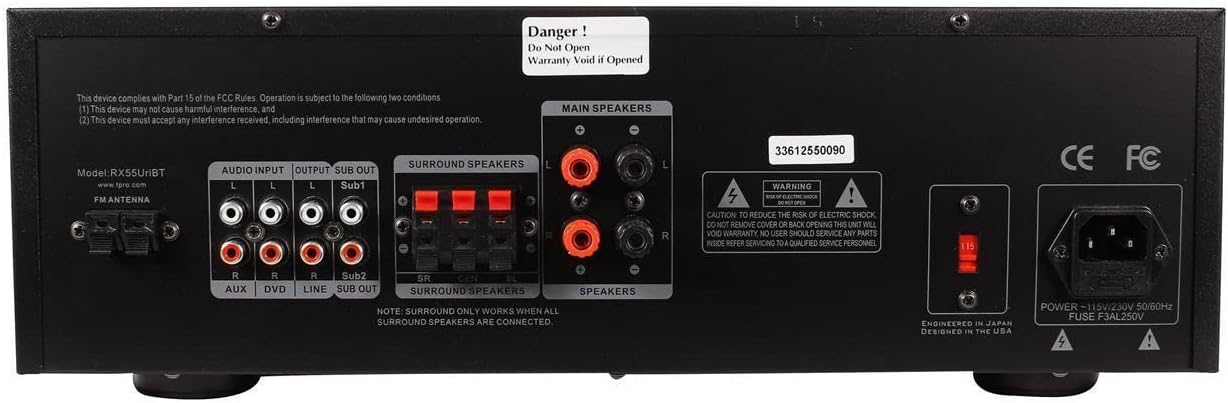
- FM антенна киргизүү: Камтылган FM антеннасын туташтыруу үчүн.
- RCA аудио киргизүүлөрү: Two sets of RCA inputs (AUX, DVD, LINE) for connecting external audio sources.
- Main Speaker Outputs: Banana binding posts for connecting two full-range speakers.
- Surround Speaker Outputs: Push button connectors for connecting up to three surround speakers.
- RCA Passive Line Output: Башкасына туташуу үчүн ampөмүр же жаздыруучу түзмөк.
- Mono RCA Subwoofer Outputs: Two outputs for direct connection to powered subwoofers.
- Кубат киргизүү: AC power cord connection (110/220V switchable).
Жайгашуу
Follow these steps to set up your Technical Pro RX55URIBT receiver.
- Жайгашкан жери: Place the receiver on a stable, flat surface with adequate ventilation. Ensure there is enough space around the unit for heat dissipation.
- Динамик туташуу:
- Connect your main speakers to the "MAIN SPEAKERS" banana binding posts on the rear panel. Ensure correct polarity (+ to + and - to -).
- If using surround sound, connect your surround speakers to the "SURROUND SPEAKERS" push button connectors. Note: Surround sound only works when all surround speakers are connected.
- For enhanced bass, connect powered subwoofers to the "SUB OUT" mono RCA outputs.
- Аудио булагы туташуу:
- Connect external audio devices (e.g., CD player, DVD player audio, mixer) to the "AUDIO INPUT" RCA jacks (AUX, DVD, LINE).
- For MP3 players or other devices with a 1/8" output, use the 1/8" MP3 input on the front panel.
- Антенна туташуу: Connect the included FM antenna to the "FM ANTENNA" terminal on the rear panel for radio reception.
- Кубат туташуу: Voltage selector (if present) is set correctly for your region (110V or 220V). Connect the power cable to the receiver's power input and then to a suitable AC outlet.
Иштөө нускамалары
Негизги операция
- Күйгүзүү/өчүрүү: Press the POWER switch on the front panel to turn the unit on or off.
- Киргизүү булагын тандоо: Press the corresponding input selector button (TUNER, DVD, AUX, MP3/SD/USB/BLUETOOTH) on the front panel to choose your desired audio source.
- Үндү тууралоо: Rotate the large VOLUME knob to adjust the overall output volume.
- Тон көзөмөлү: Use the BASS, TREBLE, and BALANCE knobs to fine-tune the audio characteristics to your preference.
USB/SD карта ойнотуу
- Insert a USB flash drive or SD card (up to 32GB) into the respective slot on the front panel.
- Select the "MP3/SD/USB/BLUETOOTH" input source.
- The digital display will show track title, track number, and elapsed time.
- Use the playback controls (Play, Repeat, Random) on the unit or remote control to manage your audio files (.mp3, .wav, .wma).
Bluetooth операциясы
- Select the "MP3/SD/USB/BLUETOOTH" input source. The unit will enter Bluetooth pairing mode.
- Bluetooth иштетилген түзмөгүңүздө (мисалы, смартфон, планшет) жеткиликтүү Bluetooth түзмөктөрүн издеңиз.
- Select "RX55URIBT" from the list to pair. Once paired, you can stream audio wirelessly within a 30-foot range.
Микрофонду колдонуу
- Connect up to two 1/4" microphones to the MIC1 and MIC2 inputs on the front panel.
- Adjust the "MIC VOL" knob to control the microphone volume.
- Use the "ECHO" and "MIC TONE" knobs to add effects and adjust the microphone's sound.
Жазуу функциясы
The RX55URIBT can record audio from microphones, the FM tuner, or RCA inputs directly onto a connected USB flash drive or SD card.
- Ensure a USB flash drive or SD card with sufficient empty space is inserted.
- Select the desired input source you wish to record (e.g., TUNER, AUX, DVD, LINE, or use microphones).
- Press the "REC" button on the front panel to start recording. The unit records .wav files at 128 kbps / 44.1 KHz sampылдамдыгы.
- Press "REC" again to stop recording.
Эквалайзерди тууралоо
The built-in dual 7-band equalizer allows for precise frequency adjustments to optimize sound for any environment.
- Adjust the sliders for each frequency band (62Hz, 160Hz, 400Hz, 1kHz, 3kHz, 8kHz, 16kHz) to boost or cut frequencies by up to ±12dB.
- Experiment with settings to achieve your desired sound profile.
Техникалык тейлөө
Туура техникалык тейлөө кабыл алгычыңыздын узак мөөнөттүү иштешин жана оптималдуу иштешин камсыз кылат.
- Тазалоо: Түзмөктүн сыртын тазалоо үчүн жумшак, кургак чүпүрөктү колдонуңуз. Суюк тазалоочу каражаттарды же аэрозолдорду колдонбоңуз, анткени алар капталына же ички компоненттерине зыян келтириши мүмкүн.
- Вентиляция: Ensure the ventilation openings on the top and sides of the unit are not blocked. Proper airflow prevents overheating.
- Сактагыч: Аппаратты узак убакытка сактасаңыз, аны электр кубатынан ажыратып, күн тийбеген жана өтө температурадан алыс салкын, кургак жерде сактаңыз.
- Электр кабели: Кубат шнурунун кандайдыр бир бузулууларын үзгүлтүксүз текшерип туруңуз. Эгерде бузулган болсо, аны дароо бекитилген шнур менен алмаштырыңыз.
Проблемаларды чечүү
If you encounter issues with your RX55URIBT receiver, refer to the table below for common problems and solutions.
| Көйгөй | Мүмкүн себеп | Чечим |
|---|---|---|
| Күч жок | Power cord not connected; Power outlet not active; Unit fuse blown. | Ensure power cord is securely plugged in; Check power outlet with another device; Contact customer support for fuse replacement. |
| Үн чыгышы жок | Туура эмес киргизүү булагы тандалды; Үнү өтө төмөн; Динамиктер туура туташтырылган эмес; Үнсүз режим функциясы иштеп турат. | Select the correct input source; Increase volume; Check speaker connections and polarity; Deactivate mute. |
| Bluetooth туташпай жатат | Аппарат диапазондон тышкары; Bluetooth баштапкы түзмөктө иштетилген эмес; Интерференция. | Ensure device is within 30 feet; Enable Bluetooth on your device; Move away from other wireless devices. |
| USB/SD карта ойнотулбай жатат | Колдоого алынбайт file format; Card/drive not inserted correctly; Card/drive corrupted; Maximum size exceeded. | камсыз кылуу files are .mp3, .wav, or .wma; Reinsert card/drive; Try a different card/drive; Ensure size is 32GB or less. |
| Радио кабыл алуу начар | Antenna not connected or positioned poorly; Weak signal. | Connect FM antenna securely; Adjust antenna position for better reception. |
Техникалык шарттар
| Өзгөчөлүк | Деталь |
|---|---|
| Модель номери | RX55URIBT |
| Эң жогорку кубаттуулук | 1500 Ватт |
| Киргизүүлөр | RCA (2 audio sources), USB, SD Card, 1/8" (MP3) |
| Чыгуулар | Banana binding post (2 speakers), Push Button (3 surround speakers), RCA (Line Out), 2 Mono RCA (Subwoofer Out) |
| USB & SD Card Max Size | 32 ГБ |
| Ойнотуу форматтары | .mp3, .wav, .wma |
| Жазуу форматы | .wav (128 kbps / 44.1 KHz) |
| Bluetooth версиясы | v2.0 with EDR (2.4GHz) |
| Bluetooth диапазону | 30 фут |
| Микрофон кириштери | Dual 1/4" with volume, echo, and tone controls |
| Equalizer Points | 62Hz, 160Hz, 400Hz, 1kHz, 3kHz, 8kHz, 16kHz |
| Equalizer Adjustment Range | ±12дБ |
| Frequency Response | 20Гц-20КГц |
| Өлчөмдөрү (L x W x Y) | 17" x 10" x 5.1" |
| Салмагы | 10.0 фунт |
| Тtage | 110/220V (Switchable) |
Кепилдик жана колдоо
Technical Pro stands by its products. The RX55URIBT Professional Audio Receiver comes with a one-year warranty from the date of purchase. This warranty covers manufacturing defects and ensures the product functions as intended under normal use.
For warranty claims, technical support, or any inquiries regarding your product, please contact Technical Pro customer service. Refer to the official Technical Pro webакыркы байланыш маалыматы үчүн сайт.
Маанилүү: Do not attempt to open the unit. Opening the unit will void the warranty. Refer all servicing to qualified service personnel.


