1. Киришүү
This manual provides detailed instructions for the safe and proper use of the Mastech MS2108 Digital Clamp Meter. This portable, professional measuring instrument features an LCD with backlight for easy reading and a 'single-hand operation' design for the range switch. It offers overload protection and low battery indication, making it an ideal multi-function instrument for industrial, mining, and vehicle maintenance electrical engineers.
2. Коопсуздук маалыматы
Always observe local and national safety codes. Use personal protective equipment (PPE) as required. Failure to follow safety precautions can result in injury or damage to the meter.
- Conforms to IEC61010-1 & IEC61010-032 standard.
- Double insulation (protection class 600V CAT III and pollution degree 2).
- Эгерде өлчөгүч же сыноо өткөргүчтөрү бузулган болсо, аны колдонбоңуз.
- Ensure the function switch is in the correct position before making measurements.
- Do not exceed the maximum input limits for any range.
- Түз электр чынжырлары менен иштөөдө өтө этият болуңуз.
3. Негизги өзгөчөлүктөрү
- Синусоидалуу эмес толкундар боюнча так окуу үчүн чыныгы RMS өлчөө.
- Inrush current function for measuring motor starting current.
- Over-molding rubber case for enhanced durability and protection.
- Clamp-on frequency function.
- Auto range/manual range selection.
- Data hold function to freeze readings on the display.
- Maximum/minimum value measurement.
- Батареянын иштөө мөөнөтүн үнөмдөө үчүн автоматтык түрдө өчүрүү.
- Backlight for improved visibility in low-light conditions.
- Jaw lighting for illuminating the measurement area.
- Continuity checking with buzzer and Diode test.
4. Продукт бүтүп калдыview

Фронт view of the Mastech MS2108 Digital Clamp Meter, showing the display, function dial, buttons, and clamp жаак.

Бурчтуу view of the Mastech MS2108 Digital Clamp Meter, highlighting its ergonomic design and compact size.

Жакын план view of the control panel on the Mastech MS2108, detailing the function dial, SEL, MIN/MAX, RAN, Hz/%, and B.L. HOLD buttons.

Included test leads for voltage and resistance measurements, along with protective caps.
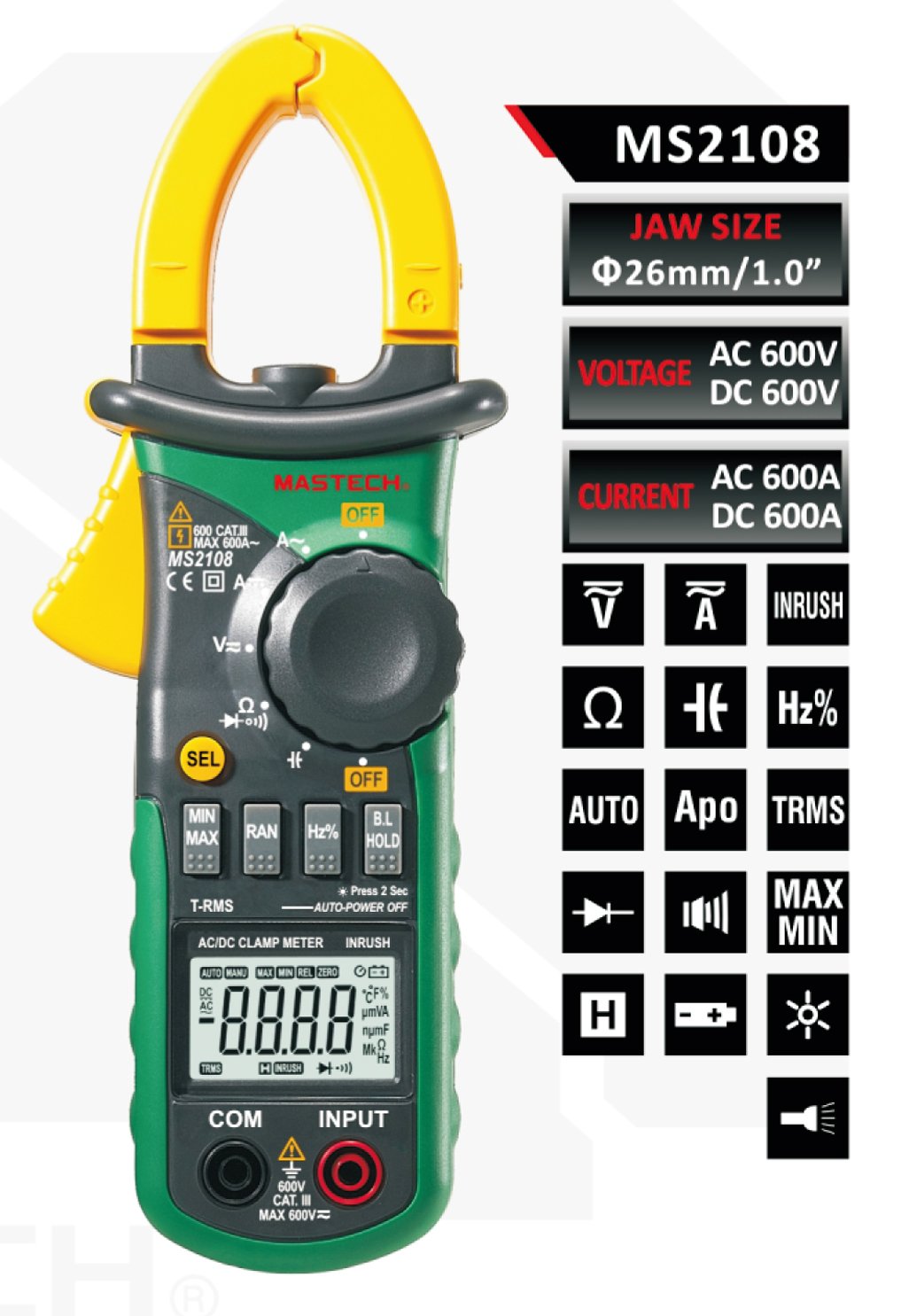
Diagram illustrating key features and specifications of the MS2108, including jaw size, voltage, current, and various measurement functions.
5. Орнотуу жана Батареяны орнотуу
5.1 Батареяны орнотуу
The MS2108 requires 3 x 1.5V AAA batteries (not included). To install:
- Эсептегич өчүрүлгөнүн текшериңиз.
- Батарея уясынын капкагын эсептегичтин арткы жагында табыңыз.
- Батарея отсегин ачуу үчүн бурагычты колдонуңуз.
- Үч AAA батарейкасын бөлүмдүн ичинде көрсөтүлгөндөй туура полярдуулукка (+/-) сактоо менен салыңыз.
- Батарея уясынын капкагын ордуна коюңуз жана аны бурама менен бекитиңиз.
5.2 Сыноо өткөргүчтөрүн туташтыруу
Том үчүнtage, resistance, capacitance, frequency (from test terminal), continuity, and diode measurements, connect the test leads:
- Кызыл сыноочу зымын 'INPUT' уячасына киргизиңиз.
- Кара сыноочу зымын 'COM' (жалпы) уячага киргизиңиз.
6. Иштөө нускамалары
6.1 Функциялык тергич
Каалаган өлчөө функциясын тандоо үчүн борбордук дөңгөлөктү айландырыңыз:
- ӨЧҮК: Эсептегичти өчүрөт.
- V~: AC Voltage өлчөө.
- V-: DC Voltage өлчөө.
- A~: AC Current measurement (using clamp).
- TO-: DC Current measurement (using clamp).
- Ω K Å: Resistance, Continuity, Diode, Capacitance measurement. Use the 'SEL' button to cycle through these functions.
- Гц%: Жыштыкты жана жумуш циклин өлчөө.
6.2 Баскыч функциялары
- SEL (Yellow Button): Selects sub-functions within a main dial position (e.g., AC/DC, Ohm/Diode/Continuity).
- MIN / MAX: Toggles between minimum and maximum recorded values during a measurement session.
- чуркап барып: Toggles between auto-ranging and manual ranging. In manual range, press repeatedly to cycle through ranges.
- Гц/%: When in Voltage or Current mode, press to display frequency or duty cycle.
- B.L. HOLD: Short press to activate/deactivate data hold (freezes the current reading). Long press (2 seconds) to turn the backlight ON/OFF.
- Катуу: Press this button when the dial is in an AC/DC current position to measure inrush current.
6.3 Өлчөө процедуралары
AC/DC токту өлчөө (Cl)amp):
- Turn the function dial to the A~ (AC) or A- (DC) position.
- cl ачыңызamp jaw and enclose a single conductor. Ensure the jaw is fully closed.
- Read the current value on the display. For DC current, observe the polarity.
AC/DC Voltage Өлчөө:
- Connect the test leads to the 'INPUT' and 'COM' jacks.
- Turn the function dial to V~ (AC) or V- (DC).
- Сыноо зонддорун текшерилип жаткан схемага же компонентке параллель туташтырыңыз.
- Томду окуңузtage мааниси дисплейде.
Resistance, Continuity, Diode, Capacitance Measurement:
- Сыноо өткөргүчтөрүн туташтырыңыз.
- Turn the function dial to the Ω K Å position.
- Press the 'SEL' button to cycle through Resistance (Ω), Continuity (K), Diode (Å), and Capacitance (uF) functions.
- Connect the test probes to the component. For continuity, a buzzer will sound if resistance is below approximately 50Ω.
Кирүүчү токту өлчөө:
- Set the function dial to A~ or A-.
- Press the 'Inrush' button. The display will show 'Inr'.
- cl ачыңызamp jaw and enclose the conductor of the device you wish to test the inrush current for (e.g., motor, compressor).
- Activate the device. The meter will capture and display the peak inrush current.
7. Техникалык тейлөө
7.1 Тазалоо
Эсептегичтин кутучасын жарнама менен сүртүңүзamp cloth and mild detergent. Do not use abrasives or solvents. Keep the input terminals free of dirt or debris.
7.2 Батареяны алмаштыруу
When the battery symbol appears on the display, replace the batteries as described in Section 5.1. Remove batteries if the meter is not used for extended periods.
7.3 Сактоо
Store the meter in a cool, dry place, away from direct sunlight and extreme temperatures. If storing for a long period, remove the batteries.
8. Кыйынчылыктарды
| Көйгөй | Мүмкүн себеп | Чечим |
|---|---|---|
| Дисплей жок же күңүрт дисплей | Өлгөн же аз батареялар | Батареяларды алмаштырыңыз (5.1-бөлүм) |
| Туура эмес окуулар | Incorrect function selected; Test leads not properly connected; Exceeding input limits | Select correct function; Ensure leads are fully inserted; Do not exceed specified limits |
| "OL" (Ашыкча жүктөө) көрсөтүлөт | Input value exceeds selected range | Switch to a higher range (if in manual mode) or ensure input is within meter's capabilities |
| No continuity buzzer | Resistance too high; Function not set to continuity | Ensure circuit is closed and resistance is low; Press SEL to select continuity mode |
9. Техникалык шарттар
The following table details the technical specifications for the Mastech MS2108 Digital Clamp Метр:

Comprehensive technical specifications table for the Mastech MS2108 and MS2108A models, detailing measurement ranges, accuracy, and general features.
- Дисплей: 6600 эсеп
- MAX. Diameter for conductor: 26мм
- Күч: 1.5V (AAA) x 3
- Өлчөмү: 208mm x 78mm x 35mm
- Салмагы: Approximately 1.1 Pounds (including batteries)
10. Кепилдик жана колдоо
Mastech products are designed for reliability and performance. This product is covered by a manufacturer's warranty against defects in materials and workmanship. For specific warranty terms and conditions, please refer to the warranty card included with your product or contact Mastech customer support.
For technical assistance, troubleshooting, or service inquiries, please contact Mastech customer support through their official website or authorized service centers. Please have your model number (MS2108) and purchase information ready when contacting support.


