Introduction
This manual provides detailed instructions for the operation and maintenance of your PENTAX Q10 digital interchangeable lens camera. The PENTAX Q10 is a super-compact and lightweight camera designed to deliver high-quality photography with a 12.4MP CMOS image sensor and improved autofocus performance.
Кутуда эмне бар
- PENTAX Q10 Camera Body
- 02 Standard Zoom Lens (5-15mm)
- Кайра заряддалуучу литий-иондук батарейка
- Батарея заряддагыч
- USB кабели
- Боо
- Body Mount Cap
- Линза капкактары (алдыңкы жана арткы)
- Программалык камсыздоо CD-ROM
- Көрсөтмө (бул документ)
Камера бүттүview

Сүрөт 1: Алдыңкы View (Lens Removed) - This image displays the front of the Pentax Q10 camera body with the lens detached, revealing the image sensor and the Q-mount for interchangeable lenses. The 'PENTAX' logo is visible at the top, and 'SR' (Shake Reduction) is indicated on the grip.
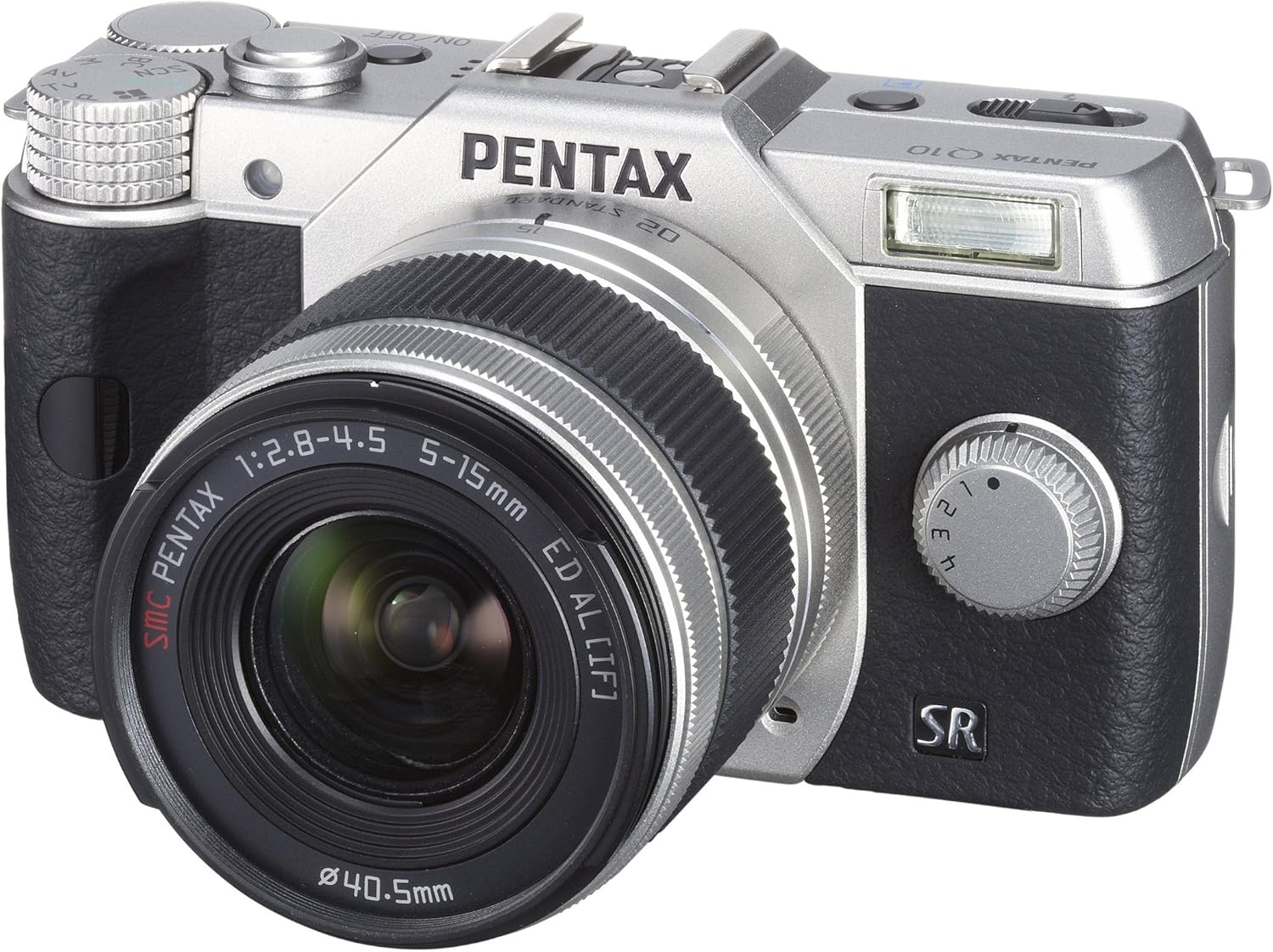
Сүрөт 2: Алдыңкы View with Lens Attached - The Pentax Q10 camera is shown with the 02 Standard Zoom Lens (5-15mm) mounted. This view highlights the compact size of the camera with its standard kit lens.

3-сүрөт: Жогорку View - This overhead view of the Pentax Q10 shows the main controls on the top panel, including the mode dial (with Auto, P, Av, Tv, M, SCN settings), the power ON/OFF button, the shutter release button, and the hot shoe for external flash units.

Сүрөт 4: Алдыңкы View with Flash Activated - The Pentax Q10 is depicted with its built-in pop-up flash extended, ready for use. This view also shows the 02 Standard Zoom Lens attached.

5-сүрөт: Арткы View - The back of the Pentax Q10 camera features the 3-inch LCD screen, along with various control buttons such as the playback button, delete button, ISO, OK, WB, and menu navigation buttons.
Негизги орнотуу
1. Батареяны заряддоо
Insert the provided rechargeable battery into the battery charger. Connect the charger to a power outlet. The charging indicator light will show the charging status. Once fully charged, remove the battery.
2. Батареяны жана эстутум картасын салуу
Open the battery/memory card compartment cover located at the bottom of the camera. Insert the charged battery with the correct orientation until it clicks into place. Insert an SD/SDHC/SDXC memory card into the card slot until it locks. Close the compartment cover securely.
3. Объективди бекитүү
Align the red dot on the lens with the red dot on the camera's lens mount. Rotate the lens clockwise until it clicks into place. To remove the lens, press the lens release button on the camera body and rotate the lens counter-clockwise.
4. Баштапкы орнотуулар
Upon first power-on, the camera may prompt you to set the date, time, and language. Follow the on-screen instructions using the control buttons and LCD screen.
Камераны иштетүү
Күйгүзүү/өчүрүү
басыңыз КҮЙГҮЗҮҮ/ӨЧҮРҮҮ button located on the top panel to power the camera on or off.
Атуу режимдери
Каалаган тартуу режимин тандоо үчүн камеранын үстүндөгү режимди айлантыңыз:
- Авто: Fully automatic shooting for ease of use.
- P (AE программасы): Camera sets aperture and shutter speed, but allows for program shift.
- Орточо (Апертуранын артыкчылыгы AE): Сиз диафрагманы орнотосуз, камера жабуу ылдамдыгын орнотот.
- ТВ (Жапкычтын артыкчылыгы AE): Сиз жабуунун ылдамдыгын, камера диафрагманы орнотот.
- M (кол): Сиз диафрагманы да, жапкыч ылдамдыгын да орнотуңуз.
- SCN (Сахна режимдери): Pre-set modes for specific situations (e.g., Portrait, Landscape, Night Scene, Macro, Blue Sky, Forest, Blur control).
Сүрөт тартуу
- Select a shooting mode using the mode dial.
- ЖК монитордун жардамы менен кадрыңызды тартыңыз.
- Press the shutter release button halfway down to focus. The camera will confirm focus.
- Сүрөткө тартуу үчүн жапкычты чыгаруу баскычын толугу менен басыңыз.
Видео жаздыруу
The PENTAX Q10 supports Full 1080p HD video recording at 30 frames per second with H.264 compression. To record video:
- Switch the camera to movie mode (if available on the mode dial or via menu setting).
- Press the dedicated movie recording button (if present) or the shutter release button to start recording.
- Жазууну токтотуу үчүн баскычты кайра басыңыз.
Flash операциясы
The camera features a built-in pop-up flash. To activate the flash, slide the flash release lever. The flash has various modes (e.g., Auto, Flash On, Red-eye Reduction) which can be selected via the camera's menu or dedicated flash button.
Автофокус системасы
The PENTAX Q10 utilizes a contrast detection autofocus system with 25 autofocus points. Available AF modes include Continuous, Face Detection, Multi-area, Selective single-point, Single, and Tracking. Select the appropriate AF mode from the camera's menu to suit your shooting conditions.
Image Stabilization
The camera incorporates a sensor-shift shake reduction system to minimize blur caused by camera shake, especially in low light conditions or when using longer focal lengths.
Техникалык тейлөө
Cleaning the Camera Body
Камеранын корпусун жумшак, кургак чүпүрөк менен сүртүңүз. өжөр кир үчүн, бир аз гampen the cloth with water or a mild cleaning solution specifically designed for electronics. Avoid using strong solvents.
Линзаны тазалоо
Use a lens blower to remove dust from the lens surface. For smudges, use a specialized lens cleaning cloth and lens cleaning fluid. Never touch the lens surface with your fingers.
Сенсорду тазалоо
The PENTAX Q10 features an integrated DRII (Dust Removal II) dust reduction system. If dust spots appear on your images, consult a professional service center for sensor cleaning. Attempting to clean the sensor yourself can cause damage.
Батареяга кам көрүү
Store batteries in a cool, dry place. Do not expose them to extreme temperatures. If the camera will not be used for an extended period, remove the battery.
Проблемаларды чечүү
Камера күйбөй жатат
- Батарея толук заряддалганын жана туура салынганын текшериңиз.
- Батарея контакттары таза экенин текшериңиз.
Сүрөткө тартууга болбойт
- Эстутум картасы салынганын жана жетиштүү бош орун бар экенин текшериңиз.
- Check if the lens is properly attached and unlocked.
- Камеранын ойнотуу режиминде эмес экенин текшериңиз.
- If the flash is set to a slow sync mode, the shutter may not release immediately.
Сүрөттөр бүдөмүк
- Линзанын таза экенин текшериңиз.
- Check if the camera is properly focused.
- Use a faster shutter speed or increase ISO in low light conditions.
- Confirm that the image stabilization (SR) is active if needed.
Эстутум картасынын катасы
- Эстутум картасын кайра салыңыз.
- Башка, шайкеш келген эстутум картасын колдонуп көрүңүз.
- Эстутум картасын форматтаңыз (эскертүү: бул бардык маалыматтарды өчүрөт).
Техникалык шарттар
| Модель аты | Pentax Q10 |
| Сүрөт сенсору | 12.4 MP Backlit CMOS (1/2.3-inch) |
| Натыйжалуу дагы эле чечим | 12.4 депутат |
| Линза орнотуу | Pentax Q-mount |
| Image Stabilization | Сенсор-жылуу |
| Video Resolution | Full HD 1080p (1920x1080) at 30fps (H.264) |
| Дисплей | 3 дюймдук LCD (460 000 чекит) |
| ISO сезгичтиги | Кеңейтилген ISO минималдуу 100 |
| Жабык ылдамдыгы | 1/8000 - 30 секунд |
| Автофокус системасы | Контрастты аныктоо (25 упай) |
| Үзгүлтүксүз атуу | 5 кадр/сек чейин |
| Сактагыч медиа | SD/SDHC/SDXC эстутум картасы |
| Байланыш | HDMI (Type C Mini), USB |
| Салмагы (болжол менен) | 0.44 Pounds (Body only) |
Эскертүү: Техникалык мүнөздөмөлөр эскертүүсүз өзгөртүлүшү мүмкүн.
Кепилдик жана колдоо
Кепилдик маалымат
The PENTAX Q10 camera comes with a 1 жылдык тетиктерге жана эмгек гарантиясына сатып алынган күндөн тартып. Кепилдик дооматтары үчүн сатып алууну тастыктаган документти сактап коюңуз. Бул кепилдик кадимки колдонуудагы өндүрүш кемчиликтерин жана чеберчиликти камтыйт.
Кардарларды колдоо
For technical assistance, service, or further inquiries, please visit the official Pentax support webсайтка же кардарларды тейлөө бөлүмүнө кайрылыңыз. Байланыш маалыматы, адатта, өндүрүүчүнүн сайтынан тапса болот webсайтында же продуктуңузга кошулган кепилдик картасында.


