1. Киришүү
This manual provides detailed instructions for the installation, operation, and troubleshooting of the Broadcom DW1501 BCM94313HMG2L WLAN 802.11n Half Mini PCI-E Card. This wireless network card is designed to provide 802.11n Wi-Fi connectivity for compatible laptop systems.
2. Коопсуздук маалыматы
- Always power off your computer and disconnect it from the power source before installing or removing any internal components.
- Discharge any static electricity from your body by touching a grounded metal object before handling the card.
- Картанын сезгич бөлүктөрүнө тийип албаш үчүн четтеринен кармаңыз.
- Картаны нымдуулуктан жана өтө жогорку температурадан алыс кармаңыз.
- This card is not compatible with certain laptop models, specifically IBM/Lenovo/Thinkpad and HP versions. Verify compatibility before installation.
3. Пакеттин мазмуну
Ensure the following item is included in your package:
- Broadcom DW1501 BCM94313HMG2L WLAN 802.11n Half Mini PCI-E Card
Эгерде кандайдыр бир буюмдар жок же бузулуп калса, сатуучуга кайрылыңыз.
4. Орнотуу
4.1 Орнотууга чейинки текшерүү тизмеси
- Verify your laptop has a compatible Half Mini PCI-E slot.
- Ensure your laptop is not an IBM/Lenovo/Thinkpad or HP model, as this card is not compatible with these systems.
- Gather necessary tools, such as a small Phillips head screwdriver.
4.2 Физикалык орнотуу
- Өчүрүү: Shut down your laptop completely and disconnect the power adapter and battery.
- Кирүү панели: Locate and open the access panel on the bottom of your laptop that covers the Mini PCI-E slot. Refer to your laptop's service manual for specific instructions.
- Эски картаны алып салыңыз (эгер бар болсо): If an existing wireless card is present, carefully disconnect any antenna cables and remove the screw securing the card. Gently slide the card out of its slot.
- Insert New Card: Align the Broadcom DW1501 card with the Half Mini PCI-E slot. Gently push the card into the slot at an angle until it is fully seated.
- Коопсуз карта: Press the card down and secure it with the screw removed earlier.
- Антенналарды туташтыруу: Carefully connect the antenna cables to the corresponding connectors on the new card. Typically, the main antenna connects to 'MAIN' or '1' and the auxiliary antenna to 'AUX' or '2'.
- Панелди жабуу: Replace the access panel and secure it.
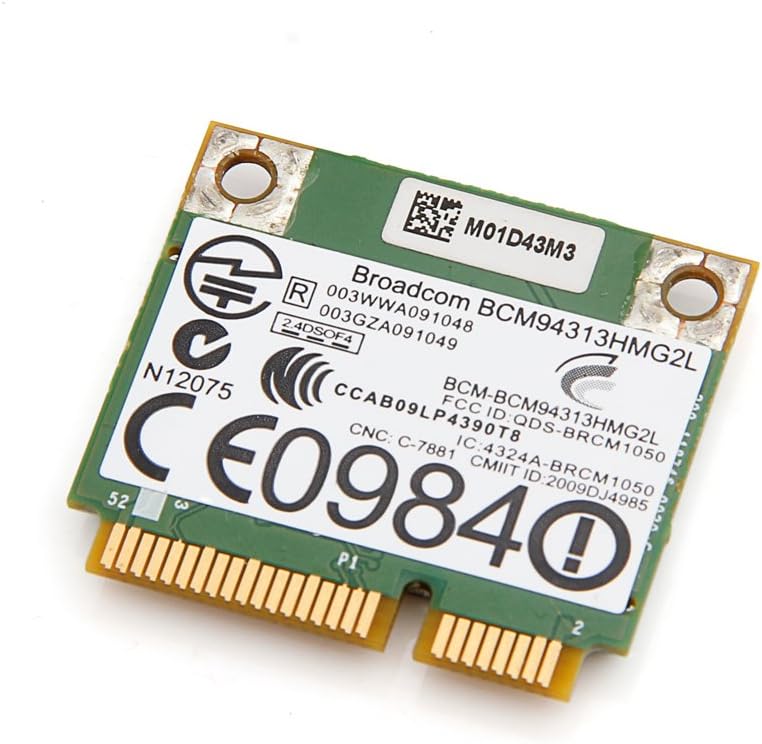
Сүрөт 1: Жогорку view of the Broadcom DW1501 BCM94313HMG2L WLAN Half Mini PCI-E Card, showing the Broadcom branding and regulatory markings. This side typically faces upwards during installation.
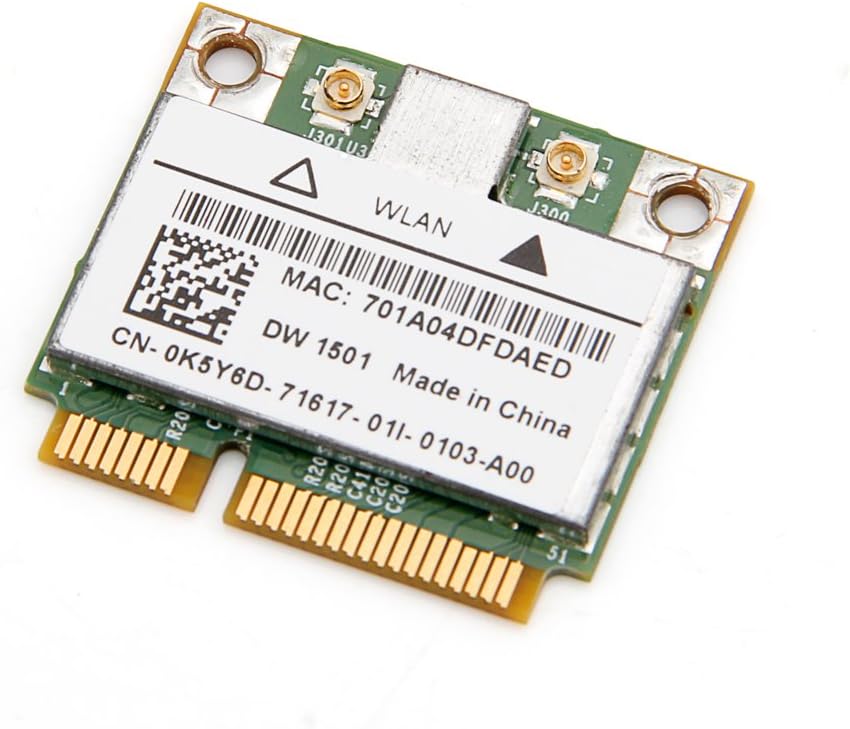
Сүрөт 2: Төмөнкү view of the Broadcom DW1501 BCM94313HMG2L WLAN Half Mini PCI-E Card, displaying the MAC address and model number. This side typically faces downwards during installation.
4.3 Драйверди орнотуу
- Күйгүзүү: Reconnect the battery and power adapter, then power on your laptop.
- Операциялык системаны аныктоо: Операциялык системаңыз жаңы жабдыкты автоматтык түрдө аныктап, жалпы драйверлерди орнотууга аракет кылышы мүмкүн.
- Атайын драйверлерди орнотуу: For optimal performance, download the latest drivers for the Broadcom DW1501 BCM94313HMG2L from your laptop manufacturer's support website or Broadcom's official webсайт.
- Экрандагы нускамаларды аткарыңыз: Run the downloaded driver installer and follow the prompts to complete the installation.
- Кайра баштоо: Restart your computer after driver installation is complete.
5. Иштөө нускамалары
Once the card is installed and drivers are successfully loaded, your laptop should detect available wireless networks.
- Тармак орнотууларына кирүү: Navigate to your operating system's network settings (e.g., Wi-Fi settings in Windows, Network Preferences in macOS).
- Wi-Fi иштетүү: Ensure that Wi-Fi is enabled.
- Тармакты тандоо: Жеткиликтүү зымсыз тармактардын тизмеси пайда болот. Каалаган тармагыңызды тандаңыз.
- Сырсөздү киргизиңиз: Тармак коопсуз болсо, суралганда Wi-Fi сырсөзүн (коопсуздук ачкычы) киргизиңиз.
- Туташуу: Зымсыз байланышты орнотуу үчүн "Байланыш" баскычын басыңыз.
6. Техникалык тейлөө
The Broadcom DW1501 BCM94313HMG2L card requires minimal maintenance.
- Keep your laptop's internal components clean by periodically removing dust with compressed air.
- Ensure your wireless drivers are up to date for optimal performance and security.
- Avoid exposing your laptop to environments with excessive heat or moisture.
7. Кыйынчылыктарды
7.1 Card Not Detected
- Физикалык орнотууну текшерүү: Power off the laptop and re-verify that the card is properly seated in the Mini PCI-E slot and secured with the screw.
- Антенна туташуулары: Ensure antenna cables are securely attached to the card.
- Драйверди орнотуу: Confirm that the correct drivers for the Broadcom DW1501 BCM94313HMG2L are installed. Check Device Manager (Windows) or System Information (macOS) for any error indicators.
- Шайкештик: Reconfirm that your laptop model is not an IBM/Lenovo/Thinkpad or HP version, as these are incompatible.
7.2 Wi-Fi'га туташуу мүмкүн эмес
- Wi-Fi иштетилген: Ensure Wi-Fi is enabled in your operating system settings and any physical Wi-Fi switch on your laptop is in the 'on' position.
- Туура сырсөз: Туура Wi-Fi сырсөзүн киргизип жатканыңызды эки жолу текшериңиз.
- Маршрутизатор маселелери: Зымсыз роутериңизди жана модемиңизди өчүрүп күйгүзүңүз.
- Драйвер жаңыртуу: Update or reinstall the wireless card drivers.
- Network Diagnostics: Use your operating system's built-in network diagnostic tools.
7.3 Байланыш ылдамдыгынын жайлашы
- Сигнал күчү: Сигналдын күчүн жогорулатуу үчүн зымсыз роутериңизге жакыныраак жылыңыз.
- Интерференция: Minimize interference from other electronic devices or crowded Wi-Fi channels.
- Драйвер жаңыртуу: Сизде эң акыркы драйверлер орнотулганын текшериңиз.
- Маршрутизатор орнотуулары: Check your router's settings for optimal 802.11n performance.
8. Техникалык шарттар
| Продукт аты | Broadcom DW1501 BCM94313HMG2L WLAN 802.11n Half WiFi Mini PCI-E Card |
| Модель номери | 8541551410 |
| Зымсыз стандарт | 802.11n |
| Интерфейс | Half Mini PCI-E |
| Аппараттык интерфейс | PCI |
| Шайкеш түзмөктөр | Laptop (excluding IBM/Lenovo/Thinkpad and HP versions) |
| Data Link Protocol | Bluetooth (Note: While listed, primary function is WLAN) |
| Продукциянын өлчөмдөрү | 3.3 x 2 x 0.1 дюйм |
| Элемент Салмагы | 0.32 унция (9.07 г) |
| Өндүрүүчү | Broadcom |
| UPC | 612148456344 |
9. Кепилдик жана колдоо
For warranty information and technical support, please refer to the documentation provided by your seller or contact Broadcom directly through their official website. Specific warranty terms may vary depending on your region and point of purchase.


