1. Киришүү
Thank you for choosing the Yato YT-73084 Digital Multimeter. This manual provides essential information for the safe and effective use of your device. Please read it thoroughly before operation and keep it for future reference. This multimeter is designed for measuring various electrical parameters including DC/AC voltage, DC/AC current, resistance, temperature, diode, continuity, and transistor hFE.
2. Коопсуздук маалыматы
WARNING: Electrical shock hazard. Failure to follow these safety instructions can result in serious injury or death.
- Always ensure the multimeter is in good working condition before use. Inspect test leads for damage.
- Көлөмдү өлчөөгө аракет кылбаңызtages or currents exceeding the specified maximum limits of the device.
- Сыноо өткөргүчтөрдүн ачык металл бөлүктөрүнө же текшерилип жаткан чынжырга эч качан тийбеңиз.
- Том менен иштөөдө этият болуңузtag30V AC RMS, 42V пик же 60V DC жогору, анткени булар шок коркунучун жаратат.
- Функциялык которгучту алмаштыруудан мурун, сыноо зымдарын ар дайым чынжырдан ажыратыңыз.
- Батареянын аз көрсөткүчү так көрсөткүчтөрдү камсыз кылуу үчүн батарейкаларды дароо алмаштырыңыз.
- Мультиметрди жарылуучу атмосферада же тез күйүүчү газдар же чаң бар жерде иштетпеңиз.
- Ensure the correct function and range are selected for the measurement being performed.
3. Продукт бүтүп калдыview
The Yato YT-73084 is a compact digital multimeter featuring an auto-ranging function for ease of use. It includes a clear LCD display, a rotary switch for function selection, and input jacks for test leads.

Сүрөт 3.1: Алдыңкы view of the Yato YT-73084 Digital Multimeter, showing the display, function buttons, rotary switch, and input jacks.

Figure 3.2: Close-up of the Yato YT-73084 branding and key measurement capabilities, including voltage, current, resistance, capacitance, and temperature ranges.
3.1 Компоненттер
- LCD дисплей: Өлчөө окууларын, бирдиктерди жана көрсөткүчтөрдү көрсөтөт.
- Функция баскычтары: Include 'FUNC', 'RANGE', 'MAX/MIN', 'DATA.H' for additional features.
- Айлануучу которгуч: Used to select the desired measurement function (e.g., V~, V-, A~, A-, Ω, Temp, Diode, Continuity, hFE).
- Киргизүү уячалары:
- COM: Common jack for the black test lead.
- VΩmA: Том үчүн киргизүүtage, каршылык жана кичинекей ток өлчөөлөрү (кызыл сыноо кабели).
- 10A: Input for high current measurements up to 10A (red test lead).
4. Орнотуу
4.1 Батареяны орнотуу
The multimeter is powered by batteries. To install or replace batteries:
- Мультиметрдин өчүрүлгөнүн жана сыноо өткөргүчтөрү ажыратылганын текшериңиз.
- Аппараттын артындагы батарея бөлүкчөсүн табыңыз.
- Бекитүүчү бураманы(ларды) бурап чыгарып, батареянын капкагын алып салыңыз.
- Insert new batteries, observing the correct polarity (+/-).
- Батареянын капкагын ордуна коюңуз жана аны бурама(лар) менен бекитиңиз.
4.2 Сыноо өткөргүчтөрүн туташтыруу
Always connect the black test lead to the 'COM' jack. Connect the red test lead to the appropriate jack based on the measurement type:
- Том үчүнtage, resistance, continuity, diode, temperature, and small current measurements (mA): Connect the red lead to the VΩmA джек.
- For high current measurements (up to 10A): Connect the red lead to the 10A джек.
5. Иштөө нускамалары
Кандайдыр бир өлчөө жүргүзүүдөн мурун, сыноо зымдары туура туташтырылганын жана айланма которгуч каалаган функцияга коюлганын текшериңиз.
5.1 Өлчөө DC Voltage (V-)
- Айлантуу которгучту V- позиция.
- Кызыл сыноо зымын чынжырдын оң (+) тарабына, ал эми кара сыноо зымын терс (-) тарабына туташтырыңыз.
- Томду окуңузtage дисплейдеги e мааниси.
5.2 AC ченөө Voltage (V~)
- Айлантуу которгучту V~ позиция.
- Сыноо өткөргүчтөрүн AC том аркылуу туташтырыңызtage булагы.
- Томду окуңузtage дисплейдеги e мааниси.

Figure 5.1: The Yato YT-73084 Multimeter in use, measuring voltage from a wall outlet, demonstrating proper probe placement.
5.3 Measuring Current (A-, A~)
CAUTION: To measure current, the multimeter must be connected in series with the circuit. Never connect it in parallel across a voltage source, as this can damage the multimeter and the circuit.
- Determine if the current is DC (A-) or AC (A~).
- Select the appropriate current range on the rotary switch (e.g., mA or 10A).
- If measuring high current (above 200mA), move the red test lead to the 10A джек.
- Break the circuit and connect the multimeter in series.
- ЖК дисплейдеги учурдагы маанини окуңуз.
5.4 Каршылык көрсөтүүнү өлчөө (Ω)
- Каршылыкты өлчөөдөн мурун чынжыр же тетиктин энергиясы өчүрүлгөнүн текшериңиз.
- Айлантуу которгучту Ω позиция.
- Сыноо өткөргүчтөрүн өлчөнө турган компонентке туташтырыңыз.
- ЖК дисплейдеги каршылыктын маанисин окуңуз.
5.5 Diode Test (→|→)
- Айлантуу которгучту Диод позиция.
- Кызыл тестти анодго, кара сынагын диоддун катодуна туташтырыңыз.
- Дисплей алдыга томду көрсөтөтtagд тамчы. Линдерди тескери бургула; жакшы диод үчүн дисплейде "OL" (Ачык цикл) көрсөтүлүшү керек.
5.6 Үзгүлтүксүздүк тести (♫)
- Айлантуу которгучту Үзгүлтүксүздүк позиция.
- Сынамык өткөргүчтөрдү чынжыр же компонент боюнча туташтырыңыз.
- Эгерде үзгүлтүксүздүк бар болсо (каршылык белгилүү бир босогодон төмөн), сигнал угулат.
5.7 Temperature Measurement (Temp)
- Айлантуу которгучту Темп позиция.
- Connect the temperature probe (if included and compatible) to the input jacks, observing polarity.
- Зонддун учун температурасы өлчөнүүчү объекттин үстүнө же жанына коюңуз.
- ЖК дисплейдеги температуранын маанисин окуңуз.
5.8 Transistor hFE Test (hFE)
- Айлантуу которгучту hFE позиция.
- Insert the transistor leads into the appropriate NPN or PNP sockets on the multimeter's hFE test socket.
- ЖК дисплейден hFE (туруктуу токтун күчөшү) маанисин окуңуз.
6. Техникалык тейлөө
6.1 Тазалоо
Ишти жарнама менен сүртүңүзamp кездеме жана жумшак жуугуч каражат. Абразивдүү заттарды же эриткичтерди колдонбоңуз. Колдонуудан мурун түзмөктүн кургак экенин текшериңиз.
6.2 Батареяны алмаштыруу
When the low battery indicator appears on the display, replace the batteries as described in Section 4.1. Remove batteries if the device will not be used for an extended period to prevent leakage.
6.3 Сактоо
Store the multimeter in a cool, dry place, away from direct sunlight and extreme temperatures. Keep it out of reach of children.
7. Кыйынчылыктарды
- Дисплей жок же дисплей алсыз: Батареянын орнотулганын жана заряддалганын текшериңиз. Зарыл болсо, батареяларды алмаштырыңыз.
- Туура эмес окуулар: Ensure test leads are properly connected to the correct input jacks. Verify the rotary switch is set to the appropriate function and range. Check for damaged test leads.
- 'OL' (Ашыкча жүктөө) көрсөтүлдү: The measured value exceeds the selected range. Switch to a higher range or ensure the circuit is within the multimeter's capabilities.
- Үзгүлтүксүздүк сигналы жок: Ensure the continuity function is selected and the circuit is de-energized. Check if the component has high resistance.
8. Техникалык шарттар
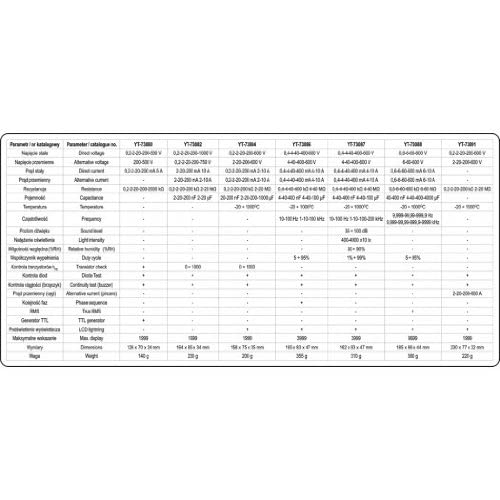
Figure 8.1: Detailed technical specifications for various Yato multimeter models, including the YT-73084.
| Параметр | Нарк |
|---|---|
| Бренд | Ято |
| Модель номери | YT-73084 |
| Продукциянын өлчөмдөрү (L x W x Y) | 15.8 x 3.5 x 7.5 см |
| Салмагы | 276 грамм |
| Power Source | Батарея менен иштейт |
| Стиль | Санарип |
| Түс | Кызыл/Кара |
| Шайкеш спецификациялар | CE |
| Жогорку температура рейтинги | 1000 градус |
| Өлчөө түрү | Мультиметр |
| Эл аралык макала кодекси | 05906083730849 |
| Температураны өлчөө диапазону | -20°Cден 1000°Cге чейин |
| Каршылык өлчөө диапазону | Up to 20 MOhm |
9. Кепилдик жана колдоо
For warranty information and technical support, please refer to the documentation provided with your purchase or contact your retailer. You may also visit the official Yato webкошумча жардам үчүн сайт.
Yato products are designed for performance and durability. If you encounter any issues not covered in this manual, please seek professional assistance or contact Yato customer service.


