Introduction
The Innova 3030g Diagnostic Code Reader is designed to assist in diagnosing issues with OBD2 compliant vehicles. This device allows users to read and clear diagnostic trouble codes (DTCs) related to the 'Check Engine' light and Anti-lock Braking System (ABS) for various vehicle makes. It provides essential information for vehicle maintenance and repair.

Figure 1: Innova 3030g Diagnostic Code Reader device.
Жайгашуу
1. Таңгактан чыгаруу жана алгачкы текшерүү
Carefully remove the Innova 3030g from its packaging. Inspect the device and its cable for any signs of damage. Ensure all components are present.
2. Унаага туташуу
- Унаанын Маалымат Байланыш Туташтыргычын (DLC) табыңыз, ал адатта айдоочу тарабындагы башкаруу панелинин астында жайгашкан.
- Унаанын от алдыруу системасы "OFF" абалында экенин текшериңиз.
- Plug the Innova 3030g's OBD2 connector firmly into the vehicle's DLC.
- Turn the vehicle's ignition to the ON position (engine can be off). The device should power on automatically.
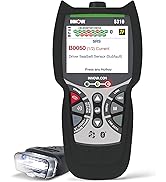
Figure 2: Connecting the diagnostic tool to a vehicle's OBD2 port.
3. Программалык камсыздоону орнотуу (кошумча)
For advanced features, detailed code descriptions, or saving data, connect the device to a computer via its USB port. Download and install the necessary software from the official Innova website. Follow the on-screen instructions for installation and registration.
Иштөө нускамалары
1. Менюда багыттоо
The Innova 3030g features an all-in-one screen displaying vital information. Use the scroll-down button to navigate through menu options. Be mindful that there is typically only a scroll-down function, requiring careful presses to select the desired option.
2. Диагностикалык көйгөй коддорун (DTC) окуу
Once connected and powered on, the device will automatically scan for DTCs. The screen will display any detected 'Check Engine' light codes or ABS codes. Red, yellow, and green LEDs on the device indicate the emissions monitor status, providing a quick visual reference.

Figure 3: Device screen showing detected Diagnostic Trouble Codes (DTCs).
3. Эрasing коддору
To clear stored DTCs and turn off the 'Check Engine' or ABS light:
- Navigate to the 'Erase Codes' option in the menu.
- Press the designated erase button (often red) and follow the on-screen prompts.
- Суралганда өчүрүүнү ырастаңыз.
Эскертүү: In some cases, it may require multiple attempts to successfully erase codes. If the code persists after erasure, the underlying issue may still be present and require further diagnosis.
4. Live Data and Emissions Readiness
The 3030g automatically refreshes data every 30 seconds when connected to the vehicle. This allows for monitoring of live sensor data. The device also displays emissions monitor status, which is useful for verifying a vehicle's readiness for emissions testing.

Figure 4: Device screen showing Powertrain Live Data.
Техникалык тейлөө
1. Аспапты тазалоо
Wipe the device with a soft, dry cloth. Do not use abrasive cleaners or solvents, as these can damage the screen or casing. Keep the OBD2 connector free of dirt and debris.
2. Сактоо
Store the Innova 3030g in a clean, dry environment, away from extreme temperatures and direct sunlight. Keep the cable neatly coiled to prevent damage.
Проблемаларды чечүү
1. Түзмөк күйбөйт
- Ensure the OBD2 connector is securely plugged into the vehicle's DLC.
- Унаанын от алдыруу системасы "ON" абалында экенин текшериңиз.
- Check the vehicle's fuse for the OBD2 port (refer to your vehicle's owner's manual).
2. Unable to Read Codes
- Confirm the vehicle is OBD2 compliant (generally 1996 and newer).
- Ensure a stable connection to the vehicle.
- Try the device on a different OBD2 compliant vehicle to rule out a vehicle-specific issue.
3. Codes Do Not Erase
- Attempt to erase the codes multiple times as per operating instructions.
- Ensure the vehicle's ignition is ON and the engine is OFF during the erase procedure.
- If codes persist, the underlying fault may still be active. Address the vehicle's issue before attempting to clear codes again.
Техникалык шарттар
| Модел | 3030г |
| Элемент Салмагы | 11.2 унция |
| Продукциянын өлчөмдөрү | 10 x 6.5 x 2 дюйм |
| Тtage | 12 вольт |
| Screen Size | 2.8 дюйм |
| Power Source | Электр зымдары |
| Колдоого алынган унаалар | 1996 and newer foreign/domestic cars, light trucks, SUVs, and Hybrids (OBD2 compliant) |
| Негизги өзгөчөлүктөрү |
|
Кепилдик маалымат
For detailed warranty information, please refer to the official Innova website or the warranty card included with your product packaging. Warranty terms and conditions may vary.
Колдоо
For technical assistance, software updates, or additional product information, please visit the official Innova website or contact Innova customer support. The website may also offer detailed repair procedures and further resources.
Official Innova Webсайт: www.innova.com