Introduction
This manual provides comprehensive instructions for the setup, operation, and maintenance of your AT&T CL2940 Corded Phone. The CL2940 is designed for ease of use, featuring a large tilt display, extra-large buttons, a speakerphone, Caller ID/Call Waiting, and Audio Assist functionality. Please read this manual thoroughly to ensure proper use and to take full advantage of all available features.
Пакеттин мазмуну
Пакетиңизде бардык буюмдар бар экенин текшериңиз:
- AT&T CL2940 Corded Speakerphone with Large Display
- Телефон
- Уюлдук аппараттын шнуры
- Телефон линиясы
- Колдонуучунун Колдонмосу (бул документ)
- Note: 4 AA batteries (not included) are required for Caller ID functionality.
Продукт бүттүview
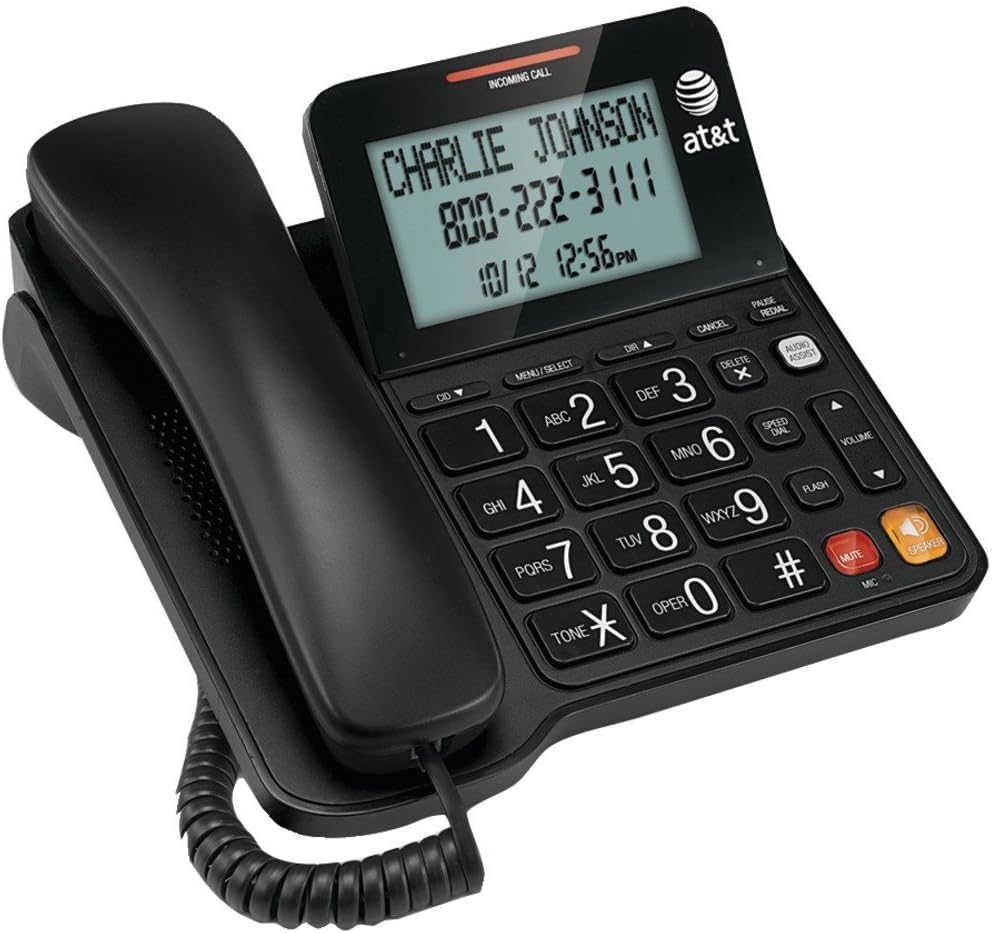
Figure 1: AT&T CL2940 Corded Phone
This image shows the AT&T CL2940 corded phone in black. The phone features a large, easy-to-read tilt display that currently shows an incoming call from 'CHARLIE JOHNSON' with the number '800-222-3111' and the date/time '10/12 12:56PM'. The large, clearly labeled buttons are visible on the keypad, including number keys, navigation buttons, and dedicated buttons for Speaker, Mute, Volume, and Audio Assist. The coiled handset cord connects the handset to the main unit.
Key Features and Components:
- Extra-Large Tilt Display: Provides clear visibility of Caller ID information, time, and menu options.
- Extra-Large Buttons: Оңой терүү жана навигация үчүн иштелип чыккан.
- Динамик: Үнсүз сүйлөшүүнү иштетет.
- Аудио жардам: Enhances audio clarity during calls.
- Чалуучунун ID/Чалуусун күтүүдө: Displays incoming caller information and manages multiple calls.
- Телефон китепчесинин каталогу: Stores up to 25 names and numbers.
- Тез терүү: 10-number speed dial for frequently called contacts.
- Extra-Loud Ringer: Adjustable ringer volume for clear alerts.
- Дубалга орнотулган: Can be placed on a desk or mounted on a wall.
Жайгашуу
1. Телефонду туташтыруу
- Connect one end of the coiled handset cord to the handset and the other end to the jack labeled сүйл on the side of the phone base.
- Connect one end of the telephone line cord to the jack labeled LINE on the back of the phone base.
- Телефон линиясынын шнурунун экинчи учун дубалдагы телефон уячасына туташтырыңыз.
2. Installing Batteries (for Caller ID/Display)
The phone operates without AC power for basic calling functions. However, to enable the Caller ID display and other display-dependent features, 4 AA batteries (not included) are required.
- Locate the battery compartment on the underside of the phone base.
- Батарея уясынын капкагын ачыңыз.
- Бөлүмдүн ичинде көрсөтүлгөндөй, туура полярдуулукту (+ жана -) сактап, 4 AA батарейкасын салыңыз.
- Батарея бөлүгүнүн капкагын ордуна коюңуз.
3. Дубалга орнотуу (кошумча)
The CL2940 can be mounted on a wall to save desk space. Ensure you have a standard wall plate with two pins spaced appropriately.
- Remove the desk stand if attached.
- Align the two keyhole slots on the back of the phone with the wall plate pins.
- Slide the phone downwards to secure it in place.
Иштөө нускамалары
Чакыруу
- Телефонду алыңыз же баскычты басыңыз СПИКЕР баскычы.
- Ариптакта аркылуу каалаган телефон номерин териңиз.
- Чалууну аяктоо үчүн, трубканы кайра рычагга коюңуз же баскычын басыңыз СПИКЕР кайра баскычын.
Чакыруу кабыл алуу
- Телефон шыңгыраганда, телефонду алыңыз же басыңыз СПИКЕР жооп берүү үчүн баскыч.
- Чалууну аяктоо үчүн, трубканы кайра рычагга коюңуз же баскычын басыңыз СПИКЕР баскычы.
Динамикти колдонуу
- Чалуу учурунда динамикти иштетүү үчүн, баскычын басыңыз СПИКЕР баскычы.
- To switch back to the handset, pick up the handset.
- Спикерфон чалуусун аяктоо үчүн, баскычын басыңыз СПИКЕР кайра баскычын.
Чалуучунун ID жана Чалуу күтүү
- When an incoming call is received, the caller's name and number will appear on the display (requires battery installation and subscription to Caller ID service).
- колдонуу CID ▼ жана DIR ▲ Чалуучунун идентификатору журналы аркылуу жылдыруу үчүн баскычтар.
- If you subscribe to Call Waiting, a tone will indicate a second incoming call. Press FLASH чалуулар ортосунда которулуу үчүн.
Телефон китепчеси жана тез терүү
The phone allows you to store frequently called numbers for quick access.
- Programming Phonebook Entries: Refer to the detailed instructions in the full user manual for programming names and numbers into the 25-entry phonebook.
- Тез терүүнү колдонуу: басыңыз ТЕЗ ТЕРҮҮ button, then the corresponding number (0-9) for the stored entry.
Аудио жардамчысы
басыңыз AUDIO Assist button during a call to temporarily boost the audio volume and clarity, making conversations easier to hear.
Үндү көзөмөлдөө жана үнсүз
- Көлөмү: колдонуу VOLUME ▲/▼ buttons to adjust the listening volume during a call (for both handset and speakerphone).
- Үнсүз: басыңыз БАСУУ button to temporarily silence your microphone during a call. The other party will not hear you, but you can still hear them. Press БАСУУ кайрадан сүйлөөнү улантуу үчүн.
Техникалык тейлөө
Телефонду тазалоо
To keep your phone in good condition, periodically wipe it with a soft, slightly damp cloth. Avoid using harsh chemicals or abrasive cleaners, as these can damage the phone's finish or electronic components.
Батареяны алмаштыруу
If the Caller ID display becomes dim or unresponsive, it may be time to replace the 4 AA batteries. Follow the battery installation steps outlined in the "Setup" section.
Проблемаларды чечүү
If you experience issues with your AT&T CL2940 phone, try the following common troubleshooting steps:
- Терүү үнү жок:
- Телефон линиясынын шнуру телефонго да, дубалдагы уячага да бекем туташтырылганын текшериңиз.
- Test the wall jack with another working phone to confirm the line is active.
- Чалуучунун ID көрсөтүлбөйт:
- Verify that 4 AA batteries are correctly installed in the battery compartment.
- Check if your telephone service provider offers Caller ID service and that it is activated on your line.
- Эски батарейкаларды жаңысына алмаштырыңыз.
- Начар аудио сапаты:
- Үнүн колдонуп, үнүн жөндөңүз VOLUME баскычтар.
- Телефондун шнуру бекем туташтырылганын текшериңиз.
- If using the speakerphone, ensure you are within a reasonable distance from the microphone.
- Try activating the AUDIO Assist өзгөчөлүгү.
- Баскычтар жооп бербейт:
- Ensure the phone is connected to a live telephone line.
- If the issue persists, try disconnecting the phone from the wall jack for a few minutes, then reconnecting it.
For more detailed troubleshooting or persistent issues, please refer to the full product support documentation or contact AT&T customer service.
Техникалык шарттар
| Бренд | AT&T |
| Модель номери | CL2940 |
| Телефон түрү | жоон |
| Түс | Кара |
| Продукциянын өлчөмдөрү | 7.9 x 8.8 x 3.7 дюйм |
| Элемент Салмагы | 1 фунт |
| Power Source | Telephone Line Powered (Batteries for Caller ID/Display) |
| Батареялар талап кылынат | 4 AA batteries (for Caller ID/Display, not included) |
| Өндүрүүчү | Vtech |
| Өзгөчөлүктөрү | Caller ID/Call Waiting, Speakerphone, Audio Assist, Extra-Large Tilt Display, Extra-Large Buttons, Extra-Loud Ringer, 10-Number Speed Dial, 25-Name/Number Phonebook |
Кепилдик жана колдоо
Your AT&T CL2940 Corded Phone is manufactured by Vtech. For warranty information and customer support, please refer to the documentation included with your purchase or visit the official AT&T or Vtech support websites. Keep your purchase receipt as proof of purchase.
For assistance, you may contact AT&T customer service directly.


