Introduction
The SilverStone FHP-141 is a high-performance 140mm fan engineered for efficient cooling of CPU heatsinks and computer cases. Its distinctive 38mm thick profile features steeply raked fan blades, optimizing both high airflow and static pressure. This fan includes an integrated switch, allowing users to select between two operational modes: a Күч режими (500 ~ 2000 RPM) for maximum cooling performance and a Тынч режим (500 ~ 1200 RPM) for reduced noise levels, both controllable via PWM fan headers.

Сүрөт 1: Алдыңкы view of the SilverStone FHP-141 fan.
Орнотуу жана орнотуу
1. Таңгактан чыгаруу жана текшерүү
Carefully remove the fan and all accessories from the packaging. Inspect for any visible damage. Ensure all components listed in the 'Included Accessories' section are present.
2. Желдеткичти орнотуу
The FHP-141 fan is designed for both 120mm and 140mm mounting holes. Use the provided mounting adapters if your case or heatsink requires 120mm spacing for a 140mm fan. Due to its 38mm thickness, verify sufficient clearance in your installation area before proceeding.

Figure 2: Detail of mounting holes and optional adapters for 120mm compatibility.
- Position the fan in the desired location, ensuring correct airflow direction.
- If using 120mm mounting points, attach the provided adapters to the fan's corners.
- Secure the fan using the included screws or rubber anti-vibration mounts. Do not overtighten.
3. Вентиляторду туташтыруу
The FHP-141 features a 3 and 4-pin combo power connector for broad compatibility. Connect the fan to an available 4-pin PWM fan header on your motherboard or a compatible fan controller.

3-сүрөт: Арткы view of the fan, illustrating the wiring and product label.
4. Камтылган аксессуарлар
- Монтаждоо бурамалар
- Rubber Anti-Vibration Mounts
- 120mm Mounting Adapters (4 pieces)
- 3-pin to 4-pin power adapter cable
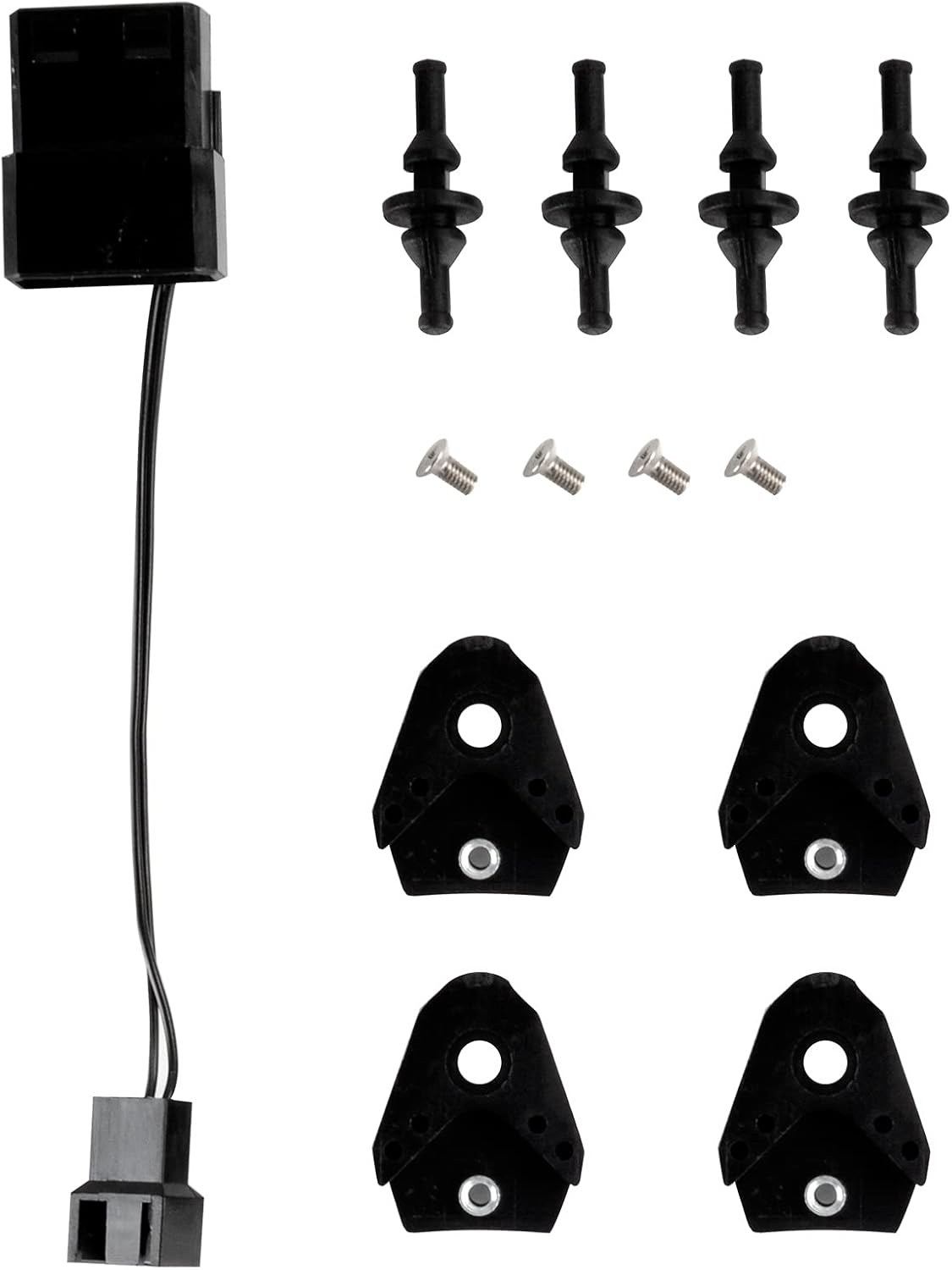
Figure 4: All included accessories for the FHP-141 fan.
Иштөө нускамалары
Кош режимде иштөө
The FHP-141 fan features an integrated switch on its side, allowing you to select between two distinct operating modes:
- Power Mode (P): This mode allows the fan to operate within a speed range of 500 to 2000 RPM. It is ideal for situations requiring maximum airflow and static pressure for optimal cooling performance.
- Quiet Mode (Q): In this mode, the fan operates within a speed range of 500 to 1200 RPM. This setting prioritizes lower noise output, suitable for systems where acoustic performance is critical.
The fan speed within each mode is dynamically controlled by the motherboard's PWM signal, adjusting based on system temperature requirements.

Figure 5: The integrated switch for selecting Power (P) or Quiet (Q) mode.
Режимдерди өзгөртүү үчүн: Ensure your system is powered off before adjusting the switch. Slide the switch to the desired 'P' (Power) or 'Q' (Quiet) position.
Техникалык тейлөө
Regular maintenance ensures optimal performance and longevity of your SilverStone FHP-141 fan.
1. Тазалоо
- Жыштыгы: Clean the fan blades and frame every 3-6 months, or more frequently in dusty environments.
- Процедура: Power off your computer and disconnect the fan. Use compressed air to remove dust from the fan blades and motor housing. A soft, dry cloth can be used to wipe down the blades and frame. Avoid using liquid cleaners.
2. Текшерүү
- Periodically check the fan for any signs of damage, such as cracked blades or loose wiring.
- Ensure the fan is securely mounted and that no cables or other components are obstructing its rotation.
Проблемаларды чечүү
If you encounter issues with your SilverStone FHP-141 fan, refer to the following common problems and solutions:
| Көйгөй | Мүмкүн себеп | Чечим |
|---|---|---|
| желдеткич айланбай жатат |
|
|
| Ашыкча ызы-чуу же титирөө |
|
|
| Начар муздатуу көрсөткүчү |
|
|
Техникалык шарттар
Detailed technical specifications for the SilverStone FHP-141 fan:

6-сүрөт: Side profile of the FHP-141 fan, highlighting its 38mm thickness.
- Модел: FHP-141
- Өлчөмдөрү: 140мм (L) x 140mm (W) x 38mm (H)
- желдеткич ылдамдыгы:
- Power Mode: 500 ~ 2000 RPM (PWM controlled)
- Quiet Mode: 500 ~ 1200 RPM (PWM controlled)
- Ызы-чуу деңгээли: Up to 43 dBA (at maximum RPM in Power Mode)
- Кубат туташтыргычы: 3 and 4-pin Combo
- Rated Voltage: 12V DC
- Шайкеш түзмөктөр: Desktop computers (CPU coolers, computer cases)
- Муздатуу ыкмасы: Аба
- Өндүрүүчү: Silverstone Tek
- Биринчи жеткиликтүү датасы: 5-ноябрь, 2012-жыл
Кепилдик маалымат
SilverStone products are covered by a limited warranty from the date of purchase. The specific terms and duration of the warranty may vary by region and product. Please retain your proof of purchase for warranty claims.
For detailed warranty information, including coverage, limitations, and the claims process, please refer to the official SilverStone webсайтка же түздөн-түз кардарларды колдоо менен байланышыңыз.
Кардарларды колдоо
If you require further assistance, have questions not covered in this manual, or need technical support, please contact SilverStone customer service.
- Онлайн ресурстар: Visit the official SilverStone website for FAQs, updated manuals, and driver downloads.
- Байланыш маалыматы: Refer to the 'Contact Us' section on the SilverStone webаймактык телефон номерлери жана электрондук почта колдоосу үчүн сайт.