1. Киришүү
This manual provides comprehensive instructions for the AT&T TL88102 DECT 6.0 2-Line Cordless Telephone System, including the TL88102 base unit and TL88002 accessory handsets. This system is designed for clear, interference-free communication with extended range, featuring a 2-line answering system with caller ID/call waiting, and intercom capabilities.
The AT&T TL88102 system is ideal for busy households or home offices requiring dual line functionality and multiple cordless handsets for convenience.

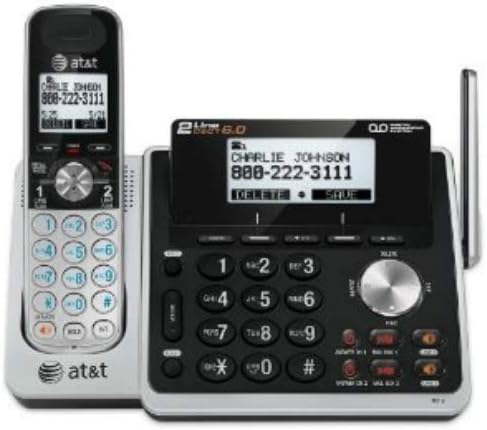
Figure 1: The AT&T TL88102 base unit with one cordless handset, and three additional TL88002 accessory handsets.
2. Орнотуу
2.1 Пакеттин мазмуну
- AT&T TL88102 Base Unit with Cordless Handset
- Негизги блок үчүн AC кубат адаптери
- Телефон линиясы
- TL88002 Accessory Handsets (quantity may vary based on bundle)
- Chargers for Accessory Handsets
- Rechargeable Batteries for Handsets (AAA batteries required)
2.2 Негизги блокту туташтыруу
- Connect the small end of the AC power adapter to the POWER jack on the back of the TL88102 base unit.
- AC кубат адаптеринин чоң учун стандарттуу электр розеткасына сайыңыз.
- Connect one end of the telephone line cord to the TEL LINE 1 or TEL LINE 2 jack on the back of the base unit. If using two lines, connect the second line cord to the other TEL LINE jack.
- Plug the other end(s) of the telephone line cord(s) into your telephone wall jack(s).
2-сүрөт: Арткы view of the TL88102 base unit, illustrating the connection points for power and telephone lines.
2.3 Телефондун батареяларын орнотуу жана заряддоо
- Ар бир зымсыз телефондун артындагы батарея бөлүкчөсүнүн капкагын ачыңыз.
- Insert the supplied rechargeable AAA batteries, observing the correct polarity (+ and - markings).
- Батарея уясынын капкагын жабыңыз.
- Place each handset in its respective charger (base unit or accessory charger). The CHARGE light on the handset will illuminate, indicating proper charging.
- Батареянын оптималдуу иштешин камсыз кылуу үчүн алгач колдонуудан мурун телефондорго кеминде 16 саат кубаттоого уруксат бериңиз.
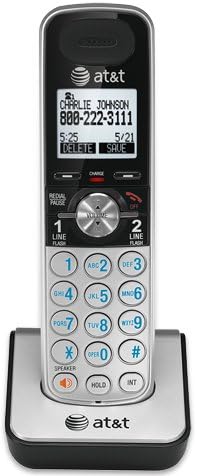
Figure 3: A cordless handset correctly seated in its charging cradle.
2.4 Телефондорду каттоо
All accessory handsets (TL88002) must be registered to the TL88102 base unit before use. The handset included with the base unit is pre-registered.
- Place the handset you wish to register into the base unit's charger cradle.
- Негизги бирдикте баскычын басып, кармап туруңуз КОЛ ТАБУУ button for approximately 4 seconds until the IN USE light on the base unit begins to flash.
- Уюлдук телефондогу баскычты басыңыз # key. The handset will display "Registering..." and then "Handset Registered" upon successful registration.
- If registration fails, remove the handset from the charger and repeat the steps.
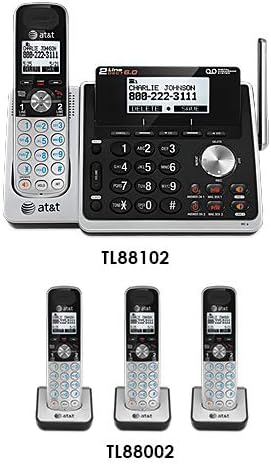
Figure 4: Illustration of the TL88102 base unit and TL88002 accessory handsets, indicating their relationship within the system.
3. Иштөө нускамалары
3.1 Чалууларды кабыл алуу жана кабыл алуу
- Чалуу үчүн: Басыңыз 1-САП or 2-САП, андан кийин номерди териңиз. Же болбосо, адегенде номерди териңиз, анан басыңыз 1-САП or 2-САП.
- Чалууга жооп берүү үчүн: Басыңыз 1-САП, 2-САП, же СПИКЕР.
- Чалууну бүтүрүү үчүн: Басыңыз ӨЧҮРҮҮ же телефонду заряддагычка коюңуз.

Figure 5: The TL88102 base unit and its cordless handset, highlighting the keypad and display for call management.
3.2 Жооп берүү системасы
The TL88102 features a digital answering system for both lines, capable of storing up to 14 minutes of messages per line.
- Күйгүзүү/өчүрүү: Басыңыз ANS ON/OFF 1 or ANS ON/OFF 2 on the base unit to activate or deactivate the answering system for each line.
- Билдирүү ойнотуу: Басыңыз ОЙНОО/ТОКТОТУУ on the base unit or access the answering system menu from any handset.
- Алыстан кирүү: You can retrieve messages remotely by calling your phone number and entering your remote access code.
3.3 Caller ID/Call Waiting
The system supports Caller ID and Call Waiting features. Ensure you subscribe to these services from your telephone service provider.
- Incoming call information (name and number) will display on the handset and base unit screens.
- During a call, if another call comes in, you will hear a tone. Press FLASH чалуулар ортосунда которулуу үчүн.
3.4 Домофон
Use the intercom feature to communicate between the base unit and handsets, or between multiple handsets.
- To initiate intercom: Басыңыз INT on the handset, then select the desired handset or base unit to call.
4. Техникалык тейлөө
4.1 Cleaning the Product
Clean the telephone system with a soft, damp кездеме. Тазалоочу чачыраткычтарды же катуу химиялык заттарды колдонбоңуз, анткени алар каптамага же электрдик компоненттерге зыян келтириши мүмкүн.
4.2 Батареяга кам көрүү
- Ар дайым берилген кайра заряддалуучу AAA батарейкаларын колдонуңуз.
- For optimal performance, keep handsets in their chargers when not in use.
- Эгерде телефон узак убакыт бою колдонулбаса, акып кетпеш үчүн батарейкаларды алып салыңыз.
- Replace batteries when the handset displays "Low Battery" or when talk time significantly decreases.
5. Кыйынчылыктарды
| Көйгөй | Чечим |
|---|---|
| Терүү үнү жок. |
|
| Handset displays "Out of Range" or "No Power at Base". |
|
| Чалуу сапаты начар же статикалык. |
|
| Автожооп берүүчү система билдирүүлөрдү жазбайт. |
|
6. Техникалык шарттар
- Технология: DECT 6.0 Санариптик технология
- Саптар: 2 сызыктуу операция
- Жооп берүү системасы: Digital, up to 14 minutes recording time per line
- Чалуучунун ID/Чалуусун күтүүдө: Ооба (жазылуу талап кылынат)
- Каталог: 50-number phonebook
- Домофон: Handset to Handset, Handset to Base
- Кубат булагы: AC Power Adapter (Base Unit), Rechargeable AAA Batteries (Handsets)
- Продукциянын өлчөмдөрү (негизги бирдиги): Болжол менен 12.1 x 10.2 x 8.6 дюйм
- Элемент Салмагы: Болжол менен 1.8 фунт
- Түсү: Silver
- Материал: Пластик
- Шайкеш түзмөктөр: Угуу аппараты шайкеш келет
7. Кепилдик жана колдоо
For warranty information and technical support, please refer to the documentation included with your product or visit the official AT&T website. You may also contact AT&T customer service directly for assistance with product setup, operation, or troubleshooting.
Сатып алуу квитанциясын кепилдик дооматтары үчүн сатып алуунун далили катары сактаңыз.


