Introduction
This user manual provides detailed instructions for the proper setup, operation, and maintenance of your ONKYO RC-506M Audio Remote Control. Please read this manual thoroughly before using the remote control to ensure correct usage and optimal performance. Keep this manual for future reference.
Жайгашуу
Батарея орнотуу
The ONKYO RC-506M remote control requires two AA (1.5V) batteries for operation. Batteries are not included with this product.
- Пульттун артындагы батарея бөлүкчөсүнүн капкагын табыңыз.
- Press down on the tab and slide the cover downwards to open the battery compartment.
- Insert two AA (1.5V) batteries, ensuring the positive (+) and negative (-) terminals align correctly with the indicators inside the compartment.
- Батарея бөлүкчөсүнүн капкагын бекем чыккыча ордуна жылдырыңыз.

Сүрөт: Артка view of the ONKYO RC-506M remote control, highlighting the location of the battery compartment cover.
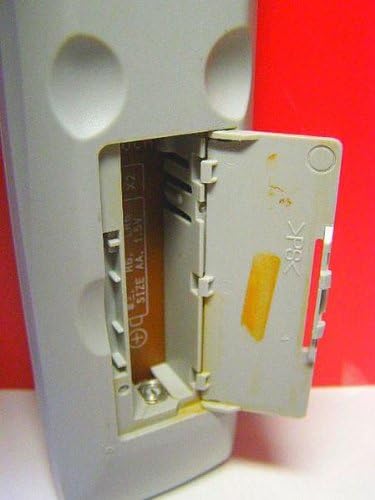
Сүрөт: Жакын план view of the ONKYO RC-506M remote control with the battery compartment open, showing the internal battery slots and polarity markings for AA (1.5V) batteries.
Иштеп жатат
The ONKYO RC-506M is designed to control compatible ONKYO audio components. Ensure there is a clear line of sight between the remote control and the ONKYO device you wish to operate.
- Кубат баскычы: Press to turn the ONKYO audio component on or off.
- Киргизүүнү тандоо: Use the designated input buttons (e.g., CD, DVD, Tuner) to switch between different audio sources.
- Үндү көзөмөлдөө: Use the Volume Up (+) and Volume Down (-) buttons to adjust the audio output level.
- Ойнотуу башкаруулары: Buttons such as Play, Pause, Stop, Fast Forward, and Rewind control media playback on compatible devices.
- Чабыттоо баскычтары: Arrow keys and an Enter/Select button are typically used for menu navigation on connected devices.
Refer to the user manual of your specific ONKYO audio component for detailed functions of each button on the RC-506M remote control.
Техникалык тейлөө
- Тазалоо: To clean the remote control, gently wipe the surface with a soft, dry cloth. Do not use abrasive cleaners, solvents, or chemical sprays, as these can damage the finish or internal components.
- Батареяны алмаштыруу: Replace batteries when the remote control becomes unresponsive or its range decreases. Always replace both batteries at the same time with new ones of the same type (AA 1.5V). Do not mix old and new batteries or different types of batteries.
- Сактагыч: Эгерде алыстан башкаруу куралы узак убакыт бою колдонулбай турган болсо, анда агып кетүүнүн жана аппаратка мүмкүн болуучу зыяндын алдын алуу үчүн батарейкаларды алып салыңыз. Пультту күн нурунан жана экстремалдык температурадан алыс, салкын, кургак жерде сактаңыз.
Проблемаларды чечүү
- Алыстан башкаруу иштебейт:
- Батареялар туура полярдуулук менен туура салынганын текшериңиз.
- Replace old batteries with new AA (1.5V) batteries.
- Ensure there are no obstructions between the remote control and the ONKYO audio component.
- Confirm that you are within the effective operating range of the remote control.
- Баскычтар жооп бербейт:
- Clean the remote control surface and buttons with a soft, dry cloth to remove any dirt or residue.
- If only specific buttons are unresponsive, the remote may require professional servicing or replacement.
- Интерференция:
- Strong light sources, such as direct sunlight or fluorescent lamps, can interfere with the remote control's infrared signal. Try operating the remote in a different lighting condition.
Техникалык шарттар
| Модель номери | RC-506M |
| Бренд | Onkyo |
| Power Source | 2 x AA (1.5V) Batteries (not included) |
| Өлчөмдөрү (болжол менен) | 21 x 7.5 x 3.5 см |
| Салмагы (болжол менен) | 80 г (батареясыз) |
| Биринчи жеткиликтүү күн | 11-декабрь, 2012-жыл |
Кепилдик жана колдоо
For warranty information, please refer to the documentation included with your original ONKYO audio component or contact ONKYO customer support directly. Specific warranty terms may vary by region and purchase date.
For further assistance or technical support, please visit the official ONKYO webсайтына же алардын ыйгарым укуктуу тейлөө борборлоруна кайрылыңыз.


