1. Киришүү
Thank you for choosing the Linq HB-02 Mini Speaker. This portable speaker is designed to provide amplified audio from a variety of devices, including smartphones, MP3/MP4 players, notebooks, and more. Its compact design and rechargeable battery make it ideal for on-the-go use. Please read this manual carefully before using the product to ensure proper operation and longevity.
2. Коопсуздук маалыматы
- Динамикти сууга же ашыкча нымдуулукка дуушар кылбаңыз.
- Ашыкча температурадан сактаныңыз.
- Динамикти өз алдынча ажыратпаңыз же оңдоого аракет кылбаңыз. Бул кепилдикти жокко чыгарат.
- Балдар жетпеген жерде сактаңыз.
- Заряддоо үчүн берилген USB кабелин гана колдонуңуз.
- Батареяны жергиликтүү эрежелерге ылайык таштаңыз.
3. Пакеттин мазмуну
The Linq HB-02 Mini Speaker package typically includes:
- Linq HB-02 Mini Speaker
- USB заряддоо кабели
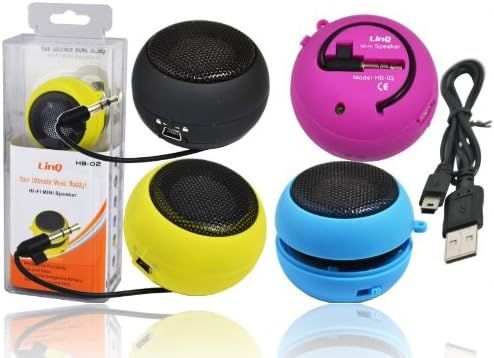
Image: Linq HB-02 Mini Speaker shown in its retail packaging, alongside other speakers and the included USB charging cable. This illustrates the typical contents and appearance of the product.
4. Продукциянын өзгөчөлүктөрү
- Mini Pocket Speaker: Жеңил алып жүрүү үчүн компакт жана портативдик дизайн.
- Жалпы шайкештик: Connects via 3.5mm audio jack to devices like iPhones, iPods, MP3/MP4 players, smartphones, notebooks, PSP, CD players, and more.
- Кайра заряддалуучу батарея: Built-in lithium-ion battery for wireless use.
- Retractable Sound Resonator: Features a pneumatic suspension system that allows the acoustic membrane to be extended from one side, enhancing amplification and sound quality.
- USB заряддоо: Conveniently recharges via the included USB cable.
- Ampжандуу үн: Delivers excellent and pleasant acoustic performance despite its small size.

Image: Four Linq HB-02 Mini Speakers in pink, yellow, purple, and blue, shown with their retractable sound resonators extended, demonstrating the design and color variety.
5. Орнотуу
5.1 Алгачкы заряддоо
- Биринчи колдонуудан мурун динамикти толук заряддаңыз.
- Connect the small end of the included USB charging cable to the mini USB port on the speaker.
- Кабелдин стандарттуу USB учун USB кубат булагына туташтырыңыз (мисалы, компьютердин USB порту, USB дубал адаптери).
- Заряддоо индикаторунун жарыгы (эгер бар болсо) заряддоо учурунда күйөт жана толук заряддалганда өчөт же түсүн өзгөртөт.
5.2 Connecting to an Audio Device
- Locate the integrated 3.5mm audio jack on the speaker. This jack is often stored neatly within the speaker's body.
- Plug the 3.5mm audio jack into the headphone port of your audio device (e.g., smartphone, MP3 player, notebook).
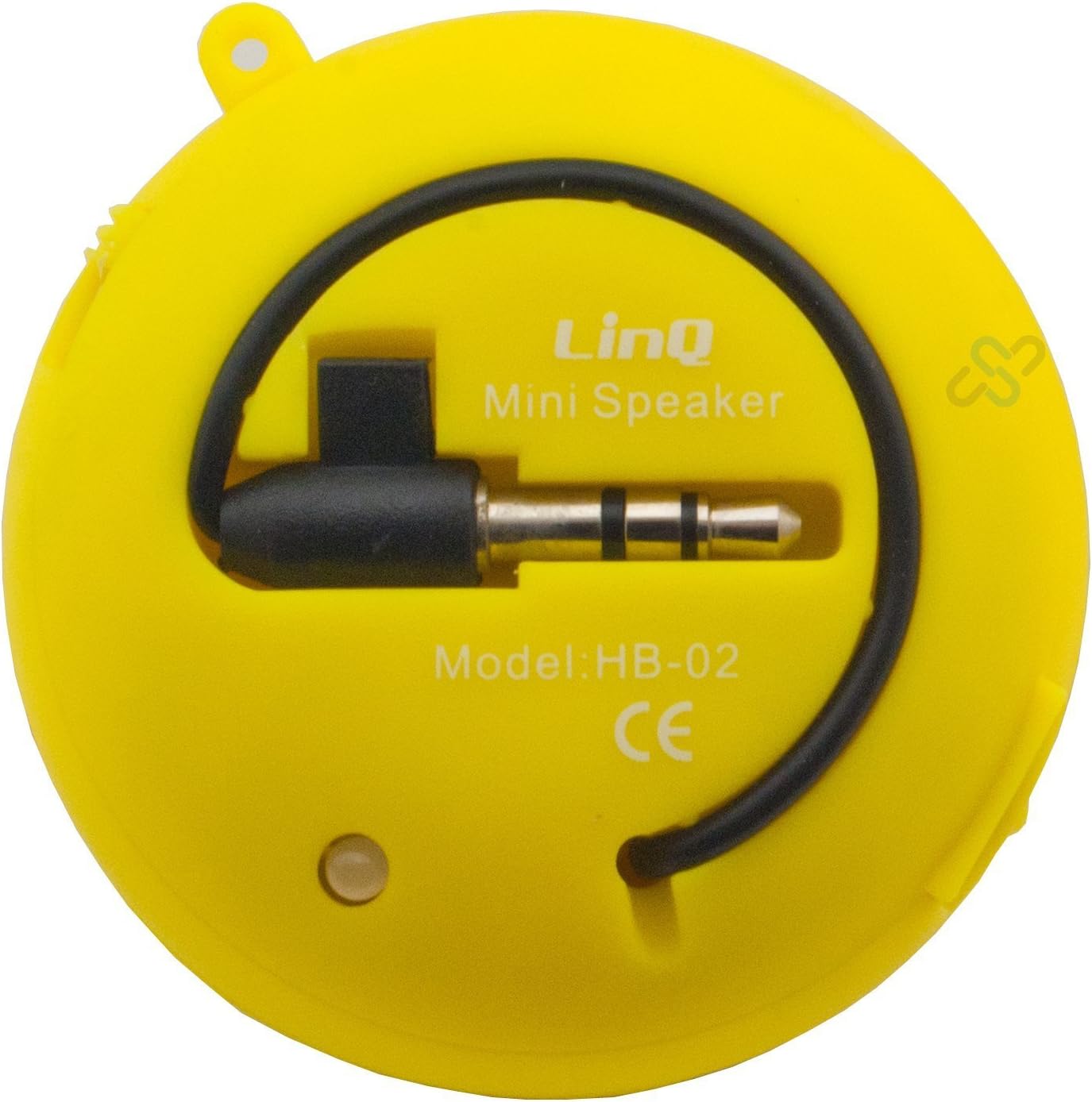
Image: A yellow Linq HB-02 Mini Speaker, viewed from the back, clearly showing the integrated 3.5mm audio jack coiled around the speaker and the model number 'HB-02'.
6. Иштөө нускамалары
6.1 Күйгүзүү/өчүрүү
Locate the power switch on the speaker. Slide it to the 'ON' position to turn on the speaker. Slide it to the 'OFF' position to turn it off.
6.2 Аудиону ойнотуу
- Ensure the speaker is connected to your audio device via the 3.5mm jack.
- Динамикти күйгүзүңүз.
- Start playing audio on your connected device. The sound will now be amplified through the Linq HB-02 speaker.
- Adjust the volume directly from your connected audio device. The speaker itself does not have volume controls.
6.3 Using the Retractable Sound Resonator
Жакшыртылган үчүн amplification and sound quality, gently pull and extend the acoustic membrane from one side of the speaker. This engages the 'Retractable Sound Resonator' system. To return to a more compact form, gently push the membrane back into the speaker body.
7. Техникалык тейлөө
- Тазалоо: Динамиктин сыртын тазалоо үчүн жумшак, кургак чүпүрөктү колдонуңуз. Суюк тазалоочу каражаттарды же аэрозольдорду колдонбоңуз.
- Сактагыч: Колдонулбаган учурда динамикти салкын, кургак жерде, тике күндүн нурунан жана өтө температурадан алыс сактаңыз.
- Батареяга кам көрүү: Батареянын иштөө мөөнөтүн узартуу үчүн динамикти бат-баттан толук кубаттап турбаңыз. Узак мөөнөткө колдонулбаса да, аны үзгүлтүксүз заряддаңыз.
8. Кыйынчылыктарды
8.1 Үн жок
- Ensure the speaker is turned ON.
- Check if the 3.5mm audio jack is fully inserted into both the speaker and your audio device.
- Verify that your audio device's volume is turned up and not muted.
- Ensure the speaker's battery is charged.
8.2 Үн сапаты начар
- Сапат маселелери боюнча аудио булагын текшериңиз.
- Ensure the 3.5mm audio jack connection is secure.
- Try extending the 'Retractable Sound Resonator' for improved sound.
- Ensure the speaker is fully charged. Low battery can affect sound quality.
8.3 Динамик заряддалбай жатат
- Verify that the USB cable is correctly connected to both the speaker and the power source.
- Башка USB портун же кубат адаптерин колдонуп көрүңүз.
- USB кабели бузулбагандыгын текшериңиз.
9. Техникалык шарттар
| Бренд | Linq |
| Модел | HB-02 |
| Максималдуу чыгаруу күчү | 2 Ватт |
| Байланыш технологиясы | AUX (3.5mm Jack), USB (for charging) |
| Монтаж түрү | Стол үстү |
| Динамик түрү | Көчмө спикер |
| Импеданс | 8 Ом |
| Power Source | Батарея менен иштейт (кайра заряддалуучу) |
| Салмагы | Not specified, designed for portability. |
10. Кепилдик жана колдоо
This product comes with a standard manufacturer's warranty. Please refer to the warranty card included with your purchase or contact your retailer for specific warranty terms and conditions. For technical support or further assistance, please contact the retailer or the manufacturer's customer service.


