Introduction
This user manual provides comprehensive instructions for the setup, operation, and maintenance of your AT&T CL82201 DECT 6.0 Cordless Phone/Answering System. This expandable system supports up to twelve handsets and features a digital answering system, caller ID, and intercom capabilities for convenient communication.
Жайгашуу
1. Пакеттин мазмуну
Бардык буюмдардын бар экенине ынаныңыз:
- AT&T CL82201 Base Unit with Digital Answering System
- Зымсыз телефондор (2 камтылган)
- Handset Battery Packs
- Battery Compartment Covers
- Негизги блок үчүн AC кубат адаптери
- Телефон линиясы
- Handset Charger with AC Power Adapter (for second handset)
2. Батареяны орнотуу
- Ар бир телефондун артындагы батарея бөлүкчөсүнүн капкагын ачыңыз.
- Батарея топтомунун сайгычын бөлүмдүн ичиндеги домкратка бекем туташтырыңыз.
- Батарея пакетин бөлүмгө салыңыз.
- Батарея бөлүгүнүн капкагын ордуна коюңуз.
- Place the handset in the base unit or charger to charge for at least 16 hours before first use.
3. Негизги блокту туташтыруу
- Plug the small end of the AC power adapter into the power jack on the back of the base unit.
- AC кубат адаптеринин чоң учун стандарттуу электр розеткасына сайыңыз.
- Телефон линиясынын шнурунун бир учун негизги блоктун арткы жагындагы TEL LINE уячасына сайыңыз.
- Телефон линиясынын экинчи учуна телефон уячасына сайыңыз.
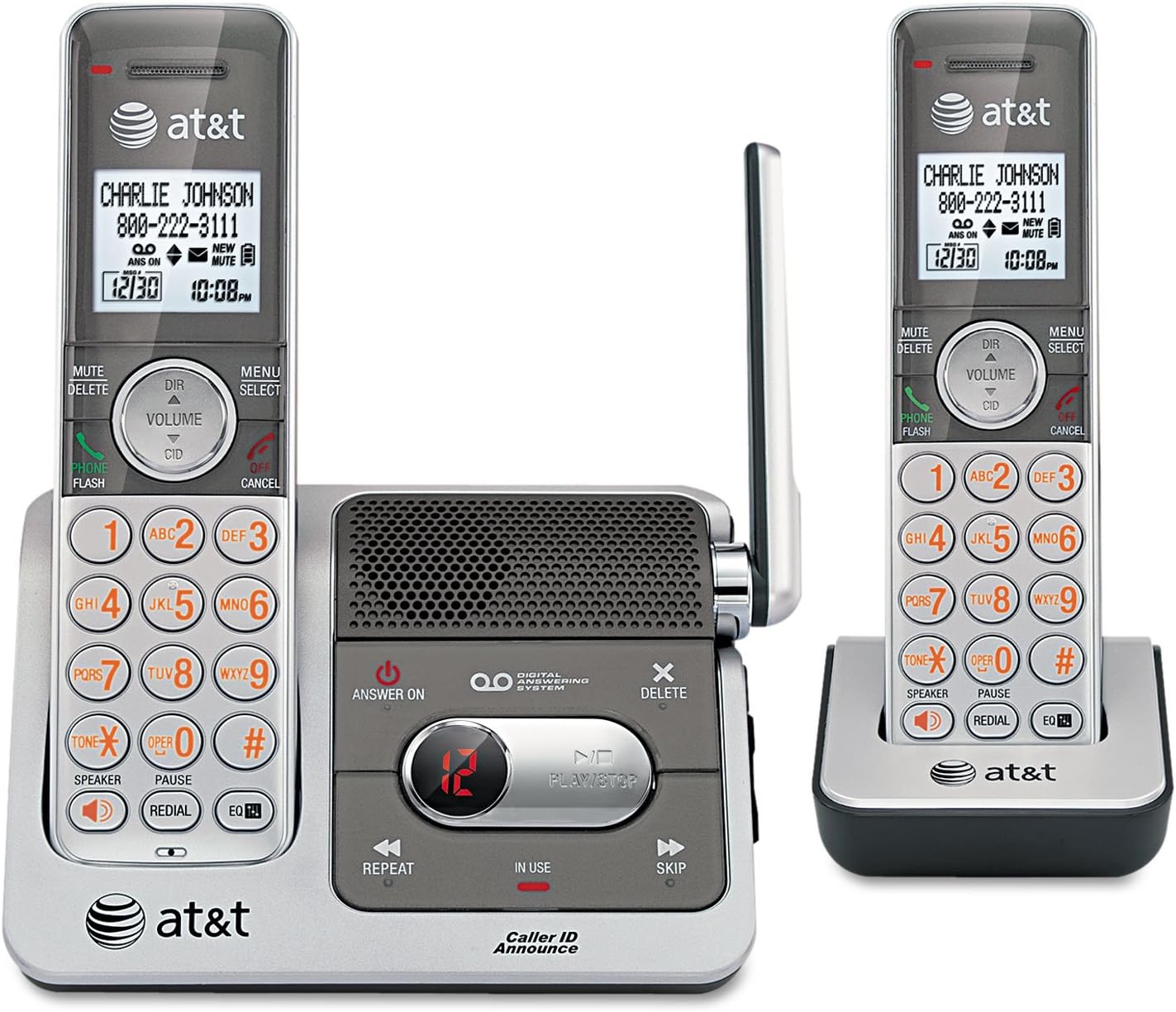
This image displays the AT&T CL82201 cordless phone system. On the left, a handset is docked in the main base unit, which features a digital answering system with controls for playback, repeat, and skip. The base also has an 'Answer On' button and a message counter. On the right, a second handset is shown docked in its charging cradle. Both handsets feature a backlit display showing caller ID information, date, and time, along with a full keypad, navigation buttons, and function keys for mute, delete, volume, speaker, and redial.
Иштөө нускамалары
1. Чалууларды кабыл алуу жана кабыл алуу
- Чалуу үчүн: Басыңыз ТЕЛЕФОН / ФЛЕШ or СПИКЕР, андан кийин номерди териңиз.
- Чалууга жооп берүү үчүн: Басыңыз ТЕЛЕФОН / ФЛЕШ or СПИКЕР телефон шыңгыраганда.
- Чалууну аяктоо үчүн: Басыңыз ӨЧҮРҮҮ/ЖОК КЫЛУУ же трубканы кайра түбүнө/кубаттагычка салыңыз.
2. Санариптик жооп берүү системасы
- Күйгүзүү/өчүрүү: Басыңыз ЖООП КҮЧҮ негизги бирдиктеги баскыч.
- Билдирүү ойнотуу: Басыңыз ОЙНОО/ТОКТОТУУ базалык бирдикте.
- Skip Message: Басыңыз ӨТКӨРҮҮ ойнотуу учурунда.
- Repeat Message: Басыңыз КАЙТАЛОО ойнотуу учурунда.
- Delete Message: Басыңыз ЖОК during playback or when the system is idle.
- Саламдашуу жазуусу: Refer to the handset menu for options to record a custom outgoing message.
3. Чалуучунун ID
The handset display shows the caller's name and number (if available) after the first ring. The system also features Caller ID Announce, which audibly announces the caller's name.
- Review Чалуучуну аныктоо журналы: Басыңыз DIR / VOLUME to scroll through the log.
- Кайра чалуу: Басыңыз ТЕЛЕФОН / ФЛЕШ to dial a number from the Caller ID log.
4. Intercom (Multi-Handset)
Телефондордун ортосунда байланышуу үчүн домофон функциясын колдонуңуз.
- Басыңыз МЕНЮ/ТАНДОО телефондо.
- Scroll to "Intercom" and press ТАНДОО.
- Select the desired handset to call.
5. Үндү башкаруу
Adjust the earpiece or speaker volume during a call by pressing DIR / VOLUME өйдө же ылдый.
6. Үнсүз функция
Чалуу учурунда басыңыз Үнсүз/ЖОК Микрофонуңузду үнсүз кылуу үчүн. Үнүн чыгаруу үчүн аны кайра басыңыз.
7. Кайра терүү
Басыңыз РЕДИАЛ чейин view акыркы 10 терилген номерди басыңыз. ТЕЛЕФОН / ФЛЕШ тандалган номерди терүү үчүн.
Техникалык тейлөө
1. Тазалоо
Телефонду жана анын негизги бөлүгүн жумшак, бир аз сүртүүчү аарчы менен тазалаңызamp кездеме. Тазалоочу спрейлерди же катуу химиялык заттарды колдонбоңуз.
2. Батареяга кам көрүү
- Keep the handset charged when not in use to maintain optimal battery performance.
- Эгер телефон көпкө чейин колдонулбаса, батарейканы телефондон чыгарып алыңыз.
- Replace the battery pack when the handset indicates low battery or performance degrades significantly.
Проблемаларды чечүү
| Көйгөй | Чечим |
|---|---|
| Терүү үнү жок. |
|
| Handset displays "Low Battery" or does not hold a charge. |
|
| Үн сапаты начар же статикалык. |
|
| Автожооп берүүчү система билдирүүлөрдү жазбайт. |
|
Техникалык шарттар
- Модел: CL82201
- Телефон түрү: Зымсыз
- Технология: DECT 6.0
- Телефондор камтылган: 2 (12га чейин кеңейтилет)
- Жооп берүү системасы: Digital, Integrated
- Жазуу жөндөмдүүлүгү: Болжол менен 17 мүнөт
- Чалуучунун идентификациясы: Yes (with Caller ID Announce)
- Конференция чалуу мүмкүнчүлүгү: 3-жол
- Домофон: Yes (Handset-to-handset)
- Дисплей: Ак жарык дисплей
- Баскычтоп: Жарыктанган
- Өндүрүүчү: AT&T
- UPC: 151903430309
Кепилдик жана колдоо
Кепилдик маалымат
This AT&T product is covered by a standard manufacturer's limited warranty. Please refer to the warranty card included in your product packaging for specific terms, conditions, and duration. Keep your purchase receipt as proof of purchase.
Кардарларды колдоо
For technical assistance, troubleshooting, or warranty service, please visit the official AT&T support website or contact their customer service hotline. Contact information can typically be found on the AT&T webсайтында же буюмдун баштапкы таңгагында.


