1. Киришүү
This manual provides comprehensive instructions for the setup, operation, and maintenance of your Zenith ZB410MB Microban 4-Device Universal Remote Control. This remote is designed to control up to four different audio/video components, including TVs, VCRs/DVDs, Satellite receivers, and Cable boxes. It features Microban antimicrobial technology and oversized, rubberized buttons for enhanced usability.
2. Продукциянын өзгөчөлүктөрү
- Controls up to 4 devices: TV, VCR/DVD, Satellite, and Cable.
- Integrated Microban antimicrobial technology for product protection.
- Oversized, rubberized 12mm buttons for improved tactile feedback and ease of use.
- HD Dot button for off-air digital use and select cable systems.
- Extensive code library for compatibility with over 400 TV manufacturers and major brands.
3. Remote Control Layout
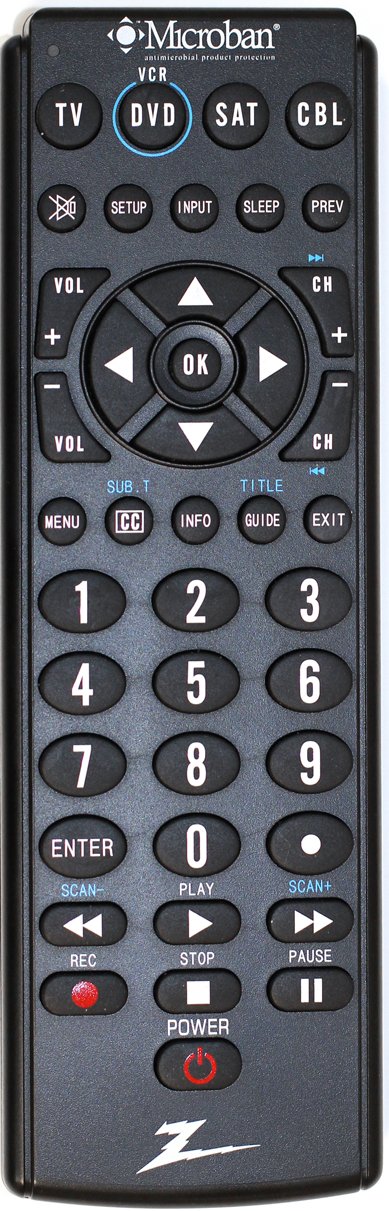
The image above displays the Zenith ZB410MB Microban 4-Device Universal Remote Control. It features a black casing with clearly labeled, large, rubberized buttons. The top section includes device selection buttons (TV, DVD, SAT, CBL) and function keys like SETUP, INPUT, SLEEP, and PREV. The central area contains navigation and OK buttons, flanked by Volume and Channel controls. Below this are numerical keys (0-9), MENU, CC, INFO, GUIDE, and EXIT buttons. The bottom section includes playback controls (SCAN-, PLAY, SCAN+, REC, STOP, PAUSE) and a POWER button.
Негизги баскыч функциялары:
- Device Select Buttons (TV, DVD, SAT, CBL): Press to select the device you wish to control.
- КҮЧ: Тандалган аппаратты күйгүзөт же өчүрөт.
- ЖАЙГАШУУ: Алыстан башкаруу пультун программалоо үчүн колдонулат.
- КИРҮҮ: Selects video input sources on your TV.
- VOL (+/-): Үнүн тууралайт.
- CH (+/-): Каналдарды өзгөртөт.
- OK / Навигация жебелери: Confirms selections and navigates menus.
- МЕНЮ: Тандалган аппараттын менюсуна кирет.
- CC (Жабык коштомо жазуу): Toggles closed captions.
- МААЛЫМАТ: Программа жөнүндө маалыматты көрсөтөт.
- ЖЕТЕКЧЕ: Электрондук программа колдонмосун ачат.
- ЧЫГУУ: Менюлардан же жол көрсөткүчтөрдөн чыгат.
- Number Pad (0-9, ENTER): Түз канал киргизүү жана башка сандык киргизүүлөр үчүн.
- Playback Controls (REC, STOP, PLAY, PAUSE, SCAN-, SCAN+): Controls functions for VCRs/DVDs.
4. Орнотуу
4.1. Батареяны орнотуу
Your remote control requires two AAA batteries (not included).
- Remove the battery compartment cover on the back of the remote by sliding it downwards.
- Бөлүмдүн ичинде көрсөтүлгөндөй (+) жана (-) терминалдарын дал келтирип, эки AAA батарейкасын салыңыз.
- Replace the battery compartment cover by sliding it back into place until it clicks.
4.2. Пулуңузду программалоо
To control your devices, the remote must be programmed with the correct codes. Refer to the code list provided with your remote or available online for specific brand codes. If a code is not found, use the Code Search Method.
4.2.1. Code Entry Method
- Программалагыңыз келген түзмөктү күйгүзүңүз (мисалы, телевизор, DVD ойноткуч).
- басып, кармап туруңуз ЖАЙГАШУУ баскычын кызыл индикатор күйгөнгө чейин басыңыз.
- Программалагыңыз келген түзмөктүн баскычын басып, коё бериңиз (мисалы, TV, DVD). The red indicator light will blink once and then remain lit.
- Enter the 3-digit code for your device's brand using the number pad.
- If the code is valid, the red indicator light will turn off. If the light blinks and stays on, the code is invalid; re-enter the code or try another code for your brand.
- Пультту аппаратка багыттап, баскычын басыңыз КҮЧ button. If the device turns off, the programming was successful. If not, repeat the steps with the next code listed for your brand.
4.2.2. Code Search Method
Use this method if you cannot find a code for your device or if the entered codes do not work.
- Программалоону каалаган аппаратты күйгүзүңүз.
- басып, кармап туруңуз ЖАЙГАШУУ баскычын кызыл индикатор күйгөнгө чейин басыңыз.
- Программалагыңыз келген түзмөктүн баскычын басып, коё бериңиз (мисалы, TV, DVD). The red indicator light will blink once and then remain lit.
- басыңыз КҮЧ button repeatedly (approximately every 2 seconds) until your device turns off. This may take several presses as the remote cycles through codes.
- Түзмөк өчкөндөн кийин, дароо басыңыз ENTER button to save the code. The red indicator light will turn off.
- Test the remote's functions (e.g., volume, channel). If all functions work, programming is complete. If not, repeat the process, as you may have passed the correct code.
5. Иштөө нускамалары
5.1. Device Selection
Before operating any device, you must select the correct device mode on the remote. Press the corresponding device button (TV, DVD, SAT, же CBL) once. The red indicator light will flash once to confirm the selection.
5.2. Негизги функциялар
- Күйгүзүү/өчүрүү: басыңыз КҮЧ Тандалган аспапты күйгүзүү же өчүрүү үчүн баскыч.
- Үндү көзөмөлдөө: колдонуу VOL+ жана VOL - buttons to increase or decrease the volume.
- Каналды өзгөртүү: колдонуу CH + жана CH - buttons to change channels sequentially. For direct channel entry, use the number pad.
5.3. Атайын функциялар
- Меню навигациясы: Басыңыз МЕНЮ to access the device's on-screen menu. Use the navigation arrows and OK button to move through and select options.
- Гид: Басыңыз GUIDE to display the electronic program guide (if supported by your device).
- Маалымат: Басыңыз INFO чейин view details about the current program or selected item.
- Жабык коштомо жазуу: Басыңыз CC to activate or deactivate closed captions.
- Ойнотуу башкаруулары: When in DVD/VCR mode, use ОЙНОО, ТЫНЫГУУ, ТОКТОТ, REC, SCAN- (артка) жана SCAN+ (fast forward) for media playback.
6. Техникалык тейлөө
- Тазалоо: Wipe the remote control with a soft, dry cloth. Do not use abrasive cleaners or solvents. The Microban technology is integrated into the product and does not require special cleaning for its antimicrobial properties.
- Батареяны алмаштыруу: Replace batteries when the remote's range decreases or the indicator light fails to illuminate consistently. Always replace both batteries simultaneously with new AAA batteries.
- Сактагыч: Пультту кургак, өтө жогорку температурадан алыс жерде сактаңыз.
7. Кыйынчылыктарды
| Көйгөй | Мүмкүн себеп | Чечим |
|---|---|---|
| Пульт түзмөктү иштетпейт. | Incorrect device mode selected. Batteries are low or dead. Remote not programmed correctly. Obstruction between remote and device. | Press the correct device button (TV, DVD, SAT, CBL). Replace batteries. Reprogram the remote using Code Entry or Code Search. Ensure a clear line of sight. |
| Кээ бир баскычтар иштебейт. | Remote not fully compatible with all device functions. Incorrect code programmed. | Try other codes for your device brand. Some advanced functions may not be supported by universal remotes. |
| Red indicator light does not illuminate. | Батареялар аз же өлүп калган. | Батареяларды алмаштырыңыз. |
| Device turns off during Code Search before I can press ENTER. | You pressed the POWER button too slowly. | Repeat the Code Search method, pressing the POWER button more quickly once the device turns off. |
8. Техникалык шарттар
- Модел: ZB410MB
- Бренд: Зенит
- Колдоого алынган түзмөктөр: 4 (TV, VCR/DVD, Satellite, Cable)
- Өлчөмдөрү: 1.38 x 4.33 x 10.91 дюйм
- Элемент Салмагы: 5.9 унция
- Батареялар: 2 x AAA (киргизилген эмес)
- Өзгөчө өзгөчөлүгү: Microban Antimicrobial Technology
- Түсү: Кара
9. Кепилдик жана колдоо
For warranty information or technical support, please refer to the documentation included with your purchase or contact Zenith customer service. Specific warranty terms may vary by region and retailer.


