Introduction
The WeatherX WR182R is a versatile emergency tool designed to keep you informed and prepared. It combines an instant NOAA weather radio, AM/FM radio, and a bright LED flashlight. Multiple power options, including a dynamo hand crank and rechargeable battery, ensure reliability in any situation. This manual provides detailed instructions for setup, operation, and maintenance of your WR182R radio.
Пакеттин мазмуну
- WeatherX WR182R Instant NOAA Weatherband Radio
- DC Charging Cable with Connectors (USB, Micro-USB, Mini-USB)
- Колдонуучунун колдонмосу (ушул колдонмо)
- Кепилдик картасы
Продукт бүттүview
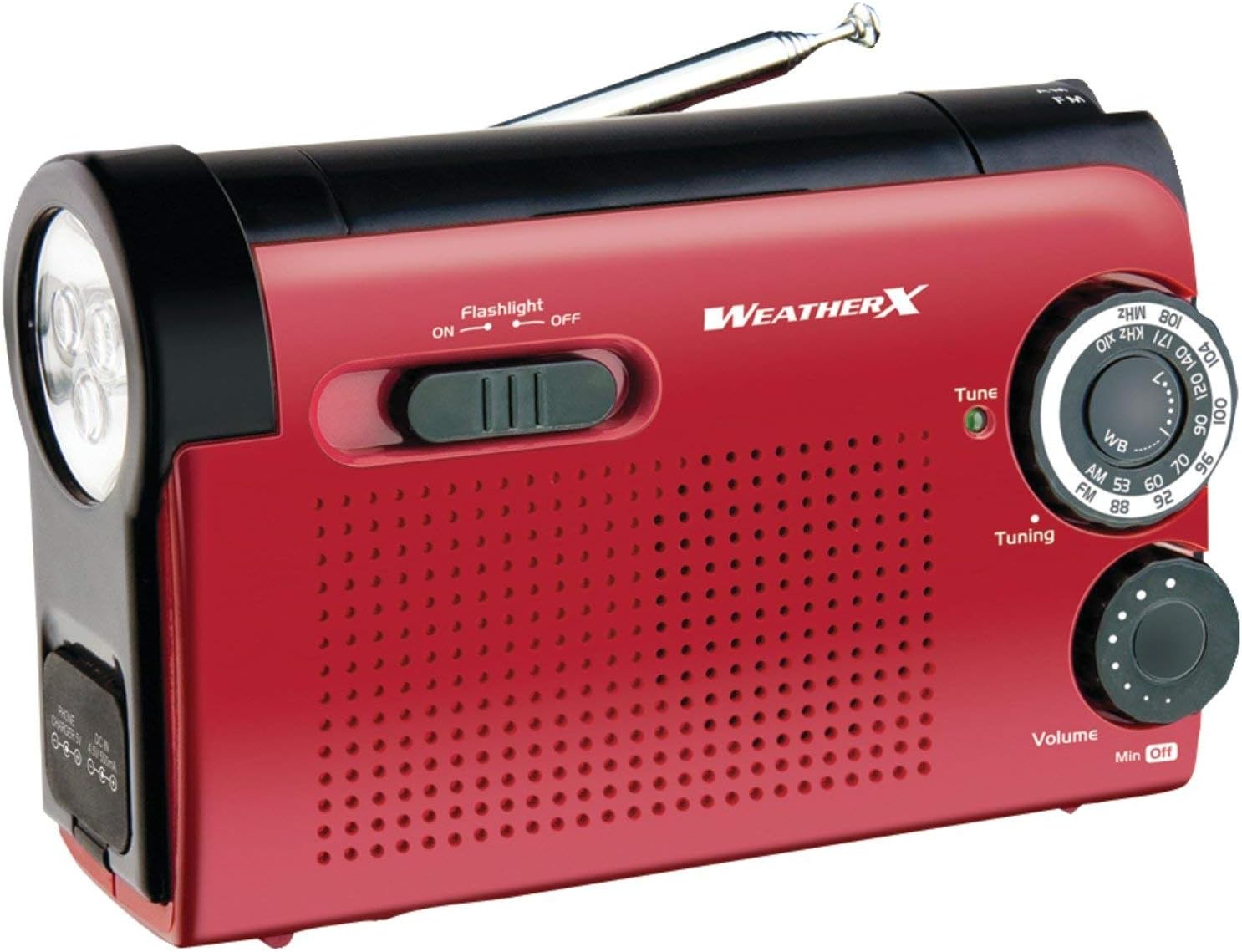
Сүрөт 1: Алдыңкы view of the WeatherX WR182R radio, showing the flashlight, speaker grille, tuning dial, and volume control.

2-сүрөт: Каптал view of the WeatherX WR182R radio, illustrating its compact dimensions (5.28" x 2.09" x 3.46") and the dynamo hand crank.
The WR182R features a robust design with intuitive controls. Key components include:
- LED фонарик: Located on the left side for illumination.
- Тюнинг терүү: Радио жыштыктарын тандоо үчүн.
- Үндү көзөмөлдөө: Analog knob for adjusting audio output.
- Топту тандагыч: Switch to choose between NOAA Weatherband (WB), AM, and FM radio.
- Динамо кол крани: Кол менен электр энергиясын өндүрүү үчүн.
- Телескопиялык антенна: Жакшыртылган радио кабыл алуу үчүн узартылат.
- USB порттору: Female USB, Micro-USB, and Mini-USB for charging and power input.
- Батарея бөлүмү: For optional AA batteries.
Жайгашуу
Радиону иштетүү
The WeatherX WR182R offers multiple power options:
- Камтылган кайра заряддалуучу батарея: The radio contains an internal rechargeable battery. This battery can be charged via the dynamo hand crank or the included DC charging cable.
- Динамо кол крани: For emergency power, extend the hand crank from the side of the radio and rotate it clockwise or counter-clockwise. Continuous cranking will generate power to operate the radio and charge the internal battery.
- AA Batteries (Not Included): For extended use, open the battery compartment and insert three (3) AA-size batteries, ensuring correct polarity. Switch the power source selector to "AA Batteries" if available, or ensure the internal battery is not selected.
- DC заряддоо кабели: Connect the provided DC charging cable to the radio's DC input port and to a compatible power adapter (included) or USB power source.

Figure 3: The radio highlighting its built-in rechargeable battery feature, which can be charged via the hand crank or DC cable.
Иштөө нускамалары
Radio Operation (AM/FM/NOAA Weatherband)
- Күйгүзүү: Rotate the Volume control knob clockwise to turn on the radio and adjust the volume.
- Тандоо тобу: Use the Band Selector switch (usually labeled WB/AM/FM) to choose your desired radio band.
- Жөндөө станциясы: Extend the telescopic antenna for optimal reception. Rotate the Tuning dial to find a station. For NOAA Weatherband, tune to the clearest signal.

Figure 4: The radio showcasing its AM/FM radio capabilities, with the tuning dial and band selector visible.
Фонардын иштеши
Slide the flashlight ON/OFF switch located near the flashlight lens to activate or deactivate the LED flashlight.

Сүрөт 5: Жакын пландан view of the flashlight end of the radio, showing the LED light and charging ports.
Тышкы түзмөктөрдү заряддоо
The WR182R can act as a power bank for small electronic devices. Connect your device's charging cable to the appropriate USB port on the radio (Female USB, Micro-USB, or Mini-USB). Power will be drawn from the radio's internal rechargeable battery. For best results, ensure the radio's battery is fully charged or continuously crank the dynamo while charging.
Техникалык тейлөө
- Тазалоо: Радиону жумшак, кургак чүпүрөк менен сүртүңүз. Абразивдүү тазалагычтарды же эриткичтерди колдонбоңуз.
- Сактагыч: Store the radio in a cool, dry place away from direct sunlight and extreme temperatures. If storing for extended periods, remove AA batteries to prevent leakage.
- Батареяга кам көрүү: Regularly charge the internal rechargeable battery, especially if not used frequently, to maintain its lifespan.
Проблемаларды чечүү
| Көйгөй | Мүмкүн себеп | Чечим |
|---|---|---|
| Электр кубаты жок/Радио күйбөй жатат | Internal battery depleted; AA batteries low or incorrectly inserted; Power source selector incorrect. | Charge internal battery via hand crank or DC cable. Replace AA batteries, ensuring correct polarity. Verify power source selector is set correctly. |
| Радио кабыл алуу начар | Антенна узартылган эмес; Сигнал аймагы алсыз; Интерференция. | Телескопиялык антеннаны толугу менен сунуңуз. Радионун ордун башка жакка жылдырып көрүңүз же ачык жерге жылдырыңыз. |
| Кол чырак иштебейт | Flashlight switch off; Battery low. | Ensure flashlight switch is in the ON position. Charge the radio's internal battery. |
| Тышкы түзмөктү кубаттоого болбойт | Radio battery low; Incorrect USB cable/port; Device not compatible. | Ensure radio's internal battery is charged. Use the correct USB cable and port. Note that some devices may not be compatible or may charge slowly. |
Техникалык шарттар
| Өзгөчөлүк | Деталь |
|---|---|
| Продукциянын өлчөмдөрү | 5.28 x 2.09 x 3.46 дюйм |
| Элемент Салмагы | 10.2 унция |
| Модель номери | WR182R |
| Power Source | Built-in rechargeable battery, Dynamo hand crank, 3x AA batteries (not included), Corded Electric (via Power Adapter) |
| Радио топтору колдоого алынат | AM, FM, NOAA Weatherband |
| Байланыш технологиясы | USB (Female, Micro-USB, Mini-USB) |
| Өзгөчө өзгөчөлүк | Analog Volume Control, LED Flashlight |
| Түс | Кызыл/Кара |
Кепилдик жана колдоо
For warranty information and technical support, please refer to the included Warranty Card or visit the official WeatherX webсайт. Кепилдик дооматтары үчүн сатып алуу дүмүрчөгүңүздү сактаңыз.
Өндүрүүчү: Digital Products International, Inc.
Тектеш документтер - WR182R
 |
WeatherX WR224R NOAA Weatherband AM/FM радиосу Bluetooth жана кол чырагы менен Колдонуучунун колдонмосу WeatherX WR224R үчүн комплекстүү колдонуучу колдонмосу, анын өзгөчөлүктөрү, анын ичинде NOAA аба ырайы жөнүндө эскертүүлөр, AM/FM радиосу, Bluetooth туташуу, кол чырак, динамо кол-криги жана мобилдик түзүлүштөрдү кубаттоо мүмкүнчүлүктөрү. |
 |
WeatherX WR383R Weatherband/AM/FM Flashlight and Lantern User Guide Comprehensive user guide for the WeatherX WR383R Weatherband/AM/FM Flashlight and Lantern, covering safety instructions, setup, power options, charging, radio operation, and troubleshooting. |
 |
WEATHERX XPC10002R Күн энергиясы банкы жана зымсыз кубаттагыч менен жарык колдонуучу колдонмосу WEATHERX XPC10002R Күн энергиясы банкы жана зымсыз кубаттагыч менен жарык үчүн комплекстүү колдонуучу көрсөтмөсү. Чоо-жайы өзгөчөлүктөрү, коопсуздук эскертүүлөрү, кубаттоо ыкмалары (күн, USB, зымсыз), фонардын иштеши жана эл аралык колдоо. |