1. Киришүү
This manual provides instructions for the setup, operation, and maintenance of your Logitech MK710 Wireless Desktop Set. This set includes a wireless keyboard and a wireless mouse, designed for enhanced comfort and productivity.
The Logitech MK710 features a long battery life, Incurve keys, a cushioned palm rest, and a sculpted mouse with hyper-fast scrolling. Both keyboard and mouse connect wirelessly via a single Logitech Unifying receiver.
2. Пакеттин мазмуну
Пакетиңизде бардык буюмдар бар экенин текшериңиз:
- Logitech MK710 зымсыз баскычтобу
- Logitech зымсыз чычкан
- Logitech бириктирүүчү кабыл алгычы (USB)
- AA батарейкалары (алдын ала орнотулган же кошо берилген)
- Колдонуучунун документтери (бул колдонмо)
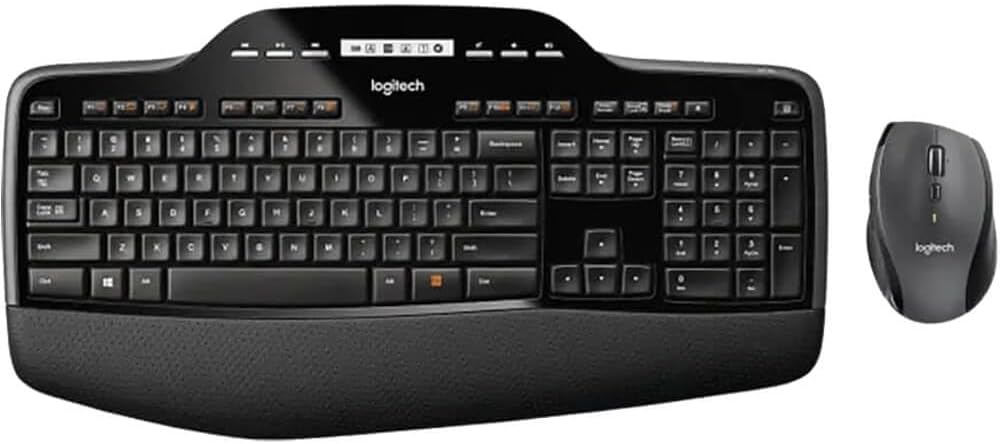
Image 1: The Logitech MK710 Wireless Desktop Set, featuring the full-size keyboard with integrated palm rest and the ergonomic wireless mouse.
3. Орнотуу нускамалары
3.1. Батареяны орнотуу
The keyboard and mouse require AA batteries. These may be pre-installed or included separately.
- Батарея бөлүмүн клавиатура менен чычкандын астыңкы бетинен табыңыз.
- Бөлүмдүн капкагын ачыңыз.
- AA батарейкаларын туура полярдуулукту (+/-) камсыз кылып, салыңыз.
- Батарея уясынын капкагын бекем жабыңыз.

Сүрөт 2: Side profile of the Logitech MK710 keyboard, showing its ergonomic design and adjustable feet. The battery compartment is located on the underside.
3.2. Бириктирүүчү кабыл алгычты туташтыруу
The Logitech Unifying receiver provides a wireless connection for both your keyboard and mouse.
- Locate the small USB Unifying receiver. It may be stored inside the mouse battery compartment for shipping.
- Unifying кабыл алгычын компьютериңиздеги жеткиликтүү USB портуна сайыңыз.
- Сиздин иштөө тутумуңуз керектүү драйверлерди автоматтык түрдө таап, орнотууга тийиш. Бул процесс бир нече мүнөткө созулушу мүмкүн.
- Драйверлер орнотулгандан кийин, клавиатура жана чычкан колдонууга даяр болушу керек.
Эскертүү: For advanced customization and to manage multiple Unifying devices, download the Logitech Unifying Software from the official Logitech webсайт.
4. Иштөө нускамалары
4.1. Баскычтопту колдонуу
The MK710 keyboard features Incurve keys and a cushioned palm rest for comfortable typing. It includes a full numeric keypad and dedicated media keys.
- Incurve Keys: The concave design of the keys helps guide your fingers, promoting a more natural typing posture.
- Жумшак алакан таянычы: Provides support for your wrists during extended typing sessions.
- LCD дисплей: A small LCD panel above the function keys displays status information such as Caps Lock, Num Lock, Scroll Lock, and battery status.
- Функция баскычтары (F1-F12): These keys can perform various functions, often in combination with the 'Fn' key. Default functions may include media control, volume adjustment, and application shortcuts.
4.2. Чычканды колдонуу
The sculpted design of the mouse provides comfort, and its hyper-fast scrolling feature allows for efficient navigation.
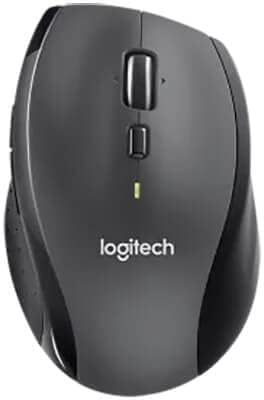
Сүрөт 3: Жакын пландан view of the Logitech wireless mouse, highlighting its ergonomic shape and scroll wheel.
- Гипер-тез жылдыруу: The scroll wheel can switch between precise click-to-click scrolling and ultra-fast free-spinning scrolling for navigating long documents or web pages. Press the button directly below the scroll wheel to toggle between modes.
- Программалануучу баскычтар: The mouse may include additional buttons (e.g., thumb buttons) that can be customized using the Logitech Options software for specific functions or shortcuts.
5. Техникалык тейлөө
5.1. Батареяны алмаштыруу
The Logitech MK710 is designed for extended battery life, up to three years for both the keyboard and mouse under typical usage. When the battery indicator on the keyboard's LCD display or the mouse's LED light indicates low power, replace the batteries.
- Turn off the keyboard and mouse using their respective power switches (usually on the underside).
- Батарея отсегин ачыңыз.
- Эски батареяларды чыгарып, аларды жергиликтүү эрежелерге ылайык жок кылыңыз.
- Insert new AA batteries, observing correct polarity.
- Close the compartment and turn the devices back on.
5.2. Тазалоо
To maintain optimal performance and hygiene, clean your desktop set periodically.
- Жумшак, түксүз кездемени жеңил колдонуңуз dampсуу же жумшак тазалоо эритмеси менен.
- Катуу химиялык заттарды, абразивдүү тазалоочу каражаттарды же суюктуктарды түз түзмөктөргө чачуудан алыс болуңуз.
- Баскычтоп үчүн, баскычтардын ортосундагы таштандыларды кетирүү үчүн кысылган абаны колдонуңуз.
6. Кыйынчылыктарды
If you encounter issues with your Logitech MK710 Desktop Set, refer to the following common solutions:
| Маселе | Чечим |
|---|---|
| Клавиатура же чычкан жооп бербей жатат. |
|
| Кечигип же үзгүлтүктүү байланыш. |
|
| Mouse cursor moves erratically. |
|
7. Техникалык шарттар
| Өзгөчөлүк | Деталь |
|---|---|
| Бренд | Logitech |
| Модель номери | LOG920002416 (MK710) |
| Байланыш технологиясы | Wireless (USB Unifying Receiver) |
| Шайкеш түзмөктөр | Ноутбук, персоналдык компьютер |
| Түс | Кара |
| Баскычтоптун атайын функциялары | Incurve Keys, Cushioned Palm Rest, LCD Display |
| Mouse Special Features | Sculpted Design, Hyper-Fast Scrolling |
| Продукциянын өлчөмдөрү | 19.1 x 9.9 x 3.1 дюйм |
| Элемент Салмагы | 3.54 фунт |
| Өндүрүүчү | Logitech |
8. Кепилдик жана колдоо
Кепилдик жөнүндө толук маалымат алуу үчүн, өнүмүңүз менен кошо берилген кепилдик картасын караңыз же расмий Logitech дүкөнүнө баш багыңыз. webсайт. Logitech өнүмдөр боюнча суроолор, техникалык жардам жана кепилдик боюнча дооматтар боюнча кардарларды колдоо кызматын көрсөтөт.
Онлайн колдоо: Visit support.logi.com for FAQs, troubleshooting guides, and driver downloads.
Колдоо кызматы менен байланышуу: Refer to the Logitech webаймактык байланыш маалыматы үчүн сайт.


