1. Киришүү
This manual provides instructions for the APEX LD200RM remote control, designed for use with various APEX LCD and LED television models. This remote control offers full functionality for your compatible APEX television, ensuring convenient operation of all features.
Compatible APEX TV Models:
- LD3249
- LD3288, LD3288T, LD3288M
- LD4077, LE4077M
- LD4088
- LD4688
- LE3212, LE3212D
- LE4012
- LE4612
- LE3242
- LE3942
- LE40B12
- LE4243
- LE4643
- LE5043
2. Орнотуу
2.1 Батареяны орнотуу
The APEX LD200RM remote control requires two (2) AA batteries for operation. Follow these steps to install the batteries:
- Пульттун артындагы батарея бөлүкчөсүнүн капкагын табыңыз.
- Төмөнкү өтмөктү басып, капкакты жылдырып ачыңыз.
- Оң (+) жана терс (-) терминалдары бөлүмдүн ичиндеги белгилер менен туура дал келишин камсыз кылып, эки АА батарейканы салыңыз.
- Батарея бөлүкчөсүнүн капкагын бекем чыккыча ордуна жылдырыңыз.
Эскертүү: Ар дайым эки батареяны тең бир убакта алмаштырыңыз. Эски жана жаңы батареяларды, же ар кандай типтеги батареяларды аралаштырбаңыз.
2.2 Алгачкы колдонуу
The APEX LD200RM remote control is an original replacement and typically does not require any programming or pairing. Once batteries are installed, point the remote control towards your compatible APEX television and begin operation.
3. Иштөө нускамалары
This section details the functions of the buttons on your APEX LD200RM remote control.
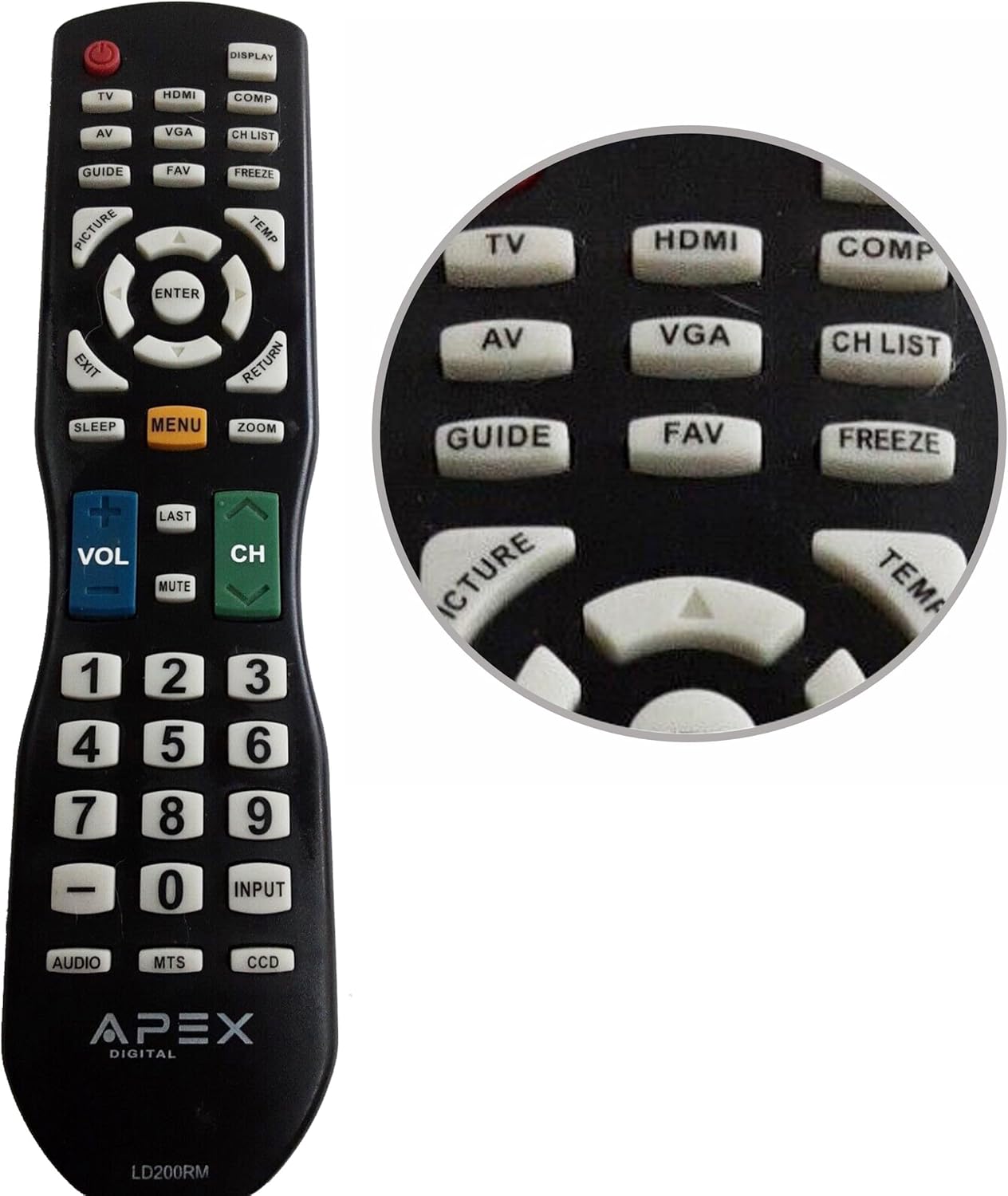
Figure 1: APEX LD200RM Remote Control Layout. This image displays the entire remote control, highlighting the arrangement of its various function buttons, including power, input selection, navigation, volume, channel, and numeric keypad.

Figure 2: Close-up of APEX LD200RM Remote Control Top Buttons. This image provides a detailed view of the upper section of the remote, focusing on buttons such as TV, HDMI, AV, VGA, COMP, CH LIST, DISPLAY, GUIDE, FAV, FREEZE, PICTURE, TEMP, MENU, ENTER, EXIT, RETURN, SLEEP, and ZOOM.
3.1 Power and Input Selection
- POWER (Кызыл баскыч): Телевизорду күйгүзөт же өчүрөт.
- TV: Selects the TV tuner input.
- HDMI: Selects the HDMI input.
- OF: Selects the Audio/Video input.
- VGA: Selects the VGA input.
- КОМП: Selects the Component video input.
- КӨРСӨТҮҮ: Экрандагы дисплей маалыматын көрсөтөт.
3.2 Channel and Volume Control
- VOL (+/-): Үн деңгээлин жогорулатат же азайтат.
- CH (Up/Down): Телеканалды өйдө же ылдый өзгөртөт.
- АКЫРКЫ: Мурункуга кайтат viewed каналы.
- Үнсүз: Телевизордун үнүн өчүрөт же ачат.
- CH ТИЗМЕСИ: Канал тизмесин көрсөтөт.
3.3 Меню жана навигация
- МЕНЮ: Телевизордун негизги менюсун ачат.
- КИРҮҮ: Confirms a selection within the menu.
- Жебе баскычтары (Өйдө/Төмөн/Сол/Оң): Меню параметрлери аркылуу өтүп, жөндөөлөрдү тууралайт.
- ЧЫГУУ: Учурдагы менюдан же экрандагы дисплейден чыгат.
- КАЙТУУ: Мурунку менюга же экранга кайтат.
3.4 Numeric Keypad and Special Functions
- 0-9 (Numeric Buttons): Түздөн-түз канал номерлерин киргизет.
- КИРҮҮ: Жеткиликтүү киргизүү булактары аркылуу айлануу.
- ЖЕТЕКЧЕ: Электрондук программалык көрсөтмөнү (эгер бар болсо) көрсөтөт.
- FAV: Сүйүктүү каналдарга жетет.
- ТОҢДУРУУ: Freezes the current image on the screen.
- СҮРӨТ: Сүрөттүн жөндөөлөрүн тууралайт.
- ТЕМП: (Function may vary by model, often related to picture temperature or a specific mode).
- УЙКУ: Уйку таймерин орнотот.
- ZOOM: Экрандын масштабын тууралайт.
- АУДИО: Selects audio modes or tracks.
- МТС: Multi-channel Television Sound (stereo/SAP).
- DCC: Closed Captioning Display.
4. Техникалык тейлөө
4.1 Батареяны алмаштыруу
When the remote control's performance degrades or it stops responding, it is likely time to replace the batteries. Refer to Section 2.1 for detailed battery installation instructions. Always use fresh AA batteries.
4.2 Тазалоо
Пультту тазалоо үчүн жумшак, кургак чүпүрөктү колдонуңуз. өжөр кир үчүн, бир аз гampкездемени суу же жумшак, абразивдүү эмес тазалоочу каражат менен сүртүңүз. Катуу химиялык заттарды же абразивдүү материалдарды колдонуудан алыс болуңуз, анткени алар пульттун бетине же ички компоненттерине зыян келтириши мүмкүн.
4.3 Сактоо
Пультту салкын, кургак, күндүн түз тийген нурунан жана өтө жогорку температурадан алыс жерде сактаңыз. Эгерде пульт көпкө колдонулбаса, агып кетүүнүн жана мүмкүн болгон зыяндын алдын алуу үчүн батарейкаларды алып салуу сунушталат.
5. Кыйынчылыктарды
- Алыстан башкаруу жооп бербей жатат:
- Батареялардын туура полярдуулукта (+/-) орнотулгандыгын текшериңиз.
- Эски батареяларды жаңы AA батареялары менен алмаштырыңыз.
- Check for any obstructions between the remote control and the television's infrared sensor.
- Ensure you are within the effective range of the television's IR receiver.
- Кээ бир баскычтар иштебей жатат:
- Бул батареянын кубаты аз экенин билдириши мүмкүн. Батареяларды алмаштырыңыз.
- Ensure the remote is clean and there is no debris lodged under the buttons.
- Verify that the button function is applicable to your specific TV model. Some functions may not be supported by all compatible TVs.
- Television is not turning on/off:
- Телевизордун иштеп жаткан розеткага сайылып турганын текшериңиз.
- Try using the power button directly on the television to rule out a TV issue.
6. Техникалык шарттар
| Өзгөчөлүк | Деталь |
|---|---|
| Модель номери | LD200RM |
| Бренд | Apex |
| Шайкеш түзмөктөр | APEX LCD & LED Televisions |
| Power Source | 2 x AA батарейкалар (киргизилген эмес) |
| Продукциянын өлчөмдөрү | 10 x 6 x 2 дюйм (болжол менен) |
| Элемент Салмагы | 3.2 унция (болжол менен) |
| Түс | Кара |
| Өзгөчө өзгөчөлүк | Эргономикалык дизайн |
7. Кепилдик маалыматы
This APEX LD200RM remote control typically comes with a 30-day warranty from the date of purchase. This warranty covers manufacturing defects. For specific details regarding warranty claims, returns, or replacements, please refer to your purchase documentation or contact the seller directly.
8. Колдоо
If you encounter issues not covered in this manual or require further assistance, please contact the retailer or the manufacturer's customer support. When contacting support, please have your product model number (LD200RM) and your television model number readily available.


