1. Продукт бүтүп калдыview
The D-Link AC1200 Wi-Fi Router (DIR-850L) delivers next-generation wireless speed and coverage to all your Wi-Fi devices. With wireless dual-band speeds of 300 Mbps (2.4 GHz) and 867 Mbps (5 GHz), the DIR-850L avoids interference to deliver fast wireless speeds, improved coverage, and reliable connections. This router is ideal for streaming HD video, gaming, connecting multiple devices, and watching shows on your TV simultaneously. The DIR-850L is also backward compatible with existing wireless 802.11a/g/n devices for seamless connectivity. D-Link’s free mobile apps provide easy setup, remote monitoring, and access to content from anywhere on your smartphone or tablet.
Негизги өзгөчөлүктөрү:
- Next Generation Wireless Technology: Wireless AC1200 for optimized performance and reliable coverage, delivering high-quality HD video streaming, gaming, and file которуулар.
- Артка шайкештик: Compatible with wireless 802.11a/g/n devices.
- Бир нече түзмөк байланышы: Connect more devices with four Gigabit Ethernet ports.
- Медиа бөлүшүү: Stream and share files using the USB Share Port and free mobile app.
- Оңой орнотуу: Intelligent browser wizard and Quick Router Setup Mobile app for simplified installation.
- Өркүндөтүлгөн коопсуздук: Preset security with advanced WPA2 encryption.
2. Пакеттин мазмуну
Ensure all items are present in your D-Link DIR-850L package:
- D-Link Wireless AC 1200 Dual-Band Gigabit Router (DIR-850L)
- Кубаттуу адаптер
- Ethernet кабели
- Ыкчам орнотуу колдонмосу
Эгерде кандайдыр бир нерселер жок болсо же бузулса, сатуучуга же D-Link колдоо кызматына кайрылыңыз.
3. Техникалык жабдыктар бүттүview
Familiarize yourself with the physical components and indicators of your DIR-850L router.

Сүрөт 3.1: Алдыңкы View. Shows the cylindrical design of the router with the D-Link logo and LED indicators for Power and Internet status.

3.2-сүрөт: Каптал View. Illustrates the side of the router, highlighting the USB port for storage sharing and the Wi-Fi Protected Setup (WPS) button.
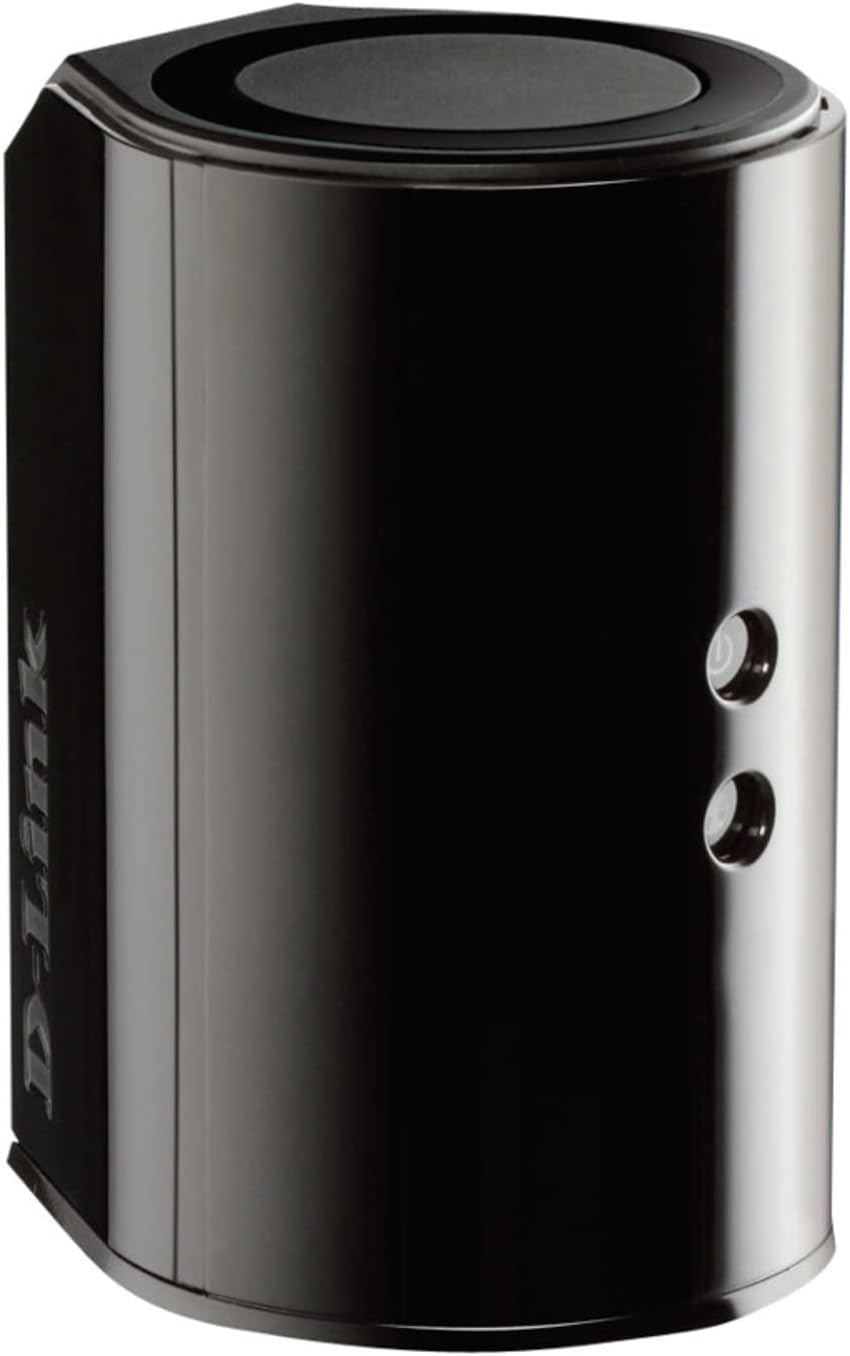
3.3-сүрөт: Арткы View. Displays the back panel of the router, featuring the WAN (Internet) port, four LAN (Ethernet) ports, and the power input connector.
LED көрсөткүчтөрү:
- Power LED: Solid green indicates the router is powered on. Blinking green indicates a firmware upgrade or reset.
- Интернет LED: Solid green indicates a successful connection to the internet. Blinking green indicates data activity. Amber indicates no internet connection.
Порттор жана баскычтар:
- WAN (Internet) Port: Интернетке кирүү үчүн модемиңизге туташат.
- LAN порттору (1-4): Компьютерлер, оюн консолдору же тармак сактагычы сыяктуу зымдуу түзмөктөрдү туташтырыңыз.
- USB порт: Connect a USB storage device for network sharing.
- Кубат туташтыргычы: Камтылган кубат адаптерине туташат.
- Калыбына келтирүү баскычы: Заводдун демейки жөндөөлөрүн калыбына келтирүү үчүн 10 секунд басып туруңуз.
- WPS баскычы: Initiates Wi-Fi Protected Setup for easy wireless connection of compatible devices.
4. Орнотуу
Follow these steps to set up your D-Link DIR-850L router:
- Маршрутизаторду жайгаштырыңыз: Place your router in a central location in your home, away from obstructions and devices that may cause interference (e.g., cordless phones, microwaves).
- Модемге туташуу:
- Модемиңизди өчүрүңүз.
- Connect one end of the provided Ethernet cable to the WAN (Internet) port on your DIR-850L router.
- Ethernet кабелинин экинчи учун модемиңиздеги Ethernet портуна туташтырыңыз.
- Күйгүзүү:
- Модемиңизди күйгүзүп, анын индикатор жарыктары турукташканча күтө туруңуз (адатта, бул активдүү интернет байланышын билдирет).
- Connect the power adapter to the power connector on your DIR-850L router and plug it into a power outlet.
- Wait for the Power LED on the router to turn solid green. The Internet LED should also turn green, indicating a successful connection.
- Түзмөктү туташтыруу:
- Зымдуу туташуу: Connect an Ethernet cable from one of the LAN ports (1-4) on the router to your computer's Ethernet port.
- Зымсыз туташуу: On your Wi-Fi enabled device (laptop, smartphone, tablet), search for available Wi-Fi networks. Select the network name (SSID) found on the Wi-Fi Configuration Card (usually a sticker on the bottom of the router) and enter the Wi-Fi password.
- Орнотуу устасын иштетүү:
- ачуу а web browser (e.g., Chrome, Firefox) on the connected device.
- Type
http://dlinkrouter.localor192.168.0.1дарек тилкеси жана басма сөз кириш салып. - Follow the on-screen instructions of the D-Link Setup Wizard to configure your internet connection and personalize your Wi-Fi network name (SSID) and password.
Setup Video (General D-Link Router Overview):
Video 4.1: D-Link Wireless AC 1200 Mbps Home Cloud App-Enabled Dual-Band Gigabit Router Overview. Бул видео жалпы маалымат беретview of D-Link routers, including the DIR-850L, and highlights their features and target users. While not a step-by-step setup guide, it offers insights into the router's capabilities.
5. Иштөө нускамалары
Once your D-Link DIR-850L router is set up, you can manage and optimize your network.
Түзмөктөрдү туташтыруу:
- Зымсыз: Use the Wi-Fi network name (SSID) and password you configured during setup to connect your wireless devices. The router supports both 2.4 GHz and 5 GHz bands.
- текст: Connect devices directly to the LAN ports using Ethernet cables for a stable, high-speed connection.
Accessing Router Settings:
To access advanced settings, open a web браузер жана багыттоо http://dlinkrouter.local or 192.168.0.1. Log in with the administrator password you set during the initial setup. From here, you can:
- Wi-Fi жөндөөлөрүн өзгөртүү (SSID, сырсөз, коопсуздук түрү).
- Configure guest Wi-Fi networks.
- Ата-энелик көзөмөл орнотуу.
- Туташкан түзмөктөрдү башкаруу.
- Микропрограмманы жаңыртуу.
Using the USB Share Port:
Plug a USB storage device (e.g., flash drive, external hard drive) into the USB port on the router. You can then access and share files on this storage device across your network using the D-Link SharePort Mobile app or through network shares on your computer.
6. Техникалык тейлөө
Үзгүлтүксүз техникалык тейлөө роутериңиздин оптималдуу иштешин жана узак мөөнөттүү иштешин камсыз кылууга жардам берет.
- Кайра жүктөлүүдө: Periodically reboot your router (unplug from power for 10 seconds, then plug back in) to clear its memory and refresh network connections. This can resolve minor performance issues.
- Программалык камсыздоонун жаңыртуулары: D-Link колдоосун текшериңиз website for firmware updates. Firmware updates can improve performance, add new features, and fix security vulnerabilities. Follow the instructions provided by D-Link carefully when performing updates.
- Тазалоо: Keep the router clean and free from dust. Use a soft, dry cloth to wipe the exterior. Do not use liquid cleaners or aerosols. Ensure ventilation openings are not blocked.
- Коопсуздук: Regularly change your Wi-Fi password and router administrator password to enhance network security.
7. Кыйынчылыктарды
If you encounter issues with your D-Link DIR-850L router, refer to the following common problems and solutions:
Интернет байланышы жок:
- Кабелдерди текшерүү: Бардык Ethernet кабелдеринин роутерге жана модемге бекем туташтырылганын текшериңиз.
- Модем абалы: Модемиңиз туура иштеп жатканын жана активдүү интернет байланышы бар экенин текшериңиз.
- Кайра жүктөө ырааттуулугу: Модемиңизди, андан кийин роутериңизди өчүрүңүз. 30 секунд күтүп, андан кийин модемди күйгүзүңүз. Модем толугу менен онлайн режимине туташкандан кийин, роутерди күйгүзүңүз.
- Интернет провайдери менен байланыш: If the issue persists, contact your Internet Service Provider (ISP) to confirm service status.
Жай Wi-Fi ылдамдыгы:
- Маршрутизатордун жайгашуусу: Move the router to a more central location, away from obstacles and interference sources.
- Канал кийлигишүүсү: Маршрутизаторго кириңиз web interface and try changing the Wi-Fi channel for both 2.4 GHz and 5 GHz bands to a less congested one.
- Туташкан түзмөктөр: Disconnect unused devices from your network.
- Микропрограмма: Роутериңиздин микропрограммасы жаңыртылганын текшериңиз.
Wi-Fi'га туташуу мүмкүн эмес:
- Туура сырсөз: Double-check that you are entering the correct Wi-Fi password (case-sensitive).
- SSID берүү: Ensure the router is broadcasting its Wi-Fi network name (SSID).
- WPS: If your device supports WPS, try using the WPS button on the router to connect.
- Маршрутизаторду баштапкы абалга келтирүү: As a last resort, perform a factory reset (see Hardware Overview) and reconfigure the router.
8. Техникалык шарттар
| Өзгөчөлүк | Description |
|---|---|
| Модель аты | DIR-850L |
| Зымсыз түрү | 802.11ac (802.11a/b/g/n менен артка шайкеш келет) |
| Жыштык тилкесинин классы | Кош тилкелүү (2.4 ГГц жана 5 ГГц) |
| Зымсыз ылдамдык | 300 Мбит/с чейин (2.4 ГГц), 867 Мбит/с чейин (5 ГГц) |
| Ethernet порттору | 4 x Гигабит LAN, 1 x Гигабит WAN |
| USB порту | 1 x USB 2.0 (for SharePort) |
| Антенна түрү | Ички |
| Операциялык системанын шайкештиги | Windows® 8, 7, Vista®, XP SP2, or Mac OS® X (v10.4 or higher) |
| Өлчөмдөрү (LxWxH) | 4.45 x 3.43 x 5.72 дюйм |
| Элемент Салмагы | 9.9 унция (0.62 фунт) |
| Түс | Кара |
9. Кепилдик жана колдоо
D-Link өнүмдөрү чектелген кепилдик менен камсыздалат. Кепилдиктин конкреттүү шарттары жана эрежелери үчүн, өнүмүңүзгө тиркелген кепилдик маалыматын караңыз же расмий D-Link веб-сайтына кириңиз. webсайт.
For technical support, product registration, and access to the latest drivers, firmware, and user manuals, please visit the D-Link support portal:
D-Link колдоо Webсайт: www.dlink.com/support
You may also find helpful resources and community forums on the D-Link webсайт.


