1. Киришүү
The iHome iP90 is a dual alarm clock radio designed for use with compatible iPhone and iPod models. It allows users to charge their device while waking up or falling asleep to their device's music, a custom playlist, or AM/FM radio. The unit features a Time Sync button to quickly synchronize the clock with a docked iPhone, leveraging cellular network time. It supports two independent alarms with a 7-5-2 day setting feature, 12 AM/FM radio presets, EQ controls, and Reson8 sound technology for enhanced audio quality.
2. Негизги өзгөчөлүктөрү
- Кош ойготкуч системасы: Set two independent alarms with options to wake to iPhone/iPod, custom playlists, AM/FM radio, or a buzzer.
- Integrated Dock: Plays and charges compatible iPhone and docking iPod models. (Note: Not compatible with iPhone 5 or newer models requiring a Lightning connector without an adapter.)
- Reson8 Speakers: Features Reson8 ported cabinet stereo speakers for clear, deep, and powerful audio.
- Убакыт шайкештирүү: Synchronizes the unit's clock with a docked iPhone/iPod for accurate time setting.
- AM/FM радиосу: Includes 12 programmable presets for your favorite AM and FM stations.
- EQ Controls: Adjust audio equalization for personalized sound.
- Көмөкчү киргизүү: Line-in jack for connecting and playing audio from other external audio sources.
3. Орнотуу колдонмосу
3.1 Пакеттен чыгаруу жана жайгаштыруу
Carefully remove the iP90 from its packaging. Place the unit on a stable, flat surface away from direct sunlight, heat sources, or excessive dust. Ensure adequate ventilation around the unit.
3.2 Кубат туташтыруу
- Connect the AC adapter to the DC jack on the back of the iP90.
- AC адаптерин стандарттуу розеткага сайыңыз.
- Install 2 AA batteries (not included) into the battery compartment for backup power in case of a power outage. This will maintain time and alarm settings.
3.3 Антеннаны туташтыруу
- FM антеннасы: Extend the FM wire antenna fully for best FM reception. Do not strip, alter, or attach to other antennas.
- AM антенна: Connect the supplied AM loop antenna to the AM antenna jack on the back of the unit. Position the antenna for optimal AM reception.
3.4 Саатты баштапкы орнотуу
Upon first power-up, the clock display will flash. You can set the time manually or use the Time Sync feature with a docked iPhone.
3.4.1 Time Sync (Recommended with iPhone)
- Ensure your iPhone is connected to a cellular network and its time is accurate.
- Carefully dock your iPhone onto the iP90's universal dock connector.
- басыңыз Убакытты синхрондоштуруу button (usually located near the dock). The iP90 will automatically set its clock to match your iPhone's time.
3.4.2 Кол менен убакыт коюу
- басып, кармап туруңуз Убакыт коюу button (refer to your unit's specific button layout, often combined with another function).
- колдонуу +/- buttons (or similar navigation buttons) to adjust the hour. Press Убакыт коюу ырастоо үчүн дагы.
- колдонуу +/- мүнөттү тууралоо үчүн баскычтар. Басыңыз Убакыт коюу ырастоо үчүн дагы.
- Adjust the year, month, and day if prompted, confirming each step with the Убакыт коюу баскычы.
4. Иштөө нускамалары
4.1 Күйгүзүү/өчүрүү
басыңыз Күч аппаратты күйгүзүү же өчүрүү үчүн баскыч.
4.2 Үндү башкаруу
колдонуу Көлөм +/- buttons (or a rotary knob) to adjust the audio output level.
4.3 Радио менен иштөө
- басыңыз Радио button to switch to AM or FM radio mode.
- басыңыз Band button (if available) to switch between AM and FM bands.
- колдонуу Түзүү +/- Станцияны кол менен жөндөө үчүн баскычтарды басыңыз. Кийинки жеткиликтүү станцияны автоматтык түрдө издөө үчүн басып кармап туруңуз.
- Алдын ала орнотууларды орнотуу: Tune to your desired station. Press and hold a Алдын ала коюлган номер button (1-6 for each band) until the display confirms the preset is saved.
- Алдын ала орнотууларды эстөө: басыңыз Алдын ала коюлган номер button briefly to recall a saved station.
4.4 iPod/iPhone Docking and Playback
- Ensure your iPhone/iPod is compatible with the 30-pin dock connector.
- Carefully dock your device onto the connector. The iP90 will begin charging the device.
- басыңыз iPod / iPhone button (or similar) to switch to docking mode.
- колдонуу Ойнотуу/Тыныгуу, Кийинки трек, жана Мурунку трек buttons on the iP90 to control playback.
4.5 Ойготкучтарды орнотуу
The iP90 features two independent alarms (Alarm 1 and Alarm 2).
- басып, кармап туруңуз Ойготкуч 1 or Ойготкуч 2 ойготкучтун убактысы күйүп-өчүп турат.
- колдонуу +/- Ойготкуч саатын тууралоо үчүн тиешелүү баскычтарды басыңыз. Ойготкуч ырастоо үчүн баскыч.
- колдонуу +/- buttons to adjust the alarm minute. Press the respective Ойготкуч ырастоо үчүн баскыч.
- Select the alarm source (iPod/iPhone, Playlist, Radio, or Buzzer) using the +/- buttons. Press the respective Ойготкуч ырастоо үчүн баскыч.
- Select the 7-5-2 day setting (Every Day, Weekdays, Weekends) using the +/- buttons. Press the respective Ойготкуч Ойготкучту ырастоо жана иштетүү үчүн баскычты басыңыз.
4.6 Snooze and Sleep Functions
- Чырым: Ойготкуч чыкканда, басыңыз Тындыр button to temporarily silence it for a set period (usually 9 minutes).
- Уйку: басыңыз Уйку button to activate the sleep timer. Repeatedly press to cycle through available sleep times (e.g., 120, 90, 60, 30, 15 minutes, or Off). The unit will automatically turn off after the selected duration.
4.7 EQ Controls
басыңыз EQ button to cycle through different equalizer presets (e.g., Flat, Rock, Pop, Jazz, Classic) or to adjust bass and treble levels if available.
4.8 Auxiliary Audio Input
Тышкы аудио түзмөгүн (мисалы, MP3 ойноткуч, CD ойноткуч) туташтырыңыз Aux-in jack on the back of the iP90 using a 3.5mm audio cable. Press the Көмөкчү button (or cycle through modes) to select the auxiliary input.
5. Техникалык тейлөө
- Тазалоо: Агрегаттын сыртын тазалоо үчүн жумшак, кургак чүпүрөктү колдонуңуз. Суюк тазалагычтарды же абразивдүү материалдарды колдонбоңуз.
- Док туташтыргычы: Periodically inspect the dock connector for dust or debris and clean gently with a soft brush if necessary.
- Батареяны алмаштыруу: Резервдик батареяларды жыл сайын же батареянын заряды аз деген индикатор пайда болгондо алмаштырып туруңуз.
6. Кыйынчылыктарды
| Көйгөй | Мүмкүн чечим |
|---|---|
| Түзмөк күйбөйт. | AC адаптери түзмөккө да, иштеп жаткан розеткага да бекем сайылганын текшериңиз. Розетканы башка түзмөк менен текшериңиз. |
| No sound from iPod/iPhone. | Ensure the device is properly docked. Check the volume level on both the iP90 and your device. Make sure the iP90 is in iPod/iPhone mode. |
| Радио кабыл алуу начар. | Adjust the position of the FM wire antenna or AM loop antenna. Try moving the unit to a different location. Ensure the antenna is fully extended. |
| Ойготкуч угулбайт. | Verify that the alarm is set and activated (check for the alarm icon on the display). Ensure the alarm volume is not set to minimum. Check the alarm source selection. |
| iPhone/iPod not charging. | Ensure the device is correctly seated in the dock connector. Check for any debris in the connector. Confirm device compatibility. |
| Static or clicking noise during playback. | This can sometimes occur due to interference from other electronic devices. Try moving the unit or other devices further apart. |
7. Техникалык шарттар
- Модел: iP90
- Продукциянын өлчөмдөрү: 3.27 x 10.64 x 3.27 дюйм
- Элемент Салмагы: 2 фунт
- Күч: AC Adapter (included), 2 x AA batteries (for backup, not included)
- Радио топтору: AM/FM
- Док туташтыргычы: 30-pin (for compatible iPod/iPhone models)
- Көмөкчү киргизүү: 3.5 мм аудио уячасы
8. Продукциянын сүрөттөрү
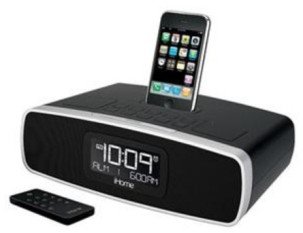
1-сүрөт: Фронт view of the iHome iP90 Dual Alarm Clock Radio, displaying the digital clock and top-panel controls.
9. Кепилдик жана колдоо
For warranty information, technical support, or service inquiries, please refer to the warranty card included with your product or visit the official iHome webсайт. Сатып алуу квитанциясын кепилдик дооматтары үчүн сатып алуунун далили катары сактаңыз.


