1. Киришүү
This user manual provides essential information for the correct handling, installation, and maintenance of the Molex 39-01-2021 Mini-Fit Jr. 5559 Series 2-position plug connector housing. Understanding these instructions will ensure optimal performance and longevity of the product.
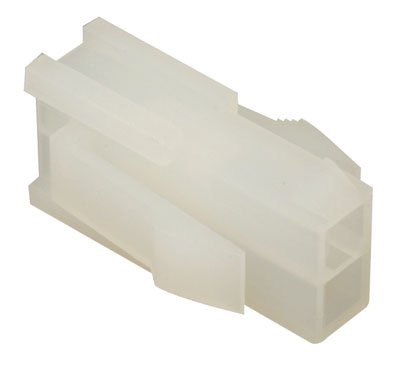
Figure 1: Molex 39-01-2021 Mini-Fit Jr. 5559 Series 2-position plug connector housing. This image displays the natural (off-white) colored rectangular housing with two square openings for male pins and features integrated mounting ears for panel snap-in installation.
2. Эмнелер камтылган
The package for the Molex 39-01-2021 typically includes:
- Molex 39-01-2021 Mini-Fit Jr. 5559 Series 2-position Plug Connector Housing (Quantity as per pack)
3. Орнотуу жана орнотуу
The Molex 39-01-2021 connector housing is designed for secure panel mounting and crimp termination of contacts. Follow these steps for proper installation:
3.1. Contact Termination
- Зымдарды даярдоо: Strip the insulation from the wire ends to the recommended length for the specific male pins (contacts) you will be using with this housing.
- Кысылган байланыштар: Using an appropriate crimping tool, crimp the male pins onto the prepared wire ends. Ensure a secure and reliable crimp connection.
- Insert Contacts: Carefully insert the crimped male pins into the designated cavities of the connector housing. Push until you hear or feel a click, indicating that the contact's locking tang has engaged with the housing. Gently tug on the wire to confirm the contact is securely seated.
3.2. Панелди орнотуу
This connector housing features integrated mounting ears for snap-in panel mounting.
- Панелди кесип даярдоо: Ensure your equipment panel has the correct cutout dimensions for the Molex Mini-Fit Jr. 5559 Series housing. Refer to the technical drawings for precise measurements.
- Insert Housing: Align the connector housing with the panel cutout.
- Snap-In: Apply firm, even pressure to the connector housing until its mounting ears snap securely into place within the panel cutout. Verify that the housing is flush with the panel surface and does not wobble.
4. Иштөө нускамалары
Once installed, the Molex 39-01-2021 connector housing functions as a receptacle for its mating connector. Ensure proper alignment before mating the connectors. The locking ramp feature provides a secure connection when fully engaged.
5. Техникалык тейлөө
The Molex 39-01-2021 connector housing requires minimal maintenance. Keep the connector free from dust, dirt, and moisture. Periodically inspect for any signs of damage or wear. Do not use harsh chemicals for cleaning; a soft, dry cloth is generally sufficient.
6. Кыйынчылыктарды
Most issues related to connector housings stem from improper installation or physical damage.
| Көйгөй | Мүмкүн себеп | Чечим |
|---|---|---|
| Connector not seating properly in panel. | Incorrect panel cutout dimensions; obstruction; mounting ears not aligned. | Verify panel cutout dimensions. Clear any obstructions. Realign and apply firm, even pressure. |
| Contacts not locking into housing. | Improper crimp; damaged contact; contact inserted incorrectly. | Ensure contacts are correctly crimped. Inspect contacts for damage. Re-insert contacts, ensuring proper orientation and full engagement. |
| Mating connector does not connect securely. | Damaged housing; foreign material in cavities; misaligned pins. | Inspect housing for cracks or deformities. Clean cavities. Ensure mating connector pins are not bent. |
7. Техникалык шарттар
Key technical specifications for the Molex 39-01-2021 Mini-Fit Jr. 5559 Series 2-position plug connector housing:
| Өзгөчөлүк | Деталь |
|---|---|
| Сериялар | Mini-Fit Jr. 5559 |
| Туташтыргыч түрү | Plug корпус |
| Байланыш түрү | For Male Pin Contacts |
| Позициялардын саны | 2 |
| Сатарлардын саны | 2 |
| Катар аралыгы | 0.165" (4.20мм) |
| Монтаж түрү | Panel Mount, Snap-In |
| Contact Termination | Crimp |
| Бекитүү түрү | Locking Ramp |
| Түс | Табигый |
| Өндүрүүчү | Molex |
8. Кепилдик жана колдоо
Specific warranty information for the Molex 39-01-2021 connector housing is not provided in this manual. For detailed warranty terms, technical support, or further inquiries, please contact Molex directly or refer to their official website. Always purchase from authorized distributors to ensure product authenticity and eligibility for support.


