1. Киришүү
This manual provides comprehensive instructions for the proper use and maintenance of your Horizon SF-400D Digital Precision Scale. Please read this manual thoroughly before operating the device to ensure accurate measurements and prolong its lifespan.
The Horizon SF-400D is a versatile digital precision scale designed for various weighing applications, including jewelry, coins, herbs, spices, and medication. It offers high accuracy and multiple weighing modes, along with a convenient counting function.

1-сүрөт: Horizon SF-400D Digital Precision Scale. This image shows the overall design of the scale, featuring a black body, a stainless steel weighing platform, and a blue backlit LCD display with control buttons.
2. Коопсуздук чаралары
- Do not overload the scale beyond its maximum capacity of 500g.
- Таразаны экстремалдык температурага, нымдуулукка же тике күн нуруна тийгизүүдөн сактаңыз.
- Таразаны күчтүү электромагниттик талаалардан алыс кармаңыз.
- Таразаны жумшак менен тазалаңыз, гamp кездеме. Абразивдүү тазалагычтарды колдонбоңуз же аппаратты сууга салбаңыз.
- Ensure the scale is placed on a stable, level surface during operation to ensure accuracy.
3. Продукциянын компоненттери
Familiarize yourself with the main parts of your SF-400D scale:
- Тараза платформасы: Буюмдарды коюу үчүн дат баспас болоттон жасалган бет.
- LCD дисплей: Backlit screen showing weight, units, and other indicators.
- ON/OFF баскычы: Таразаны күйгүзөт же өчүрөт.
- MODE баскычы: Changes weighing units (g, oz, ct, dwt, gn, T).
- TARE баскычы: Дисплейди нөлгө кайтарат, идиштеги буюмдарды таразалоо үчүн пайдалуу.
- PCS баскычы: Бөлүктөрдү саноо функциясын иштетет.
- CAL баскычы: Used for calibration.
- Жөнгө салынуучу буттар: Located on the bottom for leveling the scale.
- көбүк деңгээли: Integrated on the scale to assist with leveling.
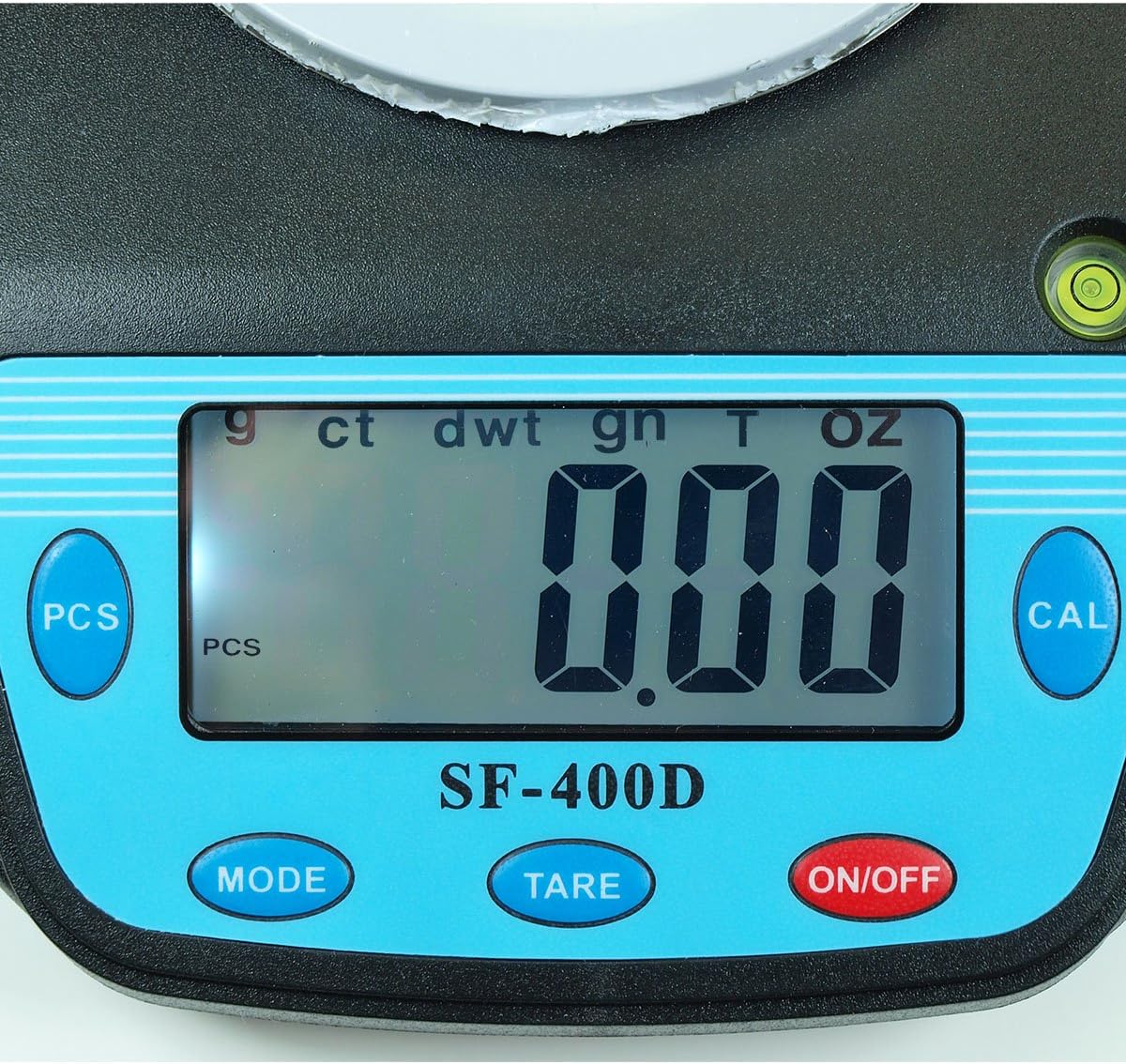
2-сүрөт: Close-up of the SF-400D display and control buttons. This image highlights the LCD screen, showing various unit indicators (g, ct, dwt, gn, T, oz), and the function buttons: PCS, MODE, TARE, ON/OFF, and CAL.

3-сүрөт: Underside of the SF-400D scale showing adjustable legs. Green arrows indicate the location of the four adjustable feet, which are used to level the scale for accurate measurements.
4. Орнотуу
4.1. Электр камсыздоо
The SF-400D scale operates on two AA batteries (included) or an optional AC power adapter (not included).
- Таразанын астыңкы жагындагы батарея бөлүкчөсүнүн капкагын ачыңыз.
- Туура полярдуулукту (+/-) камсыз кылуу менен эки AA батарейкасын салыңыз.
- Батарея отсегин жабыңыз.
- Alternatively, connect a compatible AC power adapter (6V, amperage not specified in product details, consult manufacturer if needed) to the power port.
4.2. Жайгаштыруу жана тегиздөө
For optimal accuracy, the scale must be placed on a stable, flat, and level surface.
- Place the scale on your desired weighing surface.
- Observe the integrated bubble level.
- Adjust the four adjustable legs on the bottom of the scale by rotating them until the bubble is centered within the level indicator.
5. Иштөө нускамалары
5.1. Негизги тараза
- басыңыз КҮЙГҮЗҮҮ/ӨЧҮРҮҮ button to turn on the scale. The display will show "88888" and then "0.00" (or "0.0" depending on the unit).
- Эгерде дисплей нөлдү көрсөтпөсө, баскычын басыңыз идиштер шкаланы нөлгө чыгаруу үчүн баскычты басыңыз.
- басыңыз РЕЖИМ button to select your desired weighing unit (g, oz, ct, dwt, gn, T).
- Gently place the item(s) to be weighed on the center of the stainless steel platform.
- LCD экранда көрсөтүлгөн туруктуу салмакты окуңуз.
- Таразаны өчүрүү үчүн, баскычын басып кармап туруңуз КҮЙГҮЗҮҮ/ӨЧҮРҮҮ button for a few seconds. The scale also features an auto shut-off function to conserve battery power.
5.2. Tare Function
The Tare function allows you to subtract the weight of a container, so only the contents are weighed.
- Бош идишти тараза платформасына коюңуз.
- Wait for the display to stabilize and show the container's weight.
- басыңыз идиштер button. The display will reset to "0.00" (or "0.0").
- Add the items you wish to weigh into the container. The display will now show only the net weight of the items.
- To clear the tare, remove all items from the platform and press идиштер again if the display does not return to zero automatically.
5.3. Бөлүктөрдү саноо функциясы (PCS)
This function is useful for counting multiple identical items.
- Turn on the scale and ensure it is zeroed.
- басыңыз PCS button. The display will show "PCS" and a sampөлчөмү (мисалы, "25", "50", "75", "100").
- басыңыз РЕЖИМ button to cycle through the available sample sizes (25, 50, 75, 100 pieces). Select the sample size that matches the number of items you will place on the scale for sampлинг.
- s санын так жайгаштырыңыз.ample items (e.g., 25 pieces) onto the weighing platform according to your selected sample өлчөмү.
- басыңыз PCS ырастоо үчүн баскычты кайра басыңызample. The display will now show the number of pieces.
- You can now add more items of the same type, and the scale will display the total count.
- To exit the counting mode, press the РЕЖИМ баскычы.
5.4. Калибрлөө
Calibration ensures the accuracy of your scale. It is recommended to calibrate the scale periodically or if you suspect inaccurate readings. You will need a known calibration weight (e.g., 500g) for this process.

4-сүрөт: SF-400D display showing "CAL" during calibration mode. This image illustrates the scale's screen indicating it is in calibration mode, prompting the user to place a calibration weight.
- Ensure the scale is on a stable, level surface and turned off.
- басып, кармап туруңуз КАЛ баскычын, андан кийин басыңыз КҮЙГҮЗҮҮ/ӨЧҮРҮҮ button simultaneously. Release both buttons when the display shows "CAL".
- The display will then show a flashing weight value (e.g., "500.00g"). This is the required calibration weight.
- Place the exact calibration weight (e.g., 500g) onto the center of the weighing platform.
- Wait for the display to stabilize and show "PASS" or return to normal weighing mode. This indicates successful calibration.
- Remove the calibration weight. The scale is now calibrated and ready for use.
- If "FAIL" or an error message appears, repeat the calibration process.
6. Техникалык тейлөө
6.1. Тазалоо
- Таразанын бетин жумшак, бир аз сүртүңүзamp кездеме.
- Катуу химиялык заттарды, абразивдүү тазалоочу каражаттарды колдонбоңуз же кабырчыктарды сууга салбаңыз.
- Сактоодон же кийинки колдонуудан мурун тараза толугу менен кургатылганын текшериңиз.
6.2. Сактоо
- Таразаны салкын, кургак жерде, күн нуру түз тийген жерден жана өтө жогорку температурадан алыс сактаңыз.
- Узак мөөнөткө сактасаңыз, акып кетпеш үчүн батарейкаларды алып салыңыз.
7. Кыйынчылыктарды
| Көйгөй | Мүмкүн себеп | Чечим |
|---|---|---|
| Масштаб күйбөйт. | Low or dead batteries; incorrect battery installation; no power from AC adapter. | Replace batteries; check battery polarity; ensure AC adapter is properly connected and functional. |
| Туура эмес окуулар. | Scale not level; unstable surface; needs calibration; overloaded; strong air currents or vibrations. | Ensure scale is level using adjustable legs and bubble level; place on stable surface; perform calibration; do not exceed 500g capacity; operate in a stable environment. |
| "O_Ld" or "EEEE" displayed. | Масштаб ашыкча жүктөлдү. | Ашыкча салмакты дароо алып салыңыз. 500 г ашпаңыз. |
| Display shows "UNST". | Unstable environment or surface. | Move the scale to a more stable location, away from vibrations or drafts. |
| Counting function not working correctly. | Туура эмес сample size selected; sample items not identical in weight. | s камсыз кылууample size matches the number of items placed for sampling; use identical items for accurate counting. |
8. Техникалык шарттар
| Өзгөчөлүк | Деталь |
|---|---|
| Модел | SF-400D |
| Кубаттуулугу | 500 grams (g) / 17.5 ounces (oz) |
| Accuracy (Readability) | 0.01 grams (g) / 0.0005 ounces (oz) |
| Тараза режимдери | g (grams), oz (ounces), ct (carats), dwt (pennyweights), gn (grains), T (troy ounces), pcs (pieces) |
| Платформа материалы | Дат баспаган болот |
| Platform Diameter | 4.2 дюйм |
| Дисплей | Арткы жарык менен LCD |
| Күч | 2 x AA batteries (included) or 6V AC adapter (not included) |
| Өлчөмдөрү (L x W x Y) | 8.25" x 6.0" x 1.75" |
| Өзгөчөлүктөрү | Tare function, Piece Counting, Auto Shut-Off, Backlit Display, Adjustable Legs, Bubble Level |
9. Кепилдик жана колдоо
For warranty information or technical support, please refer to the documentation included with your purchase or contact the retailer. Specific warranty terms may vary by region and retailer.
For general inquiries or to explore other products, you may visit the Horizon Store on Amazon.


