1. Киришүү
This manual provides essential information for the safe and efficient installation, operation, and maintenance of your Supermicro PWS-501P-1R 500 Watt 80 PLUS Platinum Power Supply. Please read this manual thoroughly before attempting to install or operate the unit.
The Supermicro PWS-501P-1R is a high-efficiency 500 Watt internal power supply designed for 1U rack-mount systems, featuring 80 PLUS Platinum certification for superior energy efficiency.
2. Коопсуздук маалыматы
Жарааттарды жана жабдууларды бузууну болтурбоо үчүн ар дайым төмөнкү коопсуздук чараларын сактаңыз:
- Кубатты өчүрүү: Always disconnect the system from the main power source before installing, removing, or performing any maintenance on the power supply unit.
- Квалификациялуу кадрларды: Орнотуу жана тейлөө иштери квалификациялуу тейлөө кызматкерлери тарабынан гана жүргүзүлүшү керек.
- Колдонуучу тейлей турган бөлүктөр жок: Do not open the power supply unit. There are no user-serviceable parts inside, and opening it will void the warranty and expose you to dangerous voltages.
- Туура Жерге салуу: Электр тогуна урунбоо үчүн системанын жерге туура туташтырылганын текшериңиз.
- Вентиляция: Электр булагынын айланасында жетиштүү аба айланышын камсыз кылыңыз. Желдетүүчү тешиктерди жаппаңыз.
- Экологиялык шарттар: Operate the power supply within the specified temperature and humidity ranges. Avoid exposure to moisture or extreme temperatures.
3. Пакеттин мазмуну
Verify that all items are present and in good condition. If any items are missing or damaged, contact your vendor immediately.
- Supermicro PWS-501P-1R 500 Watt Power Supply Unit
- Documentation (this user manual or similar guide)
4. Орнотуу жана орнотуу
Follow these steps for proper installation of the power supply into your 1U rack-mount system.
4.1 Орнотууга чейинки текшерүүлөр
- Ensure your system chassis is compatible with a 1U form factor power supply.
- Verify that the system's power requirements do not exceed the 500 Watt output capacity of this power supply.
- Confirm that the AC input voltage matches the power supply's operating range (typically auto-sensing, but always check system specifications).
4.2 Физикалык орнотуу
- Өчүрүү: Ensure the system is completely powered off and disconnected from the AC power outlet.
- Эски PSUну алып салуу (эгер бар болсо): If replacing an existing power supply, carefully disconnect all cables from the motherboard and other components. Unscrew and remove the old power supply from the chassis.
- Insert New PSU: Gently slide the Supermicro PWS-501P-1R into the designated power supply bay in your 1U chassis.
- Коопсуз PSU: Тиешелүү бурамалар менен кубат булагын шассиге бекитиңиз.
- Кабелдерди туташтыруу: Connect the power supply cables to the motherboard, CPU, and any other components (e.g., storage drives, expansion cards) as required by your system configuration. Ensure all connections are firm and correctly oriented.
- AC кубатына туташтыруу: Once all internal connections are made, connect the AC power cord to the power supply and then to a grounded electrical outlet.
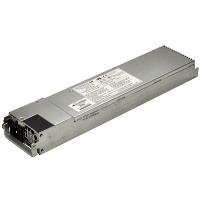
Figure 1: Supermicro PWS-501P-1R 500 Watt 1U Power Supply. The unit is a rectangular, metallic grey component with various connectors and a fan grille visible, designed for server rack integration.
5. Иштөө нускамалары
After successful installation, follow these steps to operate your system with the new power supply.
- Баштапкы күйгүзүү: With the AC power cord connected, press the system's power button. The system should initiate its boot sequence.
- Системанын мониторинги: Monitor your system's stability and performance. Ensure all components are receiving power correctly. Modern operating systems and BIOS/UEFI often provide basic power monitoring information.
- Өчүрүү: To power off the system, use the operating system's shutdown procedure. For a hard shutdown, press and hold the power button until the system turns off.
6. Техникалык тейлөө
Үзгүлтүксүз техникалык тейлөө электр менен камсыздооңуздун узак мөөнөттүү жана оптималдуу иштешин камсыз кылууга жардам берет.
- Чаңды тазалоо: Periodically (e.g., every 6-12 months), power down and disconnect the system. Use compressed air to gently clear dust from the power supply's fan and ventilation grilles. Электр жабдыгын ачпаңыз casing.
- Кабелдик текшерүү: Occasionally inspect all power cables for signs of wear, fraying, or damage. Replace any damaged cables immediately.
- Экологиялык көзөмөл: Ensure the operating environment remains clean, cool, and dry to prevent dust buildup and overheating.
7. Кыйынчылыктарды
If you encounter issues with your power supply, refer to the following basic troubleshooting steps:
7.1 Кубат жок / Система күйбөйт
- Check AC Connection: Ensure the AC power cord is securely plugged into both the power supply and a working electrical outlet.
- Сыноо түйүнү: Кубат бар экенин текшерүү үчүн башка түзмөктү ошол эле розеткага сайып көрүңүз.
- Ички байланыштар: Verify that all power cables from the PSU are correctly and firmly connected to the motherboard and other components.
- Кубат баскычы: Ensure the system's power button is functioning correctly.
7.2 Системанын туруксуздугу / кокусунан өчүрүлүшү
- Ашыкча ысып кетүү: Check for proper ventilation and dust buildup. Ensure the power supply fan is spinning.
- Ашыкча жүктөө: Ensure the total power draw of your components does not exceed the 500 Watt capacity of the power supply.
- Бошоң байланыштар: Re-check all power cable connections.
If these steps do not resolve the issue, consult Supermicro's technical support or a qualified technician.
8. Техникалык шарттар
Key technical specifications for the Supermicro PWS-501P-1R power supply:
| Өзгөчөлүк | Спецификация |
|---|---|
| Бренд | Supermicro |
| Модель номери | PWS-501P-1R |
| Чыгуу Wattage | 500 Ватт |
| 80 PLUS сертификаты | 80 PLUS Platinum |
| Rack Size | 1U |
| Output Voltage | +5V, +12V |
| Форма фактору | Менчик |
| Муздатуу ыкмасы | Аба |
| Элемент Салмагы | 4.1 фунт (болжол менен 1.86 кг) |
| Продукциянын өлчөмдөрү (LxWxH) | 17.2 x 7.2 x 4.5 дюйм (болжол менен 43.7 x 18.3 x 11.4 см) |
| UPC | 672042094608 |
9. Кепилдик жана колдоо
For detailed warranty information regarding your Supermicro PWS-501P-1R power supply, please refer to the official Supermicro webсайтка же продуктуңузга кошулган кепилдик картасы. Кепилдиктин шарттары жана шарттары аймакка жана сатып алуу күнүнө жараша өзгөрүшү мүмкүн.
For technical assistance, troubleshooting beyond this manual, or to inquire about replacement parts, please visit the official Supermicro support portal:
Supermicro расмий Webсайт: www.supermicro.com
Супермикро колдоо: расмий колдоо бөлүмүн карагыла website for contact information, FAQs, and driver downloads.